Pros
- Wired USB connection needs no batteries
- Five DPI presets and adjustable report rate
- Side buttons and onboard settings memory

All categories
 New condition
Computer Accessories
A4TECH · FM50 Plus
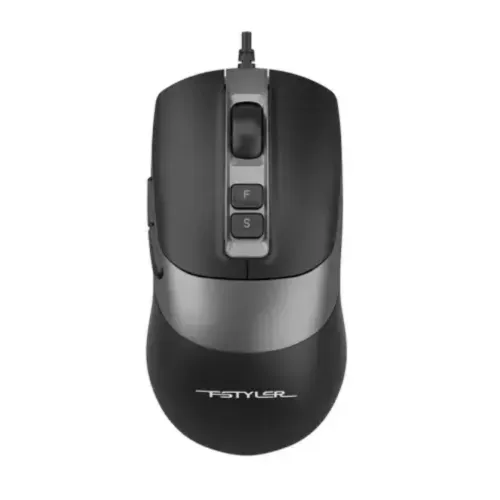
A4Tech Fstyler FM50 Plus wired optical mouse with five DPI levels, adjustable report rate and side buttons.
Approximate Market Price
BDT 810 – BDT 990
Informational market estimate only; this is not a current Store offer. Last checked Sep 14, 2026.
Compare store prices
No live offers for this variant
BDT 810 – BDT 990
Approximate Market Price
Informational market estimate only; this is not a current Store offer. Last checked Sep 14, 2026.
Loading history…
Product story
The A4Tech Fstyler FM50 Plus is a wired USB optical mouse for everyday work, browsing and gaming. Its symmetric shape and side controls provide a versatile desktop layout. A4Tech lists five preset DPI levels, adjustable report rates and onboard memory; the wired connection does not need batteries.
The manufacturer lists 1000, 1200, 1600, 2000 and 3200 DPI presets, with up to 4000 DPI available through software. Choose a setting that suits your display, desk space and application. A higher DPI changes pointer sensitivity; it does not automatically make the user more accurate. The report rate can be set to 125, 250, 500 or 1000 Hz according to A4Tech.
The F key provides a double-click function, and two thumb-side buttons are preset for back and forward navigation. A4Tech describes customisation through its Mouse Master software and 256K onboard memory for settings. Check software and operating system compatibility before purchasing if custom commands are essential. The related FM50S Plus is the silent-click model; this FM50 Plus listing should not be assumed to have silent switches.
Connect the mouse to a compatible USB port and test the pointer, wheel and buttons. The listed 150 cm cable can reach a desktop or laptop, but measure the route around the desk and allow slack. If the pointer does not respond, try a different port and check the operating system’s mouse settings. Software features and shortcuts can differ by operating system.
Confirm FM50 Plus rather than FM50S Plus, the selected colour, package contents and seller warranty. The manufacturer shows black and white options, while individual offers may supply only one. Keep the sensor and surface clean, avoid sharply bending the cable, and unplug by the connector. Warranty and service terms vary by seller.
Helpful answers
Product-specific answers maintained with the catalog information.
A4Tech lists 1000, 1200, 1600, 2000 and 3200 DPI presets, with up to 4000 DPI through software.
A4Tech identifies the related FM50S Plus as the silent-click version. Confirm the exact model with the seller.
A4Tech describes back and forward side buttons that can be customised with Mouse Master software. Check compatibility with your operating system.
Customer community
Become a merchant
Join BiponiBD, publish accurate offers and start free.