Pros
- Large 31.5-inch curved screen with 165Hz Full HD refresh.
- VA panel with Acer-listed 3000:1 native contrast.
- FreeSync Premium and FHD 165Hz timing listed for HDMI and DisplayPort.
- Two HDMI inputs, DisplayPort, audio output and built-in speakers.

All categories
 New condition
Monitors
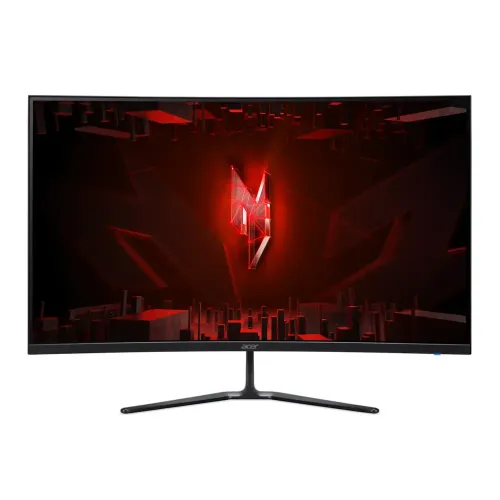
Acer · Nitro ED320QR S3 31.5-inch FHD 165Hz
31.5-inch curved FHD VA gaming monitor with 165Hz, FreeSync Premium, HDR10 and 1500R curvature.
Price unavailable
Price range updating
No verified price is available yet. Store offers will appear when merchants publish them.
Compare store prices
No live offers for this variant
Offers will appear when merchants publish them.
Loading history…
Product story
The Acer Nitro ED320QR S3 is a 31.5-inch curved Full HD gaming monitor with a VA panel, 1920 × 1080 resolution and a standard refresh rate of 165Hz. Acer’s UK specification page identifies model ED320QR S3, part UM.JE0EE.311, 1500R curvature, 300 cd/m² brightness, native contrast of 3000:1 and AMD FreeSync Premium. It also lists HDR10, two HDMI inputs, one DisplayPort 1.4 input, built-in 2W speakers and a 100 × 100mm VESA pattern. Regional SKUs can differ, so the retailer should confirm the exact part number supplied in Bangladesh. This description is based on Acer’s UM.JE0EE.311 product specification, with regional warranty and package contents stated separately.
The monitor has a 31.5-inch diagonal and a 16:9 Full HD 1920 × 1080 panel. Acer reports a pixel pitch of 0.364mm and active area of 698 × 393mm. Full HD is broadly supported by computers and consoles, but at this large screen size individual pixels are more visible at close viewing distances than on a smaller Full HD screen. Sit at a comfortable distance and use operating-system scaling if text appears too small. The large curved surface can make a single-screen gaming setup feel more immersive, while still using a familiar 16:9 layout for websites, documents and video.
Acer specifies Vertical Alignment panel technology and 1500R curvature for the UK part UM.JE0EE.311. The native contrast is listed at 3000:1, which can produce deeper blacks than many IPS panels in suitable room lighting. Acer lists 178-degree horizontal and vertical viewing angles, though image and contrast can vary as the viewer moves off-centre. The anti-glare surface helps reduce reflections. Curvature is a physical screen shape rather than a resolution or panel-quality measure; position the monitor centrally so both edges sit at a similar distance from your eyes. Avoid assuming the same curvature or contrast on other ED320QR regional variants.
Acer lists 165Hz as the standard refresh rate for the matched UK model and publishes maximum timing of 1920 × 1080 at 165Hz for both DisplayPort and HDMI. The UK page specifies two HDMI 2.0 inputs and one DisplayPort 1.4 input. Connect directly to a graphics card with a cable appropriate for the selected port, then choose 1920 × 1080 and 165Hz in the operating system. A dock, adapter, old cable, driver or source setting can limit the available refresh. The display’s 165Hz capability does not guarantee games will render 165 frames per second; that depends on the computer and game settings.
Acer lists AMD FreeSync Premium as the tearing-prevention technology for the UK part. Variable refresh synchronizes display refresh with compatible graphics output within the supported operating range. The retrieved product page does not publish that range, so this page does not promise a specific minimum or maximum VRR frequency. Enable the feature in the monitor menu and graphics driver when supported, and verify the result with the intended PC or console. FreeSync support is not the same statement as a separate NVIDIA G-SYNC certification. The catalog previously listed G-Sync support without an exact-model Acer source; that claim is removed pending documentation.
Acer specifies 1ms VRB response time. VRB is Acer’s visual response boost measurement/mode and should not be presented as a universal gray-to-gray pixel transition time. The 165Hz refresh rate, frame rate, overdrive and VRB setting all affect perceived motion. Some motion-reduction modes can change screen brightness or work only with selected refresh settings. Review the on-screen menu and test fast-moving scenes before settling on a configuration. For ordinary browsing or video, a balanced mode may look more natural than the most aggressive motion setting.
Acer lists 300 cd/m² brightness, 3000:1 native contrast and HDR10 for UM.JE0EE.311. The page also gives a dynamic contrast figure of 100,000,000:1; this is not the same as native static contrast and should not be used to compare typical black levels. HDR10 support indicates format compatibility, but the listed specifications do not establish VESA DisplayHDR certification. Brightness and contrast can vary by picture mode and environment. Use HDR only with compatible content and source settings, and compare the result with SDR. Do not infer certified HDR peak performance from the HDR10 label alone.
Acer lists 16.7 million colors, 8-bit color depth and 72% NTSC gamut for this regional part. These published values describe gamut and color output but do not include a factory calibration report or a specific Delta E accuracy guarantee. For gaming, media and general desktop use, choose a picture preset that looks comfortable. For color-critical design, ask for a measured report and use a calibrated color-managed workflow. Do not copy color gamut figures from other Nitro ED320QR S3 submodels, because Acer publishes several regional part numbers and some specifications differ.
The UK specification identifies two HDMI 2.0 inputs, one DisplayPort 1.4 input, headphone output and audio line-out. It lists built-in speakers with 2W output power. These speakers can handle basic system sounds and calls, while external speakers or headphones may provide more volume and richer sound. Acer lists an HDMI cable and UK power cord in the UK package; box contents can vary by country and retailer. Confirm the local package, plug type and included cable before purchase. A DisplayPort cable may be needed if the computer setup does not use HDMI or if the supplied regional box differs.
Acer lists tilt adjustment from -5 to +20 degrees and VESA 100 × 100mm mounting for the UK model. It does not list height adjustment or pivot in the cited specification page; the catalog previously implied a full adjustable stand, which is not supported by that source. Acer gives dimensions of 709 × 514.8 × 198mm with stand, approximate weight 4.8kg with stand, and 4.3kg without stand. Check desk width and depth, and confirm the physical configuration of the Bangladesh SKU. If using a monitor arm, verify the 100 × 100mm plate, screw requirements and arm load rating before installation.
Acer lists VisionCare 1.0 and Bluelight Shield ComfyView features, plus an anti-glare screen surface. These tools allow display adjustments intended to support viewing comfort, but they do not prevent or treat eye conditions. Set brightness to suit room lighting, reduce reflections and take regular breaks. A blue-light mode may change color temperature and may be unsuitable for color-critical work. Clean the panel with a soft, clean cloth and follow Acer’s user guide; do not spray liquid directly onto the screen or use abrasive cleaners.
The 165Hz Full HD timing and FreeSync Premium make this monitor suitable for gaming devices that support those modes. Game performance depends on the PC graphics card, console output, game engine and selected quality settings. A demanding game may run below 165 frames per second even when the monitor can refresh at 165Hz. Check whether the console supports the chosen resolution, refresh and variable-refresh feature. For a PC, connect to the discrete graphics output rather than a motherboard connector if required by the system. If 165Hz is not offered, check the cable, GPU output, display driver and operating system settings.
The large 31.5-inch curved VA screen offers Full HD resolution, 165Hz refresh, 3000:1 native contrast, 1500R curvature, AMD FreeSync Premium and two HDMI inputs alongside DisplayPort. Built-in speakers and VESA mounting add practical flexibility. Consider the lower pixel density of Full HD at 31.5 inches, the regional variation in Acer model part numbers, and the lack of height adjustment in the cited UK specification. HDR10 is listed but does not prove VESA DisplayHDR certification. Match the monitor to the desk distance and the graphics hardware before choosing it over a smaller or higher-resolution display.
The current catalog lists three years, but the cited Acer UK product page does not prove warranty coverage for a Bangladesh unit. Ask the seller to document local serial eligibility, authorized service provider, coverage period, dead-pixel policy, exclusions and invoice requirements. The official UK SKU is UM.JE0EE.311; regional Acer pages use other part numbers and can list different brightness, contrast or package details. Confirm the actual label and local terms before paying. Current BiponiBD price, stock, delivery fee and promotions were not independently checked in this editorial review.
Assemble the stand on a protected surface, place the display securely, connect the power and video cable, then choose the matching input from the on-screen menu. Set 1920 × 1080 and select 165Hz in the operating system if supported. Enable FreeSync in both the monitor and graphics settings when available. If the monitor shows no signal, wake the source, reseat the cable and confirm the selected input. If 165Hz is missing, test another supported cable or direct port and check the graphics driver. If flicker appears, lower the refresh temporarily and disable motion-related modes one at a time to isolate the setting.
Before ordering, compare the exact model and part number with the supplied unit; Acer UK lists ED320QR S3 as UM.JE0EE.311, while other regions use different parts. Confirm 31.5-inch Full HD VA, 1500R curve, 165Hz on the input you plan to use, FreeSync Premium, tilt range, 100 × 100mm VESA, local box contents and Bangladesh serial warranty. In summary, Acer Nitro ED320QR S3 UM.JE0EE.311 is a curved 31.5-inch FHD gaming monitor with 165Hz, VA contrast, HDR10, FreeSync Premium, HDMI and DisplayPort inputs, headphone output and 2W speakers. Select it when the large curved Full HD format suits your desk and viewing distance.
Helpful answers
Product-specific answers maintained with the catalog information.
Acer lists 1920 × 1080 Full HD and 165Hz for model ED320QR S3 part UM.JE0EE.311.
The Acer UK specification lists 1500R curvature.
Yes. Acer lists AMD FreeSync Premium for the matched UK part number.
Acer lists 1920 × 1080 at 165Hz for both HDMI and DisplayPort on UM.JE0EE.311.
Acer lists HDR10. The cited source does not claim a VESA DisplayHDR certification.
Acer lists built-in speakers with 2W output power.
The cited UK specification lists tilt from -5° to +20° but does not list height adjustment. Confirm the regional model contents.
Acer lists 100 × 100mm for UM.JE0EE.311.
Verify serial-specific local warranty, service provider and exclusions with the seller.
Customer community
Become a merchant
Join BiponiBD, publish accurate offers and start free.