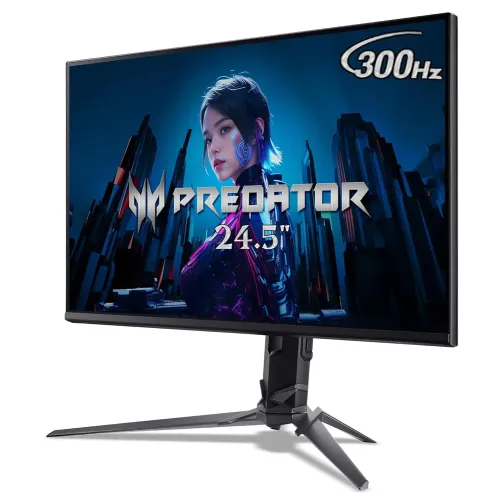
The Acer Predator XB253Q F is a 24.5-inch Full HD IPS gaming monitor in the Predator XB3 family. Acer’s regional specifications list a 1920 × 1080 panel, anti-glare finish, 1ms VRB response mode, 250 cd/m² brightness, 99% sRGB, FreeSync Premium, HDMI 2.0, DisplayPort 1.4, built-in speakers and an adjustable stand. Acer’s US regional page specifies up to 300Hz over DisplayPort and 240Hz over HDMI. Because Acer’s regional product pages use different part numbers and do not all expose the same timing table, confirm the rear-label SKU before treating the maximum refresh rate as guaranteed for a particular unit.
Panel size and Full HD detail
The visible diagonal is 24.5 inches (62.2cm) with 1920 × 1080 pixels and a 16:9 aspect ratio. Acer lists a 0.283mm pixel pitch and a 544 × 303mm active display area. This size and resolution can suit a gaming desk and avoid the additional graphics load associated with QHD or 4K. The trade-off is a smaller desktop workspace and less fine detail than higher-resolution monitors. Think about viewing distance, game interface size, text-heavy work and the number of windows you keep open.
IPS image characteristics
Acer identifies an In-Plane Switching panel with 178-degree horizontal and vertical viewing angles. IPS technology is commonly chosen for viewing-angle consistency, but this specification does not guarantee identical brightness or color across every point of the screen. The cited Acer page lists 99% sRGB and 16.7 million colors on the related US regional specification. Those numbers do not certify calibration accuracy, uniformity or print matching. For color-critical editing, use a colorimeter and a workflow matched to the delivery color space.
Refresh rate and connection limits
The Acer US XB253Q F listing specifies 1920 × 1080 at up to 300Hz over DisplayPort and up to 240Hz over HDMI, with a 240Hz standard refresh specification. That is a regional SKU page, while the Acer Israel UM.KX0EE.F06 listing confirms the model family but does not publish the refresh timings. High refresh requires a compatible GPU output, correct cable, supported monitor mode and operating-system setting. Check the exact part number and the monitor manual, then select the available refresh rate in your graphics settings.
Gaming frame rate expectations
A monitor’s maximum refresh rate is not the same as the frame rate a PC can render. To benefit from a 300Hz mode, a game and graphics system need to produce a correspondingly high frame rate, which varies by title, resolution and quality settings. A lower frame rate can still display; it simply does not use every refresh opportunity. Competitive games may prioritize low rendering latency and frame consistency, while visually demanding games may favor image quality. The right settings depend on the game and hardware.
Response mode and motion clarity
Acer lists 1ms VRB, or Visual Response Boost. VRB is a motion-clarity mode and should not be described as a universal 1ms gray-to-gray transition or total input-lag result. Backlight strobing can make motion appear clearer, but may reduce perceived brightness and can be uncomfortable for some viewers. Availability can depend on refresh rate and other display settings. Compare the monitor with VRB on and off in the content you use, and consult the model manual for supported combinations.
Adaptive sync
Acer lists AMD FreeSync Premium for the XB253Q F family; the Acer US regional specification identifies DisplayPort VRR. Adaptive sync coordinates display refresh with compatible graphics output within a supported range, which can reduce tearing in suitable conditions. The range and connection availability can vary by region and GPU. Confirm the exact SKU, cable, graphics card support and driver settings. Retailer mentions of NVIDIA compatibility should not be treated as a manufacturer-certified claim unless Acer documents it for the exact model.
Brightness, contrast and HDR10
Acer’s Israel product page lists 250 cd/m² brightness and 1000:1 native contrast, along with a 100,000,000:1 dynamic contrast figure. Native and dynamic contrast are different measurements, so the dynamic figure does not represent ordinary static scene contrast. Acer lists HDR10 as a feature, but the cited page does not establish VESA DisplayHDR certification or a peak HDR brightness. Consider this an HDR10 input/display feature claim rather than proof of a high-brightness HDR experience.
Color gamut and everyday use
Acer specifies 99% sRGB on the model family. This can provide broad coverage of common sRGB content, but gamut coverage alone does not confirm color accuracy, calibration, uniformity or performance in a wider cinema gamut. For ordinary gaming, web browsing and general desktop use, the factory image mode and personal preferences matter. For editing, check color temperature and gamma, use a measured calibration where accuracy matters and soft-proof images for the intended output. Avoid presenting a coverage percentage as a color-accuracy score.
Inputs, cables and connected devices
Acer lists two HDMI 2.0 inputs and one DisplayPort 1.4. The US regional page specifies a higher maximum refresh rate on DisplayPort than on HDMI. Choose the input and cable based on the resolution and refresh rate you need; cable quality and source output capabilities also matter. The monitor lists audio output and built-in speakers. Acer’s cited pages do not confirm USB data ports for the F06 SKU, so do not assume this model functions as a USB hub or laptop dock.
Stand ergonomics and VESA
The Acer Israel regional listing specifies up to 150mm of height adjustment, tilt from -5° to +25° and swivel from -20° to +20°. It does not state pivot on that page, although some other regional descriptions include pivot. Confirm the stand movements on the exact part number before buying. Acer lists a 100 × 100mm VESA pattern. A compatible arm can provide different positioning; verify load capacity, screw requirements and cable slack before installation.
Speakers, dimensions and power
Acer lists speakers and 2W output per speaker in the regional technical information, with audio line out. The speakers are suitable for basic desktop sound, but headphones or dedicated speakers may be preferable for richer audio. The UM.KX0EE.F06 page gives dimensions of 557.5 × 549.1 × 246.1mm with stand and approximate weight of 4.2kg with stand. It lists 36W maximum and 0.3W standby under its Energy Star data. Allow room for the base and cable routing.
Regional part numbers and box contents
Acer pages identify different part numbers for this monitor family: UM.KX0EE.F06 in Israel and UM.KX0AA.F02 in the US. Their published information is not identical. The US page includes refresh timing and package details; the Israel page lists stand geometry, physical dimensions and Energy Star power. Package cables, warranty terms, stand features and input behavior can vary. Read the rear label and included regional manual, then verify each required feature against that exact part rather than combining every regional page into one guaranteed configuration.
Bangladesh availability and warranty
Bangladesh retailers list the Acer Predator XB253Q F, but listing status and prices can change. No current BiponiBD offer was verified during this review. Retailer warranty statements do not independently establish local Acer coverage, adapter inclusion, dead-pixel rules or serial eligibility. Before purchase, request a current written price, stock confirmation, exact part number, warranty provider, coverage duration, service location and exclusions. Keep the invoice and serial details.
Who should consider this monitor
This model family can suit competitive players who value a 24.5-inch Full HD IPS screen, high refresh, adaptive sync and an adjustable stand. It may be less appropriate if you want QHD workspace, a larger 4K desktop, verified high-end HDR, a USB-C dock or guaranteed pivot adjustment. Check the part number and whether your PC can use the high refresh mode. Compare the required input and graphics performance before paying for a refresh ceiling that your setup cannot reach.
Setup and care
Place the monitor on a stable surface, route cables so the stand can move freely and select the correct input in the OSD. Use the manufacturer-approved timing and refresh combinations for the exact SKU. Clean with the display powered off using a soft, lint-free cloth; do not spray liquid directly onto the panel. Keep the invoice, packaging and serial information for service. For firmware, drivers or adjustment instructions, use Acer support for the exact part number, since similarly named XB253Q configurations can differ.
Key features
- 24.5-inch (62.2cm) flat IPS panel with 1920 × 1080 Full HD resolution and anti-glare surface.
- Up to 300Hz refresh rate through DisplayPort 1.4 on Acer US regional XB253Q F listing; HDMI timing is listed up to 240Hz.
- Acer specifies 1ms VRB; this motion-strobing response measure is not the same as GtG pixel response.
- Acer Israel lists 250 cd/m² brightness, 1000:1 native contrast and 99% sRGB gamut.
- AMD FreeSync Premium is listed by Acer for the family; US regional page specifies DisplayPort VRR.
- Two HDMI 2.0 inputs and one DisplayPort 1.4 provide options for a PC and other sources.
- Two built-in 2W speakers and an audio output are listed by Acer.
- Acer regional listing shows height adjustment up to 150mm, tilt and swivel adjustment.
- 100 × 100mm VESA mounting and anti-glare screen surface.
- HDR10 is listed as a feature; peak HDR brightness and certification should be checked for the regional SKU.
- Acer Israel SKU UM.KX0EE.F06 lists 36W maximum and 0.3W standby power.
- Regional XB253Q F configurations vary; verify the exact part number and input refresh limits.
Pros
- A very high refresh ceiling can benefit competitive games when the computer can render enough frames.
- The 24.5-inch Full HD IPS format is a familiar size for desk gaming and keeps GPU rendering load lower than QHD.
- Acer lists FreeSync Premium and DisplayPort variable refresh for the XB253Q F family.
- The regional Acer listing shows an adjustable height, tilt and swivel stand and a 100 × 100mm VESA pattern.
- Integrated speakers and multiple video inputs cover basic desktop use without extra accessories.
Cons and limitations
- Full HD at 24.5 inches provides less workspace and fine detail than higher-resolution monitors.
- Reaching the highest refresh rate requires DisplayPort, a compatible graphics output, suitable cable and supported timing.
- 1ms VRB is a backlight strobing specification, not a guarantee of 1ms GtG or zero blur; strobing can affect brightness and comfort.
- The official regional product pages differ in part number and the Israel listing omits refresh-rate timing; verify the rear-label SKU.
- HDR10 feature listing alone does not establish HDR certification, peak brightness or a high-impact HDR experience.
Frequently asked questions
What is the screen size and resolution?
Acer lists a 24.5-inch (62.2cm) IPS panel with 1920 × 1080 Full HD resolution and a 16:9 aspect ratio.
Does it really support 300Hz?
Acer’s US XB253Q F regional listing specifies 240Hz standard, up to 300Hz at 1920 × 1080 over DisplayPort, and up to 240Hz over HDMI. Acer’s Israel UM.KX0EE.F06 page does not state refresh timings. Confirm your exact part number, GPU, input and cable.
What does 1ms VRB mean?
Acer specifies 1ms VRB, meaning Visual Response Boost. It is a motion-clarity mode and is not the same measurement as gray-to-gray pixel response or complete system input latency.
What panel, brightness and contrast does it have?
Acer’s regional page lists IPS, 250 cd/m² brightness and 1000:1 native contrast. Actual appearance depends on room lighting, settings and panel variation.
Does it support variable refresh rate?
Acer lists AMD FreeSync Premium for the XB253Q F family. Acer US identifies DisplayPort VRR. Confirm the exact regional SKU and GPU/input compatibility.
Is HDR supported?
Acer lists HDR10 as a feature, but the cited regional listing does not establish a VESA HDR certification or peak HDR brightness. Treat HDR capability accordingly and verify the exact part number.
What ports are included?
Acer lists two HDMI 2.0 inputs and one DisplayPort 1.4, plus audio output. The maximum refresh rate differs by input on Acer’s US listing.
Does it include speakers?
Yes. Acer specifies two built-in speakers rated at 2W each and an audio output. Separate speakers or headphones may provide fuller sound.
Can I adjust the stand?
The Acer Israel listing shows up to 150mm height adjustment, -5° to +25° tilt, and -20° to +20° swivel. Verify whether pivot is present on the exact regional stand before ordering.
Can I use a monitor arm?
Acer specifies 100 × 100mm VESA mounting. Check the arm’s load rating, screw size and clearance against the exact unit manual.
What is the price and warranty in Bangladesh?
Bangladesh seller pages list this monitor family, but prices and stock vary. Retailer warranty claims are not confirmation of Acer serial eligibility. Ask the seller for a current written quote and service terms.
How do I confirm the correct model?
Check the rear-label model and part number, for example Acer Israel lists UM.KX0EE.F06 while the US page lists UM.KX0AA.F02. Match the supplied manual and input limits to that SKU rather than relying on XB253Q F name alone.
Source note: Core product details were checked against Acer regional specifications and exact-model retailer documentation on 2026-11-08T21:50:52.587Z. Refresh timing is explicitly tied to Acer’s US regional page; confirm the exact SKU. Bangladesh retailer observations do not establish a BiponiBD offer or warranty eligibility. No independent hands-on test is claimed.