Pros
- Choose a 2.4GHz USB receiver or Bluetooth 5.0 connection according to the host device.
- Three on-mouse DPI settings provide simple pointer-sensitivity choices.
- Uses one replaceable AA battery rather than an integrated rechargeable battery.

All categories
 New condition
Computer Accessories
AJAZZ · NJ02
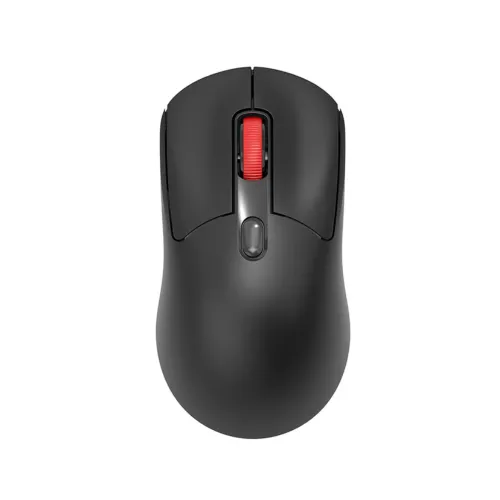
The AJAZZ NJ02 is a black dual-mode wireless mouse with 2.4GHz USB-receiver and Bluetooth 5.0 connections, three DPI levels (800/1200/1600), and one AA battery. Check device compatibility and seller warranty before buying.
Approximate Market Price
BDT 680 – BDT 700
Informational market estimate only; this is not a current Store offer. Last checked Sep 13, 2026. Source
Compare store prices
No live offers for this variant
BDT 680 – BDT 700
Approximate Market Price
Informational market estimate only; this is not a current Store offer. Last checked Sep 13, 2026. Source
Loading history…
Product story
The AJAZZ NJ02 is a black wireless mouse that offers two connection methods: 2.4GHz wireless through a USB receiver and Bluetooth 5.0. It is designed for compatible computers and other host devices that support the selected connection. The mouse uses one AA battery and provides three selectable sensitivity settings. Choose the connection that fits your device and workspace; Bluetooth mode does not use the USB receiver, while 2.4GHz mode requires an available USB-A port for the receiver.
In 2.4GHz mode, plug the matching USB receiver into a compatible host port and pair the mouse as directed by the included instructions. In Bluetooth 5.0 mode, put the mouse into pairing mode and select it from the host's Bluetooth settings. The receiver and Bluetooth are alternative connection paths; verify the product's switch or pairing procedure and whether the exact batch can remember more than one paired host. TechLand's page prose also mentions wired USB operation, although its specification table and Star Tech/Geary list 2.4GHz and Bluetooth modes. Wired operation is not treated as confirmed here; ask the seller which connection modes the supplied revision supports. A device with only USB-C may need an appropriate USB-A adapter to use the receiver. Bluetooth pairing requires host Bluetooth support.
Retailer specifications list three DPI settings: 800, 1,200 and 1,600. A DPI control lets you move between sensitivity levels for different screen sizes or tasks. A lower setting moves the pointer less for a given hand movement; a higher setting moves it farther. DPI is a sensitivity value and does not by itself measure tracking accuracy or guarantee a particular gaming result. Geary lists approximate response rates of 250 Hz in 2.4GHz mode and 125 Hz in Bluetooth mode; these are retailer-reported figures and may vary by mode or revision.
Product listings describe four buttons plus one scroll wheel. The reviewed material does not establish side-navigation buttons, programmable macros, onboard profiles or dedicated configuration software. If you need specific remapping or software functions, ask the seller to confirm them for this model before ordering.
Geary lists the body at approximately 118 × 62 × 39 mm and 68 g, with a black finish. Measurements may describe the mouse body only and may not include the receiver or battery. The listed power source is one AA battery. Confirm whether a battery is included in the package and keep a spare available if you use the mouse away from a charger. The unit is wireless, so it does not use a tethered mouse cable during normal operation.
For 2.4GHz use, connect the receiver and ensure that the host can accept its USB connector. For Bluetooth use, enable Bluetooth on the host and follow the mouse's pairing instructions. A USB-C-to-USB-A adapter may be needed if the receiver is included as USB-A and the host has no USB-A port. On tablets and phones, check operating-system support and any pointer or peripheral permissions. If the mouse does not appear, check its power switch, battery orientation, pairing state and host settings before assuming a hardware fault.
TechLand and Geary specification tables list a one-year warranty for the AJAZZ NJ02. Geary also shows a 7-day replacement note, which may describe a separate return window. Confirm the written warranty provider, coverage, exclusions, replacement terms and return period with your seller. Confirm the terms printed on the warranty card and keep the purchase invoice. Before checkout, verify model NJ02, black colour, the included AA battery and USB receiver, selected wireless mode, current stock, delivery costs, return policy and price. Retail listings and promotional prices can change; the BiponiBD market estimate is informational and is not a live Store offer.
Use the listed dimensions and weight as retailer references rather than guaranteed measurements for every batch. If your setup depends on a specific response rate, Bluetooth pairing behavior, button layout or package item, confirm it with the seller for the exact unit being shipped.
Helpful answers
Product-specific answers maintained with the catalog information.
Star Tech and Geary list 2.4GHz via a USB receiver and Bluetooth 5.0. TechLand specification lists these modes, but its description also mentions wired USB, which conflicts; confirm the exact connection modes of your unit with the seller.
Retailer specifications list 800, 1,200 and 1,600 DPI. These settings change pointer sensitivity; they do not guarantee a specific tracking-accuracy level.
It is listed for one AA battery. The retailer pages reviewed do not consistently confirm whether a battery is included in the box, so check with the seller.
Listings describe four buttons plus one scroll wheel. Side navigation buttons and programmable software are not confirmed in the product details reviewed.
Geary lists 68 g and its specification table lists one year; TechLand also lists one year. Geary separately notes a 7-day replacement period, which may be a return term. Confirm the written warranty and return conditions with the seller.
Customer community
Become a merchant
Join BiponiBD, publish accurate offers and start free.