Pros
- USB-A and USB-C host connections accommodate equipment with either supported connector.
- Supports the common SD and microSD/TF card formats in one compact reader.

All categories
 New condition
Computer Accessories
Amalink · AL-CR531A
Amalink AL-CR531A provides USB-A and USB-C host connections for SD and microSD/TF cards. Tech Land BD lists USB 3.0; actual card speeds and capacity limits are unverified. Retailers advertise SD-to-microSD copying and 2-year coverage, subject to compatible host operation and seller terms.
Approximate Market Price
BDT 630 – BDT 683
Informational market estimate only; this is not a current Store offer. Last checked Nov 11, 2026. Source
Compare store prices
No live offers for this variant
BDT 630 – BDT 683
Approximate Market Price
Informational market estimate only; this is not a current Store offer. Last checked Nov 11, 2026. Source
Loading history…
Product story
The Amalink AL-CR531A is a compact memory card reader with USB-A and USB-C host connections. It is intended for accessing files on supported SD and microSD cards from compatible computers and mobile devices. Having both connector types makes it useful when moving between equipment with different USB ports, while keeping the card-reading function in a single portable accessory.
Star Tech and Tech Land BD both list one USB-A and one USB Type-C connection for the AL-CR531A. Select the connector appropriate to the host being used. The dual-interface description should not be interpreted as a USB hub with two extra peripheral sockets, a charging accessory or a device for connecting two computers together.
A suitable physical connector is only part of compatibility. The host must support external storage access, and mobile devices may require USB host or OTG functionality and a compatible file-management app. Check device support before relying on the reader for a particular phone or tablet. A Lightning-equipped device does not directly accept the USB-C or USB-A plugs shown in the product specifications.
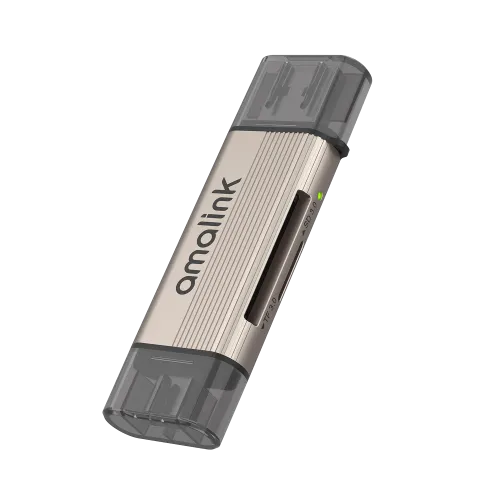
The reviewed retailer listings name SD, microSD and TF cards. TF is the earlier naming associated with the microSD format; it should not be read as an additional third card slot. The product image shows card openings along the side of the reader and protective caps over its ends. Match the card format to the correct opening and avoid forcing a card or connector into place.
Maximum supported capacity, exact SDHC or SDXC coverage, UHS mode and supported file systems are not established in the reviewed product specifications. If you plan to use a large-capacity camera card or a specific file system, ask the seller to demonstrate or confirm that exact combination. Capacity and speed claims from a similarly numbered reader from another brand are not used for this Amalink model.
Tech Land BD describes the AL-CR531A as a USB 3.0 reader. This is a retailer-stated interface classification, rather than an independently measured card-transfer result. The reviewed sources do not provide a dependable numerical read or write benchmark for this exact unit. This listing therefore does not promise a particular number of megabytes per second.
Practical performance depends on the memory card, reader controller, host connection, file sizes and storage destination. A faster USB connection cannot make a slow card write faster than the card supports. For frequent large video transfers, verify real-world speed with the type of card and computer you intend to use.
Both retailers advertise direct SD-to-microSD copying. Star Tech also uses wording about copying without a computer, while Tech Land BD describes avoiding the need for separate readers. The reviewed material does not establish a standalone copy control, independent power source or detailed operating procedure. Do not assume that inserting two cards starts an automatic copy.
Confirm how the reader exposes both cards to a compatible host and which app or operating-system steps are required. If simultaneous card access is essential, ask the seller to verify it on the intended device. This distinction matters when planning to move photographs on a phone while away from a desktop computer.
The retailer compatibility list includes Windows, macOS, Chrome OS, Android and iOS. These broad platform names do not establish support for every release, phone model or card file system. Desktop file managers and mobile storage apps may handle removable media differently. Confirm the complete host-and-card setup instead of assuming universal compatibility.
For ordinary use, connect the reader to a compatible host, insert a supported card and check that the expected storage appears before transferring files. Keep important files backed up, wait for writes to finish and use the host eject or unmount function before removing a card or disconnecting the reader. The reader provides card access; it does not itself guarantee recovery of damaged cards or missing files.
The existing image shows a slim metallic-coloured body with Amalink branding, side card openings and translucent dark end caps. Exact housing composition, dimensions and weight are not confirmed by the reviewed listings, so the photograph is not used to invent those values. Memory cards shown or mentioned in compatibility examples are not established as included in the package.
Star Tech lists a two-year replacement warranty, and Tech Land BD lists two years. Confirm the supplying seller coverage, exclusions and claim procedure. Keep the purchase invoice; a retailer warranty statement does not prove that a particular warranty card or other accessory is included in every package.
At the time of review, Tech Land BD lists BDT 630 as its discounted price. Star Tech lists BDT 633 cash and BDT 683 regular price. The displayed BDT 630–683 reference range reflects these observed options and is not a guaranteed live BiponiBD store offer. Stock, delivery charges and payment conditions should be checked before purchase.
Sources: Star Tech AL-CR531A listing and Tech Land BD AL-CR531A listing. Manufacturer identifiers, exact capacity limits and the direct-copy procedure still require supplier confirmation.
Helpful answers
Product-specific answers maintained with the catalog information.
It has USB-A and USB-C host connections. These provide alternative ways to attach it to compatible equipment; the reader is not a two-port USB peripheral hub or a computer-to-computer link.
Retailers list SD and microSD/TF cards. TF refers to the microSD format, not an extra third slot. Exact capacity limits, SDHC/SDXC coverage and file-system support require confirmation.
Tech Land BD calls it USB 3.0, but the reviewed sources do not provide a verified numerical read/write benchmark. Actual transfer speed depends on the card, reader, host and workload.
Retailers advertise SD-to-microSD copying, but the operating procedure is not documented in the reviewed sources. Do not assume autonomous copying without a host or app. Ask the seller to demonstrate the workflow on your intended device.
Android and iOS are listed by retailers, but the exact device must support the connection and external storage workflow. Confirm USB host/OTG and file-system compatibility. Lightning devices cannot directly accept its USB-A or USB-C plugs.
Windows, macOS, Chrome OS, Android and iOS are listed. This is not confirmation of every release or device. Check your host, memory card and file-management app together.
Tech Land BD lists BDT 630 discounted price; Star Tech lists BDT 633 cash and BDT 683 regular. Star Tech advertises a two-year replacement warranty and Tech Land BD lists two years. Confirm current seller terms and availability.
Memory cards are not established as included by the reviewed sources. Confirm package contents and maximum card capacity with the seller. Wait for transfers to finish and eject or unmount the storage before removing it.
Customer community
Become a merchant
Join BiponiBD, publish accurate offers and start free.