Pros
- Connects a compatible USB-C video source to a DisplayPort display
- Short 0.2 m cable reduces clutter near the source device

All categories
 New condition
Computer Accessories
Amalink · AL-UC953
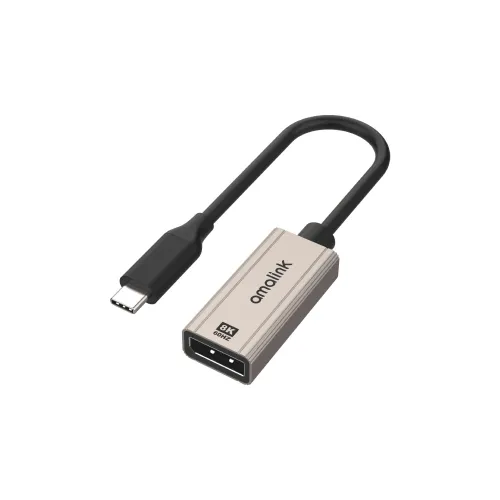
Connect a compatible USB-C device to a DisplayPort monitor with the Amalink AL-UC953, a 0.2 m converter advertised for up to 8K at 60 Hz. USB-C video output and matching display capabilities are required.
Approximate Market Price
BDT 780 – BDT 950
Informational market estimate only; this is not a current Store offer. Last checked Sep 14, 2026.
Compare store prices
No live offers for this variant
BDT 780 – BDT 950
Approximate Market Price
Informational market estimate only; this is not a current Store offer. Last checked Sep 14, 2026.
Loading history…
Product story
The Amalink AL-UC953 connects a compatible USB-C video source to a DisplayPort monitor. Its short cable is listed as 0.2 metres, making it useful where the source device and monitor connection are close together. Retail listings advertise a maximum output of 8K at 60 Hz; the result depends on the source, display, cable and supported video bandwidth.
The USB-C port on the laptop, tablet or phone must support DisplayPort Alt Mode or another compatible DisplayPort video output. A USB-C port used only for charging or data will not necessarily send video. Check the device manufacturer’s port specifications and the monitor input before ordering. A suitable DisplayPort cable may be needed; confirm package contents with the seller.
The advertised 8K at 60 Hz maximum requires compatible hardware throughout the connection. Your device and monitor may negotiate a lower resolution or refresh rate. Check the source graphics capability, monitor specification and cable rating if a particular display mode is essential. This adapter is intended to connect a USB-C source to a DisplayPort display; reverse-direction operation has not been verified.
Connect the USB-C end to the compatible source and attach the DisplayPort display using the appropriate connection. Select the correct input on the monitor and adjust the display settings on the source device. If no image appears, verify USB-C video support and test the monitor and cable with a known working setup.
Confirm connector configuration, available stock, package contents and local warranty terms with the seller before purchase. The listed 0.2 m cable length and 8K claim are based on retailer specifications; manufacturer documentation and independent performance testing were not available for this review.
Helpful answers
Product-specific answers maintained with the catalog information.
No. Check that the source USB-C port supports DisplayPort Alt Mode or compatible video output. A charging-only or data-only port may not work.
Retailers advertise up to 8K at 60 Hz. Achieving that mode requires a compatible source, display and cable with sufficient bandwidth; actual output can be lower.
Retail listings state a cable length of 0.2 m. Confirm the exact connector configuration and package contents, including whether a separate DisplayPort cable is supplied, with the seller.
Customer community
Become a merchant
Join BiponiBD, publish accurate offers and start free.