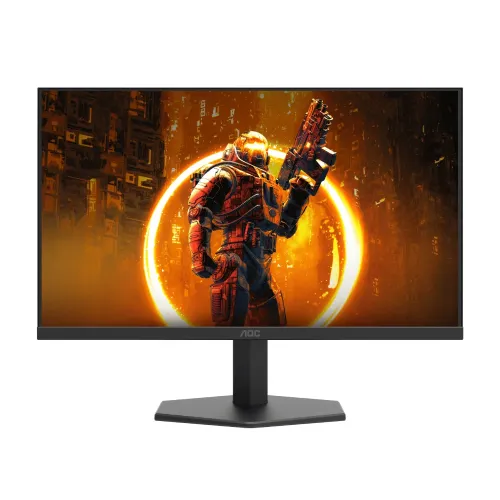
AOC 24G11ZE 23.8-inch Full HD Fast IPS Gaming Monitor
The AOC 24G11ZE is a 23.8-inch flat Fast IPS gaming monitor with a native 1920 × 1080 Full HD resolution. Its refresh rate needs careful interpretation: AOC identifies 200Hz as the optimum timing and documents an OSD OverClock mode up to 240Hz through supported HDMI or DisplayPort configurations. This model should not be described as 260Hz. If an overclocked signal flickers, drops out or behaves inconsistently, disable OverClock and use the documented 200Hz mode.
This page concerns model 24G11ZE. Retailer titles can confuse the model with other G11 monitors or quote a 260Hz rate that the manufacturer documentation does not substantiate. Confirm the 24G11ZE model code on the carton and product label. Maximum refresh depends on the graphics source, port, cable, driver, monitor OSD and selected timing. The refresh rate shown in your computer’s advanced display settings is the operating mode actually negotiated by your setup.
Fast IPS display and Full HD picture
The 16:9 panel measures 23.8 inches diagonally and displays 1920 × 1080 pixels. Full HD is broadly compatible with desktop computers and many gaming systems, and it can be easier to drive at high frame rates than a higher-resolution display. At this screen size, it offers a practical balance for competitive gaming, study, office work, streaming and general browsing. QHD monitors provide more pixels and working space, so buyers who prioritize fine text or detailed creative work may prefer a higher resolution.
AOC specifies a Fast IPS panel and 178-degree horizontal and vertical viewing angles. IPS viewing angles help the image remain more consistent when viewed away from the centre, although brightness, contrast and colour can still shift with angle and each panel can vary. The anti-glare surface helps reduce reflections in ordinary rooms; it cannot eliminate glare from a window or bright lamp placed in front of the screen.
200Hz native timing and 240Hz OverClock
The manufacturer leaflet lists 1920 × 1080 at 200Hz as the optimum resolution and refresh rate, and lists 240Hz as an OverClock option using DisplayPort or HDMI. Enable the monitor’s OverClock setting only if you want to try that mode, then select the supported refresh rate in the graphics driver or operating system. A capable GPU, suitable cable and stable signal are required. If the display shows artifacts, blinking, black screens or intermittent signal, reduce the refresh rate and return to 200Hz.
Very high refresh can make motion updates appear more frequent when a game or application actually delivers matching frame rates. It does not by itself make a game render at 200 or 240 frames per second. Performance depends on the computer, graphics settings and game. For everyday desktop use, you can choose a lower refresh rate if that better fits the source or power and compatibility needs.
Response time and motion settings
AOC quotes 1ms GtG and 0.3ms MPRT. These are different measurements and should not be read as a promise that every pixel transition finishes in those times under every setting. GtG describes a grey-to-grey pixel transition; MPRT describes perceived motion persistence and may use a strobing mode. Pixel overdrive settings can change transition behaviour and may introduce bright or dark trails if set too aggressively. Choose the setting that looks cleanest in actual content rather than relying on a headline number alone.
The monitor supports Adaptive-Sync, which can coordinate supported graphics output with display refresh and reduce tearing in compatible configurations. Compatibility depends on the computer, driver, connection and active refresh mode. This listing does not claim NVIDIA G-SYNC certification. Check the GPU vendor’s current compatibility information and test your own system if variable refresh is important to you.
Brightness, contrast, colour and HDR
The published typical brightness is 300 cd/m² and the typical static contrast ratio is 1000:1. AOC also lists a dynamic contrast figure; dynamic contrast is not directly comparable to static contrast and should not be treated as the normal simultaneous black-to-white performance. Ambient light, selected picture preset and individual panel variation affect perceived brightness and contrast.
The stated gamut is 127% sRGB measured under CIE 1931 and 94% DCI-P3 under CIE 1976, with 16.7 million colours listed. Gamut percentages can exceed 100% when a panel covers colours outside a smaller reference gamut; they do not mean the screen has been professionally calibrated or that every colour is accurate. For colour-critical photo, print or video work, use a calibrated display and an appropriate colour-managed workflow.
HDR10 input support allows the monitor to accept compatible HDR signals. It should not be confused with a guarantee of premium HDR output, local dimming, very high peak brightness or a particular certification. The 300 cd/m² typical brightness and IPS contrast class are more relevant when setting expectations. HDR appearance varies by source, game, operating system and monitor picture mode.
Connections, sound and mounting
Inputs include one HDMI 2.0 port and one DisplayPort 1.4 port. Select the connection and cable that support the resolution and refresh mode you intend to use; a damaged or insufficient cable can cause dropouts at high bandwidth. The display also provides a headphone output. It has no integrated speakers and no USB hub, so plan for external speakers or headphones and connect USB accessories to your computer or a separate hub.
The stand supports tilt from -5° to +20°. It does not provide height, swivel or pivot adjustment, so a VESA arm or riser may be useful for ergonomic positioning. A 100 × 100mm VESA pattern is listed. Check arm capacity, screw length and clearance before installation, and support the monitor while attaching it. Keep the supplied external adapter ventilated and use the correct power supply.
Who should consider this monitor?
The 24G11ZE may suit players who want a high refresh Full HD IPS display, a compact 23.8-inch screen and both HDMI and DisplayPort inputs. It can also serve as an everyday monitor for browsing, documents, classes and video. Consider your computer’s ability to maintain high frame rates, the limited Full HD workspace, the tilt-only stand and the lack of built-in speakers before choosing it. If you need height adjustment, integrated audio, USB connectivity, high-resolution creative work or carefully certified HDR, compare alternatives against those specific needs.
Bangladesh price, availability and warranty
Retailer pages observed for this review showed prices around ৳18,100–৳19,900, but price and stock are time-sensitive and may differ by shop, location, import batch and payment method. One seller page showed out-of-stock status; another retailer listing can change without notice. These observations are comparison context only, not a live BiponiBD offer or a promise of availability. Confirm the final price, stock, delivery charge and return policy with the seller before ordering.
Bangladesh retailer listings advertise a three-year warranty for this model, but the actual service provider, coverage, dead-pixel policy and serial-number eligibility must be confirmed for the particular unit and invoice. Ask whether the warranty is manufacturer-backed or seller/importer-backed, where service is provided, and what proof is required. Do not assume that a warranty statement on another retailer’s page applies to a BiponiBD listing.
Setup and care
Use the native 1920 × 1080 resolution, choose a refresh rate supported by your source and cable, and enable OverClock only when you intentionally want to test the 240Hz mode. Keep vents and the external power adapter unobstructed. Clean the screen gently with a soft, clean cloth and follow the manufacturer’s care guidance; avoid spraying liquid directly onto the display. Keep the serial number, invoice and packaging details for warranty support.
Frequently asked questions
Specification note: Manufacturer documentation takes precedence where retailer titles conflict. AOC documents 200Hz optimum and 240Hz OverClock, not 260Hz. Regional configurations, package contents, price and warranty service can vary; confirm the exact unit with the seller.