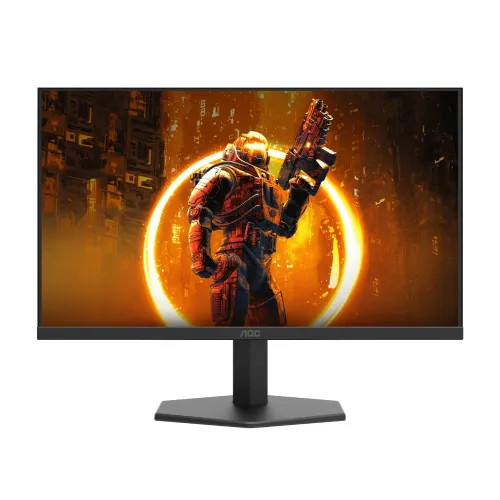
AOC 24G11ZE 23.8-inch Full HD FAST IPS monitor
The AOC 24G11ZE is a 23.8-inch Full HD FAST IPS gaming monitor. Its model-specific AOC leaflet distinguishes a 200Hz optimum mode from 240Hz operation with overclocking enabled, over both HDMI and DisplayPort. AOC lists 0.3ms MPRT, Adaptive Sync, HDR10 signal support, a 100 × 100mm VESA mount and -5° to +20° tilt. The manual also lists a 12V, 2.5A adapter and 30W typical / 34W maximum consumption. These manufacturer documents are the basis for the core specifications; local price and warranty remain seller-dependent.
Model, panel and resolution
The display uses a 23.8-inch FAST IPS panel with a native 1920 × 1080 resolution and 16:9 aspect ratio. AOC lists a 0.2745mm pixel pitch and 16.7 million colours. Full HD can suit competitive gaming, study and everyday desktop work at this size. It has fewer pixels than QHD, so fine text and detailed creative work will not have the same sharpness or workspace as a higher-resolution panel. FAST IPS describes the panel family; actual pixel transitions and motion clarity depend on settings and content.
200Hz standard and 240Hz overclock mode
The AOC leaflet lists 1920 × 1080 at 200Hz as the optimum mode on both HDMI and DisplayPort, then lists 1920 × 1080 at 240Hz (OC) on both connections. This distinction matters: 240Hz is an overclocked operating mode rather than the leaflet's standard optimum timing. Enable the overclock option in the monitor's on-screen display, then choose the refresh rate in the computer's display or graphics settings. The source GPU, its port, cable quality, driver and any adapter or dock must also support the chosen signal.
How to reach the intended refresh rate
Connect directly to a supported HDMI or DisplayPort output and select 1920 × 1080. Check the monitor OSD for the OC setting before selecting 240Hz; if it is off, 200Hz is the listed optimum mode. If the operating system does not show the expected rate, confirm the correct input, update the graphics driver, check cable ratings and remove unsupported adapters from the path. A high-refresh monitor cannot create frames that the game or computer does not render. The perceived benefit depends on frame rate, game settings, motion handling and user preference.
Response time: MPRT versus GtG
AOC lists 0.3ms MPRT for the 24G11ZE. Some Bangladesh sellers also advertise 1ms GtG. MPRT and GtG describe different measurements: one relates to motion-picture persistence, while the other records a pixel transition between grey levels. They are not interchangeable and neither value guarantees every transition at every refresh rate. Check the manual and OSD for the mode used to achieve the MPRT claim; fast modes can have specific operating conditions. Competitive buyers should evaluate independent tests of the exact unit and settings rather than relying only on a headline number.
Adaptive Sync and gaming compatibility
AOC lists Adaptive Sync. Variable refresh can coordinate compatible graphics output and display timing to reduce tearing within a supported operating range. Actual compatibility depends on the graphics card, driver, connection, selected mode and monitor settings. Enable the feature in the display menu and the graphics software as appropriate, then confirm it operates with the intended game. AOC's reviewed leaflet does not provide a complete per-GPU certification matrix, so verify the exact setup if variable refresh is essential.
HDR10 signal support
AOC product material lists HDR10. This indicates support for an HDR signal or mode; it should not be read as a guarantee of high peak brightness, local dimming, a specific VESA DisplayHDR certification or reference HDR reproduction. HDR results depend on the source, game or video, operating-system configuration and display capabilities. For HDR-critical movie or creative work, compare measured luminance, local dimming and certification data rather than relying on the format label alone.
Brightness, contrast and colour
AOC lists 300 cd/m² brightness and a 1000:1 typical contrast ratio, alongside an 80,000,000:1 dynamic contrast figure. Typical static contrast and a dynamic processing ratio are different kinds of values and should not be compared as if measured identically. The leaflet lists sRGB 127% under CIE1931 and DCI-P3 94% under CIE1976. Gamut percentages can use different measurement spaces and methods; they do not establish calibration accuracy, uniformity or colour volume. The reviewed manufacturer material does not specify a factory accuracy target.
Viewing comfort and screen placement
The panel is listed with 178-degree horizontal and vertical viewing angles. AOC includes a Flicker Free and Low Blue Light feature set in its materials. These features and settings may support personal comfort preferences, but they cannot guarantee that long sessions will not cause fatigue. Set brightness for the room, position the screen to avoid direct reflections, use readable scaling and take breaks. The flat panel format can fit a single-display or multi-monitor gaming desk; check desk depth and viewing distance before purchase.
HDMI, DisplayPort and headphone output
The official manual identifies HDMI, DisplayPort and a headphone output. AOC's leaflet lists the 200Hz optimum and 240Hz overclock modes on both HDMI and DisplayPort. Confirm which ports are physically present on the Bangladesh unit and whether any included cable is appropriate for your source. The reviewed specification does not list built-in speakers or a USB hub. The headphone jack is an audio output; route sound from the source and select the correct output device in the operating system or console.
Stand, VESA and physical installation
AOC specifies a tilt range from -5° to +20° and a 100 × 100mm VESA mount. Height adjustment, swivel and portrait pivot are not listed in the reviewed product documents. A compatible arm can provide additional positioning, but check the monitor's weight, required screw length and bracket instructions. Support the display during installation and do not force fasteners. Keep the ventilation area and ports accessible after mounting.
Power, package contents and care
The AOC manual lists a 12V DC, 2.5A power supply, 30W typical consumption and up to 34W maximum under its stated conditions. Use the adapter supplied for this unit and check its output label before replacement. Retail packages can vary by country; confirm the adapter, stand components, power cable and video cable included with the local seller. Keep the serial label, invoice, carton and warranty card. Clean the panel with a soft, suitable cloth and follow AOC care guidance; avoid applying liquid directly to the screen.
Who should consider the AOC 24G11ZE?
This model can suit PC gamers who want a compact Full HD FAST IPS screen and understand the 200Hz standard / 240Hz overclock distinction. It offers HDMI and DisplayPort modes documented by AOC, Adaptive Sync and VESA mounting. It is also usable for everyday office, study and media tasks. Consider a QHD display if text detail and workspace are more important, built-in speakers if you need integrated audio, or a stand with height and pivot adjustment if ergonomic movement matters.
Bangladesh availability, price and warranty
Retailer pages checked for this review showed prices around ৳19,900–৳20,900, though listings may refer to different stock batches or even inconsistent 240Hz/260Hz marketing. AOC model documentation supports 240Hz overclocked; confirm the exact model label and manual rather than accepting a seller's higher refresh headline. These observations are not a live BiponiBD offer; price, stock and delivery terms change. Some sellers advertise three-year warranty. Ask which service provider covers the unit, whether its serial is eligible in Bangladesh, and what dead-pixel, repair and replacement terms apply. Obtain written terms and keep the purchase receipt.
Frequently asked questions
Refresh reminder: AOC lists 200Hz optimum and 240Hz overclocked at 1920 × 1080 on HDMI and DisplayPort. Confirm OC mode, source capability, exact stock and Bangladesh warranty before purchase.