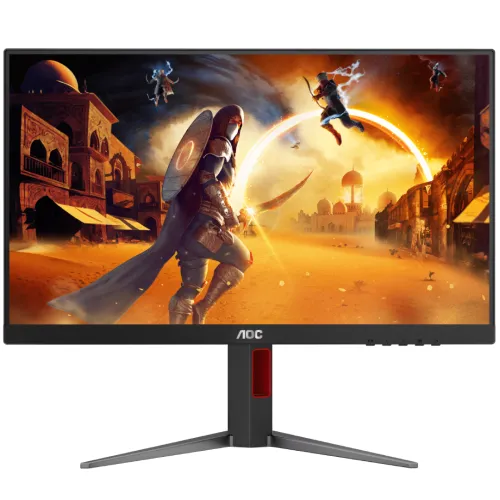
AOC 24G4 23.8-inch FHD 180Hz Fast IPS Gaming Monitor is a 23.8-inch-class Full HD Fast IPS gaming display with a manufacturer-confirmed maximum refresh rate of 180Hz. This guide covers its panel, motion features, connections, ergonomic setup, strengths, limitations, local seller observations and buyer checks.
A 23.8-inch Full HD gaming display
The AOC 24G4 is a 23.8-inch-class monitor designed around a Fast IPS panel and a high refresh rate. It displays 1920 × 1080 pixels in a 16:9 layout, the standard Full HD format used by many PCs, consoles, games and streaming services. The official manual identifies a 60.5cm diagonal viewing area and a 0.2745mm pixel pitch. At this size, Full HD keeps game interfaces readable and allows a graphics card to target high frame rates without rendering a QHD or 4K image. It provides less fine detail and desktop workspace than a 1440p screen, so buyers focused on dense spreadsheets, small typography or high-resolution creative work may prefer a higher-resolution panel.
The 180Hz model specification
Refresh rate is a defining feature of this exact 24G4. The AOC manual specifies a maximum resolution of 1920 × 1080 at 180Hz and a vertical scan range reaching 180Hz. This confirms the standard model claim. Some regional seller copy uses 200Hz overclocked language for 24G4 or related market variants; this product record remains named and described as 180Hz because the supplied official manual for 24G4 confirms 180Hz. A 180Hz display can show a new frame more frequently than 60Hz, which may make motion and input response feel smoother when the computer can render at a high frame rate. The final experience still depends on the game, graphics card, port, cable and settings.
Fast IPS and viewing experience
Fast IPS is intended to combine IPS viewing characteristics with gaming-focused response behavior. The panel can suit a player who wants broad viewing angles and smooth motion in a compact Full HD format. Local sellers publish differing gamut percentages, brightness and response-time modes for this model. Because those claims are not all consistently reproduced in the official manual evidence checked here, this product description avoids treating retailer-only color-gamut or response figures as manufacturer-certified. AOC's manual is the reference for the 24G4 model identity and 180Hz timing. For color-critical work, use a calibrated display and verify a current official regional specification rather than relying on gaming marketing language.
Adaptive-Sync and frame pacing
The manufacturer manual states that Adaptive-Sync works through DisplayPort and HDMI with compatible graphics hardware. Variable refresh can align the monitor refresh with frame output within a supported operating range and can reduce tearing in supported setups. It does not increase the graphics card's rendering performance and it cannot guarantee a fixed frame rate. Use a compatible GPU, a suitable driver and the correct display mode. The OSD includes DP capability settings, and AOC notes that Adaptive-Sync support depends on using an appropriate DisplayPort capability mode. Console compatibility may differ from PC support, so check the console output settings and the active input before purchase.
Gaming controls and motion options
The monitor's on-screen controls include gaming-oriented adjustments such as Game Mode, Shadow Control, Game Color, a frame counter and overdrive. These allow the user to change the visual presentation for a particular game or preference. AOC also documents Motion Blur Reduction with adjustable levels. The manual warns that brightness decreases as the MBR setting rises, and that aggressive overdrive can produce visible blur or artifacts. These controls involve trade-offs: a brighter image, clear motion and clean transitions do not always occur together at every setting. Start with moderate values, compare the actual game image and avoid treating a maximum setting as automatically best.
Ports and audio
The official manual identifies HDMI and DisplayPort video connections plus an earphone output. Local Bangladesh product listings specify one HDMI 2.0 and one DisplayPort 1.4. If you plan to use the 180Hz mode, check which input and cable combination supports the desired timing for your graphics card. A video cable may or may not be included depending on the regional bundle. The monitor has no built-in speaker listed in the reviewed specifications. The earphone output can support an audio connection, but users may prefer to connect their headset or speakers directly to the computer or console. A two-input setup offers more flexibility than a single-input monitor, though changing sources may still require using the monitor controls.
Ergonomics and mounting
Bangladesh sellers describe the stand as offering height adjustment, tilt, swivel and pivot, with one listing specifying 130mm of height travel. That makes the advertised stand more flexible than a basic tilt-only design, but the included stand version should be confirmed because regional bundles can differ. The AOC manual shows a 100 × 100mm VESA pattern and provides M4 screw guidance for a compatible wall or desk mount. Follow the manufacturer's installation instructions and verify the mount rating and screw length. Do not apply pressure to the panel while changing the angle. Arrange the monitor so the screen center and viewing distance are comfortable for your desk and posture.
Power and setup
The official manual lists typical power consumption of 23W, maximum consumption at or below 37W and standby consumption at or below 0.3W. It specifies an AC input range of 100–240V, 50/60Hz and 1.5A. Connect the power supply and video cable with the monitor turned off, select the correct source input and then set the operating system to the preferred resolution and refresh rate. If 180Hz is unavailable, inspect the cable, graphics driver, input selection and display mode before assuming the screen is defective. Retain the box and accessories until the seller's return and warranty terms are clear.
Price, stock and Bangladesh warranty
At review time, Monarch IT displayed ৳22,300 for the 24G4, while TechLand showed ৳22,600 and marked it out of stock. The observed ৳22,300 listing is a seller snapshot, not a BiponiBD offer or a promise that the price and inventory remain available. Ask the seller for an updated quote, stock status and delivery terms. TechLand advertises three years of warranty, but seller advertising alone does not establish who will service a particular imported serial number or which claim conditions apply. Request the warranty provider, invoice requirements, dead-pixel policy, serial eligibility and exact regional SKU before payment.
Who should choose the AOC 24G4?
This monitor is worth considering for a PC gamer who values 180Hz Full HD motion, an IPS-type panel and both HDMI and DisplayPort connections in a 23.8-inch format. The resolution is familiar and comparatively manageable for a system targeting fast frame rates. It can also serve everyday browsing and office tasks, though its strongest feature is the refresh rate rather than high pixel density. It may not suit users who want QHD detail, USB-C docking, integrated speakers, verified professional color accuracy or guaranteed high-end HDR capability. Decide based on the exact GPU, games, desk distance, connection needs and local warranty terms rather than on response-time labels alone.
Specifications at a glance
- Brand: AOC
- Model: 24G4
- Display Size: 23.8-inch class (60.5cm diagonal)
- Panel Type: Fast IPS / TFT color LCD
- Resolution: 1920 × 1080 Full HD
- Aspect Ratio: 16:9
- Pixel Pitch: 0.2745mm horizontal × 0.2745mm vertical
- Refresh Rate: Up to 180Hz at 1920×1080 (official manual)
- Maximum Resolution: 1920×1080 at 180Hz
- Display Colors: 16.7 million (manual)
- Video Inputs: HDMI and DisplayPort
- Local Port Listings: 1 × HDMI 2.0; 1 × DisplayPort 1.4 (verify regional SKU)
- Audio Output: Earphone output
- Adaptive-Sync: Yes; manual states it works over DP/HDMI
- HDCP: Retailer lists HDCP 2.2; confirm exact input-level version
- Stand Adjustments: Local listings state height, tilt, swivel and pivot; confirm supplied stand variant
- VESA Mount: 100 × 100mm; manufacturer manual shows M4 screw guidance
- Typical Power: 23W
- Maximum Power: ≤37W
- Standby Power: ≤0.3W
- Power Input: 100–240V AC, 50/60Hz, 1.5A
- Built-in Speakers: Not listed
- Warranty: Local seller pages advertise 3 years; confirm provider and unit eligibility
Frequently asked questions
What is the maximum refresh rate?
The AOC manual identifies 24G4 and lists 1920×1080 at up to 180Hz. This is the confirmed native model specification. Do not confuse this 24G4 listing with other regional or similarly named AOC models advertised with an overclocked 200Hz mode.
What panel and resolution does it use?
It is a 23.8-inch-class Fast IPS gaming monitor with 1920×1080 Full HD resolution. AOC lists a 60.5cm diagonal image area and 0.2745mm pixel pitch in the official manual.
Which ports does the AOC 24G4 have?
AOC lists HDMI, DisplayPort and an earphone output. Bangladesh listings specify one HDMI 2.0 and one DisplayPort 1.4, but check the exact regional box and port revision with the seller.
Does it support Adaptive-Sync?
Yes. AOC states Adaptive-Sync works over DisplayPort and HDMI. Function depends on compatible graphics hardware, driver, chosen input, refresh settings and supported operating range.
Is 1ms response time guaranteed?
Local sellers advertise different response-time modes, including MPRT and GtG figures. These are distinct measurement types, and mode settings can affect brightness or artifacts. The official manual we checked confirms 180Hz but the precise 1ms marketing claim should be verified against the exact regional spec sheet.
Can the stand rotate and adjust height?
Bangladesh listings describe height, tilt, swivel and pivot adjustment, including around 130mm height travel. The public manual excerpt focuses on setup and does not fully confirm every local stand variant, so verify the included stand before purchase.
Can I mount the monitor on an arm?
The AOC manual illustrates 100×100mm VESA mounting and identifies M4 screw requirements. Check the mount weight rating and screw length, and follow the installation guide to avoid panel damage.
Does it have speakers?
No built-in speakers are listed. The manual shows an earphone output, so audio can be routed to suitable headphones or speakers, while many users will connect audio directly to the computer.
What is its price in Bangladesh?
A current Monarch IT page displayed ৳22,300 when checked. TechLand displayed ৳22,600 but stated the item was out of stock. Prices and availability can change; confirm a fresh quote directly with the seller. BiponiBD has no verified live offer for this review.
What warranty is offered locally?
TechLand advertises three years on its listing. This does not establish eligibility for every imported unit. Confirm the warranty provider, serial coverage, invoice and claim conditions for the specific monitor before paying.
Is it good for esports?
Its 180Hz Full HD refresh and Fast IPS panel make it a plausible esports-oriented option if the GPU can deliver high frame rates. Actual motion clarity depends on overdrive, response behavior, game settings and personal preference; no monitor can guarantee a particular competitive result.
What is in the box?
Cable and accessory bundles vary. Ask the local seller to confirm included HDMI/DisplayPort cable, power lead, stand components, documentation and warranty card for the exact regional SKU.
Source note: AOC manual for model and technical details; local sellers for market snapshots. Confirm exact regional specification, stock, price, stand version and warranty before ordering.