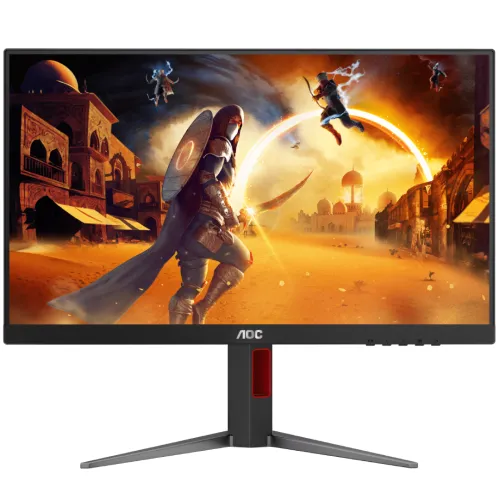
AOC 24G4 23.8-inch FHD 200Hz Fast IPS Gaming Monitor is listed in Bangladesh as a 23.8-inch Full HD Fast IPS gaming monitor with a 200Hz maximum refresh, Adaptive-Sync, HDMI 2.0, DisplayPort 1.4 and 100 × 100mm VESA. AOC’s China regional page lists the 24G4 at 200Hz, while some international 24G4 pages/manuals describe 180Hz variants. Verify the delivered region/version and timing table; local listings report 300 cd/m², 1000:1 contrast and an adjustable stand. No built-in speaker is specified.
23.8-inch Full HD screen and gaming desk fit
The AOC 24G4 listing for Bangladesh identifies a 23.8-inch Fast IPS monitor with 1920 × 1080 Full HD resolution and a 16:9 format. This size is common for competitive gaming because the full scene can remain comfortably visible without requiring the large desk footprint of a 27-inch screen. Full HD is also comparatively manageable for a broad range of graphics cards. The panel’s IPS construction and wide-angle specification support viewing from different positions, while the flat display fits conventional desks and dual-monitor arrangements.
For productivity, Full HD at 23.8 inches offers a practical balance between text readability and screen space. Use native resolution for sharp pixel mapping and adjust scaling or font size if needed. Users who work with large spreadsheets, dense code, image timelines or many side-by-side windows may prefer QHD for additional detail. Choose based on viewing distance, workload and the computer’s output capacity rather than diagonal size alone.
Regional 180Hz versus 200Hz listing difference
The Bangladesh 24G4 listing and AOC’s Chinese product page describe a 23.8-inch Full HD 200Hz Fast IPS model. AOC’s international 24G4 product pages and a family manual found during review describe variants at 180Hz. This difference means buyers should check regional model suffix, box label, manual and supported timing table. The copy keeps the 200Hz claim tied to the exact regional seller/manufacturer pages rather than transferring a figure from another 24G4 variant or a similarly named 24G4X.
The AOC family manual found here lists Full HD timing up to 180Hz for its documented version, so the delivered unit’s own guide is the final authority for the maximum supported mode. A source graphics card, cable, driver and selected input also affect what refresh rate is available. If the operating system only offers a lower rate, inspect the connection, update the graphics driver and consult the exact regional manual before assuming the monitor is defective.
Fast IPS response and motion settings
Fast IPS panels are designed to combine broad viewing angles with faster pixel transitions than many traditional office panels. Retailer specifications advertise 1ms response time, but the measurement method is not consistent across the pages reviewed. MPRT and GTG describe different measurements and should not be compared as if they meant the same thing. Actual transition speed, blur and overshoot depend on the shade change, overdrive setting, refresh mode and the individual panel.
Treat a one-millisecond headline as a published claim, not a guarantee that every pixel transition is always one millisecond. When using overdrive, compare settings in the games you play and look for bright or dark inverse trails. Motion clarity also depends on how many frames the computer renders and how stable frame pacing is. A fast panel cannot create frames that the GPU or game does not produce.
Adaptive-Sync and graphics compatibility
Local specifications list Adaptive-Sync and FreeSync/G-Sync compatibility. Variable refresh can coordinate the display with compatible graphics output to reduce tearing within the supported operating range. Enable the feature in the monitor menu or graphics driver if required and connect using a supported HDMI or DisplayPort cable. Compatibility depends on the graphics card, driver, input and refresh configuration; a seller claim does not guarantee that every device or adapter will expose the same modes.
If flicker, blanking or unstable brightness occurs, update the driver, test another cable, reduce refresh temporarily or compare with variable refresh disabled. Check the monitor’s on-screen settings and ensure the source is actually outputting the intended mode. Consoles, laptop docks and adapters can have different limits from a direct PC connection. Adaptive-Sync coordinates frame delivery but does not increase the frame rate generated by the source.
Colour coverage, contrast and brightness
Bangladesh product pages list 300 cd/m² brightness, approximately 1000:1 typical contrast and wide viewing angles. One listing reports 100% sRGB and 90% NTSC coverage. These gamut numbers describe colour range rather than factory calibration accuracy, uniformity or measured colour error. Fast IPS and the stated viewing angles can help maintain a consistent image when the user shifts position, but room lighting, picture mode and panel variation influence what is seen.
For competitive gaming, the listed colour range can produce vivid scenes and clear interface elements. For design, photography or print matching, calibrate the actual unit and use colour-managed software; a coverage percentage alone is not proof of accuracy. Set brightness to the room and avoid direct reflections. The product listing does not make professional calibration claims, so use appropriate equipment when consistent colour matters.
Inputs, audio and device setup
Local Bangladesh specification pages list one HDMI 2.0 input, one DisplayPort 1.4 input and an audio output. These ports can connect a gaming PC and another source, subject to the exact regional unit. Use the input and cable that support the desired resolution and refresh mode. The monitor is not listed with built-in speakers, so plan to use headphones, a headset or external speakers. USB-C, a USB hub and laptop charging are not listed among the checked features.
If audio is routed through HDMI or DisplayPort, select the monitor as the computer’s output device and confirm the output is passed to an available audio connector. If no sound is available, check the source settings and consult the regional connection guide. Verify which cable is included with the seller, since regional packages and promotions can vary. Inspect the rear panel when the monitor arrives and use the exact port labels rather than relying on generic listing images.
Ergonomic stand claims and VESA installation
Local seller specifications describe a stand with height, tilt, swivel and pivot adjustment, along with a 100 × 100mm VESA pattern. Those details are useful but should be checked against the exact manual and delivered version because regional variants and listing templates can differ. The stand can help position the screen for a seated gaming setup, and VESA mounting offers another path when using a compatible arm. Confirm screw length and bracket load rating before installation.
When attaching an arm, support the panel, follow the monitor guide and avoid overtightening hardware. Route cables so they do not snag as the display turns or pivots. If frequent height adjustment matters, verify the full travel range in person rather than inferring it from marketing imagery. Measure desk depth and arm clearance in advance. VESA dimensions alone do not establish that every third-party mount is suitable or that a seller’s stand description applies to all 24G4 regional units.
Eye-comfort and longer gaming sessions
Local sellers list Flicker-Free and Low Blue Light functions. These may provide preferred viewing modes during long gaming or study sessions, but they do not guarantee that fatigue will be prevented. Brightness, room lighting, glare, text size, viewing distance and posture also affect comfort. Place the display so the screen does not face a strong light source, and use a brightness level appropriate to the room.
Low-blue-light modes can shift white balance and alter colour appearance, so use a neutral profile when judging colours and a comfortable mode for reading if preferred. Take breaks and keep interface text large enough to read without leaning forward. Persistent discomfort warrants adjusting the setup and seeking appropriate professional guidance. These are general usage suggestions, not medical claims about the monitor.
Competitive gaming and frame-rate expectations
A 200Hz maximum can make supported motion appear smoother than 60Hz or 144Hz operation when the computer sends frames at a high enough rate. The benefit depends on the exact regional version, selected input, cable, driver and graphics performance. Competitive games with lower graphics demands may approach higher frame rates more easily than visually complex titles. Check the display control panel after setup and confirm the actual active refresh rate rather than relying only on a product headline.
A high refresh ceiling does not mean every game will run at 200 frames per second. A GPU may need lower visual settings or a different frame target to maintain stable output. If the exact model’s manual specifies 180Hz rather than 200Hz, follow that limit. Variable refresh may help synchronize supported output, but frame pacing and game settings still matter. Choose a refresh mode that remains stable for your system and the games you play.
Console, PC and multi-device use
AOC and retailer information describe compatibility with common gaming setups, and the HDMI/DisplayPort inputs support typical PC and console connections. Available modes still depend on the source device and game. Some consoles do not output 200Hz, while PCs may require the right GPU output and driver. A second input can remain connected to another system, with the monitor’s input menu used to switch between them if the delivered unit supports the listed arrangement.
For a console, review the console’s video settings and the game’s supported resolution and refresh rate. For a laptop, check whether a dock or adapter restricts output. USB-C video and charging are not listed, so do not assume a single-cable laptop connection. If multiple displays are used, verify the graphics card has enough outputs and that the game opens on the correct monitor. The display can accept compatible source signals but does not upscale every game or create unsupported modes.
Setup, care and delivery inspection
Place the monitor on a stable desk or mount and keep the power and video cables away from foot traffic. Clean the panel with a soft microfiber cloth and avoid pressing on the LCD or spraying liquid directly onto it. Follow the manual when adjusting the stand or attaching VESA hardware. Retain packaging and purchase documents through the seller return period, and record the serial number before discarding the box.
On delivery, inspect the screen, stand, input ports, power lead and included accessories. Test the native Full HD resolution, available high-refresh modes, each input you plan to use, Adaptive-Sync if supported and the audio output with external equipment. Report damage or missing items within the seller’s stated window. Product photographs can be illustrative and may not match every regional package or finish exactly.
Bangladesh prices and local warranty
Computer Village listed ৳19,900 for the exact AOC 24G4 200Hz item. Canvas IT showed an offer price of ৳21,600 and regular price of ৳22,800, and marked its listing in stock when checked. These are independent seller snapshots, not a BiponiBD offer; discounts, stock, delivery fees and payment terms may change. Confirm the final payable amount and product code with the seller before ordering.
Warranty terms should be confirmed for the specific serial and seller. Ask who handles service, the coverage period, exclusions, dead-pixel policy, claim documents and service location, and keep the answers in writing. The local product pages reviewed do not prove eligibility for a particular serial. Retain the invoice, warranty card and box if required by the seller’s claim process. A seller’s advertised warranty period is not a guarantee that every panel issue is covered.
Who should consider the AOC 24G4
This monitor may suit a competitive gamer who wants a compact 23.8-inch Fast IPS screen, Full HD resolution, high refresh potential and Adaptive-Sync features. The listed HDMI and DisplayPort inputs can work with common gaming PCs and consoles, while VESA mounting can free desk space. Full HD is less demanding than QHD and can help a mid-range graphics card target higher frame rates. Check the regional model’s exact refresh capability before purchase.
Choose a QHD model if text detail, workspace or creative content matters more than high frame rates. Consider a monitor with built-in speakers, USB-C, verified professional calibration or a locally documented warranty provider if those are priorities. Stand movement should be confirmed if ergonomic adjustment is important. Match the model to your graphics hardware, desk space, games and seller support rather than relying on one headline feature.
Model and source verification notes
AOC’s Chinese regional 24G4 page identifies the model as 23.8-inch FHD 200Hz Fast IPS. The retrieved AOC international 24G4 page and an AOC family manual describe a 180Hz regional variant; the manual lists HDMI and DisplayPort connections and timing limitations. Bangladesh retailer pages specifically name 24G4 200Hz and were used for local port, stand, price and stock details. Similar names such as 24G4X are not treated as identical products.
The 200Hz claim is therefore recorded with its regional qualifier and the version discrepancy is visible to buyers. Actual supported refresh, stand travel, ports, package contents and warranty should be confirmed from the delivered product label and regional manual. No BiponiBD offer, review, in-hand gallery verification, serial-specific warranty, GTIN or country-of-origin record was independently established in this review.
Bangladesh price observations and sources
Checked 2026-11-08 against AOC regional documentation, Computer Village, Canvas IT and local specification listings. Computer Village listed ৳19,900; Canvas IT showed ৳21,600 offer / ৳22,800 regular and in stock. These are seller snapshots, not a BiponiBD offer. Confirm current stock, regional version, final price, stand and written warranty terms.