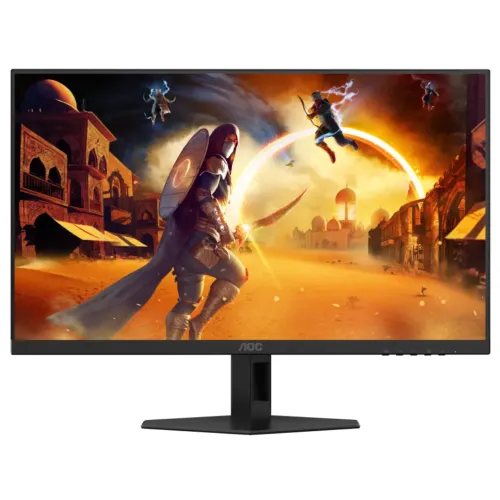
The AOC 24G4XE is a 23.8-inch Full HD Fast IPS gaming monitor with a maximum 180Hz refresh rate, 1ms GtG and 0.5ms MPRT figures. AOC lists Adaptive-Sync, G-SYNC Compatible support, HDR10 input, two HDMI ports, DisplayPort and an earphone output. This product guide separates manufacturer specifications from local seller observations and explains setup limits.
Who this monitor suits
The 24G4XE is aimed at users who want a compact Full HD gaming screen with refresh up to 180Hz. It can suit competitive titles, everyday web and office use, and general video viewing when the computer supports the selected mode. The screen size keeps the footprint modest while maintaining familiar 1080p compatibility.
The most relevant choice is between this model’s Full HD resolution and high refresh, versus a higher-resolution display with more desktop detail. A graphics card can often render Full HD more easily than QHD, but actual frame rates depend on the game, CPU, GPU and settings.
Screen size, panel and detail
AOC specifies a 23.8-inch (60.5 cm diagonal) Fast IPS panel with a 1920 × 1080 matrix. The flat 16:9 screen offers 92.3 pixels per inch and a 0.2745 mm pixel pitch. At a typical desk distance, interface scaling is usually straightforward; users who prioritize small text or large creative workspaces may prefer higher pixel density.
Fast IPS is intended to combine quick pixel transitions with broad viewing angles. AOC rates the viewing angle at 178 degrees horizontally and vertically under its CR10 criterion. This does not guarantee identical brightness or color at every angle, nor does it replace testing the actual panel for uniformity.
Refresh rate and connection setup
AOC lists a maximum 180Hz refresh rate and a vertical scan range from 48 to 180Hz. A high refresh rate can make motion appear smoother when the computer produces frames quickly enough. The monitor does not increase game frame rate by itself; graphics performance, game engine, resolution, quality settings and driver all contribute.
Connect using a suitable HDMI or DisplayPort cable and select 180Hz in the operating system or graphics control panel. If 180Hz is unavailable, check the source output, cable, driver and selected resolution before changing other settings. AOC’s leaflet identifies HDMI and DP connectivity, a maximum 1920 × 1080 at 180Hz mode and detachable signal cables.
Response time, overdrive and motion
The manufacturer lists 1ms GtG and 0.5ms MPRT. GtG measures a pixel transition, while MPRT describes moving-picture response using another method. They are not equivalent and should not be combined into a promise of blur-free motion. Real response depends on the panel, refresh rate, overdrive level and scene.
Overdrive may make transitions faster, but an aggressive setting can create bright or dark inverse trails. MPRT blur reduction can also affect brightness or work differently with variable refresh. Adjust the on-screen controls to the setting that looks cleanest in the games you play; use the supplied manual for the exact menu combinations.
Color and HDR behavior
AOC specifies 16.7 million colors, 130.4% sRGB and 93.4% DCI-P3 under the CIE 1976 method. Wide-gamut coverage can make compatible content more vivid, but gamut percentages are not the same as a measured calibration result for a specific unit. Color appearance depends on picture mode, source settings, application color management and ambient light.
AOC lists HDR10 input support and 300 cd/m² brightness. HDR10 compatibility means the monitor can accept the signal; it does not establish VESA DisplayHDR certification or a peak brightness category. For color-critical editing, verify calibration with suitable tools and check how HDR and picture presets affect available controls.
Contrast, brightness and room setup
AOC rates static contrast at 1000:1 and dynamic contrast at 80M:1. Static contrast is the more useful figure for comparing ordinary display behavior; dynamic contrast may use changing backlight or image processing. Neither value guarantees black uniformity or contrast for every unit.
The listed 300 cd/m² brightness is intended for ordinary indoor environments. Adjust brightness to reduce glare and eye fatigue, and avoid placing a bright window directly behind the user or reflected in the screen. An anti-glare coating diffuses reflections but cannot cancel strong direct light.
Adaptive sync and compatible GPUs
AOC lists Adaptive-Sync and NVIDIA G-SYNC Compatible. Variable refresh can coordinate the panel update with compatible GPU frame delivery and reduce tearing across supported modes. The effective range and behavior depend on the graphics card, driver, connection, selected refresh and game.
Enable the feature in the monitor and graphics settings, then confirm stable operation with the games you use. If flicker, blanking or frame pacing problems appear, test a lower refresh mode and review the cable and driver. The product page does not provide enough evidence to promise identical performance on every computer.
Ports, speakers and device connections
The official leaflet lists two HDMI inputs, one DisplayPort input and an earphone output. These connections support multiple source devices, but the monitor does not list a USB hub. Check the supplied manual for exact input timing and use the appropriate port when troubleshooting a mode that is missing.
AOC’s product page highlights speakers, while PC House specifies 2 × 2W built-in audio. Audio output is suitable for basic system sound; users who need stronger or more detailed sound may prefer external speakers or headphones. Verify that the seller’s regional SKU includes and enables the listed speaker function.
Eye comfort and gaming controls
AOC lists Flicker-Free and Low Blue Light functions, along with low-input-lag gaming features and G-Menu support. These controls can change the image appearance. Blue-light reduction often warms the color temperature, so choose the mode that fits the task and comfort preference.
Eye comfort also depends on brightness, reflections, viewing distance and taking breaks. The monitor’s comfort features do not guarantee that a user will avoid fatigue. For color work, disable color-altering modes while calibrating and then choose a comfortable profile for general use.
Stand, tilt and desk placement
AOC specifies a tilt range of -5 degrees with tolerance to +23 degrees with tolerance. The official technical listing does not confirm a height-adjustable XE stand, so do not assume features of another 24G4 model carry over. PC House lists a 100 × 100 mm VESA mount; verify the rear mounting pattern and screws before buying an arm.
AOC lists dimensions with base of 540 × 434.5 × 177.4 mm and without base of 540 × 325 × 50.6 mm. Net weight is 3.48 kg with the base and 2.7 kg without it; packaged gross weight is 5.63 kg. Leave space for the base and cables, and place the display on a stable desk.
Power, cables and ownership
AOC lists an internal 100–240V, 50/60Hz power supply, 21W typical consumption, maximum up to 37W and standby up to 0.3W. Its box information lists one HDMI cable, one DisplayPort cable and a power cable. Package contents can vary by country or seller, so check the delivered box.
AOC’s regional listing gives a three-year warranty period and the official product information includes EAN 4038986142045. Bangladesh sellers can apply their own local warranty process and exclusions. Keep the invoice, confirm serial eligibility and check panel/dead-pixel terms before purchase.
Bangladesh price and availability
PC House displayed ৳20,000 and In Stock at review time. This is a seller page observation that may change before checkout. It is not a BiponiBD offer or proof that the same price, stock, warranty, or delivery terms are available through BiponiBD.
Before ordering, verify the exact 24G4XE model, local warranty provider, included cables, return window, delivery charge and payment terms. Do not confuse it with 24G4, 24G4E or 27G4XE; those model names can have different panel size, stand or features.
Setup and troubleshooting
For the best refresh mode, connect the monitor directly to a compatible graphics output, select 1920 × 1080 and choose 180Hz in display settings. If 180Hz is missing, check the cable, port, GPU output, driver and monitor input selection. Try a known supported cable and remove adapters or docks when diagnosing a limited signal.
A picture that flickers or moves can be caused by electrical interference, a cable fault or a refresh mode that the source cannot sustain. AOC’s manual recommends checking the video cable and using a suitable maximum refresh for the selected resolution. Lower the rate to recover a stable picture and consult AOC support if artifacts persist.
Who may prefer another display
A different monitor may suit users who need QHD or 4K text detail, a height-adjustable stand, USB connectivity, much brighter HDR performance or a larger screen. The 24G4XE focuses on 1080p and high refresh rather than those functions. Decide based on your applications, desk layout and GPU output before comparing prices.
For competitive gaming, the refresh advantage is most useful when the PC can supply a high frame rate. For strategy games, productivity or high-detail content, resolution and workspace can matter more. No hands-on performance measurement or guaranteed calibration result is claimed for this catalog listing.
Features
- 23.8-inch Fast IPS display with Full HD 1920 × 1080 resolution and 16:9 aspect ratio.
- Up to 180Hz refresh with a 48–180Hz vertical scan range.
- 1ms GtG and 0.5ms MPRT manufacturer figures; these use different measurement methods.
- 300 cd/m² brightness, 1000:1 static contrast and 80M:1 dynamic contrast on AOC specification.
- 130.4% sRGB and 93.4% DCI-P3 coverage figures in AOC CIE 1976 specification.
- Adaptive-Sync and NVIDIA G-SYNC Compatible support; HDR10 signal support.
- Two HDMI 2.0 inputs, one DisplayPort input and an earphone output.
- Flicker-Free and Low Blue Light features.
- Two 2W speakers are listed by the Bangladesh seller; confirm included functionality on the delivered regional unit.
- Tilt adjustment, anti-glare 3H screen, 100 × 100 mm VESA listing and bundled HDMI/DP cables per sources.
- AOC G-Menu support and low-input-lag gaming features.
- Internal universal-range power supply with 21W typical consumption and 0.3W standby (AOC leaflet).
Pros
- 180Hz Full HD refresh can deliver fluid motion when the source system sustains high frame rates.
- Fast IPS panel, wide viewing angles and high refresh combine gaming responsiveness with general desktop usability.
- Adaptive-Sync and G-SYNC Compatible support can reduce tearing with compatible graphics hardware.
- Two HDMI inputs, DisplayPort, audio output and seller-listed built-in speakers provide practical connectivity.
- Compact 23.8-inch footprint suits desks where a larger display would take too much space.
Cons
- Full HD has less workspace detail than QHD at a similar screen size; choose based on resolution preference and GPU capacity.
- The included stand is tilt-focused; height adjustment is not verified for this XE variant.
- The 1ms GtG and 0.5ms MPRT figures are method- and setting-dependent, not universal measured response guarantees.
- Bangladesh warranty provider, panel replacement terms and serial eligibility need seller confirmation.
- PC House stock and price are a seller snapshot and do not establish a BiponiBD offer.
Specifications
- Brand: AOC
- Model: 24G4XE
- DisplaySize: 23.8 inches (60.5 cm diagonal)
- PanelType: Fast IPS, WLED backlight
- Resolution: Full HD 1920 × 1080
- AspectRatio: 16:9
- RefreshRate: Up to 180Hz; vertical scan range 48–180Hz
- ResponseTime: 1ms GtG; 0.5ms MPRT (separate methods)
- Brightness: 300 cd/m²
- ContrastRatio: 1000:1 static; 80M:1 dynamic
- ViewingAngle: 178° horizontal / 178° vertical (CR10)
- ColorDepth: 16.7 million colors
- ColorGamut: 130.4% sRGB CIE 1976; 93.4% DCI-P3 CIE 1976
- HDR: HDR10 signal support
- AdaptiveSync: Adaptive-Sync; NVIDIA G-SYNC Compatible
- Inputs: 2 × HDMI 2.0; 1 × DisplayPort 1.4; earphone out
- Speakers: 2 × 2W built-in speakers (seller listing; official page labels speakers feature)
- EyeCare: Flicker-Free; Low Blue Light
- Surface: Flat, 3H hardness, anti-glare
- Ergonomics: Tilt -5° (+3/-0) to +23° (-3/+0); height adjustment not confirmed for XE
- VesaMount: 100 × 100 mm (Bangladesh seller listing; confirm before mounting)
- Power: Internal 100–240V, 50/60Hz; 21W typical, ≤37W maximum, ≤0.3W standby
- DimensionsWithBase: 540 × 434.5 × 177.4 mm (W×H×D)
- DimensionsWithoutBase: 540 × 325 × 50.6 mm (W×H×D)
- Weight: 3.48 kg net; 2.7 kg without stand; 5.63 kg packaged
- Warranty: AOC regional data lists 3 years; Bangladesh seller warranty terms and local serial eligibility require confirmation
- EAN: 4038986142045
Frequently asked questions
What resolution does the AOC 24G4XE use?
It uses a 23.8-inch Full HD panel at 1920 × 1080 pixels and a 16:9 aspect ratio, according to AOC.
What is the maximum refresh rate?
AOC lists a maximum 180Hz refresh and vertical scan range of 48–180Hz. Use a compatible video output, cable and graphics mode, then select 180Hz in the operating system.
What are the response-time figures?
AOC lists 1ms GtG and 0.5ms MPRT. These are separate measurement methods and should not be treated as identical measurements or guaranteed results for every setting.
Does it support Adaptive-Sync or G-SYNC?
AOC lists Adaptive-Sync and NVIDIA G-SYNC Compatible. Actual variable-refresh operation depends on the GPU, driver, cable, input and supported range.
Does the 24G4XE support HDR?
AOC lists HDR10 support. HDR input support alone does not imply a VESA DisplayHDR certification or a particular peak-brightness tier.
How bright is the display?
AOC specifies 300 cd/m² brightness. Room lighting, selected picture mode and settings affect perceived brightness.
What ports are included?
The official leaflet lists two HDMI inputs, one DisplayPort and an earphone output. Confirm the precise port versions and supported timings in the supplied regional manual.
Are speakers built in?
The AOC page labels speakers as a feature and PC House lists 2 × 2W speakers. Verify audio operation on the exact unit and note that external headphones can use the audio output.
Can I mount it on a monitor arm?
PC House lists a 100 × 100 mm VESA pattern. Confirm the pattern and screw requirements on the rear of the exact unit before selecting an arm.
Does the included stand adjust for height?
AOC’s technical listing gives tilt adjustment. Height adjustment was not confirmed for the XE stand in the sources reviewed; check the exact stand or use a suitable VESA arm.
What warranty applies in Bangladesh?
AOC’s regional data lists three years, and PC House advertises a three-year warranty. Ask the seller to confirm the local provider, serial eligibility, dead-pixel policy and service terms before purchase.
What is the current Bangladesh price and stock?
PC House displayed ৳20,000 and In Stock when checked. This is a seller listing snapshot, not a BiponiBD price or stock guarantee; confirm at checkout.
Source note: AOC product page, leaflet and manual provide official specifications. PC House provides price, stock and seller warranty observations only. No BiponiBD offer or hands-on test is claimed.