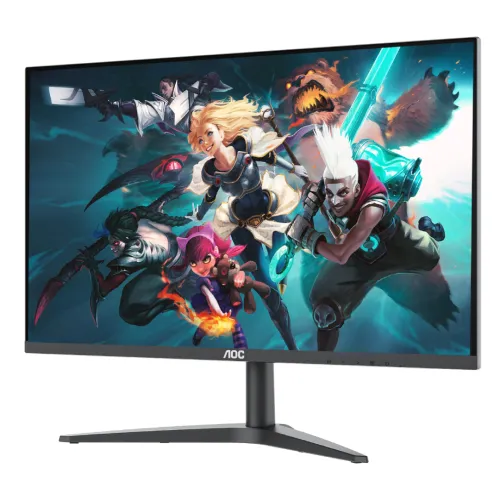
AOC 27B1H2 27-inch Full HD IPS monitor
The AOC 27B1H2 is a 27-inch Full HD IPS monitor with a 100Hz maximum refresh rate over HDMI, AdaptiveSync and a slim three-sided frameless design. AOC lists 1920 × 1080 resolution, 250 cd/m² typical brightness, 1300:1 typical contrast, 178-degree viewing angles and a 1ms MPRT mode. Inputs include one HDMI 1.4 and one VGA, with a headphone output for sound. The stand tilts and the monitor supports 75 × 75mm VESA mounting. AOC lists no built-in speakers.
AOC notes that the 1ms MPRT version entered production from February 2023, so used, old-stock or mixed-batch listings may refer to an earlier specification. Confirm the label, production date and exact unit with the seller. This description follows AOC’s official product specification and user manual. Bangladesh prices, stock and warranty are independent retailer observations and can change.
27-inch IPS panel and Full HD resolution
The monitor uses a 27-inch IPS panel with a native resolution of 1920 × 1080 in a 16:9 aspect ratio. AOC lists a 0.3114mm horizontal and vertical pixel pitch and an effective viewing area of 597.89 × 336.31mm. The IPS panel supports 178-degree horizontal and vertical viewing angles. The anti-glare finish helps reduce reflections in typical indoor lighting but cannot eliminate direct light or all glare.
AOC specifies 250 cd/m² typical brightness and a 1300:1 typical contrast ratio. The product page also lists a dynamic contrast figure; that value is not comparable to static contrast measured under the same conditions. AOC gives colour gamut as NTSC 83% under CIE1976 and sRGB 103% under CIE1931, while colour accuracy is not rated. These coverage figures do not prove calibration, uniformity or professional colour accuracy.
Full HD at 27 inches has larger pixels than Full HD at 24 inches. This can make interface elements easier to see at a distance, while small text and detailed images are less sharp than on a 27-inch QHD screen. If you use dense spreadsheets, detailed design tools or fine text all day, compare QHD alternatives before choosing.
100Hz refresh and input-specific limits
AOC specifies 1920 × 1080 at up to 100Hz over HDMI. VGA supports Full HD up to 60Hz. To use 100Hz, connect through HDMI, confirm the computer’s graphics output and cable support the mode, then select the rate in the operating system’s display settings. The actual signal depends on the source device, cable and active input.
A 100Hz refresh can make cursor movement, scrolling and supported games look smoother than a 60Hz screen when the computer renders enough frames. The monitor does not increase the graphics card’s frame rate. If 100Hz is unavailable, check the HDMI port, cable, graphics driver and selected resolution. With VGA, 60Hz at native resolution is the specified maximum.
1ms MPRT and AdaptiveSync
AOC lists 1ms MPRT. MPRT is not the same measurement as grey-to-grey pixel response, so it should not be described as a 1ms GtG guarantee. Perceived motion depends on the refresh mode, frame rate, pixel transition, overdrive behaviour and content. AOC says the 1ms MPRT version began production from February 2023; confirm the product label and manufacturing date if this feature matters.
The monitor supports AdaptiveSync according to AOC. Variable refresh can help coordinate compatible graphics output with the monitor and reduce tearing within a supported range. Operation depends on the graphics card, driver, input and display settings. AOC’s official materials reviewed here do not establish G-Sync certification, so buyers should verify compatibility with their exact GPU rather than assume certification.
Eye-care and on-screen features
AOC lists Low Blue Mode and Flicker Free to provide display settings for different tasks and viewing preferences. These functions cannot guarantee that extended use will prevent eye fatigue. Adjust brightness for the room, use readable text size and a comfortable viewing distance, and take breaks during long sessions.
The product family also includes AOC i-Menu software for adjusting on-screen settings from a compatible computer. Availability depends on the operating system and software version. Download the current software and manual from AOC’s official support sources for the exact monitor. On-screen gaming features and image modes should be tested with the applications you use.
HDMI, VGA and headphone audio
The 27B1H2 has one HDMI 1.4 input, one VGA input and one headphone output. HDMI supports Full HD at up to 100Hz, while VGA supports Full HD up to 60Hz. The headphone jack provides sound only; it is not a microphone input. AOC lists no USB hub.
The monitor has no built-in speakers. Connect headphones or external speakers to the headphone output if audio is routed from the active source, or connect them directly to the computer. A video connection alone does not create audible sound from a display without speakers. Confirm the source’s audio settings and output routing if using the monitor jack.
Tilt stand and VESA mounting
The supplied stand tilts from -5° to +23°. Height adjustment, swivel and pivot are not listed. AOC specifies a 75 × 75mm VESA mount for attaching a compatible arm or bracket. Check screw length, arm weight rating and clearance around ports before installing. Use the manufacturer instructions and support the screen during mounting.
Approximate dimensions are 611.3 × 460.2 × 199.8mm with the stand and 611.3 × 360.4 × 35.7mm without the stand, measured width × height × depth. AOC lists approximate weight at 5.25kg with stand and 3.28kg without. Verify desk depth, cable routing and the space behind the monitor before setup.
Power and package contents
The monitor uses a 19V DC, 1.31A adapter. AOC lists typical power consumption around 19W and a local data table reports up to 23W maximum; actual use depends on brightness and operating mode. Use the adapter supplied for this unit and verify the label before replacing it.
AOC product materials list an HDMI cable in the box for the cited configuration. Regional packages can vary, so confirm whether the adapter, stand, power cable and HDMI cable are included in the Bangladesh shipment. Keep the serial number, carton and purchase receipt for service or warranty claims.
Who should consider the AOC 27B1H2?
This monitor may suit users seeking a large Full HD IPS screen with 100Hz over HDMI, AdaptiveSync, VESA support and a headphone output. It can support office tasks, study, browsing, video and casual gaming. The slim three-sided design can work well in a dual-screen setup, and Low Blue Mode and Flicker Free add useful viewing settings.
Consider a higher-resolution display if you need sharper text at 27 inches. Choose another model if you require built-in speakers, DisplayPort, USB, height adjustment, swivel or pivot. Competitive gamers should compare higher refresh rates and independent response tests. For colour-critical work, verify calibration data rather than relying on gamut coverage.
Bangladesh price, stock and warranty
Bangladesh seller pages checked for this review showed prices around ৳18,500–৳19,800. Availability and seller promotions can change. These are retailer observations, not a BiponiBD offer. Confirm current stock, the 1ms MPRT version, final price, delivery charges and return policy before paying.
Some local retailers advertise a three-year warranty, but the service provider, serial eligibility and claim terms depend on the seller or distributor. Ask who handles service, whether the serial is covered in Bangladesh, what the dead-pixel policy includes and whether the original box is required. Retain the invoice and warranty card.
Frequently asked questions
Version note: AOC says the 1ms MPRT model version entered production from February 2023. HDMI supports FHD 100Hz; VGA supports FHD 60Hz. Verify actual unit date, local warranty and stock.