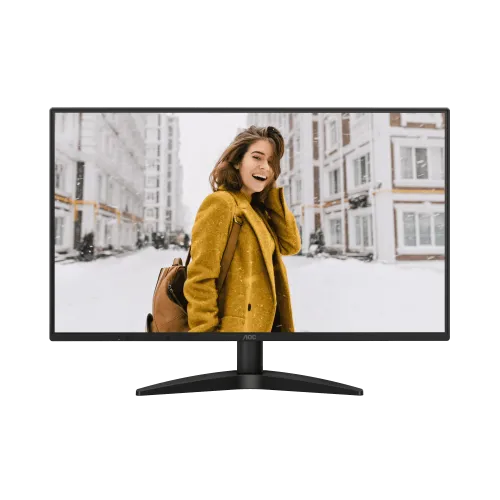
AOC 27B36H 27-inch Full HD IPS monitor
The AOC 27B36H is a 27-inch IPS Full HD display with HDMI refresh up to 120Hz maximum overclock, VGA up to 75Hz, Adaptive Sync, LowBlue Mode and Flicker-Free technology. AOC’s leaflet lists 250 cd/m² brightness, 1500:1 contrast, 4ms GtG / 1ms MPRT, one HDMI 1.4 and one VGA input, no speakers and 100 × 100mm VESA mounting. Local product availability and warranty require seller confirmation.
27-inch Full HD IPS overview
The AOC 27B36H is a 27-inch IPS monitor designed for general desktop work, media and casual gaming. AOC documentation specifies a 1920 × 1080 resolution and 16:9 aspect ratio. The panel gives a larger physical image than a 24-inch class screen, but retains Full HD pixel count. Buyers who sit close or work with fine text should compare pixel density with a QHD alternative before deciding.
AOC lists IPS viewing angles of 178 degrees horizontally and vertically. This describes the specified viewing cone and does not promise identical brightness or colour at every angle. The flat anti-glare display suits ordinary desk placement. Leave space around the display for the stand and cables, and check the included manual because regional box contents can differ.
120Hz maximum and refresh modes
The AOC leaflet describes an optimum HDMI mode of 1920 × 1080 at 100Hz and a VGA mode of 75Hz. The model manual gives a maximum of 120Hz over HDMI and 75Hz over VGA. Bangladesh listings describe 120Hz as an HDMI overclock mode. These sources distinguish a normal recommended mode from the maximum supported timing; select the higher mode only when the actual unit and source remain stable.
Refresh rate is the number of display updates per second. A higher setting can make scrolling and supported game motion appear smoother, but the source must produce the frames. A 120Hz monitor does not force every game to render at 120 frames per second. Check the operating system’s advanced display settings after connecting and review the manual’s supported timing table before changing refresh.
Response time: GtG and MPRT
AOC publishes 4ms GtG and 1ms MPRT. Grey-to-grey measures a pixel transition between shades; motion-picture response time describes how long a moving image persists on screen. They are not equivalent measures and neither number means every transition will take exactly that time under all settings. Actual motion also depends on refresh, frame pacing, overdrive and the game’s own frame rate.
The monitor includes Adaptive Sync and Flicker-Free technology. Tune available picture settings with the content you use and avoid assuming a single response number eliminates blur. If a mode introduces flicker or unwanted trails, return to a more comfortable setting. For competitive gaming, compare independent motion tests for the exact model and use the games you play as the final reference.
Brightness, contrast and colour
AOC’s leaflet lists 250 cd/m² typical brightness and 1500:1 typical contrast. It also lists 16.7 million colours, 104% sRGB area and 91% NTSC, with colour-space references. Gamut area figures do not establish factory calibration, uniformity or accurate colour reproduction. For colour-critical creative work, request calibration evidence or use measurement tools; do not infer accuracy from gamut coverage alone.
Set brightness for the room and reduce reflections by avoiding direct light on the screen. An anti-glare finish can help but cannot eliminate glare. LowBlue Mode can change the image tone, so check colour appearance after enabling it and use a neutral mode for colour-sensitive tasks. Breaks, viewing distance and room lighting also affect comfort.
Adaptive Sync, LowBlue Mode and Flicker-Free
AOC lists Adaptive Sync, LowBlue Mode and Flicker-Free technology. Adaptive Sync coordinates compatible display timing with a graphics source to reduce tearing within supported conditions. The source, driver and display settings must all support the feature. If it is unavailable, verify the graphics driver, connection and monitor menu before assuming the feature is broken.
LowBlue Mode adjusts the display for reduced blue-light output, while AOC describes its Flicker-Free system as DC backlight control. These features do not guarantee that long sessions will prevent fatigue. Use a comfortable brightness, readable scaling, an appropriate viewing distance and breaks. If LowBlue changes colour appearance too much, select another preset when colour matters.
HDMI, VGA and audio
The AOC leaflet lists one HDMI 1.4 input and one VGA input; there is no USB hub. HDMI can carry digital video and audio from a compatible source, while VGA is an analogue video connection and requires a separate audio path. The manual lists HDMI/D-Sub connector types. No DisplayPort is listed for this model, so check connector needs before purchase.
AOC’s model leaflet says there are no built-in speakers and no line-in/earphone connector. Use speakers or headphones connected to the PC, laptop or console. If sound is absent over HDMI, choose the right audio output on the source device. Do not rely on seller data copied from another AOC model that advertises speakers or an audio jack.
Stand, VESA and physical setup
The stand tilts from -5° to +23° and does not list height adjustment. A 100 × 100mm VESA pattern is specified. The leaflet gives approximately 616.6 × 445.5 × 205.6mm with stand, and 616.6 × 356.7 × 37.4mm without. Listed weight is 3.4kg with stand and 3.1kg without; verify the packaging label for the regional product.
Before mounting, use the supplied manual to confirm screw type and length, and ensure the arm supports the monitor weight. Position the screen so the top edge is near eye level; a riser or VESA arm may be needed because the included stand tilts only. Route cables so they do not pull on the connectors when the screen is adjusted.
PC, laptop and console compatibility
For a PC, connect HDMI directly to the graphics output, select 1920 × 1080 and choose a supported refresh rate. Try the documented HDMI maximum only if the manual and source support it; if the signal becomes unstable, return to a lower mode. VGA supports up to 75Hz according to the product documentation, so use HDMI for the higher refresh setting.
Laptops and consoles have their own output limitations. A dock, adapter, cable or graphics port can reduce the maximum refresh rate. Check the source device’s supported modes before expecting 100Hz or 120Hz. The two different connectors let users connect one digital and one analogue source, but only one is active at a time through the monitor input selection.
Bangladesh price, stock and warranty
A reviewed TechLand listing showed a ৳21,500 promotional price and ৳25,500 regular price, while also marking the product out of stock. These are time-bound retailer observations, not a live BiponiBD offer. Verify current price, stock location, delivery fee, exact model code and included accessories with the seller before ordering.
Local listings advertise three-year warranty, but a warranty label does not confirm eligibility for a particular serial, importer or service provider. Ask for written coverage, dead-pixel thresholds, replacement terms and claim location. Keep the invoice and serial details. Check the delivered carton says AOC 27B36H, not a similar B36 series model with different resolution, connectors or speaker configuration.
Setup, cleaning and troubleshooting
Assemble the stand following the manual and inspect the screen before the seller’s return period ends. Retain the carton and invoice. Turn the display off before cleaning and use a soft cloth as directed; do not spray liquid directly on the panel or press hard. Keep ventilation clear and avoid placing the monitor in direct sunlight or near heat sources.
If 120Hz is missing, verify the model, HDMI connection, source output, display resolution, operating-system settings and driver. If an overclock timing causes flicker or no signal, revert to 100Hz or a supported lower mode. If there is no sound, connect audio equipment to the source because the monitor has no speakers or earphone connector. Report panel issues promptly and follow the seller’s written return policy.
Who should consider the AOC 27B36H
Consider this model if a 27-inch IPS Full HD screen, HDMI overclock refresh and Adaptive Sync fit your budget and desk. Its VGA input supports legacy equipment, while HDMI can connect a current PC or console. VESA mounting is useful if the tilt-only stand does not place the screen at a comfortable height. Check the actual viewing distance because Full HD density is lower than QHD on a 27-inch panel.
Choose another model if you need sharper text, built-in speakers, DisplayPort, a USB hub or a height-adjustable stand. Compare resolution, refresh modes, warranty and local service alongside price. AOC’s model documentation is more reliable for physical features than seller descriptions that may reuse generic gaming copy. Confirm current inventory before making a trip or placing an order.
Frequently asked questions
What is the panel size and resolution?
AOC specifies a 27-inch IPS panel at 1920 × 1080 Full HD, 16:9, with a 0.3114mm pixel pitch.
Does the 27B36H support 120Hz?
AOC documentation lists a maximum 1920 × 1080 at 120Hz over HDMI. The product leaflet lists 100Hz HDMI as an optimum mode and 75Hz over VGA; the 120Hz figure is an overclocked maximum.
What is the response time?
AOC lists 4ms GtG and 1ms MPRT. GtG and MPRT are different methods and do not guarantee every transition has that response time.
Which inputs are available?
The AOC leaflet lists one HDMI 1.4 and one VGA input. It does not list DisplayPort or a USB hub.
Are speakers included?
No. AOC product leaflet lists no speakers and no line-in/earphone connector. Connect headphones or speakers to the source device.
Does it support Adaptive Sync?
Yes, AOC lists Adaptive Sync. Operation depends on the graphics source and supported display mode.
What colour gamut is specified?
AOC lists 104% sRGB area and 91% NTSC under CIE1931/CIE1976 references. Gamut area is not the same as colour accuracy or calibration.
Can it be VESA mounted?
Yes. AOC lists 100 × 100mm wall mounting. Follow the manual for screw fit and mounting safety.
Does the stand adjust in height?
The stand tilts from -5° to +23°. Height adjustment is not listed.
What is the local price and warranty?
The reviewed TechLand page showed ৳21,500 promotional / ৳25,500 regular but marked the product out of stock. Confirm live price, availability, importer and serial warranty with the seller; this is not a BiponiBD offer.