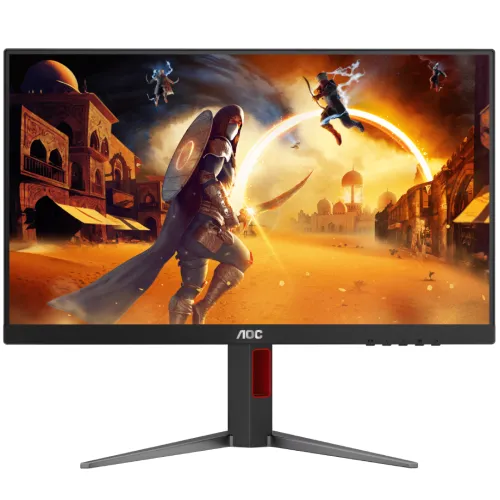
The AOC 27G4 is a 27-inch flat Fast IPS gaming monitor with a 1920 × 1080 native resolution and 180Hz maximum refresh rate. AOC lists 1ms GtG, 0.5ms MPRT, Adaptive-Sync, G-SYNC Compatible, HDR10 support, HDMI 2.0 and DisplayPort 1.4. Its stand is height-adjustable and supports swivel, pivot and tilt. The monitor is designed for high-refresh Full HD gaming and general computer use. The 27-inch screen offers a broad image, while Full HD has lower pixel density than QHD at the same size. A graphics card must deliver an appropriate frame rate to take advantage of 180Hz. This page identifies the exact 27G4 model and keeps its specifications separate from AOC Q27G4 and other G4 displays.
Fast IPS panel and Full HD detail
The panel is a 27-inch flat IPS display with a 16:9 aspect ratio, 1920 × 1080 pixels and 0.31125mm pixel pitch. IPS technology provides wide typical viewing angles, and the antiglare treatment can help reduce reflections from room lighting. AOC lists 300 cd/m² typical brightness, 1000:1 static contrast and 16.7 million colors.
Full HD is comparatively easy for many graphics cards to render at high frame rates. On a 27-inch screen, it provides less fine detail per inch than a 1440p monitor. Users working with small text, detailed images or numerous windows may prefer a higher-resolution model. For games, use the native resolution for the clearest output and choose image settings that balance visual quality with frame rate.
180Hz refresh and output setup
AOC lists 180Hz maximum refresh and specifies an optimum resolution of 1920 × 1080 at 180Hz using DisplayPort or HDMI in its leaflet. Refresh rate describes display updates each second; it does not guarantee that a computer renders 180 frames each second. GPU performance, game, scene, settings, cable, port and driver all matter.
Connect a suitable HDMI 2.0 or DisplayPort 1.4 source, select the monitor input and set 1920 × 1080 with the highest available refresh mode. If 180Hz is missing, inspect the cable and GPU output, update the graphics driver and check operating-system advanced display settings. Verify the selected mode in both the OS and the monitor information screen. Frame pacing and stable game output affect perceived smoothness as much as the maximum refresh label.
Response time, MPRT and motion
AOC states 1ms GtG and 0.5ms MPRT. Gray-to-gray response describes pixel transition behavior; MPRT is a separate moving-picture response metric. They are not interchangeable and neither is a measure of complete system input latency. Perceived clarity also depends on refresh rate, frame delivery, overdrive or strobing settings, scene contrast and viewing conditions.
Choose response and motion settings based on visible performance rather than the smallest number on the specification sheet. Aggressive overdrive can introduce overshoot. MPRT features can have limitations depending on brightness, refresh and sync configuration. Test representative games, adjust the OSD and use a setting that avoids distracting artifacts. No instrument measurement or independent motion test is claimed for this product listing.
Adaptive-Sync and G-SYNC Compatible
AOC lists G-SYNC Compatible and Adaptive-Sync, with a regional leaflet stating a 48–180Hz vertical signal range. Variable refresh can coordinate monitor updates with supported GPU frame output, which may reduce tearing and judder within a compatible range. It requires compatible hardware, drivers, selected display mode and software settings.
Enable Adaptive-Sync in the monitor OSD and the graphics control panel, then verify behavior in a supported game. The feature does not guarantee tear-free output in every game or outside its operating range. AOC’s G-SYNC Compatible label should not be confused with a dedicated G-SYNC hardware module. GPU compatibility and driver behavior can differ, so use the exact PC/GPU setup to confirm.
Color gamut and color accuracy
AOC’s regional materials list color-space area values such as sRGB 128.3%, DCI-P3 95.5% and Adobe RGB 90.8% using CIE1976; other AOC leaflets round these values. A gamut-area percentage is not the same as measured coverage or factory calibration. AOC also lists a color and brightness uniformity report in the box for a regional configuration.
If the supplied report is present, check that it corresponds to the exact unit and serial rather than assuming every region includes it. Gamut figures alone do not establish Delta E, white point, gamma or uniformity. For color-critical photo, design or print work, use a suitable measured calibration workflow and verify the target color space. The monitor’s game and color modes can change the picture, so review settings for the task.
HDR10, brightness and contrast
AOC lists HDR10 support, 300 cd/m² typical brightness and a 1000:1 static contrast ratio. HDR10 identifies a supported HDR signal format; it does not automatically mean the monitor has a VESA DisplayHDR certification, high peak luminance or local dimming. AOC’s listed gamut and contrast specifications should be considered alongside those limits.
The product materials do not list VESA DisplayHDR certification for this model. Avoid promising a high-impact HDR experience based only on the HDR10 label. If HDR is a major reason for purchase, compare certified tier, peak brightness, local dimming and contrast performance. For typical desktop use, adjust brightness to room conditions and disable or enable HDR according to the content and operating-system workflow.
Ergonomic stand, VESA and placement
The adjustable stand supports 130mm height movement, swivel around -30° to +30°, pivot around -91° to +91° and tilt. AOC regional sheets differ slightly in how the tilt range is rounded, so use the exact unit’s manual for hard limits. A 100 × 100mm VESA mount is listed, and the stand is removable.
Measure desk depth and cable slack before rotating the display. Portrait pivot requires the computer to rotate the desktop image. A monitor arm should match the VESA pattern and support the screen weight. Tighten fasteners as instructed and support the panel while attaching the arm. The height-adjustable stand can reduce the need for a separate arm for many desk setups, while VESA remains available for users who need a custom placement.
Connections, audio and gaming utilities
AOC lists one HDMI 2.0, one DisplayPort 1.4 and one audio-out, with HDCP 2.2 on the video connections. There is no integrated speaker or USB hub listed. On-screen and software features include six game modes, Low Input Lag, DialPoint crosshair, G-Menu, Low Blue Light and Flicker-Free options.
Connect speakers to a suitable audio output on the PC or another supported source; the monitor is not listed with integrated sound. AOC notes HDMI and DisplayPort connections can reach 1080p 180Hz for this model. Keep cables accessible and select the correct input from the OSD. Use game utilities as settings conveniences, not as guarantees of better results or reduced latency under every configuration.
Power, dimensions and package
AOC lists an internal power supply using 100–240V at 50/60Hz, 24W typical and 0.3W standby/off. With stand dimensions are about 613.9mm wide, 386–516mm high and 207.7mm deep; without stand the display is 613.9 × 366.3 × 51.3mm. Weight is listed as 5.41kg with stand and 3.57kg without.
The AOC regional leaflet lists HDMI and DisplayPort cables, power cable, RS232 and a color/brightness uniformity report. Accessories can vary by market, so ask the Bangladesh seller to confirm the actual sealed box contents. Keep the packaging and invoice until the screen is inspected and tested. Leave ventilation clear and use a stable surface when assembling or adjusting the display.
Bangladesh price, stock and warranty
Skyland’s direct product page showed ৳26,349 and Out of Stock during this review; a search listing showed an older in-stock snapshot. PC House listed ৳26,490/In Stock. These observations can change quickly and are not a confirmed BiponiBD offer or market-wide guaranteed price. Confirm stock and delivery immediately before ordering.
AOC regional specifications list a three-year warranty, and local sellers advertise three years. Actual service depends on the exact serial, import configuration and local provider. Confirm authorized service eligibility, warranty period, dead-pixel terms, invoice requirement, service location and claim process in writing. This product page does not claim that any retailer observation verifies a BiponiBD stock offer or hands-on tested unit.
Key features
- 27-inch flat Fast IPS panel with Full HD 1920 × 1080 resolution and 16:9 aspect ratio.
- 180Hz maximum refresh and AOC-listed 48–180Hz Adaptive-Sync range.
- 1ms GtG and 0.5ms MPRT are separately stated response metrics; neither is total input latency.
- G-SYNC Compatible and Adaptive-Sync support for compatible graphics devices and settings.
- 300 cd/m² typical brightness, 1000:1 static contrast and 16.7 million colors.
- Height-adjustable stand with 130mm travel, swivel, portrait pivot and tilt.
- One HDMI 2.0 and one DisplayPort 1.4, each with HDCP 2.2, plus audio-out.
- HDR10 input support; AOC does not list VESA DisplayHDR certification for this model.
- Game modes, Low Input Lag, DialPoint crosshair, Low Blue Light, Flicker-Free and G-Menu options.
- 100 × 100mm VESA support, removable stand and Kensington lock.
Frequently asked questions
What is the resolution and panel type?
AOC specifies a 27-inch flat Fast IPS panel with 1920 × 1080 Full HD resolution and 16:9 aspect ratio.
Does the AOC 27G4 support 180Hz?
Yes. AOC lists up to 180Hz. Its regional leaflet lists 1920 × 1080 at 180Hz over DisplayPort and HDMI. The computer, connection, cable, driver and selected mode must support that output.
What is the difference between 1ms GtG and 0.5ms MPRT?
GtG measures pixel transitions between gray levels; MPRT describes moving-picture response under a different method. They are not interchangeable and neither represents total PC-to-screen input latency.
Is G-SYNC supported?
AOC lists G-SYNC Compatible and Adaptive-Sync. Use a compatible NVIDIA GPU/driver and supported connection/settings; behavior can depend on the exact configuration.
Does it support FreeSync or Adaptive-Sync?
AOC lists Adaptive-Sync and a 48–180Hz vertical VRR range in its leaflet. Compatible GPU, driver, source and settings are required.
Is this monitor HDR certified?
AOC lists HDR10 support. The consulted AOC materials do not show VESA DisplayHDR certification, so HDR10 signal support should not be described as certified HDR performance.
What ports are included?
AOC lists one HDMI 2.0, one DisplayPort 1.4 and one audio-out, with HDCP 2.2 stated for the digital inputs. There is no USB hub listed.
Does it have built-in speakers?
No integrated speakers are listed for AOC 27G4. Use external speakers or another audio device through the computer or supported audio connection.
How adjustable is the stand?
AOC lists 130mm height adjustment, -30° to +30° swivel, approximately -91° to +91° pivot and tilt. The leaflet and regional page round the tilt values slightly differently; exact mechanical range may vary by page rounding.
What is the current price and stock in Bangladesh?
Skyland’s direct page showed ৳26,349 and Out of Stock when checked; PC House showed ৳26,490/In Stock in its listing. Prices and stock change and neither confirms a BiponiBD offer.
What warranty is available?
AOC regional pages and some local retailers list three years. Confirm local serial eligibility, service provider, invoice requirement, dead-pixel conditions and claim process for the exact unit.
What comes in the box?
AOC’s regional leaflet lists HDMI and DisplayPort cables, power cable, RS232 and a color/brightness uniformity report. Regional packages can differ; ask the seller to confirm the sealed box contents.
Source note: Technical details are based on AOC’s model page and regional product leaflets; Bangladesh price, availability and warranty are retailer snapshots checked 2026-11-08T21:13:22.859Z. Regional specifications can vary, confirm the exact SKU/serial. No hands-on or instrument measurement is claimed.