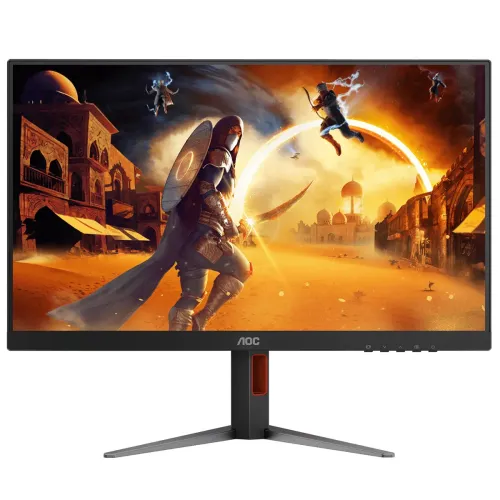
AOC 27G4H is a 27-inch Full HD gaming monitor built around a Fast IPS panel and a manufacturer-rated 200Hz refresh rate. It is designed for players who want fast image updates, responsive controls and the wide viewing angles associated with IPS. Its 1920 × 1080 native resolution keeps the rendering workload lower than QHD or 4K, which can help a compatible gaming PC reach high frame rates. The model identity matters: this page covers 27G4H, not AOC 27G4, 27G4HRE, C27G4H2 or another similarly named monitor. Confirm the full label printed on the carton and rear product sticker before ordering.
Panel, size and resolution
The display measures 27 inches diagonally and uses a flat Fast IPS panel with a 16:9 aspect ratio. Its native resolution is 1920 × 1080 pixels, also called Full HD or 1080p. AOC lists a 597.88 × 336.31 mm effective viewing area and a 0.3114 mm pixel pitch. At 27 inches, Full HD provides a large desktop and game image; text and fine interface details will look less dense than on a same-size QHD display, so viewing distance and personal preference should guide the choice. Use the native resolution for the sharpest one-to-one image.
Refresh rate and response
AOC lists 200Hz at 1920 × 1080 over both DisplayPort and HDMI. A 200Hz panel can refresh up to 200 times per second when the connected computer, cable, game and selected output mode support it. The manufacturer quotes 1ms GtG and 0.3ms MPRT; these are different response measurements and should not be treated as interchangeable guarantees for every transition or setting. The MPRT mode may use motion-blur-reduction backlight behavior and can affect brightness. Set 200Hz in the computer operating system or GPU control panel after connection; default settings may use a lower rate.
Adaptive-Sync and motion
The manufacturer identifies Adaptive-Sync as a feature. When supported by the source device and enabled with a compatible connection and settings, variable refresh can help synchronize display updates with rendered frame delivery and reduce tearing or uneven motion. Compatibility, supported frame-rate range and graphics-card branding should be checked against the exact GPU and driver; the available manufacturer page does not warrant every vendor-specific certification. A high fixed refresh rate remains useful for responsive motion, while adaptive synchronization addresses fluctuating frame delivery. Actual smoothness depends on game performance and setup.
Color and viewing angles
AOC specifies 16.7 million display colors, 178° horizontal and vertical viewing angles at its stated contrast criterion, and color-gamut figures of NTSC 100% (CIE 1976), sRGB 120% (CIE 1931) and DCI-P3 92% (CIE 1976). The product page also reports color accuracy E<2. Gamut coverage describes the range of colors the display can reproduce; it does not mean every unit is factory-calibrated for a particular workflow. For color-critical editing, verify calibration, profile and measurement conditions instead of relying only on gamut figures.
Brightness, contrast and HDR
The listed typical brightness is 300 cd/m² and the typical static contrast ratio is 1000:1; AOC also lists 80M:1 dynamic contrast. The model documentation identifies HDR10. HDR10 signal support does not by itself establish high peak brightness, local dimming or a particular HDR certification. Treat HDR playback as source-format compatibility, and keep expectations appropriate to the documented 300 cd/m² typical brightness and IPS contrast specification. Room lighting, picture mode and content affect the perceived result.
Ports and device connections
The specification lists one HDMI 2.0 input and one DisplayPort 1.4 input, plus a 3.5 mm headphone output. HDCP 2.2 is listed for both HDMI and DisplayPort. There is no USB hub and no built-in speaker. Plan on external speakers, a headset or another audio device when sound is required; the headphone jack is not a substitute for integrated speakers. Confirm which cable is included with the Bangladesh-region package because included accessories can differ by market.
Ergonomic stand and mounting
AOC lists a stand with 130 mm height adjustment, tilt from -5° to 23°, swivel from -30° to 30° and pivot from -90° to 90°. It also lists a 100 × 100 mm VESA mounting pattern. The stand can help position the screen for sitting height and portrait orientation, while an arm or wall mount requires a compatible VESA bracket and suitable fasteners. Check desk depth and clearance before choosing an arm: the assembled monitor is listed as 613.8 mm wide and 240 mm deep, with height varying from 386.6 to 516.6 mm.
Dimensions, weight and power
Manufacturer dimensions with the stand are 613.8 × 386.6–516.6 × 240.0 mm (width × height range × depth); without the stand they are 613.8 × 366.3 × 51.3 mm. Net weight is 4.76 kg with stand and 3.37 kg without it. Packaging is listed at 822 × 481 × 162 mm and 8.42 kg gross. The power supply is internal, accepts 100–240V at 50/60Hz, and typical consumption is 23W. These published values help with desk and shipping planning but do not replace checking the carton or regional label.
Gaming and everyday use
The 200Hz Full HD mode is most useful when a computer can deliver high frame rates in the games being played. Competitive titles may benefit from responsive motion, while everyday browsing, office work and video playback remain supported at lower frame rates. Adaptive-Sync can help when frame delivery varies, subject to compatible hardware and configuration. The 27-inch screen offers room for multiple windows, but Full HD pixel density may be a compromise for users who prioritize very fine text or detailed creative work. Consider desk distance and the type of content used most often.
AOC gaming features
The official feature list includes Low Input Lag mode, Dial Point selectable crosshair, six game modes, Flicker-Free technology, Low Blue Mode and G-Menu software. These are monitor settings and conveniences, not substitutes for game skill, eye-health advice or a calibrated professional display. Presets can change image appearance; users may need to adjust brightness and color to suit their room and preference. The Dial Point overlay should be used consistently with game rules and tournament policies.
What is verified and what is not
The exact-model AOC product page and 27G4H leaflet support the display, refresh, response, color, ports, stand, mounting, dimensions and power details stated here. Regional packaging, included cable, serial-specific warranty, dead-pixel eligibility, local after-sales coverage, current stock and a BiponiBD price were not confirmed by those manufacturer materials. Local retailer pages are snapshots, not a BiponiBD seller offer. Check the exact SKU and obtain written Bangladesh warranty terms before payment.
Who may prefer this monitor
This model may suit competitive PC players who prioritize a 27-inch screen, Full HD resolution and a high refresh ceiling, as well as users who want an adjustable stand and a standard VESA option. It may be less suitable for buyers who require QHD detail at 27 inches, built-in speakers, a USB hub, multiple video inputs, verified local warranty before checkout, or professional color calibration evidence. Compare the model label and connection needs before choosing; AOC product numbers can differ by panel, refresh, stand or market.
Setup checklist
Connect the display through DisplayPort 1.4 or HDMI 2.0 with a suitable cable, select 1920 × 1080, and then choose 200Hz in the graphics settings if offered. Enable Adaptive-Sync only after confirming support and compatibility on the graphics device. Adjust height, tilt, swivel or pivot for a comfortable position; avoid pressing on the LCD surface while moving the stand. Select an image preset and brightness appropriate to room lighting. Connect audio to the headphone output or use separate speakers. Verify the region, serial, accessories, screen condition and written warranty at delivery.
Buying and support notes
The product specification can change without notice, as AOC states in its leaflet. Retail price, availability, imported version, package contents and warranty can also change independently. Before ordering, ask the seller to confirm the printed model number is 27G4H, the unit supports the advertised mode through the intended port, the included cable, the display condition policy, delivery terms and the service contact. Keep the invoice and serial number. The warranty wording on this catalog page intentionally avoids claiming a verified local period until a BiponiBD offer and applicable importer terms are confirmed.
Summary
AOC 27G4H combines a 27-inch 1920 × 1080 Fast IPS screen with manufacturer-listed 200Hz, 1ms GtG / 0.3ms MPRT, Adaptive-Sync, HDR10, HDMI 2.0 and DisplayPort 1.4. Its adjustable stand, VESA 100 × 100 mount, 300 cd/m² typical brightness and 23W typical consumption are documented by AOC. It has no built-in speakers or USB hub. Use the manufacturer details as the technical reference, then confirm local stock, exact regional unit and written serial warranty with the seller before purchase.
Key features
- 27-inch flat Fast IPS panel
- Full HD 1920 × 1080 native resolution
- Manufacturer-listed 200Hz over DisplayPort and HDMI
- 1ms GtG and 0.3ms MPRT manufacturer ratings
- Adaptive-Sync support
- HDR10 signal feature
- 300 cd/m² typical brightness and 1000:1 typical static contrast
- One HDMI 2.0 and one DisplayPort 1.4 input
- 3.5 mm headphone output; no built-in speakers
- Height, tilt, swivel and pivot adjustable stand
- 100 × 100 mm VESA mounting
- Low Input Lag, Dial Point, six game modes and Flicker-Free
Advantages
- High 200Hz Full HD refresh is documented for HDMI and DisplayPort.
- Fast IPS viewing angles and manufacturer-listed 1ms GtG / 0.3ms MPRT.
- Height, tilt, swivel and pivot adjustments are included in the listed stand.
- AOC lists Adaptive-Sync, HDR10, Low Input Lag, Dial Point and Flicker-Free.
- VESA 100 × 100 mm and a headphone output expand setup options.
Limitations
- Full HD on a 27-inch panel is less pixel-dense than QHD at the same size.
- Only one HDMI and one DisplayPort input are listed.
- No built-in speakers and no USB hub.
- HDR10 support does not establish high peak brightness or local dimming.
- BiponiBD price, live offer and serial-specific Bangladesh warranty remain unverified.
Frequently asked questions
What is the native resolution of the AOC 27G4H?
AOC lists 1920 × 1080 pixels (Full HD) at a 16:9 aspect ratio.
What is the maximum refresh rate?
The manufacturer lists 200Hz at 1920 × 1080 through both DisplayPort and HDMI. The computer and selected settings must support that mode.
What response time does AOC list?
AOC specifies 1ms GtG and 0.3ms MPRT. They are different measurement methods and do not guarantee identical results in every mode.
Does it have a Fast IPS panel?
Yes. The official model page identifies a Fast IPS panel.
Does it support Adaptive-Sync?
Yes, AOC lists Adaptive-Sync. Compatibility depends on the graphics device, connection and configuration.
Does the monitor support HDR?
AOC lists HDR10. This does not by itself confirm a high peak brightness or local-dimming capability.
Which video inputs are available?
The listed inputs are one HDMI 2.0 and one DisplayPort 1.4. A 3.5 mm headphone output is also listed.
Are speakers built in?
No. The manufacturer specification says there are no built-in speakers. Use the headphone output or separate speakers.
Can the stand be adjusted?
AOC lists 130 mm height adjustment, -5° to 23° tilt, -30° to 30° swivel and -90° to 90° pivot.
Can I use a monitor arm?
The monitor lists a 100 × 100 mm VESA mounting pattern. Confirm bracket compatibility and fastener requirements.
What is the typical power consumption?
AOC lists 23W typical consumption and an internal 100–240V, 50/60Hz power supply. Actual use varies with settings.
What warranty applies in Bangladesh?
The exact BiponiBD offer and serial-specific local warranty have not been verified. Ask the seller for written duration, service provider and dead-pixel terms before purchase.
Manufacturer sources: AOC 27G4H product specification and AOC 27G4H leaflet. Local price/stock, BiponiBD offer and serial-specific Bangladesh warranty are not confirmed by these sources. Reviewed 2026-11-08T22:17:21.487Z.