Pros
- QHD Fast IPS with high refresh on supported PC connections.
- Ergonomic stand offers height, tilt, swivel and pivot.
- Two HDMI ports plus DisplayPort support multiple sources.
- White cabinet and Light FX suit themed setups.

All categories
 New condition
Monitors
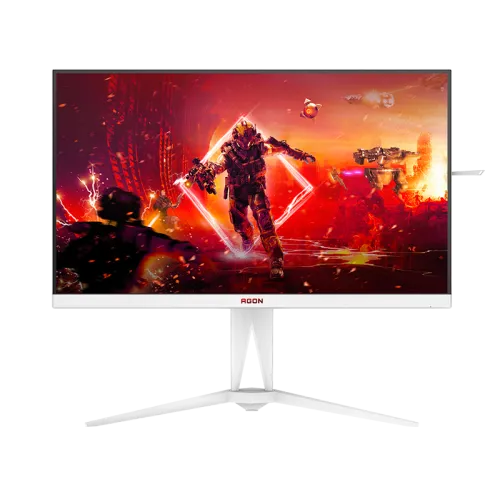
AOC · AGON AG275QXW
27-inch white QHD Fast IPS monitor; older datasheet lists 180Hz DP/144Hz HDMI, while newer AOC revision info mentions 200Hz. Verify unit serial.
Price unavailable
Price range updating
No verified price is available yet. Store offers will appear when merchants publish them.
Compare store prices
No live offers for this variant
Offers will appear when merchants publish them.
Loading history…
Product story
The AOC AGON AG275QXW is a white 27-inch QHD Fast IPS gaming monitor. AOC’s regional product page and leaflet describe 180Hz over DisplayPort and 144Hz over HDMI, with 1ms GtG and 0.5ms MPRT. A newer Chinese AOC product page reports a specification upgrade to native 200Hz from products manufactured starting 2025-05-01. The current local listing does not identify the manufacturing revision, so confirm the date/serial and OSD before treating this unit as 200Hz.
The 27-inch display uses 2560 × 1440 resolution in a 16:9 aspect ratio. QHD provides more desktop detail and workspace than Full HD, while a GPU must render more pixels to drive high frame rates. The leaflet lists a 596.736 × 335.664mm viewing area and a 0.2331mm pixel pitch. The white cabinet gives this model a distinct appearance, but the color finish does not indicate a different panel resolution or refresh mode.
AOC specifies a Fast IPS panel with 178-degree horizontal and vertical viewing angles and a 1200:1 static contrast ratio. The regional product sheet lists typical brightness of 350cd/m², 1.07 billion colors and color accuracy Delta E below 2. These are manufacturer ratings, not a calibration certificate for each retail unit. IPS viewing behavior and panel uniformity vary; creators should calibrate the screen for color-critical work.
For the revision documented by the leaflet, QHD 180Hz is supported over DisplayPort 1.4 and QHD 144Hz over HDMI 2.0. A newer AOC China page says QHD native refresh was upgraded from 180Hz to 200Hz for products introduced from 2025-05-01, alongside changes to gamut, response and weight. Since the catalog record lacks a serial/revision date, retain 180Hz as the verified standard for the listed revision and disclose the possible newer version only after seller confirmation.
AOC’s leaflet and technical documentation show HDMI 2.0 x2 and DisplayPort 1.4 x1, with the older revision’s maximum QHD timing 144Hz over HDMI and 180Hz over DisplayPort. Use DisplayPort for the higher refresh on that revision. The newer 200Hz claim may correspond to a later panel/firmware revision and should not be assumed from the same suffix alone. Connect a compatible GPU, use an appropriate cable and select the refresh mode in the operating system.
The AG275QXW leaflet lists 1ms GtG and 0.5ms MPRT. These methods describe different behavior and should not be combined into a single universal response time. MPRT modes can affect brightness or introduce artifacts; overdrive can produce halos if set too aggressively. Try different modes in actual games and choose a comfortable result. High refresh improves frame presentation only when the source sends frames at a matching rate.
AOC lists Adaptive Sync and regional pages identify FreeSync support. The product is promoted with DisplayHDR 400 and VESA Adaptive-Sync characteristics; check the exact revision documentation for its certification bundle. Variable refresh can help reduce tearing with supported GPUs and drivers. Compatibility depends on the connected source, port, cable and configuration. Enable the monitor feature and GPU option, then verify operation in a supported game.
The 180Hz leaflet describes DisplayHDR 400, while AOC’s specifications list 350cd/m² typical brightness. HDR needs compatible content, a suitable output signal and operating-system configuration. DisplayHDR 400 does not imply advanced local dimming or OLED-level contrast. The newer revision may change relevant performance values; confirm the serial’s product sheet before stating certification or peak brightness in an offer. HDR support is one part of the display capability and does not make every source video HDR.
The listed earlier leaflet reports NTSC 108%, sRGB 127% and DCI-P3 99% with Delta E below 2. The newer AOC China notice says gamut specifications changed together with the 200Hz upgrade. Gamut coverage and gamut-size percentages use different conventions and cannot be compared directly. For color work, identify the exact revision and calibrate the monitor. Avoid claiming one set of gamut values applies to every AG275QXW production batch.
The monitor provides two HDMI 2.0 inputs, one DisplayPort 1.4 and a 3.5mm headphone output. The leaflet does not list USB-C video or a USB hub. Select DisplayPort for the highest refresh on the older 180Hz revision; HDMI is useful for a console or second source but has a lower QHD refresh limit. Audio can route to headphones through the 3.5mm jack. Integrated speakers are not listed in the reviewed model specification.
The AOC product specification lists tilt from -5 to +23 degrees, height adjustment up to 150mm, swivel around 20 degrees left/right and pivot about 90 degrees each way. This allows a more flexible desk position than a tilt-only stand. Check the lock, stand parts and movement on delivery. Leave space for height and pivot adjustments and avoid rotating the screen when connected cables are tight.
The model lists 100 × 100mm VESA mounting and a white rear cabinet. Use an arm with a suitable load rating and correct screw length. The datasheet lists dimensions around 613.4mm wide and 231.8mm deep with the base, and about 5.54kg net without packaging. Confirm dimensions against the delivered revision. Support the frame while mounting and keep the screen surface free of pressure or impact.
AOC calls out its white cabinet and Light FX ambient lighting in regional marketing. Confirm lighting controls and colors on the exact unit if they matter to a setup. The decorative lighting does not replace room lighting and can be disabled or adjusted according to the OSD options. The anti-glare surface helps with reflections but cannot remove strong direct sunlight; position the monitor away from bright windows where possible.
The official product information specifies an internal power supply with 100–240V, 50/60Hz input. Typical consumption is reported around 47W on the regional product page, while revision/measurement conditions can vary. Confirm the supplied power cord, DisplayPort cable and documentation; package contents differ by region. Do not assume a USB-C cable is included, since the monitor has no USB-C input listed. Use the correct local AC connection.
A compatible PC can use QHD at 180Hz over DisplayPort on the listed revision. HDMI 2.0 supports up to 144Hz at QHD according to the leaflet. Console refresh depends on console generation and game; the monitor’s PC maximum does not guarantee a console can use that mode. Check resolution, VRR, HDR and audio output in the source menus. For a newer 200Hz revision, obtain the serial-specific timing sheet and test the available OSD modes.
QHD combines detailed visuals with a high refresh rate for PC games that can render enough frames. Competitive titles may reach high frame rates when settings are tuned, while demanding games may require reduced effects. Fast IPS, Adaptive Sync and motion features can help with clarity, but the GPU, game engine and input timing determine actual performance. Choose a stable frame rate and appropriate VRR settings rather than expecting the monitor to create frames the PC cannot render.
The 27-inch QHD panel suits office work, browsing, study and general media as well as gaming. Stand height, pivot and swivel can help position the display for different tasks. The QHD resolution can place two application windows side by side, while system scaling can make text comfortable. For long sessions, adjust brightness and seating. Color-critical work needs calibration and revision-specific gamut verification.
Use a soft clean cloth and follow AOC care guidance. Avoid abrasive cleaners, pressure on the LCD, liquids near connectors and blocking ventilation. Keep the monitor on a stable desk and route power/video cables without strain. Check panel, white cabinet, stand, ports, refresh modes and pixel condition during the seller’s allowed inspection period. Preserve the original box and accessories until the return window has passed.
The catalog currently states a three-year warranty, but a specific Bangladesh serial and authorized service channel have not been checked. Ask the seller to confirm warranty provider, local service address, dead-pixel policy and invoice requirements in writing. Verify the current offer price, stock, delivery charge, return terms and included accessories because these can change. A product datasheet does not verify a local warranty or current merchant offer.
This AOC AGON suits buyers seeking a white 27-inch QHD Fast IPS gaming display with a flexible stand and high refresh. The verified 180Hz revision reaches its highest listed mode over DisplayPort; a newer production revision may support 200Hz, but seller evidence is needed for this unit. It is less suitable for someone who needs USB-C docking, integrated speakers or guaranteed 200Hz without checking revision. Confirm serial, port limits, warranty and package before checkout.
Helpful answers
Product-specific answers maintained with the catalog information.
AG275QXW is a 27-inch 2560 × 1440 QHD monitor.
The older AOC leaflet lists 180Hz over DP; a newer AOC China page says native 200Hz from products manufactured 2025-05-01 onward. Confirm the serial and OSD.
The listed 180Hz revision supports QHD 180Hz via DisplayPort and QHD 144Hz via HDMI.
AOC specifies Fast IPS.
Integrated speakers are not listed; a 3.5mm headphone output is.
Yes, AOC lists 150mm height adjustment plus tilt, swivel and pivot.
AOC lists DisplayHDR 400 for the documented revision; verify certification against the exact production batch.
USB-C is not listed; the ports are HDMI, DisplayPort and headphone out.
Confirm serial-specific local AOC warranty and service terms with the seller.
Customer community
Become a merchant
Join BiponiBD, publish accurate offers and start free.