Pros
- 520Hz DP mode targets elite high-frame-rate esports.
- FHD is less demanding for GPUs than QHD or 4K.
- Adaptive-Sync and G-SYNC Compatible support smooth variable refresh.
- Stand supports height, tilt, swivel and portrait pivot.

All categories
 New condition
Monitors
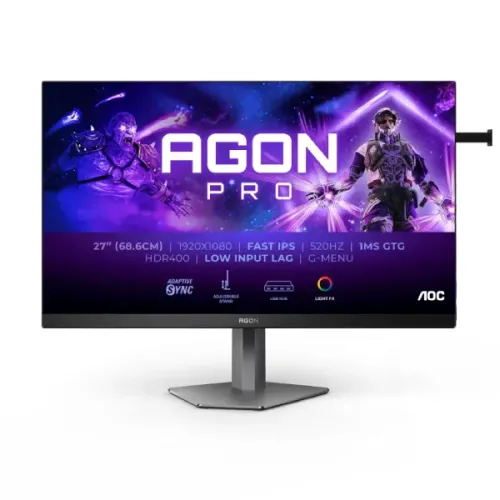
AOC · AGON PRO AG276FK
27-inch FHD Fast IPS esports monitor with 520Hz DisplayPort, 240Hz HDMI, Adaptive-Sync and DisplayHDR 400.
Price unavailable
Price range updating
No verified price is available yet. Store offers will appear when merchants publish them.
Compare store prices
No live offers for this variant
Offers will appear when merchants publish them.
Loading history…
Product story
The AOC AGON PRO AG276FK is a 27-inch Full HD esports monitor built around a Fast IPS panel and a 520Hz maximum refresh rate through DisplayPort 1.4. It combines 1920 × 1080 resolution, Adaptive-Sync, a 0.5ms GtG specification and VESA DisplayHDR 400. The very high refresh is aimed at competitive PC play where a capable graphics system can generate exceptionally high frame rates. Actual performance depends on GPU, cable, input, game and selected settings. Confirm the exact model and seller’s Bangladesh warranty and stock terms; manufacturer specifications do not prove a current local offer.
Check the rear label and packaging for AG276FK. This is not AG276QZD, AG276QZD2 or another AGON PRO model: those may use OLED panels, different resolutions or different refresh modes. The AG276FK is a flat Fast IPS Full HD display. Regional accessory and warranty bundles may differ, but the model identity should match exactly. Actual performance depends on GPU, cable, input, game and selected settings. Confirm the exact model and seller’s Bangladesh warranty and stock terms; manufacturer specifications do not prove a current local offer.
The screen measures 27 inches diagonally and has a native 1920 × 1080 resolution with a 16:9 aspect ratio. FHD is less demanding to render than QHD or 4K and can help a gaming PC reach very high frame rates. At 27 inches it has about 81.6 pixels per inch, so text and detailed images are less dense than on smaller FHD or same-size QHD monitors. Actual performance depends on GPU, cable, input, game and selected settings. Confirm the exact model and seller’s Bangladesh warranty and stock terms; manufacturer specifications do not prove a current local offer.
AOC specifies a Fast IPS LCD with 16.7 million colors, 400 cd/m² brightness, 1000:1 static contrast and broad viewing angles. The listed color coverage is around 119.8% sRGB and 94.4% DCI-P3 under the stated measurement convention. Gamut coverage does not guarantee color accuracy; use a calibrated mode and profile for color-sensitive work. Actual performance depends on GPU, cable, input, game and selected settings. Confirm the exact model and seller’s Bangladesh warranty and stock terms; manufacturer specifications do not prove a current local offer.
The maximum vertical refresh is 520Hz through DisplayPort 1.4. The source computer must provide a compatible signal and enough rendered frames to make full use of this mode. Use a direct connection from the graphics card, select 1920 × 1080 at 520Hz in system display settings and verify the active mode in the monitor information screen. Actual performance depends on GPU, cable, input, game and selected settings. Confirm the exact model and seller’s Bangladesh warranty and stock terms; manufacturer specifications do not prove a current local offer.
The monitor has two HDMI 2.0 inputs, each supporting up to 240Hz at 1920 × 1080 per AOC’s specifications. HDMI does not deliver the 520Hz maximum. If the refresh selection is lower than expected, confirm which input is active, the cable quality, GPU output, driver and operating-system advanced display setting. Actual performance depends on GPU, cable, input, game and selected settings. Confirm the exact model and seller’s Bangladesh warranty and stock terms; manufacturer specifications do not prove a current local offer.
AOC lists 0.5ms gray-to-gray and 0.3ms MPRT. These represent different measurement methods and are not interchangeable with total input latency. Motion blur reduction modes can affect brightness or compatibility, so test the available settings in the actual game. The panel response, frame rate, refresh and game engine all contribute to perceived motion clarity. Actual performance depends on GPU, cable, input, game and selected settings. Confirm the exact model and seller’s Bangladesh warranty and stock terms; manufacturer specifications do not prove a current local offer.
Adaptive-Sync supports variable refresh with compatible graphics hardware, helping reduce tearing when the frame rate fluctuates. AOC also identifies the monitor as NVIDIA G-SYNC Compatible. Enable sync in the monitor menu and graphics driver, then verify the chosen input and frame-rate range. Variable refresh cannot increase the frame rate produced by the PC. Actual performance depends on GPU, cable, input, game and selected settings. Confirm the exact model and seller’s Bangladesh warranty and stock terms; manufacturer specifications do not prove a current local offer.
The display is VESA Certified DisplayHDR 400, with a stated peak brightness of 400 cd/m². This is standard DisplayHDR 400, not DisplayHDR True Black 400. The certification does not imply OLED black levels or advanced local dimming. HDR appearance depends on source content, game settings and ambient lighting; compare it with SDR for your use. Actual performance depends on GPU, cable, input, game and selected settings. Confirm the exact model and seller’s Bangladesh warranty and stock terms; manufacturer specifications do not prove a current local offer.
Connectivity includes two HDMI 2.0 inputs, two DisplayPort 1.4 inputs, two USB 3.2 Gen 1 downstream ports, one USB upstream connection and a 3.5mm headphone output. A USB-B upstream connection is needed to use the monitor hub with a computer. There are built-in 5W × 2 speakers, according to the AOC specification and manual. Actual performance depends on GPU, cable, input, game and selected settings. Confirm the exact model and seller’s Bangladesh warranty and stock terms; manufacturer specifications do not prove a current local offer.
The stand provides 130mm height adjustment, tilt, swivel and 90-degree pivot. AOC lists 100 × 100mm VESA mounting and a quick-release stand. Check the dimensions and cable slack if rotating the display to portrait mode. The 27-inch screen can also be mounted to a compatible arm rated for the monitor’s weight. Actual performance depends on GPU, cable, input, game and selected settings. Confirm the exact model and seller’s Bangladesh warranty and stock terms; manufacturer specifications do not prove a current local offer.
For 520Hz gaming, connect via DisplayPort 1.4 and use a high-quality cable. Select native FHD and 520Hz, enable Adaptive-Sync or the preferred motion mode, and test for stability. A high-refresh monitor is most useful in esports titles where the GPU can output many frames. If the PC produces substantially fewer frames, the panel still works but the full refresh advantage is limited. Actual performance depends on GPU, cable, input, game and selected settings. Confirm the exact model and seller’s Bangladesh warranty and stock terms; manufacturer specifications do not prove a current local offer.
Consoles typically do not output at 520Hz. HDMI 2.0 supports up to 240Hz on this display, but console and game limits may be lower. Select the console’s supported resolution and refresh, and check the monitor’s detected signal. A laptop can use DisplayPort Alt Mode over USB-C only with a suitable adapter and supported host output. Actual performance depends on GPU, cable, input, game and selected settings. Confirm the exact model and seller’s Bangladesh warranty and stock terms; manufacturer specifications do not prove a current local offer.
The AG276FK’s main advantage is its 520Hz DisplayPort mode for highly competitive games such as fast shooters when paired with a system capable of very high frame rates. FHD can ease GPU load compared with higher resolutions. Adaptive-Sync, low input lag options and the adjustable stand round out the esports focus. General desktop use is also possible, though pixel density is moderate. Actual performance depends on GPU, cable, input, game and selected settings. Confirm the exact model and seller’s Bangladesh warranty and stock terms; manufacturer specifications do not prove a current local offer.
AOC lists selectable game modes, Low Input Lag, G-Menu software and rear Light FX RGB lighting. The included wired gamepad can provide convenient OSD access. These controls affect convenience or presentation rather than GPU performance. Use a neutral picture mode when image fidelity matters and switch to game-specific settings only when they provide a clear benefit. Actual performance depends on GPU, cable, input, game and selected settings. Confirm the exact model and seller’s Bangladesh warranty and stock terms; manufacturer specifications do not prove a current local offer.
At 27 inches, FHD text may appear less crisp at close viewing distance than denser screens. Position the monitor at a comfortable distance, center the panel and adjust scaling where necessary. The matte anti-glare finish helps manage reflections but does not remove direct light glare. Tune brightness for the room and use low-blue-light features if preferred. Actual performance depends on GPU, cable, input, game and selected settings. Confirm the exact model and seller’s Bangladesh warranty and stock terms; manufacturer specifications do not prove a current local offer.
Benefits include 520Hz DisplayPort refresh, a Fast IPS panel, FHD rendering efficiency, Adaptive-Sync, G-SYNC Compatible support, DisplayHDR 400 and comprehensive ergonomic adjustment. Trade-offs include 240Hz maximum over HDMI, the need for an extremely capable PC to exploit 520Hz, moderate FHD pixel density and HDR400 rather than premium HDR. Speakers are suitable for basic audio, not room-filling sound. Actual performance depends on GPU, cable, input, game and selected settings. Confirm the exact model and seller’s Bangladesh warranty and stock terms; manufacturer specifications do not prove a current local offer.
Before buying in Bangladesh, confirm the AG276FK model label, actual local stock, delivered price, included cables and gamepad, return/dead-pixel terms, local warranty provider and serial eligibility. Ask whether the warranty covers the exact unit and keep written terms. AOC’s international warranty period does not by itself establish service coverage in Bangladesh. Actual performance depends on GPU, cable, input, game and selected settings. Confirm the exact model and seller’s Bangladesh warranty and stock terms; manufacturer specifications do not prove a current local offer.
What is the resolution? 1920 × 1080 Full HD. What is the maximum refresh rate? 520Hz via DisplayPort 1.4. How fast is HDMI? Up to 240Hz at FHD over HDMI 2.0. What is the panel? Fast IPS. What response times are listed? 0.5ms GtG and 0.3ms MPRT. Does it support G-SYNC? AOC lists G-SYNC Compatible. What HDR standard? VESA DisplayHDR 400, not True Black 400. Does it have speakers? AOC lists 5W × 2. Actual performance depends on GPU, cable, input, game and selected settings. Confirm the exact model and seller’s Bangladesh warranty and stock terms; manufacturer specifications do not prove a current local offer.
Choose the AGON PRO AG276FK if competitive PC gaming and extremely high refresh take priority over resolution density. A 520Hz-capable GPU output and DisplayPort connection are necessary to use its maximum mode. For console play, high-resolution work or richer HDR, compare models designed for those needs. Confirm local stock and warranty before ordering. Actual performance depends on GPU, cable, input, game and selected settings. Confirm the exact model and seller’s Bangladesh warranty and stock terms; manufacturer specifications do not prove a current local offer.
Helpful answers
Product-specific answers maintained with the catalog information.
It is a 27-inch Full HD monitor with native 1920 × 1080 resolution.
Use DisplayPort 1.4, a compatible graphics output and select 520Hz in display settings.
No. The two HDMI 2.0 inputs support up to 240Hz at FHD.
AOC specifies a Fast IPS LCD panel.
AOC lists 0.5ms GtG and 0.3ms MPRT.
AOC lists NVIDIA G-SYNC Compatible and Adaptive-Sync.
It is VESA Certified DisplayHDR 400; this is not DisplayHDR True Black 400.
AOC lists built-in speakers rated at 5W × 2.
Yes, the stand supports 90-degree pivot, along with 130mm height adjustment, tilt and swivel.
Confirm local provider, duration and serial-specific eligibility with the seller in writing.
Customer community
Become a merchant
Join BiponiBD, publish accurate offers and start free.