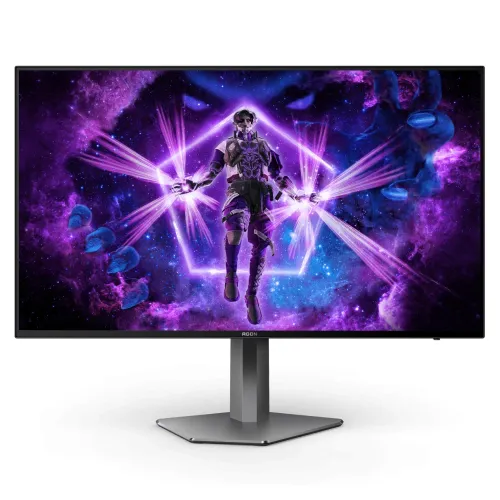
AOC AGON PRO AG276QKD overview
The AOC AGON PRO AG276QKD is a flat 26.5-inch QHD OLED monitor built around a 2560 × 1440 resolution and a 480Hz maximum refresh rate. AOC lists 0.03ms GTG response, 1,500,000:1 typical contrast, DisplayHDR True Black 400, Adaptive-Sync, two HDMI 2.1 inputs, two DisplayPort 1.4 inputs and a USB 3.2 Gen 1 hub. Its high refresh is intended for compatible PC gaming systems; the source must produce the required resolution and frame rate.
Exact model and nearby variants
Confirm the model code AG276QKD on the carton and rear label. It is distinct from AG276QKD2, which is a different model with its own specifications and a higher refresh figure in AOC’s catalog. Do not transfer the newer sibling’s 500Hz rate, brightness, port setup, panel generation or warranty terms to AG276QKD. BiponiBD’s original product slug and SKU remain unchanged in this update.
26.5-inch OLED panel
AOC specifies a 26.5-inch diagonal OLED panel and flat screen surface. The independently emissive pixels support deep black image areas and a high stated contrast ratio. OLED picture characteristics can vary with the room, image mode and ambient light. Keep the panel clean using the manufacturer’s instructions and avoid pressing or rubbing its surface. This is a monitor display, not a television with a built-in streaming platform.
QHD 2560 × 1440 resolution
The native panel resolution is 2560 × 1440, commonly called QHD or 1440p. It provides more desktop detail than Full HD while requiring less rendering power than 4K at the same refresh. Set the computer to the native resolution and use a compatible input and cable. Text scaling and game rendering settings can be adjusted to balance clarity, performance and comfortable viewing distance.
480Hz maximum refresh
AOC advertises a maximum 480Hz refresh rate, and its leaflet specifies 2560 × 1440 at 480Hz using DisplayPort 1.4 with DSC or HDMI 2.1 with DSC. Reaching that mode requires a compatible graphics output, suitable cable, driver and settings. Refresh is the number of display updates per second; a game still needs to render high frame rates to fully use it.
0.03ms GTG response specification
The leaflet lists 0.03ms gray-to-gray response time. This is a panel transition figure, not a guarantee for total input lag or end-to-end system response. Input devices, game engine, frame pacing, rendering and signal processing also affect perceived responsiveness. For competitive play, configure the source and monitor consistently and evaluate the game at its actual frame rate.
HDR True Black 400
AOC lists VESA DisplayHDR True Black 400 support for this OLED monitor. The certificate class describes HDR performance under its defined test conditions; it is not a claim that every scene reaches a particular brightness. HDR needs compatible content, operating-system configuration, application support and a suitable input signal. SDR and HDR may look different depending on picture mode and room lighting.
Brightness and highlight behavior
The official leaflet lists typical brightness of 275 cd/m² at 100% APL. This condition matters: brightness behavior can vary with the portion of the screen showing bright content and with picture settings. Do not confuse this typical figure with a peak HDR highlight measurement or assume that peak values can be sustained full screen. Set brightness for room conditions and follow OLED care prompts.
Color gamut and 10-bit output
AOC publishes sRGB 100%, DCI-P3 98.5% and 1.07 billion display colors, with Delta E below 2 in the product leaflet. These manufacturer figures describe model capabilities rather than a measurement of the delivered individual unit. Color-managed software, selected preset, graphics output and calibration influence actual work. If color-critical accuracy is required, request calibration evidence and validate the specific monitor.
Adaptive-Sync and tear reduction
The product leaflet identifies Adaptive-Sync, while NVIDIA lists AG276QKD as G-SYNC Compatible and AOC regional materials describe compatible adaptive synchronization. Variable refresh can align screen updates with supported graphics output to reduce tearing. Availability depends on graphics hardware, driver, input and supported refresh range. Enable the feature in the monitor and driver, then verify the signal with a compatible game.
HDMI 2.1 and DisplayPort DSC inputs
AOC specifies two HDMI 2.1 inputs and two DisplayPort 1.4 inputs. The 480Hz QHD timing uses DSC according to the leaflet; check the exact port, cable and GPU support for compression and desired color depth. The monitor has several inputs, but not every source or cable supports the maximum mode. Choose a port based on the source documentation and confirm the active signal in system display settings.
USB hub and audio output
The leaflet lists two USB 3.2 Gen 1 hub ports and one earphone output. A USB upstream link may be needed for the downstream hub to carry data; consult the supplied manual and package cables. The official leaflet specifies two built-in 5W speakers. Speaker sound is convenient for basic listening, while headphones or external speakers may provide a different sound quality for games and media.
Ergonomic stand adjustments
AOC lists 130mm height adjustment, tilt from -5° to 20°, swivel from -30° to 30° and pivot from -90° to 90°. Adjust height and angle so the screen is comfortable and reflections are controlled. Pivot can help with portrait-oriented documents but the monitor is primarily a landscape gaming display. Secure the stand according to the assembly guide before moving the unit.
VESA installation and physical fit
The manufacturer specifies a 100 × 100mm VESA mount. The leaflet gives approximate dimensions of 605.2mm wide and 240mm deep with the stand, with height varying by stand position. It lists 5.8kg with stand and 4.4kg without. Check arm load capacity, screw specification, desk depth and cable clearance using the delivered unit manual before mounting.
OLED care and static content
OLED technology can be affected by uneven wear after prolonged display of static bright elements. Use AOC’s recommended pixel maintenance, screen care and standby settings; do not interrupt maintenance cycles. Hide static taskbars or vary content when practical. These habits help manage use but do not eliminate wear risk. Check the local warranty document for the specific policy on image retention and burn-in.
PC setup for competitive games
For the full QHD 480Hz mode, confirm GPU capability, DSC support, port choice, cable quality and operating-system refresh settings. Start with 2560 × 1440 and choose 480Hz only if the option appears and the signal remains stable. The monitor cannot improve frame pacing in an underperforming game. Competitive titles, graphics settings and GPU load determine whether the system can provide enough frames.
Console and general device use
HDMI 2.1 makes the monitor connectable to modern consoles, but the maximum console refresh is governed by the console, game and supported timing rather than the monitor’s 480Hz PC headline. Check the console’s video output screen for accepted resolution and refresh. For office tasks, QHD offers a compact high-detail desktop; select a comfortable brightness and consider static interface use in OLED care routines.
What is included and local service
Package accessories may vary by region. Confirm the monitor stand, power adapter, HDMI or DisplayPort cable, USB upstream cable, documentation and warranty card with the seller. AOC’s manufacturer specification does not confirm the condition, local stock or serial eligibility of the BiponiBD unit. Keep the invoice and carton information so the exact model can be identified for support.
Bangladesh stock, price and warranty
This page does not verify a live BiponiBD offer or current inventory. Before buying, ask the seller to confirm the exact AG276QKD model, new or sealed condition, final price, local service provider and warranty period tied to the serial number. Confirm in writing whether panel or burn-in issues are covered. Manufacturer terms from another market are not proof of local coverage.
Frequently asked questions
What is the native resolution? 2560 × 1440 QHD. What refresh rate is supported? Up to 480Hz, with DSC on the stated maximum timing. What is the response time? AOC specifies 0.03ms GTG. Is this AG276QKD2? No, this is AG276QKD; the QKD2 is a separate model. Which HDR certification is listed? DisplayHDR True Black 400. How many HDMI ports? Two HDMI 2.1. Does it have speakers? The leaflet lists two 5W speakers. What is the Bangladesh warranty? Confirm serial-specific local terms with the seller.