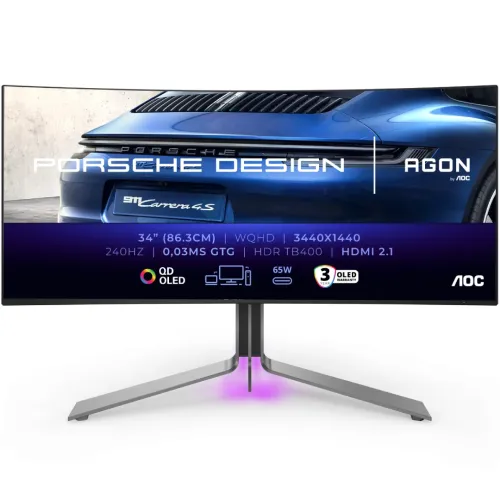
Porsche Design AOC AGON PRO PD34 overview
The PD34 is a 34-inch curved QD-OLED monitor developed by Porsche Design and AGON by AOC. It combines 3440 × 1440 UWQHD resolution, a 21:9 aspect ratio, 1800R curvature, 240Hz refresh and 0.03ms GTG response. AOC lists DisplayHDR True Black 400, 99.3% DCI-P3, 10-bit color, USB-C with 65W PD, KVM, HDMI 2.1 and built-in DTS speakers. It serves both high-refresh gaming and wide desktop workflows.
Exact model and design identity
The manufacturer model is PD34, within the AGON PRO line and Porsche Design collaboration. Confirm PD34 on the label, carton and invoice. The industrial design takes cues from Porsche 911 cooling-grille forms, but the product is a monitor and is not a Porsche vehicle component. Regional suffixes, included cables and warranty terms can vary. Existing BiponiBD slug and SKU are retained.
34-inch 21:9 curved QD-OLED
AOC specifies a 34-inch diagonal QD-OLED panel with 21:9 aspect ratio and 1800R curvature. The gently curved ultrawide screen can make game worlds and timelines feel wider and provides horizontal room for side-by-side windows. Some applications and video are 16:9 and may display bars. Measure desk width and viewing distance before choosing this large display.
UWQHD 3440 × 1440 resolution
The native 3440 × 1440 resolution is known as UWQHD. It provides more horizontal pixels than standard QHD and a wide workspace while requiring less rendering power than 4K at a similar frame rate. Choose native resolution in the operating system and confirm the graphics card, dock and cable support the preferred refresh and color mode.
240Hz refresh rate
AOC lists a maximum 240Hz refresh and a 48–240Hz adaptive-sync range. High refresh can make supported motion appear smoother when the source renders enough frames. Output depends on graphics hardware, cable, input, driver and settings. The monitor does not create game frames; tune game settings and GPU capability to take advantage of high refresh.
0.03ms GTG response
The AOC leaflet specifies 0.03ms gray-to-gray response time. This is a panel response figure, not a measure of total input lag, controller response or network latency. Game engine, frame pacing and source path affect perceived responsiveness. AOC specifies the figure under its own test conditions; use the actual monitor mode and content to assess motion.
DisplayHDR True Black 400
The monitor is VESA certified DisplayHDR True Black 400. The AOC material lists up to 1,000 cd/m² peak brightness under its stated conditions, while some regional leaflets may not include the same detailed APL breakdown. A peak is not full-screen sustained brightness. HDR needs compatible content, software, graphics output and monitor mode.
Color gamut and calibration
AOC lists DCI-P3 99.3%, Adobe RGB 97.8%, sRGB 139% and 1.073 billion 10-bit colors. The leaflet also states average Delta E below 2. Gamut coverage and factory claims do not replace calibration of the exact delivered unit. For color-critical work, use a managed workflow, request the calibration report and validate the screen with a measurement device.
QD-OLED contrast and surface
AOC specifies QD-OLED and a 1.5-million-to-one static contrast ratio, with an anti-reflection treatment. OLED pixels light individually and can display deep black areas. Ambient light, screen position and reflections still affect perceived contrast and color. Clean the surface only according to AOC guidance and avoid pressure or abrasive materials.
HDMI 2.1 and console mode
AOC lists two HDMI 2.1 ports. Its product information describes console mode with HDMI 2.1 bandwidth, variable refresh and ALLM. Console output still depends on the console and game, so 240Hz is not a guaranteed console rate. Check supported resolution and refresh in both the source and monitor manual and use a suitable cable.
DisplayPort 1.4 input
The PD34 includes a DisplayPort 1.4 input. AOC specifies 3440 × 1440 up to 240Hz in its product information. Graphics output, link settings, bit depth and cable determine the usable mode. If the desired refresh is absent, check the selected input, source GPU, cable and driver. Do not transfer DisplayPort 2.1 capabilities from a different monitor.
USB-C with 65W Power Delivery
AOC regional product details list one USB-C port with DisplayPort Alt Mode and 65W Power Delivery. A compatible laptop can send video and receive power through a single cable, though 65W may not satisfy every laptop under load. Confirm the regional model and supplied USB-C cable before depending on this as the only charger.
KVM and USB hub workflow
The PD34 offers KVM and a USB hub so compatible devices can share keyboard and mouse through the monitor. Connect each device’s video and USB upstream paths as required by the manual. KVM switches peripheral routing; it does not combine computer processing or create extra desktops. Review the port map if USB devices do not follow the active source.
DTS speakers and audio output
AOC lists built-in speakers rated at 8W × 2 with DTS and an earphone output. This can provide convenient sound for calls, games and media without a separate speaker set. Headphones or external speakers may produce different quality. Select the correct audio output on the computer and confirm which input is active when using Picture-by-Picture.
Stand ergonomics and VESA mount
The AOC specification lists 130mm height adjustment, tilt from -5° to +20°, swivel around ±20° and a 100 × 100mm VESA pattern. Set the monitor centered and at comfortable eye level. Confirm desk depth and arm load capacity before mounting. Follow the supplied manual for screws, lifting and cable routing around the stand.
OLED care and static-image use
AOC describes OLED Care functions intended to reduce image sticking and burn-in risk. Long display of fixed bright taskbars, logos or dashboards can still contribute to uneven wear. Follow pixel maintenance prompts, use sleep behavior and allow care routines to finish. Protection features help manage risk but do not guarantee zero image retention.
Gaming features and AOC G-Menu
The manufacturer lists Adaptive-Sync, NVIDIA G-SYNC support, low-blue-light and flicker-free features, plus gaming controls through AOC G-Menu. Settings can change picture appearance or motion behavior and may depend on the selected input and mode. Download software for exact model PD34 and use overlays only where allowed by the game.
PC, console and productivity setup
For PC use, verify that the GPU can output 3440 × 1440 at the target refresh over DisplayPort or HDMI. Consoles may use a supported HDMI mode but will not necessarily fill a 21:9 screen. For office workflows, arrange windows and check application ultrawide support. Set brightness to suit the room and review OLED care guidance before long static sessions.
Bangladesh offer and warranty
This review does not verify current BiponiBD stock, offer price, delivered condition or local serial eligibility. AOC/Porsche Design materials advertise three-year burn-in warranty in some regional listings, but confirm the exact Bangladesh seller’s coverage, service route and serial-specific terms in writing. Check package contents and keep the invoice, serial label and warranty document.
Frequently asked questions
What is PD34 resolution? 3440 × 1440 UWQHD. What is refresh? Up to 240Hz. Is the panel curved? Yes, 1800R. What panel technology? QD-OLED. What HDR certification? DisplayHDR True Black 400. Does it have USB-C? Yes, DP Alt Mode with 65W PD in the cited regional specification. Does it include KVM? Yes. What speakers? 8W × 2 DTS. What is response time? 0.03ms GTG. What Bangladesh warranty applies? Confirm the exact unit serial and local OLED/burn-in terms with seller.