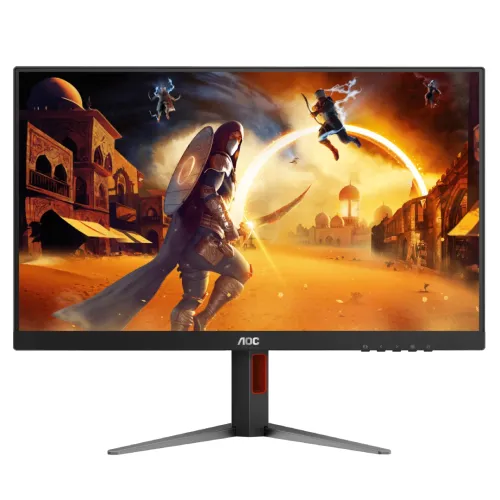
AOC AGON Q27G4F overview
AOC AGON Q27G4F is a 27-inch flat gaming display with QHD resolution, a Fast IPS panel and refresh rates up to 180Hz through DisplayPort. AOC’s exact-model product page lists 2560 × 1440 resolution, 1ms GtG, 0.5ms MPRT, HDMI 2.0, DisplayPort 1.4, headphone output, Adaptive Sync and NVIDIA G-SYNC support. The official product page gives connection-specific maximums: HDMI 2.0 operates from 48 to 144Hz and DisplayPort 1.4 from 48 to 180Hz. This distinction matters when planning a PC connection. The product is a monitor, not a source of game frames; actual performance depends on the computer, application, cable and selected signal mode.
27-inch QHD resolution
The 27-inch (68.5cm) panel has a native 2560 × 1440 QHD resolution and 16:9 aspect ratio. Compared with Full HD at a similar size, QHD provides more desktop detail and room for interface panels, timelines, documents and browser windows. Select the native resolution in the operating system for the clearest image. Text can be scaled for comfortable reading without changing the monitor’s physical size. The screen is flat, and the manufacturer lists approximately 108.7 pixels per inch with 0.2331mm pixel pitch. QHD gaming requires more graphics processing than Full HD, especially when trying to approach 180 frames per second.
Fast IPS panel and viewing angles
AOC identifies a Fast IPS panel with LED backlighting and 178-degree horizontal and vertical viewing angles. IPS can preserve a consistent view from a range of seated positions, while the fast-panel design targets gaming motion. AOC lists 16.7 million displayed colors on the product page, while its manual notes that up to 1.07 billion colors may be supported under specific signal and graphics-card conditions. The effective color depth depends on the selected refresh, input, color format and source output; do not assume every mode supports the maximum color depth. The monitor’s anti-glare surface helps reduce reflections but does not remove all glare from a bright room.
180Hz refresh by connection
AOC specifies a maximum of 180Hz over DisplayPort 1.4 and 144Hz over HDMI 2.0 at QHD, as reflected in the official connection timing range. Use DisplayPort when you want the listed 180Hz mode. HDMI is listed up to 144Hz, so a system showing 144Hz over HDMI may be operating as designed. Connect the computer directly with a suitable cable, then select 2560 × 1440 and the supported refresh rate in operating-system or graphics settings. A dock, KVM switch, adapter or cable can restrict the available timing. The monitor cannot increase the game’s frame rate; the source has to render the frames.
QHD gaming and GPU requirements
QHD at 180Hz can deliver a detailed and responsive experience when the computer can render enough frames. Many demanding games will run below 180fps at high detail, while lighter competitive titles may reach higher frame rates with settings tuned to the system. The monitor continues to display lower supported rates, and Adaptive Sync can help coordinate refresh with variable frame output. The graphics card, game engine, CPU, memory and visual settings all affect performance. Check the intended game and PC configuration rather than purchasing based on the panel maximum alone. For console use, confirm the console’s output mode and the monitor input’s supported timing.
Response time: GtG and MPRT
AOC lists 1ms gray-to-gray and 0.5ms MPRT specifications. These measure different behavior: GtG describes pixel transition time under a specified mode, while MPRT relates to perceived motion persistence and may rely on a strobing or blur-reduction setting. Neither number is the same as input lag or a promise of perfect clarity in all scenes. AOC notes that the 0.5ms MPRT mode can interact with Adaptive Sync or other settings; check the exact manual for simultaneous feature support. Overdrive and strobing settings can produce artifacts or reduce brightness, so compare modes in real content and choose the clearest stable result.
Brightness, contrast and HDR10
AOC lists 300 cd/m² typical brightness, 1000:1 typical static contrast and HDR10 support for the Q27G4F. HDR10 indicates signal support; it should not be read as proof of a VESA DisplayHDR tier, local dimming or a high-brightness HDR backlight. The official page and leaflet reviewed do not establish a DisplayHDR certification. HDR appearance depends on source content, operating-system configuration, game, picture mode and ambient light. Try HDR with compatible content and compare with SDR; use the mode that renders naturally. Set SDR brightness to match the room and avoid assuming the peak brightness figure describes every picture mode.
Adaptive Sync and G-SYNC compatibility
AOC lists Adaptive Sync and NVIDIA G-SYNC support/compatibility for this model. Variable refresh can reduce tearing and stutter when the graphics card and monitor operate within a supported range. Enable the feature in the monitor menu and graphics driver as appropriate, then verify that the driver detects the display. Compatibility can depend on GPU generation, driver, input, cable and selected display mode. Adaptive Sync does not increase frame rate or eliminate every form of latency. If the function is unavailable, update the driver, test a direct DisplayPort connection and consult the current AOC manual for the supported signal range.
Inputs and port-specific setup
The exact-model AOC page lists one HDMI 2.0 input, one DisplayPort 1.4 input and a 3.5mm headphone output. DisplayPort supports up to 180Hz, while HDMI supports up to 144Hz according to AOC’s mode ranges. Use the right input for the desired refresh and check the source output specification. USB ports are not listed for this product, so do not plan to use it as a USB hub. The audio jack is an output, not a microphone input. Use a direct connection when diagnosing mode limitations; adapters and docks can change bandwidth or variable-refresh support.
Color gamut and calibration
AOC’s product listing for this model reports color gamut values in multiple standards and measurement systems, including NTSC, sRGB and DCI-P3. Gamut size and coverage percentages should not be compared as though they were the same metric. The catalog’s original attribute uses NTSC 102% (CIE1976), sRGB 120% (CIE1931) and DCI-P3 93% (CIE1976); retain these only as the manufacturer-published specifications for the relevant region and datasheet version. They do not establish factory calibration or color accuracy. For photography, print or grading, calibrate the individual monitor with appropriate software and hardware and use a managed workflow.
Game features and on-screen tools
The Q27G4F provides gaming-oriented picture functions such as Game Mode, Low Input Lag, Dial Point and Sniper Scope as described in AOC’s leaflet. Game modes can store picture preferences; crosshair-style overlays and scope tools are optional visual aids and may not suit every title or competitive rule set. Use the OSD to select the features you want and turn off overlays when they obstruct content. Low input lag settings can change processing behavior, while excessive sharpening or shadow adjustment can alter image appearance. These options complement the high refresh and synchronization features but do not improve the PC’s frame generation or network latency.
Stand ergonomics and VESA mounting
The product specification lists a stand with 130mm height adjustment, tilt, swivel from -30 to +30 degrees and pivot from -90 to +90 degrees. AOC also identifies a 100 × 100mm VESA mount, removable stand and quick-release function. This range helps align the screen with the seated user and rotate the image for portrait workflows. Allow cable slack and check clearance before pivoting or swiveling. Use a VESA arm rated for the monitor and follow the manufacturer’s screw and mounting instructions. AOC lists a Kensington lock slot for physical security. Do not lift the monitor by its panel edges or rely on the stand as a carrying handle.
Audio and headset use
The monitor has a 3.5mm headphone output, while AOC does not list built-in speakers. Plan for headphones or external speakers. Audio can be routed to the display over HDMI or DisplayPort when the computer selects the monitor as its playback device, then connected to the headphone output. Check operating-system audio selection, monitor volume and mute state if there is no sound. The audio output does not provide a microphone input. Confirm whether a local package includes an audio cable or headphones; the manufacturer’s specification does not imply these accessories are included.
Power, dimensions and weight
AOC lists 100–240V AC, 50/60Hz input with a typical consumption of 23W and maximum consumption up to 49W under high brightness and contrast settings; standby is up to 0.5W in the manual. The monitor uses an internal power supply. The product specification lists approximate dimensions and weight that vary by stand configuration and regional datasheet. Verify the current manual for exact package dimensions before fitting a narrow shelf or arm. Keep ventilation clear, use a properly grounded outlet and avoid pinching the power and signal cables under the adjustable stand. Disconnect power safely before cleaning or moving the display.
Advantages for gaming and productivity
The Q27G4F combines QHD detail with a 180Hz DisplayPort maximum, a Fast IPS panel and Adaptive Sync, which can suit fast PC games and everyday desktop tasks. The stand’s height, tilt, swivel and pivot movement allows more precise setup than a basic tilt-only base. A 100 × 100mm VESA pattern, quick-release stand and headphone output provide practical flexibility. The 27-inch 16:9 shape fits common desk layouts and games. For users who can drive high frame rates at QHD, the high refresh can make motion feel smoother; for office tasks, the extra QHD workspace helps keep windows visible.
Trade-offs and purchase checks
The 180Hz maximum requires DisplayPort; HDMI is listed up to 144Hz. QHD at high frame rates requires a capable graphics card, and the 0.5ms MPRT mode may have feature trade-offs that should be checked in the manual. The reviewed sources do not establish a VESA DisplayHDR tier or integrated speakers. Color-gamut numbers depend on the manufacturer’s measurement standard and do not prove calibration. Confirm the exact regional Q27G4F SKU, included cables, warranty provider and dead-pixel policy with the Bangladesh seller. Check that your computer has a compatible DisplayPort output if 180Hz is important.
Warranty and Bangladesh purchase
AOC regional warranty terms can differ, and the reviewed manufacturer product page does not establish coverage for a specific Bangladesh unit. The catalog’s original “3 Year Warranty” requires seller confirmation against the exact serial number. Ask whether service is handled by an authorized local channel or the seller, how long coverage lasts, whether panel and backlight issues are included, and what invoice is required. Current BiponiBD price, stock, shipping and returns must be verified on the live offer; this content review does not infer those terms from foreign AOC pages. Keep the invoice and monitor serial information.
Setup and troubleshooting
Assemble the stand using the included instructions, connect AC power and use DisplayPort 1.4 for the listed 180Hz mode or HDMI 2.0 for up to 144Hz. Select 2560 × 1440 in the operating system and choose the desired supported refresh. If 180Hz is missing, verify the input, cable, GPU output and driver; remove docks or adapters during diagnosis. Enable Adaptive Sync in both monitor and graphics settings if required. If there is no sound at the headphone jack, choose the display as the audio output device and check volume. If motion artifacts appear, reduce overdrive or disable MPRT strobing and compare results.
Who should consider this model
The AOC AGON Q27G4F suits a PC gamer who wants a 27-inch QHD display with a high refresh rate, Fast IPS viewing and an ergonomic stand. It can also serve study and general desktop tasks where QHD workspace is useful. Buyers should choose it only after checking their GPU and connection can drive the intended refresh; DisplayPort is needed for 180Hz. It may be unnecessary for a PC that cannot render above 60–100fps or for a user who prefers a larger screen over pixel density. Color-critical users should calibrate the panel, and users needing integrated audio should budget for external speakers or a headset.
Product summary
AOC AGON Q27G4F is a 27-inch QHD 2560 × 1440 Fast IPS gaming monitor with a 180Hz DisplayPort maximum, 144Hz HDMI maximum, 1ms GtG and 0.5ms MPRT claims, 300 cd/m² typical brightness, HDR10 signal support and Adaptive Sync. AOC lists HDMI 2.0, DisplayPort 1.4, headphone out, a height-adjustable multi-direction stand and 100 × 100mm VESA mounting. Check exact regional color and warranty details, GPU compatibility and the live Bangladesh offer before ordering.