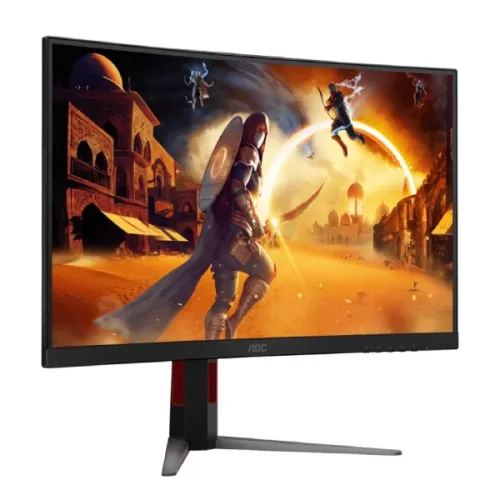
AOC C27G4Z overview
The AOC C27G4Z is a 27-inch Full HD curved gaming monitor built around a VA panel. AOC lists 1920 × 1080 resolution, a maximum 280Hz refresh rate, 0.3ms MPRT, Adaptive Sync, a 1500R curve, 300 cd/m² typical brightness, two HDMI 2.0 inputs and one DisplayPort 1.4 input. This page covers the exact C27G4Z model. The source page describes 280Hz; the previous catalog title said 300Hz, so that incorrect refresh claim has been corrected. Always match the full model number printed on the carton and rear label.
Refresh rate and connection limits
AOC specifies a maximum refresh rate of 280Hz. Its signal table states HDMI 2.0 supports 48–240Hz while DisplayPort 1.4 supports 48–280Hz. Therefore, use a compatible DisplayPort connection and graphics source to target the full 280Hz mode. Through HDMI, the listed maximum is 240Hz. Available timings can also depend on GPU, driver, cable, operating system and display settings. After connecting, select 1920 × 1080 and the supported refresh rate in the operating system or graphics control panel, then confirm the active signal in the monitor menu. Do not treat the 300Hz previously shown in this catalog record as the verified specification for this exact model.
Full HD resolution and 27-inch size
The panel measures 27 inches diagonally and has a native resolution of 1920 × 1080 pixels in a 16:9 aspect ratio. This gives a familiar Full HD desktop and game image and can be easier to drive at high frame rates than higher-resolution panels. At 27 inches, pixel density is lower than on a 24-inch Full HD monitor; viewing distance and personal preference affect perceived sharpness. Buyers who prioritize fine text or more workspace may prefer QHD, while players prioritizing high refresh at Full HD may value this model’s target. Set the source to the native resolution for the clearest result.
Curved Fast VA panel
AOC identifies the panel as VA and the curvature radius as 1500R. The curve wraps the horizontal screen gently around the viewing position. AOC describes the panel as Fast VA; the page’s specific panel type is VA. AOC lists 3000:1 typical static contrast, which is a VA-class contrast figure, but actual black level and uniformity vary by unit and room conditions. The panel has anti-glare treatment and a three-sided frameless front bezel. A curved monitor is a personal preference: position it centrally and at a comfortable distance, and check desk width before purchase.
Response time and motion
The manufacturer page lists 0.3ms MPRT and describes up to 1ms GtG in the overview. MPRT and GtG are different measurement methods and should not be presented as interchangeable guarantees. MPRT modes can use backlight strobing or other motion settings that affect brightness and how the image looks. A high refresh rate can make supported motion appear smoother when the computer produces sufficiently high frame rates, but it does not guarantee a particular game performance. Choose overdrive and motion settings carefully, and check the manual if an option cannot be combined with Adaptive Sync.
Adaptive Sync and variable refresh
AOC lists Adaptive Sync as the variable refresh technology and gives a 48–280Hz sync range. Synchronization can reduce visible tearing when a compatible graphics source varies its frame rate within the supported range. The result depends on the device, port, driver, frame rate and enabled settings. AOC’s page identifies Adaptive Sync; do not infer a specific certification or compatibility badge beyond what the exact manufacturer listing states. If tearing or flicker appears, check the driver, selected input, refresh mode and monitor menu, then compare behavior with synchronization enabled and disabled.
Brightness, contrast and color
The manufacturer specification lists 300 cd/m² typical brightness, 3000:1 typical static contrast and 80M:1 dynamic contrast. It lists 16.7 million display colors, 178° horizontal and vertical viewing angles at CR10, 125.7% sRGB color space under CIE 1976 and 92.4% DCI-P3 under CIE 1976. Gamut coverage figures describe color-space volume or area as defined by the measurement; they do not alone prove color accuracy or calibration. For photography, design or print work, use a measured profile and verify the individual panel. Set brightness for the room rather than assuming the maximum is appropriate.
HDMI, DisplayPort and audio
The exact-model page specifies two HDMI 2.0 inputs, one DisplayPort 1.4 input and a 3.5mm headphone output. The source timing table gives HDMI up to 240Hz and DisplayPort up to 280Hz at the supported signal range. AOC’s current page lists an HDMI cable and a DisplayPort cable in the box, plus a power cable; regional packages may vary, so verify the delivered carton. The listed connectors do not include USB-C or a USB hub. The headphone output is available for audio; built-in speakers are not listed in the official specification and should not be assumed.
Stand and ergonomics
AOC specifies a stand with 130mm height adjustment, tilt from approximately -3° to 21° with the stated tolerance, and swivel from about -28° to +28° with tolerance. The display supports a 100 × 100mm VESA wall mount. The published product dimensions with the base are 611.5 × 516.4 × 239.4mm, and net weight without packaging is 5.44kg. Check desk depth, arm load rating, mounting screws and clearance before installing. The listed feature set does not establish pivot rotation, so portrait orientation should not be assumed from the stock stand.
Power and operating setup
AOC lists an internal power supply, 30W typical on-mode consumption, 0.5W standby consumption and 0.3W off-mode consumption. Actual power use changes with image settings, brightness, refresh operation and usage. Connect the supplied region-appropriate power cord to a suitable outlet and keep ventilation clear. Start with the monitor’s native 1920 × 1080 resolution. For 280Hz, use DisplayPort 1.4 and verify that the source and cable support the selected mode; HDMI is listed up to 240Hz. The monitor’s maximum mode cannot make an underpowered graphics system render more frames.
Gaming and everyday use
The C27G4Z’s key use case is high-refresh Full HD gaming: 280Hz over DisplayPort, Adaptive Sync, a curved VA panel and a manufacturer-listed 0.3ms MPRT. It can also serve for ordinary browsing, video and desktop use. The Full HD resolution is less demanding than QHD, but a computer still needs a capable GPU and compatible output to benefit from the highest refresh rates. For productivity, consider the 27-inch Full HD pixel density and whether a flat panel or greater resolution better fits the work. Compatibility should be checked against each console or computer’s output modes.
Eye comfort and software
AOC lists Flicker-Free and Low Blue Light technologies, and offers G-Menu software for compatible PC configuration. Low blue light and flicker-control features can change the image appearance or viewing comfort but do not replace sensible brightness, room lighting, breaks and comfortable posture. The product page identifies an antiglare surface. Software availability, operating-system support and individual feature behavior can change; use the manufacturer’s current driver and manual information for setup.
What is in the box
The manufacturer page lists one HDMI cable, one DisplayPort cable and a power cable. It does not list a USB upstream cable, USB hub, built-in speakers or a USB-C connection. Regional bundles and retailer packages can differ, so inspect the sealed carton and confirm included accessories with the seller. Keep packaging and proof of purchase until the return period and initial setup checks are complete.
Advantages and trade-offs
Potential advantages include the verified 280Hz maximum over DisplayPort, 0.3ms MPRT rating, Adaptive Sync, 1500R curved VA panel, 3000:1 typical contrast, height adjustment and swivel/tilt stand. Trade-offs include Full HD resolution at a 27-inch size, a listed 240Hz ceiling over HDMI, no manufacturer-listed USB-C or USB hub, and no built-in speaker specification. These are specification-based considerations rather than subjective performance measurements. Decide based on your connection, graphics hardware, preferred resolution and desk setup.
Bangladesh availability and warranty
The catalog record currently carries a three-year warranty term, but the manufacturer page used for this specification review does not establish local serial eligibility, an authorized Bangladesh distributor, dead-pixel coverage or service terms for the unit offered here. Treat the warranty duration as a catalog or seller claim until the seller confirms it for the exact serial and invoice. Ask for current stock, total price, return window, warranty provider, service address, panel policy and included cables in writing before purchase. No current BiponiBD offer or price was independently confirmed in this review.
Buyer checklist
Before ordering, confirm the label is AOC C27G4Z and the listing states the corrected 280Hz maximum. Ask which connection is needed to reach 280Hz; the manufacturer lists up to 280Hz on DisplayPort 1.4 and up to 240Hz on HDMI 2.0. Confirm local stock, price, box contents, warranty provider, serial registration, dead-pixel terms, return policy and physical condition. On setup, connect DisplayPort, select 1920 × 1080 and the desired refresh rate, enable Adaptive Sync only with a compatible source, and adjust height, tilt and swivel to suit the desk.
Summary
AOC C27G4Z is a 27-inch 1920 × 1080 curved VA gaming monitor with 1500R curvature, 280Hz maximum refresh over DisplayPort 1.4, 0.3ms MPRT, Adaptive Sync, 300 cd/m² typical brightness, 3000:1 typical static contrast, two HDMI 2.0 inputs, one DisplayPort 1.4 input and a 3.5mm headphone output. The stand provides 130mm height adjustment plus tilt and swivel, and VESA mounting is 100 × 100mm. HDMI is specified up to 240Hz. The official page corrects the prior catalog’s 300Hz claim. Confirm the local offer and serial-specific warranty with the seller.