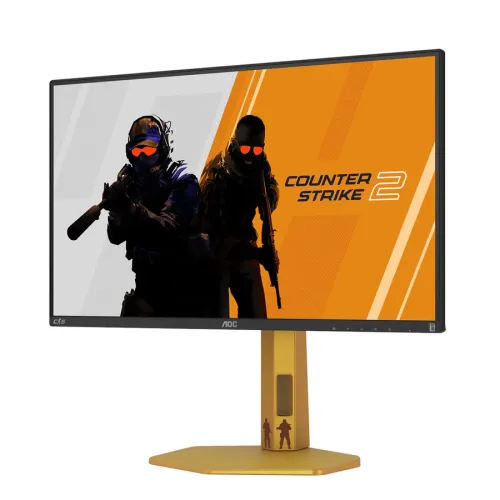
Exact model overview
The AOC CS25G is a 24.5-inch flat Fast IPS gaming monitor designed around Counter-Strike 2 branding and high-refresh PC play. AOC lists Full HD 1920 × 1080, 300Hz native refresh with an overclocked 310Hz maximum through DisplayPort, 1ms GtG, 0.3ms MPRT, 400 nits brightness, 1000:1 static contrast, G-SYNC Compatible and Adaptive-Sync, and VESA Certified DisplayHDR 400. The stand supports 130mm height adjustment, tilt, swivel and pivot. Use DisplayPort for the 310Hz overclocked mode; HDMI is limited to 240Hz per the exact manual.
24.5-inch Full HD and pixel density
The flat 24.5-inch panel has a 16:9 aspect ratio and native Full HD resolution of 1920 × 1080. At this size, FHD keeps the image and interface elements legible at typical desktop distances and asks less of the graphics card than QHD. Set the native resolution for direct pixel mapping. The specified pixel pitch is 0.2832 × 0.2802mm and viewing area is 543.744 × 302.616mm. Competitive players may value the lower rendering load, while users needing a larger workspace or finer text may prefer a higher-resolution display.
Fast IPS panel and viewing
AOC identifies a Fast IPS panel with a flat anti-glare treatment and 178° horizontal and vertical viewing angles. Fast IPS is intended to combine rapid pixel transitions with IPS viewing characteristics. The manufacturer lists 1000:1 static contrast, 16.7 million colors at 8 bits and 85% NTSC / 92% DCI-P3 overlap using CIE 1976. Gamut overlap is not the same as certified color accuracy for each unit. For color-critical work, calibrate the actual display. Center the panel and reduce direct reflections for consistent viewing.
300Hz native and 310Hz overclocked refresh
AOC lists 300Hz native refresh and 310Hz when overclocking is enabled. The user manual specifies that 310Hz requires 1920 × 1080 over DisplayPort; HDMI supports up to 240Hz. Enable overclock in the monitor menu and select the available timing in the computer settings. AOC advises reducing to 300Hz if display errors occur in overclock mode. Cable, GPU output and driver must also support the mode. Refresh capacity does not guarantee the computer can render 300 or 310 frames per second.
Competitive gaming and system requirements
The CS25G’s high refresh ceiling can benefit fast competitive titles when the PC supplies high frame rates. Actual performance depends on GPU, CPU, game engine, settings and thermal limits. Counter-Strike 2 mode adjusts display image and response-related behavior for that game, but the monitor does not improve the computer’s frame generation. At Full HD, many systems can reach higher frame rates than at QHD, although results vary by hardware. Check game benchmarks and use a direct DisplayPort connection for the highest advertised mode.
Response measurements and motion clarity
AOC lists 1ms GtG and 0.3ms MPRT. GtG measures pixel transitions under specified conditions, while MPRT relates to perceived motion persistence and may involve blur-reduction techniques. Neither figure is input lag and neither guarantees every transition has the same result. The monitor offers overdrive and MBR options. The manual notes MBR behavior can depend on sync and refresh settings and that stronger blur reduction reduces screen brightness. Try settings in the games you play and watch for overshoot or dimming.
Adaptive-Sync and G-SYNC compatibility
AOC lists Adaptive-Sync and G-SYNC Compatible support. Variable refresh can synchronize the display with a compatible GPU’s changing output and reduce tearing in supported conditions. It does not create frames or eliminate every form of stutter or latency. Enable it in the monitor and graphics software, and verify the selected input, driver and refresh range. The manual describes different combinations for MBR and MBR Sync; consult it before combining blur reduction with adaptive refresh. If flicker occurs, use a stable frame-rate and refresh mode.
DisplayHDR 400, brightness and contrast
The CS25G is VESA Certified DisplayHDR 400, and AOC lists 400 nits brightness and a 1000:1 static contrast ratio. HDR is supported as a certified input/display capability, but the panel uses global dimming rather than multiple local dimming zones; HDR appearance depends on content and tone mapping. AOC separately lists 16.7 million 8-bit colors. HDR certification does not mean every scene is dramatically brighter or that the display has OLED-level blacks. Compare SDR and HDR with familiar content and set brightness for the room.
Color gamut and modes
AOC lists 85% NTSC and 92% DCI-P3 overlap under CIE 1976, along with 16.7 million colors. Its CS2 Mode adjusts image presentation for that title, and six game presets include FPS, racing and RTS modes with a custom profile option. Game Color can alter saturation and gray levels. These controls are preferences, not color-calibration proof. For general desktop and content work, a neutral mode may be more predictable. Restore default color settings when over-saturated scenes or altered shadows make other content look unnatural.
HDMI, DisplayPort and audio
The rear connections are two HDMI 2.0 ports, one DisplayPort 1.4 and one audio output. According to the manual, HDMI supports 1920 × 1080 up to 240Hz, while DisplayPort supports up to 310Hz with overclock enabled. Connect a PC directly to DisplayPort when using 310Hz. Adapters, docks and KVMs can limit timing or VRR. The audio port is an output for compatible headphones or speakers; the AOC specification does not list built-in speakers. No USB-C or general USB hub is listed for this exact model.
Stand ergonomics and VESA mounting
The stand offers 130mm height adjustment, swivel from -30° to +30°, pivot from -90° to +90° and tilt from approximately -3.5° to +21.5°. AOC lists 100 × 100mm VESA mounting and M4 × 10 mounting screws. Position the screen at a comfortable viewing height and keep cable slack for rotation and pivot. When turning to portrait, change the operating-system orientation. Check that an external arm supports the monitor and use the proper screw length; do not force the supplied stand beyond its range.
Eye comfort and flicker-free operation
AOC lists Flicker-Free technology and promotes low input lag for competitive play. The OSD includes LowBlue modes for multimedia, internet, office and reading; the manual says these adjust color temperature. These display features do not guarantee that every user will avoid fatigue. Set brightness to suit ambient light, maintain a comfortable viewing distance and take breaks. LowBlue modes can alter color appearance, so switch to a neutral mode for color-sensitive content. Use MBR selectively because higher blur-reduction settings can reduce brightness.
Power and operating conditions
The monitor uses an internal power supply rated for 100–240V AC, 50/60Hz at 1.5A. AOC lists 30W typical consumption, up to 50W at maximum brightness and contrast, standby at or below 0.5W and off mode at 0.3W. Use a grounded outlet and the supplied power cable. The manual specifies operation from 0°C to 40°C and non-condensing humidity limits. Keep ventilation clear, keep liquids away from the monitor and disconnect power before cleaning or moving it.
Desk setup and physical fit
The effective viewing area is 543.744 × 302.616mm. Catalog data lists product dimensions around 780 × 162 × 481mm and weight 8.15kg, but those retailer-derived dimensions should be confirmed against the exact carton or manual because measurement conventions may differ. The height-adjustable base needs room to rise, swivel and pivot. Measure desk width, depth and rear clearance before ordering. Keep the DisplayPort and power cables clear of the stand joints and avoid a position where an adjustable desk can pinch them.
Advantages and trade-offs
The CS25G offers Fast IPS, Full HD, 300Hz native refresh and a 310Hz DisplayPort overclock, plus Adaptive-Sync, G-SYNC Compatible support, VESA DisplayHDR 400 certification and a full-adjustment stand. The manual’s input limits matter: HDMI reaches 240Hz while the highest mode requires DisplayPort and overclock. Trade-offs include 1080p rather than QHD resolution, no built-in speakers listed, and reduced brightness with stronger MBR settings. A capable PC is needed to make use of very high frame rates.
Bangladesh warranty, price and availability
AOC’s Malaysia product page confirms product features but does not establish the warranty for a Bangladesh serial or current BiponiBD price, stock and delivery. The catalog’s three-year warranty should be confirmed with the seller and authorized local service channel. Ask when coverage starts, how dead pixels are handled, which defects qualify and what serial or invoice evidence is required. Commercial terms may change by seller and date. Check the live listing at checkout, and retain invoice, serial information and packaging for any claim.
Setup and troubleshooting
Connect power and a compatible DisplayPort cable, select 1920 × 1080, then choose up to 300Hz native or enable overclock for 310Hz. HDMI supports up to 240Hz according to the manual. If the mode is missing, check the cable, GPU output, driver, monitor overclock setting and input. If errors occur at 310Hz, AOC recommends returning to 300Hz. Use a lower MBR intensity if the screen becomes too dim, and review the manual’s sync/MBR combinations. For blur or ghosting, adjust overdrive and test moving scenes.
Who should consider this monitor
The CS25G suits a PC player prioritizing high refresh and fast motion at a compact 24.5-inch Full HD size, especially for competitive shooters such as Counter-Strike 2. It works best when the GPU can deliver high frame rates and a direct DisplayPort connection is available. Users focused on detailed QHD desktop work, built-in speakers, USB-C docking or HDR with local dimming should compare alternatives. Check the desk, graphics output, preferred game and exact local warranty before choosing.
Specification summary
AOC CS25G: 24.5-inch flat Fast IPS, 1920 × 1080, 16:9, 300Hz native and 310Hz overclocked maximum over DisplayPort; HDMI maximum 240Hz. AOC lists 1ms GtG, 0.3ms MPRT, 400 nits, 1000:1 static contrast, 85% NTSC / 92% DCI-P3 overlap, 16.7M 8-bit colors, Adaptive-Sync, G-SYNC Compatible and VESA DisplayHDR 400. Ports: HDMI 2.0 × 2, DP 1.4 × 1 and audio out. Stand: 130mm height, tilt, swivel and pivot; VESA 100 × 100mm.