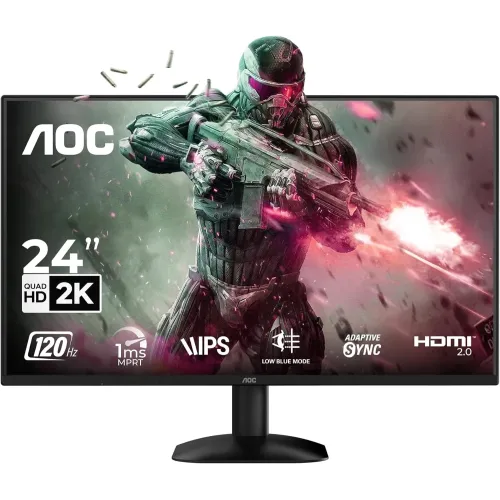
The AOC Q24B35 combines a 23.8-inch IPS display with 2560 × 1440 QHD resolution and a 120Hz maximum refresh rate. Its compact panel size can fit desks where a larger monitor is impractical, while QHD gives a denser desktop for compatible applications. This guide distinguishes AOC leaflet specifications from local seller observations so that measurements, connectivity and purchase terms are not confused.
Screen size, resolution and viewing area
AOC identifies the panel as 23.8 inches with IPS technology. Its effective viewing area is 526.848 mm horizontally by 296.352 mm vertically, with a pixel pitch of 0.2058 × 0.2058 mm. The native QHD grid contains 2560 × 1440 pixels. This creates more desktop space than 1920 × 1080 at a similar physical size, but interface scaling may be useful for comfortable reading.
The leaflet lists 16.7 million display colors, typical brightness of 250 cd/m² and typical contrast of 1300:1, with Mega DCR also mentioned. AOC states color gamut values of NTSC 101% under CIE 1976 and sRGB 121% under CIE 1931. These are manufacturer claims with their specified color spaces; they do not independently certify factory calibration, color uniformity or professional color accuracy. Calibrate the display and confirm the intended workflow if color matching is important.
The listed viewing angle is 178° horizontally and vertically at a contrast criterion greater than 10. IPS viewing angles help maintain a usable image when viewed off-centre, although brightness and color can still appear different at oblique angles.
Refresh rate and response figures
AOC specifies an optimum 2560 × 1440 resolution at 120Hz over both DisplayPort and HDMI. A 120Hz screen can refresh more frequently than a 60Hz screen, which can make cursor movement, scrolling and supported games appear smoother. The computer or console must be capable of sending the selected resolution and refresh rate; a display specification alone cannot increase a game's frame rate.
The leaflet reports two response-time measures: 4ms GtG and 1ms MPRT. GtG measures transitions between gray levels, while MPRT describes moving-picture response under a different method. Treat them as separate specifications rather than promising 1ms GtG. Motion clarity also depends on refresh rate, frame rate, overdrive settings, content and viewing conditions.
Inputs and device compatibility
There is one HDMI 2.0 input and one DisplayPort 1.4 input. AOC lists the full QHD 120Hz optimum mode over either interface. Check the source device's output specification and select a suitable cable; adapters, docks and older graphics outputs may limit the available mode, color format or refresh rate.
The leaflet lists an earphone output, but no built-in speakers and no USB hub. Audio can be routed to headphones or external speakers as supported by the connected source. USB accessories require ports on the computer or a separate hub. The monitor does not provide USB-C power delivery or a USB-C video input in the listed specifications.
Image controls, game modes and eye comfort
AOC describes HDR visual enhancement in the product leaflet. This is a feature description, not a promise of a particular HDR certification, peak brightness or local-dimming capability; those claims are not made here. Confirm the source-device signal and the exact desired HDR workflow before buying.
Six game modes are named: FPS, Racing, RTS, Gamer1, Gamer2 and Off. They are selectable picture presets, not a replacement for per-game graphics settings. The leaflet also lists Flicker-Free and Low Blue Mode. These options may help tailor the image for a user's preference, but no display mode can guarantee that long sessions will prevent discomfort. Regular breaks and appropriate room lighting remain useful.
Stand, mounting and physical dimensions
The included stand is specified with tilt from -5° to 23°. Height, swivel and pivot adjustment are not listed in the leaflet. AOC specifies a 100 × 100 mm VESA mount pattern for a compatible arm or bracket. Check the mount's supported load, screw fit and clearance before installation.
Without the stand, the dimensions are 317.8 mm high × 542.4 mm wide × 35.1 mm deep and weight is 2.23 kg. With the stand, the listed dimensions are 413.0 × 542.4 × 185.9 mm and weight is 2.54 kg. The leaflet gives package dimensions of 420 × 615 × 112 mm and packaged weight of 4.51 kg. Measure desk depth and monitor-arm reach using the with-stand dimensions if the supplied stand will be used.
Power and operating setup
The manufacturer lists an external 19V DC, 1.31A power supply and typical power consumption of 20W. Typical consumption is not a guarantee of exact usage in every brightness mode. Use the supplied or manufacturer-approved power adapter, keep ventilation clear and follow the product manual for installation and cleaning.
For a first setup, connect the source to HDMI or DisplayPort, select the corresponding input, then choose 2560 × 1440 and 120Hz in the source operating system if both devices support it. If 120Hz is missing, check graphics drivers, the selected input, cable and any dock or adapter in the path. Enable HDR only when the operating system and content support the desired mode; reset picture settings if image behavior is unexpected.
Use cases and realistic expectations
For office work, QHD can show more spreadsheet columns or document content than Full HD at a similar size. The IPS panel and listed viewing angles may help when more than one person looks at the display. For media, QHD content and the earphone output can be useful, while separate speakers or headphones are needed for sound.
For gaming, 120Hz and the two response-time figures can support smoother motion when a compatible graphics system supplies suitable frame rates. The monitor is still a 120Hz display; it should not be represented as a 144Hz, 165Hz or 240Hz model. For photography or design, the stated gamut numbers are a useful starting point, but calibration, uniformity and application color management should be checked for professional work.
What the model does not include
The manufacturer leaflet says the Q24B35 has no USB hub and no built-in speakers. It lists one HDMI input and one DisplayPort input, plus an earphone output. No USB-C port, integrated webcam, height-adjustable stand or pivot mode is stated in the leaflet. This description avoids treating unlisted extras as included accessories.
The listed specifications do not establish the exact box contents or regional variation. Check the package contents, power adapter, supplied cables and manual with the seller for the unit being offered. Monitor packaging and warranty policy can differ between markets.
Bangladesh price, stock and warranty checks
Bangladesh seller pages reviewed for this article showed different conditions: Creatus displayed ৳21,400 and In Stock; Tech Land BD displayed ৳21,700 but Out of Stock; Canvas IT displayed ৳22,600 and Out Of Stock. These are observations from the respective seller pages, not a promised BiponiBD selling price. Stock and price can change, so confirm directly before placing an order.
Some seller listings state three years of warranty. The manufacturer leaflet reviewed here does not define a Bangladesh warranty provider or local service eligibility. Ask the actual seller who provides the warranty, what proof is required, whether the serial number is eligible and which parts are covered. No BiponiBD offer, current inventory or warranty is inferred from another retailer's listing.
Strengths and trade-offs
The main strengths are QHD resolution on a compact IPS panel, a manufacturer-listed 120Hz mode over either input, Flicker-Free and Low Blue Mode options, VESA mounting and both HDMI and DisplayPort. The limitations to weigh are the tilt-only stand specification, lack of built-in speakers and USB hub, 250 cd/m² typical brightness, and the need for a capable source to use QHD at 120Hz.
Use the detailed features, specifications, pros, cons and FAQs alongside the exact seller's current offer. Verify model code Q24B35, stock, price, included accessories, display condition and warranty terms before purchase. Market listings are comparison references only; they do not constitute a BiponiBD offer.
Frequently asked questions
What is the native resolution of the AOC Q24B35?
AOC specifies QHD at 2560 × 1440 pixels. The leaflet lists the optimum resolution at 120Hz through either DisplayPort or HDMI; confirm the graphics output and cable support the chosen mode.
How large is its screen?
The manufacturer lists a 23.8-inch IPS panel. The effective viewing area is 526.848 × 296.352 mm.
Does the Q24B35 support 120Hz?
Yes. AOC specifies 2560 × 1440 at 120Hz over DisplayPort and HDMI. Actual available modes depend on the computer or console, graphics hardware, settings and cable.
What does 1ms MPRT mean, and is it the GtG response time?
The leaflet lists both 4ms GtG and 1ms MPRT. They are different response-time methods; 1ms MPRT should not be described as 1ms GtG.
Which video inputs does it have?
The AOC leaflet lists one HDMI 2.0 input and one DisplayPort 1.4 input. Check your source device output and cable before ordering.
Does it have built-in speakers?
No. The AOC leaflet lists no speakers, but does list an earphone output. Use external speakers or headphones for audio.
Can I mount it on a monitor arm?
The manufacturer specifies a 100 × 100 mm wall-mount pattern. Confirm that the arm or bracket supports the monitor weight and mounting pattern.
Can the included stand adjust height?
The leaflet only specifies tilt adjustment from -5° to 23°. It does not list height adjustment, swivel or pivot, so plan for a compatible stand or arm if those adjustments are needed.
Does the monitor have eye-care modes?
AOC lists Flicker-Free technology and Low Blue Mode. These are display settings and do not guarantee prevention of eye discomfort.
What are its brightness and contrast ratings?
The leaflet states 250 cd/m² typical brightness and a typical 1300:1 contrast ratio, with Mega DCR also noted. Actual viewing results vary with settings and room conditions.
Is there a USB hub?
No USB hub is listed in the AOC specification leaflet. The listed signal inputs are HDMI 2.0 and DisplayPort 1.4.
What warranty and current price apply in Bangladesh?
Retailer pages show different prices and stock states, and some listings state a three-year warranty. Confirm the live seller, exact stock, warranty provider and terms before ordering; these external listings do not establish a BiponiBD offer or warranty.
Specification source: AOC Q24B35 product leaflet. Bangladesh market observations are attributed to the respective seller pages. No hands-on testing or independent color measurement is claimed.