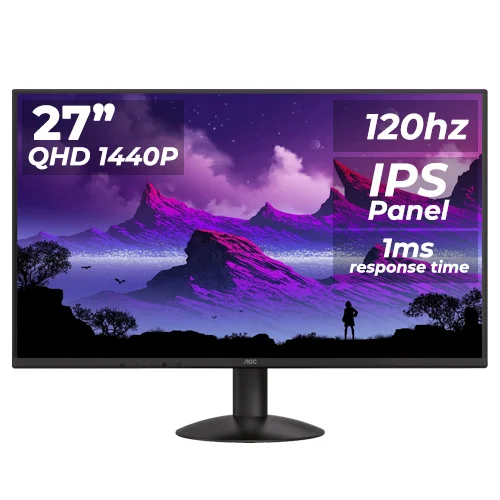
The AOC Q27B30S3 is a 27-inch QHD 2560 × 1440 IPS monitor with up to 120Hz, Adaptive Sync, HDR10, 300 cd/m² typical brightness, one HDMI 2.0 and one DisplayPort 1.4. AOC lists 4ms GtG and a separate 1ms MPRT mode. The included stand tilts; height, swivel and pivot adjustments are not listed. Read the full specifications and purchase notes below.
Overview and intended use
The AOC Q27B30S3 is a 27-inch QHD monitor with an IPS panel, 2560 × 1440 resolution and a 120Hz maximum refresh rate. AOC lists 300 cd/m² typical brightness, 1500:1 typical static contrast, Adaptive Sync, HDR10, flicker-free technology and Low Blue Mode. Its combination of QHD detail and 120Hz can suit general work, entertainment and casual gaming when the connected computer supports the mode.
The stand tilts but does not list height adjustment, swivel or pivot. A 100 × 100mm VESA pattern allows a compatible arm. The response specification includes 4ms GtG typical and a 1ms MPRT option; these are separate measurements. AOC also warns that flicker may occur in some games with Adaptive Sync enabled. This description follows AOC manufacturer sources and keeps retailer availability and warranty separate from official specifications.
QHD image and 27-inch workspace
AOC specifies a 27-inch IPS panel with 2560 × 1440 resolution, a 16:9 ratio, 0.2331mm pixel pitch and 108 PPI. QHD provides 3,686,400 pixels, about 78% more than Full HD, which can show finer text and more workspace at a similar screen size. The 596.736 × 335.664mm active area gives room for side-by-side windows, larger canvases and detailed media while keeping a familiar widescreen format.
More pixels can require additional graphics performance, especially in games. A game may need lower visual settings to maintain a high frame rate at QHD than it would at Full HD. Operating-system scaling and viewing distance affect how small text appears. Consider your GPU capability and typical work: QHD can help with detail and multitasking, while FHD may be easier to drive at a higher frame rate on older hardware.
120Hz refresh and setup
AOC specifies up to 120Hz at 2560 × 1440. A higher refresh can make compatible scrolling and motion look smoother than 60Hz, but the graphics source must deliver a supported signal. The manual lists HDMI vertical scan range 48–120Hz and the maximum mode as 2560 × 1440 at 120Hz. A source device, graphics output, cable, adapter or dock may affect which modes are available.
Connect the monitor directly where practical, set the resolution to 2560 × 1440, then select 120Hz in advanced display settings and verify the active mode. DisplayPort 1.4 and HDMI 2.0 are listed by AOC. A 120Hz monitor does not automatically make a game render at 120 frames per second; frame rate depends on GPU, CPU, settings and game load. If the mode is missing, check the cable, port, driver and manual.
IPS panel, brightness and color
AOC lists an IPS panel, 300 cd/m² typical brightness, 1500:1 typical static contrast, 178° viewing angles and 16.7 million display colors. The anti-glare finish helps limit ordinary reflections. The manufacturer lists gamut figures as NTSC 119% (CIE1976) and sRGB 129% (CIE1931). These percentages use different color-space conventions and should not be read as a promise of color accuracy or a calibrated 129% sRGB coverage result.
For everyday web, office and entertainment content, IPS viewing angles and QHD detail can be useful. If your work requires exact color, look for independent measurements and calibration data. The 300 cd/m² typical brightness is a specification reference rather than an individual panel measurement. Set brightness for your room and avoid direct sunlight or strong reflections. Color gamut alone does not describe uniformity, white-point accuracy or factory calibration.
Response modes, Adaptive Sync and HDR10
AOC publishes 4ms GtG typical and 1ms MPRT response. GtG describes pixel transition time under a specified test method, while MPRT relates to moving-image persistence; the figures are not interchangeable and neither measures input lag. The monitor also supports Adaptive Sync. AOC’s user manual cautions that flashing can occur in some game environments when Adaptive Sync is enabled, so compatibility and behavior should be checked with the specific graphics card and refresh mode.
AOC also lists HDR10 mode. This confirms HDR-related signal and display modes, but the reviewed documentation does not provide a VESA DisplayHDR certification or local-dimming specification. HDR10 support alone does not guarantee high peak brightness or deep HDR blacks. If HDR performance is a priority, compare measured brightness and contrast rather than treating the HDR10 label as a quality tier. Use the on-screen menu and manual to set the preferred mode.
Ports and connected devices
AOC lists one HDMI 2.0 input and one DisplayPort 1.4 input, with HDCP 1.4/2.2 support. This pair works with many desktop graphics cards and HDMI sources. The official specification does not list USB ports, a USB hub, USB-C charging, integrated speakers or a headphone output. Do not assume such features from a generic monitor category description; confirm the connectors on the exact unit and its regional packaging.
For QHD at 120Hz, use a suitable source and connection. If connecting a console, check that the console supports the desired resolution and refresh combination. For a PC, connect the monitor to the graphics card output rather than a motherboard port when using a discrete GPU. Audio should be handled by the source device or external audio equipment unless the specific product documentation confirms monitor audio hardware.
Stand, VESA and desk fit
AOC lists tilt adjustment from approximately -5° to +23° and 100 × 100mm VESA mounting. Height adjustment, swivel and pivot are not specified for the included stand. The monitor measures 616 × 447.4 × 195.9mm with base and 616 × 358.8 × 35.9mm without base. Its net weight is 3.15kg with the stand and 2.84kg without it; packaged weight is listed as 5.57kg.
Check the base footprint against your desk and leave room behind the stand for cables. If you need height movement, portrait orientation or a wider swivel range, a compatible monitor arm can provide it. Verify that the arm supports the monitor’s weight, use the correct screw length and follow the mounting instructions. The VESA fit alone does not confirm the capability or stability of a particular third-party arm.
Power and care features
AOC specifies an external 19V DC, 2A power supply. Typical consumption is 22W, with maximum use up to 37W at brightness and contrast set to 100; standby and off modes are listed at 0.3W. AOC lists Flicker-Free technology and Low Blue Mode. The user manual describes several display presets and adjustments, including reading, game, movie and low-blue modes. Use only an adapter with the specified output and polarity.
Care features are not medical treatments and cannot guarantee that eye fatigue will not occur. Adjust viewing distance, text size, brightness and room lighting, and take breaks during long sessions. Use a soft cloth and follow the AOC manual for cleaning. Keep the power adapter and ventilation area clear. Adaptive Sync’s possible flashing in some games is a separate compatibility issue; disable it if it causes visible flicker in your setup.
Bangladesh stock, price and warranty
At review, Star Tech listed the Q27B30S3 as Up Coming, PCPartsBD showed Call for Price/check stock, and Moharaz listed ৳24,500 while Out of Stock. These pages do not establish a live BiponiBD offer or reliable current availability. A local warranty period is advertised in some listings, but exact service terms and serial eligibility can vary by importer and seller.
Before ordering, confirm stock, final price, delivery charges, exact model name, included adapter and cables, and written warranty coverage. Ask which service provider handles the claim, whether the box and invoice are required, and what dead-pixel policy applies. Keep the packaging and proof of purchase. No hands-on test, live BiponiBD offer or guaranteed inventory is claimed in this product content.
Key features
- 27-inch IPS panel with QHD 2560 × 1440 resolution, 16:9 aspect ratio and 108 PPI.
- Maximum 120Hz refresh at QHD, subject to the input, cable, graphics hardware and selected mode.
- 300 cd/m² typical brightness and 1500:1 typical static contrast specified by AOC.
- 4ms GtG typical response plus a separate 1ms MPRT mode; these values describe different response measures.
- One HDMI 2.0 input and one DisplayPort 1.4 input, with HDCP 1.4/2.2 listed.
- Adaptive Sync, HDR10, flicker-free technology and Low Blue Mode are listed by AOC.
- Anti-glare panel treatment and 178° horizontal/vertical viewing angles.
- Tilt stand adjusts from -5° to +23°; VESA mounting is 100 × 100mm.
- AOC publishes color-gamut values of NTSC 119% (CIE1976) and sRGB 129% (CIE1931); do not read the latter as coverage or accuracy.
- External 19V/2A supply, 22W typical use, up to 37W, and 0.3W standby/off are specified.
Pros
- QHD resolution on a 27-inch IPS display offers more desktop detail than FHD at the same size.
- 120Hz refresh and Adaptive Sync can improve motion smoothness with compatible systems and settings.
- AOC lists HDR10 mode, flicker-free and Low Blue Mode functions for supported content and user preferences.
- HDMI 2.0 and DisplayPort 1.4 provide common modern desktop video connections.
- The monitor supports 100 × 100mm VESA mounting and adjustable tilt.
Cons and buying considerations
- The stand lists tilt adjustment only; height adjustment, swivel and pivot are not specified.
- AOC warns Adaptive Sync may flicker in some game environments; compatibility and behavior vary by source and settings.
- The 1ms MPRT marketing mode is not equivalent to GtG response or input lag; typical GtG is listed as 4ms.
- HDR10 mode is not a VESA DisplayHDR brightness certification and no local dimming rating is listed.
- Bangladesh stock/price is uncertain across sellers; BiponiBD offer and local serial warranty remain unverified.
Full specifications
- Brand: AOC
- Model: Q27B30S3
- ScreenSize: 27 inches / 68.5cm diagonal
- Panel: IPS TFT LCD
- Backlight: WLED
- Resolution: 2560 × 1440 QHD
- AspectRatio: 16:9
- PixelPitch: 0.2331 × 0.2331mm
- PixelDensity: 108 PPI
- ActiveArea: 596.736 × 335.664mm
- RefreshRate: Up to 120Hz at 2560 × 1440; AOC manual lists HDMI vertical range 48–120Hz
- Brightness: 300 cd/m² typical
- ContrastRatio: 1500:1 typical; MEGA DCR (dynamic)
- ViewingAngle: 178° horizontal / 178° vertical (CR >10)
- ResponseTime: 4ms GtG typical; 1ms MPRT mode (different measurement)
- ColorSupport: 16.7 million colors (8-bit as AOC specification)
- ColorGamut: AOC states NTSC 119% (CIE1976) / sRGB 129% (CIE1931); these are not sRGB coverage percentages or independent color-accuracy results.
- Surface: Anti-glare (AG); haze 25%
- HDR: HDR10 input/mode listed by AOC; no VESA DisplayHDR certification or local dimming rating claimed
- Sync: Adaptive Sync; AOC manual warns that flickering may occur in some game environments when enabled
- Ports: 1 × HDMI 2.0; 1 × DisplayPort 1.4 (HDCP 1.4/2.2)
- Audio: AOC page does not list integrated speakers or an audio output; confirm exact regional package if audio is required.
- Stand: Tilt -5° to +23°; height/swivel/pivot adjustment not listed
- VESA: 100 × 100mm
- Power: External 19V DC, 2A adapter; 22W typical; maximum ≤37W at brightness/contrast 100; standby/off 0.3W
- Dimensions: With base 616.0 × 447.4 × 195.9mm (W×H×D); without base 616.0 × 358.8 × 35.9mm
- Weight: 3.15kg net with base; 2.84kg without stand; 5.57kg packed
- Included: Check regional box contents and cable bundle with seller; AOC documentation lists external power adapter requirements.
- Warranty: Local retailers commonly list 3 years; exact Bangladesh serial coverage and service provider not confirmed.
- LocalMarketObservation: Star Tech marked the product Up Coming; PCPartsBD result showed Call for Price/check stock; Moharaz listed ৳24,500 but Out of Stock. Retailer snapshots only.
- Sources: [object Object]
- CheckedAt: 2026-11-08T20:22:40.508Z
Frequently asked questions
What are the size and resolution?
AOC specifies a 27-inch IPS display with 2560 × 1440 QHD resolution, 16:9 aspect ratio and 108 PPI.
Does it support 120Hz at QHD?
Yes. AOC lists a maximum 2560 × 1440 at 120Hz mode. The manual lists HDMI vertical scan from 48–120Hz. The graphics output, connection, cable and settings must support the mode; confirm the active signal.
Which video ports are included?
AOC lists one HDMI 2.0 port and one DisplayPort 1.4 port. HDCP 1.4/2.2 support is listed.
What does 1ms MPRT mean?
AOC lists 1ms MPRT and 4ms GtG typical. MPRT and GtG use different measurement approaches; neither figure is an input-lag measurement.
Does it support Adaptive Sync?
Yes. AOC lists Adaptive Sync. Its manual warns flickering can occur in some game environments when the feature is enabled. Compatibility depends on the GPU, driver, connection and supported refresh range.
Does it support HDR?
AOC lists HDR10 and HDR modes. The documentation reviewed does not list VESA DisplayHDR certification or a local-dimming system, so HDR10 input support should not be treated as a guarantee of premium HDR brightness or contrast.
What are the brightness and contrast?
AOC lists 300 cd/m² typical brightness and 1500:1 typical static contrast, plus MEGA DCR dynamic contrast. These are published specifications, not an independent test of a particular unit.
How should I interpret the gamut figures?
AOC publishes NTSC 119% (CIE1976) and sRGB 129% (CIE1931). Those are manufacturer gamut figures using different coordinate standards; 129% does not mean 129% sRGB coverage or calibrated color accuracy.
Can I adjust the stand?
The product specification lists tilt from -5° to +23°. Height adjustment, swivel and pivot are not listed. A compatible VESA arm can add movement.
Can I use a monitor arm?
Yes. AOC lists 100 × 100mm VESA mounting. Check arm capacity, screw length and installation instructions before mounting.
What are the power requirements?
AOC specifies an external 19V, 2A adapter, 22W typical consumption, up to 37W at maximum brightness/contrast, and 0.3W standby/off. Use a compatible adapter with the required rating.
What is the Bangladesh price and warranty?
Star Tech showed Up Coming; PCPartsBD showed Call for Price/check stock; Moharaz listed ৳24,500 but Out of Stock. Local sellers advertise three years in some listings. Confirm live stock, price and written serial warranty with the seller.
Source note: AOC’s product page, leaflet and user manual are the manufacturer sources. Bangladesh stock, price and warranty are retailer observations and may change. No BiponiBD offer or hands-on test is claimed. Sources checked 2026-11-08T20:22:40.508Z.