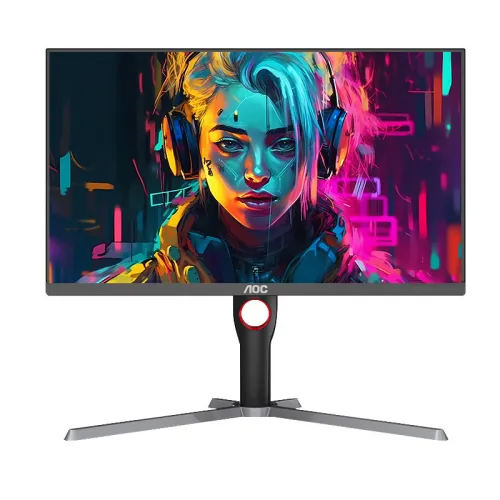
Exact model overview
AOC Q27G3H2 is a 27-inch flat IPS gaming monitor with 2560 × 1440 QHD resolution and a 210Hz maximum refresh rate. AOC’s official China product page identifies the exact model as a 27-inch IPS QHD 210Hz monitor. The catalog and Bangladesh retailer list additional features including Fast IPS, DisplayHDR 400, adaptive sync, a height-adjustable stand and HDMI/DisplayPort inputs; these expanded details are retailer-derived where the official page does not expose a complete searchable specification table. Confirm regional ports, warranty and box contents for the delivered unit.
27-inch QHD resolution
The 27-inch panel has native 2560 × 1440 resolution in a 16:9 format. QHD provides more detail and desktop area than Full HD at the same size, useful for game interfaces, documents, timelines and multitasking. Choose native resolution for direct pixel mapping and adjust scaling if text is too small. Rendering QHD games requires more GPU power than Full HD, so actual frame rate depends on the computer, game and graphics settings.
IPS panel and viewing
AOC’s official product page identifies an IPS panel. The catalog’s Bangladesh listing describes Fast IPS and 178-degree viewing angles; confirm the exact panel revision and measurement details in the local manual. IPS is generally chosen for broad viewing positions and color consistency, but it does not guarantee calibration or uniformity for each unit. Center the screen for the most consistent image. If color accuracy matters for design or photo work, calibrate the specific monitor.
210Hz refresh rate
AOC’s exact-model page lists a 210Hz maximum refresh rate. To select it, connect the monitor to a compatible graphics output, set 2560 × 1440 and choose an available refresh rate in system display settings. The source device, cable and input timing determine which modes are exposed. If 210Hz is unavailable, check the local manual’s timing table and verify the cable, port and GPU driver. Refresh capability does not cause the computer to render 210 frames per second.
Gaming performance and system matching
A QHD 210Hz monitor can suit fast games when the computer can produce high frame rates at 2560 × 1440. Competitive titles may be less demanding than graphically intensive games, while frame output changes with CPU, GPU, settings and thermal limits. Check expected performance for the games you play. The monitor cannot increase rendering speed. Consoles may support only a subset of resolution and refresh combinations, so verify console output modes and the chosen input.
Response time and motion
Retailer information associates the Q27G3H2 with 1ms GtG and 0.3ms MPRT, but the official product page excerpt available for this review confirms the model and 210Hz headline, not test conditions for these response claims. GtG and MPRT are different measurements and neither is input latency. Pixel behavior changes with settings and transitions. Choose a balanced overdrive mode and inspect moving images for overshoot, trailing or reduced brightness before relying on the fastest setting.
Brightness, contrast and HDR
The catalog and Bangladesh retailers report 400 cd/m² brightness and HDR400/DisplayHDR 400. These details were not confirmed in the official page text accessed for this audit, so verify the exact regional certificate and manual before treating them as manufacturer-certified. HDR input support and a certification label do not by themselves guarantee high-end local-dimming performance. Set brightness for the room and compare HDR with familiar content. Do not interpret a retailer specification as a measured sustained brightness result.
Color gamut and color depth
Retailer specifications list IPS and wide-gamut color features, but a complete official color-gamut table was not available on the exact-model page used here. No unit-level calibration or color accuracy is claimed. Gamut percentages are only comparable when measurement standard and coverage method match. For creative work, calibrate the monitor and use color-managed software. For games and media, use a natural preset and adjust saturation only if the source content benefits.
Adaptive sync and compatibility
The catalog lists both FreeSync and G-SYNC support, while retailer pages describe adaptive sync. Confirm the exact technology names, supported range and input compatibility in the local manual before relying on them. Variable refresh can coordinate screen updates with a compatible GPU’s changing frame output and may reduce tearing in supported conditions. It does not create frames or eliminate every kind of stutter. Enable the feature in the display and graphics settings when the source supports it.
Video inputs and port limits
The catalog lists two HDMI 2.0 inputs and one DisplayPort 1.4 input; these connector details are retailer-derived and should be verified against the product label/manual. Port bandwidth affects whether QHD 210Hz, HDR and adaptive sync can work together. Use a direct cable from a compatible graphics card when troubleshooting. Docks, adapters and KVM switches can restrict refresh or VRR. No USB-C video input is listed in the catalog record for this model.
Audio and speakers
The catalog’s existing specifications do not establish integrated speakers. If speakers are not listed in the delivered manual, plan separate headphones or desktop speakers. When audio is carried over HDMI or DisplayPort, select the monitor as the playback device if available and connect compatible audio equipment to its output. Check whether the local version includes an audio-out jack; the seller’s connector list should not be assumed universal across regional packages. An output jack is not a microphone input.
Stand and ergonomic adjustment
The catalog lists 130mm height adjustment and ±90° pivot, and its retailer description advertises an ergonomic stand. Confirm tilt, swivel and pivot ranges against the exact regional manual because AOC pages may differ by market. Raise the screen to a comfortable eye level, position it centered and adjust tilt to reduce reflections. Leave cable slack if the stand pivots. Do not assume a height-adjustable stand is included unless it appears in the delivered product configuration and package list.
VESA mounting
The catalog lists a 100 × 100mm VESA pattern, a retailer-derived value that should be checked against the official manual or rear label before buying a bracket. Confirm screw dimensions, insertion depth and mount load rating. Use compatible hardware and support the display while installing it. A monitor arm can provide positioning that a supplied stand may not offer, but the 27-inch panel still requires a stable support and safe cable routing.
Dimensions and desk fit
The catalog gives dimensions with stand of approximately 614.4 × 403.3–533.3 × 302.6mm and without stand 614.4 × 365.6 × 71.8mm. Treat these measurements as retailer-provided until confirmed in the local manual. Measure desk width, depth, monitor height and rear clearance before purchase. Account for stand-footprint space, connector protrusion and cable bend radius. QHD at 27 inches can be comfortable at typical desk distance, with operating-system scaling available for smaller text.
Eye comfort and display care
The catalog lists flicker-free and low-blue-light features for the Q27G3H2; verify available modes in the delivered OSD. Low-blue-light modes can warm the image and are not medical treatments. Comfort also depends on brightness, ambient lighting, viewing distance and regular breaks. An anti-glare finish can reduce some reflections but cannot remove direct bright sources. Clean the panel with a soft cloth and follow AOC’s manual; do not spray liquid directly on the screen.
Advantages and practical trade-offs
The official AOC page confirms the central combination of 27-inch IPS, QHD and 210Hz maximum refresh. The catalog also records DisplayHDR 400, adaptive sync, height adjustment, VESA mounting and multiple digital inputs, subject to regional verification. QHD can provide finer detail than Full HD at this size, but high frame rates at QHD require capable graphics hardware. Confirm response-time test conditions, HDR certification, input limits, stand movement and warranty before purchase.
Bangladesh warranty, price and availability
AOC’s exact-model product page does not establish the warranty for a Bangladesh serial sold through BiponiBD. The catalog says three years, which must be verified with the local seller and authorized service channel. Ask when coverage begins, what panel and pixel defects qualify, who performs service and what invoice or serial proof is required. Current price, stock, delivery, return and payment terms can change; check the live BiponiBD offer at checkout and retain the invoice and packaging.
Setup and troubleshooting
Connect the supplied power cable and a compatible HDMI or DisplayPort cable. Select 2560 × 1440 and choose a refresh rate supported by both the monitor and graphics device. If 210Hz is missing, check the exact input timing, cable bandwidth, GPU output, driver and monitor OSD. If adaptive sync is unavailable, verify compatibility and enable it in both display and GPU settings. For picture artifacts, try a different overdrive setting. Use the local manual for port-specific modes and service steps.
Who should consider this monitor
The Q27G3H2 may suit a PC gamer who wants a 27-inch QHD IPS screen and a high refresh ceiling for competitive and fast-moving games. It is most useful with a computer capable of rendering demanding titles at high frame rates. Users who prioritize confirmed HDR performance, a precise response-time guarantee, built-in speakers or a specific warranty should verify those details separately. Check local ports, stand features and desk fit before ordering.
Specification summary
AOC Q27G3H2 is officially identified as a 27-inch IPS QHD monitor with 210Hz maximum refresh. Catalog and retailer details additionally report 2560 × 1440, Fast IPS, 400 cd/m², HDR400, adaptive sync, 1ms GtG/0.3ms MPRT, HDMI 2.0 × 2, DP 1.4 × 1, 100 × 100mm VESA and a height-adjustable stand. Those expanded values require confirmation against the local manual and delivered version. Verify Bangladesh serial warranty and current seller terms before purchase.