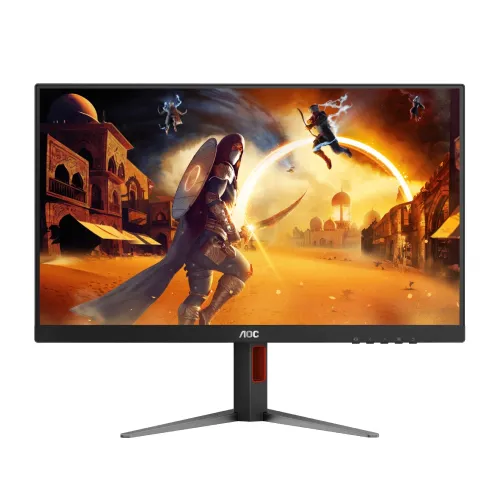
AOC Q27G4 overview
The AOC Q27G4 is a 27-inch QHD gaming monitor with an IPS panel, 180Hz maximum refresh rate and 1ms GtG response. AOC’s exact-model Philippines product page identifies Q27G4, 2560 × 1440 resolution, Fast IPS positioning, Adaptive Sync and VESA Certified DisplayHDR 400. Its detailed specifications list two HDMI 2.0 inputs, one DisplayPort 1.4, a 3.5mm audio output, 130mm height adjustment, tilt, swivel and pivot. Refresh depends on connection: HDMI supports up to 144Hz and DisplayPort up to 180Hz. Use DisplayPort for the highest PC refresh and confirm the GPU and cable support the chosen mode.
27-inch QHD and workspace
The monitor has a 27-inch diagonal, 16:9 aspect ratio and native 2560 × 1440 QHD resolution. QHD offers more detail and workspace than Full HD at the same physical size, making it useful for games, browser windows, documents and editing timelines. AOC lists 108.8 pixels per inch and a 0.2331mm pixel pitch. Set the computer to native resolution and select scaling for comfortable text. The display is flat and uses an anti-glare coating. QHD at 180Hz requires substantial graphics performance; the refresh specification describes the display maximum rather than the frame rate a particular game will achieve.
Fast IPS panel and viewing
AOC identifies an IPS panel and lists 178-degree horizontal and vertical viewing angles. The product page describes Fast IPS performance and the detailed specification lists a 1ms GtG response time. IPS viewing can be useful when a player moves slightly off center or shares the screen. AOC lists 1.07 billion colors under supported input conditions. Color depth depends on the chosen refresh, input and graphics output, so consult the manual’s timing and bit-depth table if 10-bit output is important. The 3H anti-glare surface and 25% haze specification help manage reflections but cannot eliminate all glare in a bright room.
Refresh rate by input
AOC specifies a maximum 180Hz refresh over DisplayPort 1.4 and up to 144Hz over HDMI 2.0 at 2560 × 1440. Use DisplayPort when targeting 180Hz. If HDMI reports 144Hz, that matches the manufacturer-listed ceiling. Connect directly to the graphics card, select QHD and choose a supported refresh in the operating system or driver. A cable, dock, adapter or KVM can reduce available bandwidth or hide modes. If the maximum mode is unavailable, check the active input, cable specification, GPU output and driver. Do not force unsupported timings; return to a stable mode if the image blanks or flickers.
QHD gaming and frame rates
The Q27G4’s QHD resolution and 180Hz maximum can benefit a PC capable of rendering high frame rates. Competitive games may approach the maximum with tuned quality settings, while demanding titles can run below it. The display does not generate frames; graphics hardware and software determine actual performance. Adaptive Sync can coordinate refresh with variable frame delivery when the system supports it. Console modes may be limited by console output and HDMI timing and should not be expected to match the DisplayPort PC maximum. Check your computer’s QHD performance and the games you play before choosing the monitor for 180fps use.
Response time and MPRT
AOC lists 1ms GtG and 0.5ms MPRT. GtG measures pixel transition behavior, while MPRT describes perceived motion persistence and may use backlight strobing. They are different measurements, not equivalent to input latency or a guarantee that all motion will be artifact-free. MPRT operation can change brightness and may interact with variable refresh or other settings; check the manual’s supported modes. The monitor also includes Trace Free overdrive. If aggressive overdrive causes bright trails or overshoot, try a lower level. Evaluate the actual game and refresh mode rather than relying on the shortest marketing figure alone.
DisplayHDR 400 and image output
AOC identifies the Q27G4 as VESA Certified DisplayHDR 400 and lists a 450 cd/m² brightness value on its current product page. The page describes DisplayHDR 400 peak luminance at 400 cd/m²; the detailed specification’s 450-nit field may refer to panel brightness. Treat these values as mode-dependent specifications rather than constant brightness across the full screen. HDR performance also depends on content, operating-system configuration, local dimming behavior and picture mode. The reviewed spec page does not describe a local-dimming zone system. Enable HDR for compatible content and compare with SDR if the picture looks washed out or too dim.
Contrast, color and gamut
AOC lists a 1000:1 static contrast ratio and wide color-space figures including NTSC 108%, sRGB 127% and DCI-P3 99% under specified measurement conventions. Gamut size and coverage are not interchangeable, and these percentages do not establish factory calibration. The detailed page also lists sRGB 127.3%, DCI-P3 93.5% and Adobe RGB 89.8%, illustrating that exact figures vary with the metric and source field. Use a suitable sRGB or GameVisual preset for everyday content. For design, photography or print, use a calibrated color-managed workflow and check individual-unit measurements. Wide-gamut SDR content may look oversaturated when not color managed.
Adaptive Sync and G-SYNC
AOC lists Adaptive Sync for the Q27G4, and NVIDIA’s G-SYNC Compatible monitor roster includes Q27G4 with a DisplayPort variable-refresh range. Adaptive Sync can reduce tearing or stutter by matching display updates to the GPU’s frame rate within the supported range. Enable it in the OSD and graphics driver where applicable. The feature does not improve rendering speed and cannot guarantee every frame-rate behavior. Compatibility depends on GPU, driver, port, cable and selected timing. Use DisplayPort for the official NVIDIA-listed range and check the driver’s monitor detection if the feature is missing.
Ports and connectivity
The exact-model AOC page lists two HDMI 2.0 inputs, one DisplayPort 1.4, one audio output and no USB hub. The HDMI and DisplayPort refresh ranges are different, so choose the input according to the required mode. HDCP 2.2 is listed for HDMI. A 3.5mm audio output can connect headphones or external audio equipment; it is not a microphone input. The product has no listed VGA, DVI, RJ45 or USB data ports. Confirm which cable is included in the local package. For best troubleshooting, connect the source directly rather than through a dock or conversion adapter.
Stand ergonomics and rotation
AOC specifies 130mm height adjustment, tilt from approximately -3 to +21 degrees, swivel around ±28 degrees and pivot around ±90 degrees. The stand also has a quick-release feature. These movements can help align the screen for seated use, rotate a supported application to portrait orientation and make shared viewing more convenient. Leave cable slack before adjusting and check clearance around the desk and wall. The monitor supports a 100 × 100mm VESA mount if an arm is preferred. Use an arm rated for the monitor and follow the manufacturer’s screw-depth instructions.
Audio and headphones
The Q27G4 has a 3.5mm audio output, but AOC’s specification page does not list built-in speakers. Plan to use headphones or external speakers. When connected by HDMI or DisplayPort, the computer may route audio through the display; choose the AOC monitor as the playback device and adjust source and monitor volume. The audio output passes sound to a compatible headset or powered speakers. If using VGA, which is not listed for this model, the sound path would need a separate source connection. Check local box contents before purchase; the product page does not imply that headphones or speakers are included.
Power, dimensions and package
AOC lists an internal power supply accepting 100–240V AC at 50/60Hz. Typical power consumption is 29W, standby is 0.5W and off-mode consumption is 0.3W. Product dimensions with base are approximately 613.9 × 386–516 × 207.7mm; without base they are about 613.9 × 366.3 × 51.3mm. Net weight is around 5.29kg with stand and 3.42kg without. The Philippines product page lists HDMI and DisplayPort cables, but accessories vary by region. Confirm package contents and measurements for the exact regional SKU before installation. Provide ventilation and avoid pinching cables in the adjustable stand.
Gaming features and software
AOC lists Low Input Lag mode, Game Mode, Adaptive Sync, Game Color, Shadow Control, Sniper Scope, Dial Point and AOC G-Menu software. These optional settings can customize the display for different games. Sniper or crosshair overlays can be disabled if not useful or permitted in a particular game. Shadow controls change dark-scene presentation, while low input lag changes processing behavior. AOC G-Menu requires installation on a compatible PC. Start with a neutral picture preset and adjust features one at a time so you can tell what changed. Reset to a known profile if colors or shadow details become unnatural.
Eye comfort and screen finish
The product lists Flicker-Free and Low Blue Light technology, plus an anti-glare panel treatment with 3H hardness. These settings can help reduce perceived flicker and reflections for some users, but comfort depends on brightness, room light, text scale, distance and breaks. Low-blue-light modes can warm the image and are not ideal for judging color. Position the monitor away from direct reflections and choose brightness appropriate to the room. Eye-care functions are display options, not medical treatment. For long sessions, combine a comfortable screen setting with a stable ergonomic posture.
Advantages and realistic limits
The Q27G4 pairs QHD detail, a high 180Hz DisplayPort refresh and Fast IPS viewing with a VESA Certified DisplayHDR 400 feature set. Adaptive Sync and NVIDIA G-SYNC compatibility support variable-refresh gaming, while the adjustable stand offers height, tilt, swivel and pivot. Multiple HDMI inputs and an audio output suit a desk with several sources. It is still a 27-inch display with 1000:1 static contrast and high-refresh operation dependent on a powerful PC. HDR certification does not make it an OLED or local-dimming display, and wide gamut does not guarantee calibration. Match features to the actual use case.
Warranty and Bangladesh seller terms
AOC’s Philippines page lists a three-year warranty for that market; it does not establish coverage for the specific Bangladesh unit. The catalog’s original three-year wording needs confirmation against the serial number and invoice. Ask whether service is provided by an authorized local channel or seller, the coverage start date, panel and pixel policy, exclusions and repair location. Current BiponiBD price, stock, delivery and return terms are separate from the manufacturer specification and should be checked on the live offer. Keep the product serial, invoice and included accessories for any service request.
Setup and troubleshooting
Install the stand and connect the power cord. Use DisplayPort 1.4 for QHD at the listed 180Hz maximum or HDMI 2.0 for up to 144Hz. Select 2560 × 1440 and the desired supported refresh in the computer settings. If 180Hz is missing, verify the DisplayPort connection, cable, GPU output and driver; remove adapters during diagnosis. Enable Adaptive Sync in the monitor menu and graphics driver if required. If MPRT or overdrive causes artifacts, reduce or disable the feature and compare. For audio, select the monitor as output and connect headphones or powered speakers to the 3.5mm jack.
Who should consider the Q27G4
This AOC model suits PC users seeking a 27-inch QHD display with high refresh, Fast IPS and a fully adjustable stand. It can serve gaming, study and general productivity, especially when the graphics card can render QHD at high frame rates. It is less useful if a PC is limited to low refresh, if the user needs integrated speakers or if the desk cannot fit a stand with height and pivot movement. Buyers who prioritize HDR should understand the DisplayHDR 400 class and compare peak brightness with their expectations. Color-critical users should calibrate the individual unit. Confirm the exact Q27G4 rather than a Q27G4F, Q27G4X or other similarly named model.
Product summary
AOC Q27G4 is a 27-inch QHD 2560 × 1440 IPS gaming monitor with 180Hz DisplayPort, 144Hz HDMI, 1ms GtG, 0.5ms MPRT, Adaptive Sync and VESA Certified DisplayHDR 400. AOC lists 1000:1 static contrast, 450-nit brightness field, two HDMI 2.0 inputs, DisplayPort 1.4, audio out and an adjustable stand with 130mm height range. It supports 100 × 100mm VESA mounting and includes Low Blue Light and Flicker-Free features. Check local warranty, exact package and live seller offer before ordering.