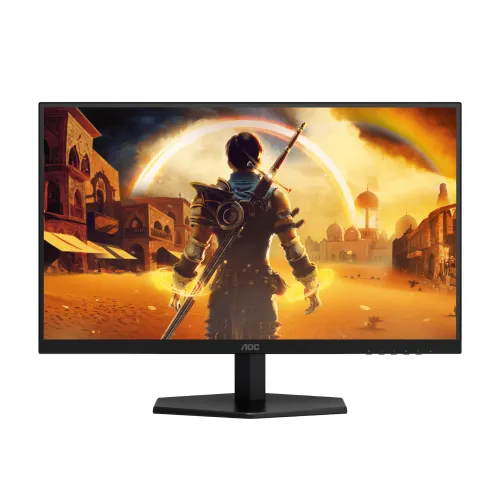
The AOC Q27G40E is a 27-inch QHD Fast IPS monitor with a maximum 180Hz refresh rate over DisplayPort 1.4 and 144Hz over HDMI 2.0, according to AOC. It also lists 1ms GtG, 0.5ms MPRT, HDR10 signal compatibility, Adaptive-Sync and a tilt-adjustable stand. This guide keeps the port limits and seller observations explicit.
Model identity and intended use
The AOC Q27G40E is a flat 27-inch Fast IPS gaming monitor with QHD resolution. Its high-refresh mode is port-dependent: AOC specifies 2560 × 1440 at 180Hz over DisplayPort 1.4 and 144Hz over HDMI 2.0. This distinction is important when planning a PC or console setup. The product page name includes the exact Q27G40E model to avoid confusion with similar Q27G4 models.
The model pairs a 2560 × 1440 panel with a maximum 180Hz refresh rate. QHD provides more pixels than Full HD for games, browser tabs, spreadsheets and creative applications, while high refresh can improve motion fluidity when the system supplies enough frames. The connected graphics device, cable, software and game all affect the mode that can be used.
Panel, resolution and viewing area
AOC lists a 27-inch Fast IPS panel with pixel pitch of 0.2331 × 0.2331 mm. The effective viewing area is 596.736 × 335.664 mm and the viewing angle is 178° horizontally and vertically under a contrast-ratio criterion greater than 10. These are manufacturer figures and do not guarantee uniform brightness or color from every angle.
The panel is flat and provides QHD 2560 × 1440. Text and interface size may need scaling depending on viewing distance. For gaming, QHD demands more rendering work than 1080p, so check whether the graphics card can reach a suitable frame rate at the intended quality settings.
AOC states 16.7 million display colors, sRGB 127% under CIE 1931, DCI-P3 102% under CIE 1976 and Delta E below 2. Gamut coverage and a stated Delta E are manufacturer claims, not independent measurements of the unit purchased. For color-sensitive design, verify calibration and application color management.
Refresh rate and port selection
AOC specifies 180Hz at QHD through DisplayPort 1.4 and 144Hz at QHD through HDMI 2.0. The manual’s vertical scan ranges are 48–180Hz for DisplayPort and 48–144Hz for HDMI. A 180Hz mode should therefore use a supported DisplayPort connection rather than assuming both inputs share the maximum.
A higher refresh rate can make motion appear smoother when the graphics system produces frames at a matching pace. It does not improve a game’s frame rate by itself. The graphics card, game engine, settings, driver, input and cable contribute to the final result. If 180Hz is missing, use a direct DisplayPort connection and check the source and operating-system display mode.
If the screen is connected over HDMI, the manufacturer’s listed QHD maximum is 144Hz. This remains a high-refresh mode but is lower than the DisplayPort maximum. Verify the console or PC video output and cable before buying if a particular refresh rate is essential.
Response time, sync and motion controls
AOC lists 1ms GtG and 0.5ms MPRT. These are separate response-time methods, not two equivalent measurements of the same setting. GtG concerns pixel transitions; MPRT describes moving-picture response under a different method. Motion clarity also depends on refresh, frame rate and overdrive.
The manual offers overdrive settings and notes that its fastest option may blur the displayed image; users can reduce or disable overdrive according to preference. The extreme mode has additional conditions and may decrease screen brightness. This is why a minimum headline figure should not be treated as a guaranteed result for every configuration.
AOC identifies the display as G-SYNC Compatible and Adaptive-Sync. Variable refresh can coordinate updates with compatible graphics hardware. Actual operation depends on GPU model, driver, input, cable and supported refresh range. Check the intended device and configure the feature in the graphics settings rather than assuming identical behavior across all systems.
HDR10, brightness and contrast
The leaflet lists 300 cd/m² typical brightness, a 1000:1 typical contrast ratio and 80-million-to-one dynamic contrast. It also identifies HDR10 input compatibility and picture modes. HDR10 signal compatibility does not by itself prove DisplayHDR certification or a specific peak-brightness tier. This description does not state that the monitor is DisplayHDR 400 certified.
HDR performance depends on compatible source hardware, operating-system settings, content and the monitor’s mode. AOC’s manual notes that picture controls may become unavailable in certain HDR settings. If standard desktop content looks different after HDR is enabled, review the source and on-screen settings or return to SDR mode.
For regular SDR, adjust brightness to suit the room and avoid direct glare. The 300-nit typical rating may be adequate for many indoor desks but can be modest in bright rooms. Contrast and brightness figures are manufacturer specifications; no independent lab measurement was made for this catalog entry.
Inputs, audio and copy-protection
The monitor has one HDMI 2.0 input, one DisplayPort 1.4 input and an earphone output. AOC lists HDCP 2.2 for HDMI and DisplayPort. Only one HDMI input is specified, so users who need multiple HDMI sources may need an external switch or reconnect cables. Verify the device’s output and cable type for QHD at the desired refresh.
AOC lists no USB hub and no built-in speakers. The earphone output can connect compatible headphones or external audio equipment. No USB-C input, charging, integrated webcam or microphone is listed. Plan for audio and peripheral connections separately.
The detachable signal cable and external adapter are part of the setup. Check the included cables and power adapter with the exact retailer’s package. Adapters and docks can reduce supported bandwidth, so test directly to the monitor if a high refresh mode is not available.
Stand, mounting and physical dimensions
The supplied stand is listed with tilt from -5° to +23°. The leaflet does not list height adjustment, swivel or pivot. Users who need those movements may add a compatible monitor arm; the VESA pattern is 100 × 100 mm. Confirm the arm’s load rating and screws before mounting.
With the stand, AOC lists dimensions of 449.7 mm high × 613.9 mm wide × 197.6 mm deep. Without the stand, dimensions are 366.3 × 613.9 × 51.1 mm. Packaging is 454 × 690 × 126 mm. Product weight is 3.53kg with stand and 3.14kg without; packaged weight is 5.82kg. Measure desk depth and shipping access using the relevant figures.
The black cabinet includes a 100 × 100mm mount pattern. Follow the manual for disassembly and installation, protect the screen while changing stands and avoid screw lengths that exceed the manufacturer guidance. Keep ventilation clear and ensure the cables do not become pinched when adjusting tilt.
Power, controls and care
AOC specifies an external 20V DC, 2.25A power supply. Typical consumption is 21W, maximum consumption is up to 50W and standby is 0.3W or less. Use the supplied or manufacturer-approved adapter. Keep the power cable away from sharp edges and provide suitable ventilation.
The monitor includes on-screen controls for game settings, picture, audio and input selection. AOC lists Game Mode, Game Color, Shadow Control, Low Input Lag, MBR Sync, Flicker-Free, Low Blue Mode and G-Menu software. Manual notes describe setting interactions; some features are unavailable together in HDR or variable-refresh configurations.
Clean the screen with a soft cloth following the manual. Avoid liquid directly on the panel and do not press on the LCD. If a resolution or refresh mode appears incorrect, verify input, cable, driver and source capability before resetting the monitor.
Bangladesh price and seller terms
Computer Vision BD displayed ৳23,500 and In Stock; Creatus displayed ৳24,900 and In Stock. These are the sellers’ page observations at review time. Price and availability may change before checkout. A seller’s displayed offer is not a BiponiBD offer and does not establish BiponiBD inventory.
The seller pages state different warranty periods or details, and this review did not independently verify a local AOC warranty provider or serial eligibility. Before ordering, ask who provides service, how warranty is claimed, whether the serial is eligible and what panel/dead-pixel terms apply. Keep the invoice and box if required.
Compare actual checkout price, shipping, accessories, warranty and return conditions rather than relying only on discount labels. Confirm exact model Q27G40E, port-specific refresh limits and the external power adapter in the seller’s listing.
Who should consider the Q27G40E
The product may suit a user looking for QHD resolution and a Fast IPS panel with a 180Hz DisplayPort mode. It can be useful for games and general desktop work when the PC supports the refresh rate. A creator should verify the required color workflow, since manufacturer gamut figures are not a substitute for calibration of a specific unit.
The main trade-offs are HDMI’s 144Hz QHD ceiling, a tilt-only included stand, no speakers, no USB hub and 300-nit typical brightness. Buyers who need HDMI 180Hz, height adjustment, built-in audio or higher HDR brightness should compare alternatives before buying.
Use the product details, features, pros/cons, specifications and FAQs to compare systems. No claims of hands-on performance, actual panel uniformity, local warranty entitlement or guaranteed lowest price are made.
Key features
- 27-inch Fast IPS panel with QHD 2560 × 1440 resolution and 16:9 aspect ratio.
- 180Hz maximum at QHD over DisplayPort 1.4; HDMI 2.0 supports QHD up to 144Hz per AOC.
- 1ms GtG and 0.5ms MPRT response-time measures, as stated by AOC; the methods are distinct.
- 300 cd/m² typical brightness and 1000:1 typical contrast ratio per the AOC leaflet.
- 127% sRGB (CIE 1931) and 102% DCI-P3 (CIE 1976), with Delta E < 2 stated by AOC.
- HDR10-compatible input and G-SYNC Compatible / Adaptive-Sync.
- One HDMI 2.0 input, one DisplayPort 1.4 input and one earphone output.
- Flicker-Free, Low Blue Mode, Low Input Lag, MBR Sync and AOC game picture controls.
- Tilt adjustment from -5° to +23° and 100 × 100 mm VESA mounting.
- No USB hub or built-in speakers listed.
- External 20V/2.25A adapter; 21W typical and ≤0.3W standby.
- Manufacturer lists QHD gaming modes at 180Hz DP and 144Hz HDMI; system capability and cable remain important.
Pros
- QHD resolution on a 27-inch Fast IPS panel provides more desktop detail than Full HD.
- 180Hz over DisplayPort and Adaptive-Sync can support smooth gaming with a compatible high-frame-rate system.
- AOC lists HDR10 signal compatibility, Low Input Lag, MBR Sync, Flicker-Free and Low Blue Mode.
- One HDMI plus one DisplayPort and an audio output cover common PC and console connections.
- VESA 100 × 100 mount and tilt adjustment provide basic positioning and arm-mount options.
Cons and trade-offs
- HDMI is limited to 144Hz at QHD; 180Hz requires DisplayPort according to AOC.
- The included stand is tilt-only in the leaflet; height, swivel and pivot are not listed.
- 300 cd/m² typical brightness may be modest in bright environments.
- No built-in speakers and no USB hub are listed.
- Bangladesh seller warranty terms were not verified against a confirmed BiponiBD offer.
Specifications
- Brand: AOC
- Model: Q27G40E
- DisplaySize: 27 inches (68.5 cm diagonal)
- PanelType: Fast IPS
- Resolution: QHD 2560 × 1440
- AspectRatio: 16:9
- ScreenForm: Flat
- RefreshRate: 180Hz maximum over DisplayPort; 144Hz maximum over HDMI
- ResponseTime: 1ms GtG / 0.5ms MPRT
- Brightness: 300 cd/m² typical
- ContrastRatio: 1000:1 typical; 80 million:1 dynamic contrast stated
- ViewingAngle: 178° horizontal / 178° vertical (CR > 10)
- PixelPitch: 0.2331 × 0.2331 mm
- EffectiveDisplayArea: 596.736 × 335.664 mm
- ColorGamut: sRGB 127% (CIE 1931) / DCI-P3 102% (CIE 1976)
- ColorAccuracy: Delta E < 2 (manufacturer leaflet)
- DisplayColors: 16.7 million
- HDR: HDR10 input compatible
- AdaptiveSync: G-SYNC Compatible / Adaptive-Sync
- VideoInputs: 1 × HDMI 2.0; 1 × DisplayPort 1.4
- Audio: Earphone output; no built-in speakers
- USBHub: No
- HDCP: 2.2 over HDMI and DisplayPort
- EyeCare: Flicker-Free; Low Blue Mode
- GameFunctions: Low Input Lag, MBR Sync, Game Mode, Game Color and Shadow Control listed by AOC
- StandAdjustment: Tilt -5° to +23°; height/swivel/pivot not listed
- VesaMount: 100 × 100 mm
- PowerSupply: External 20V DC, 2.25A
- PowerConsumption: 21W typical; ≤50W maximum; ≤0.3W standby
- DimensionsWithoutStand: 366.3 × 613.9 × 51.1 mm (H × W × D)
- DimensionsWithStand: 449.7 × 613.9 × 197.6 mm (H × W × D)
- PackagingDimensions: 454 × 690 × 126 mm (H × W × D)
- WeightWithoutStand: 3.14 kg
- WeightWithStand: 3.53 kg
- PackagedWeight: 5.82 kg
- CabinetColor: Black
Frequently asked questions
What resolution does the AOC Q27G40E have?
AOC specifies QHD 2560 × 1440 on a 27-inch Fast IPS panel.
Does it support 180Hz over HDMI?
No. AOC lists QHD up to 180Hz through DisplayPort 1.4 and QHD up to 144Hz through HDMI 2.0.
What are its response-time ratings?
AOC lists 1ms GtG and 0.5ms MPRT. They use different methods and should not be treated as interchangeable.
What brightness and contrast does AOC specify?
The leaflet lists 300 cd/m² typical brightness and 1000:1 typical contrast. It also states 80 million:1 dynamic contrast.
Does it work with G-SYNC?
AOC identifies it as G-SYNC Compatible and lists Adaptive-Sync. Actual operation depends on the graphics card, driver, port and selected refresh mode.
Is HDR supported?
AOC states compatibility with HDR10 input signals and includes HDR picture modes. This does not by itself confirm a VESA DisplayHDR certification tier.
Which inputs are provided?
One HDMI 2.0, one DisplayPort 1.4 and an earphone output are listed.
Does it have built-in speakers or USB ports?
AOC lists no speakers and no USB hub. An earphone output is provided for audio connection.
Can the stand adjust height?
The manufacturer leaflet lists tilt from -5° to +23°; it does not list height adjustment, swivel or pivot.
Can the monitor be wall-mounted?
Yes. AOC specifies a 100 × 100 mm VESA mount. Confirm the arm or bracket load rating and required screws.
What is the power requirement?
AOC lists an external 20V DC, 2.25A supply, 21W typical power, up to 50W maximum and 0.3W or less standby.
What is the current Bangladesh price?
Computer Vision BD displayed ৳23,500 in stock and Creatus displayed ৳24,900 in stock when reviewed. Confirm live price and stock directly; these are seller listings, not a BiponiBD offer.
Source note: AOC Q27G40E product leaflet and user manual provide technical facts; Bangladesh seller pages provide price/stock observations only. No hands-on test or BiponiBD offer is claimed.