Pros
- Large 17.3-inch portable screen with high pixel density.
- 4K resolution can provide detailed workspace with compatible sources.
- Mini-HDMI and two USB-C inputs provide multiple connection paths.
- Built-in speakers and stand are listed by seller.

All categories
 New condition
Monitors
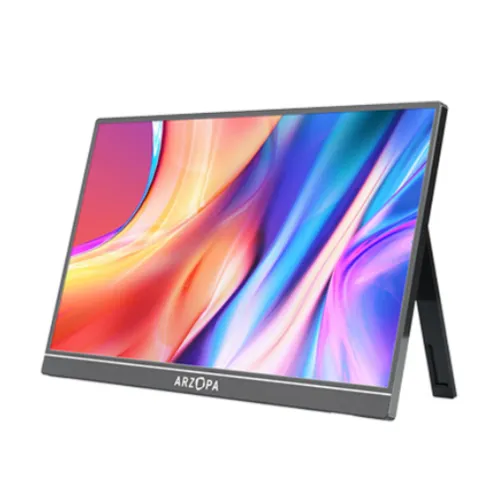
Arzopa · Z5RC
17.3-inch portable 4K UHD IPS monitor with 60Hz, mini-HDMI and dual USB-C listed; detailed regional specs should be verified with the seller.
Price unavailable
Price range updating
No verified price is available yet. Store offers will appear when merchants publish them.
Compare store prices
No live offers for this variant
Offers will appear when merchants publish them.
Loading history…
Product story
The ARZOPA Z5RC is listed by Bangladesh retailers as a 17.3-inch portable 4K UHD monitor with an IPS panel and 60Hz refresh. The seller specification describes one mini-HDMI 2.0 input, two USB-C ports supporting DisplayPort output and power, and two 1W speakers. ARZOPA’s current public support page explains general portable-monitor setup but does not provide a model-specific Z5RC datasheet in the reviewed source. Treat detailed figures and two-year local warranty as seller-listed until confirmed against the exact unit and documentation.
The seller lists a 17.3-inch 3840 × 2160 UHD panel in a 16:9 format. At this size, 4K provides high pixel density for fine text and detailed images, though some applications may need operating-system scaling. The portable form can serve as a second screen for a laptop or compatible device. Confirm the connected source supports 4K output and choose the resolution in its display settings; a USB-C connector does not guarantee 4K video from every host.
The product listing identifies an IPS panel with 1200:1 contrast and 350cd/m² brightness. These figures are retailer-listed; a model-specific manufacturer datasheet was not located in the public support materials reviewed. IPS technology generally provides broad viewing angles, but actual color, contrast and uniformity depend on the panel revision and viewing conditions. Use the monitor for general productivity and media; calibrate it if the task requires accurate color.
Retailer information lists a 60Hz refresh rate. This suits office work, browsing, video and secondary-screen use rather than high-refresh gaming. The refresh rate that appears depends on the source, cable, input and resolution. Select 3840 × 2160 at 60Hz where supported. Do not transfer refresh claims from other Arzopa models such as gaming-oriented Z3FC or M1RC products; those are different model codes.
The seller lists one mini-HDMI 2.0 input and two USB-C ports that support DisplayPort output and power. USB-C video requires a host device with DisplayPort Alt Mode or compatible video output. Some computers’ USB-C ports handle charging/data only and will not send a display signal. HDMI requires a mini-HDMI cable or suitable adapter. Check the included cable types and port labels on the actual unit before connecting.
Portable monitors may be powered through USB-C from a laptop or through an external power source, depending on screen brightness and host output. The Z5RC retailer listing describes power delivery support but does not specify the exact input and output wattage for each USB-C port. Avoid promising that one cable will power both monitor and laptop without confirming the unit. Use the supplied adapter or a compatible source and cable as identified in the manual.
The monitor can work as an external display with a compatible laptop, desktop graphics output, phone or game device. Compatibility depends on the device’s resolution support and available video protocol. A USB-C port must support video to send a display signal; an HDMI source may need a mini-HDMI connection. Confirm whether the source can output 4K at 60Hz and whether it supplies enough power. Device features and cable adapters are not included unless listed in the package.
The retailer lists HDR10 support. HDR playback requires compatible content, software and a source output configured for HDR. The HDR label alone does not establish peak brightness, certification, local dimming or any particular HDR impact. The 350cd/m² brightness figure is also seller-listed. Adjust brightness and color temperature for the room and avoid assuming the monitor matches larger HDR televisions or professional reference displays.
The seller lists 1.07 billion colors and an 8-bit plus FRC color mode. This describes the reported color depth, not guaranteed color accuracy. A model-specific official Z5RC gamut specification was not found in the support source reviewed, so no coverage percentage should be advertised as confirmed. If used for photo or video work, calibrate the display and compare results with a trusted reference. For ordinary documents and media, the high-resolution panel can still be useful.
The retailer describes two 1W speakers. These can provide basic audio when travelling or using the monitor as a laptop companion, but they are small built-in speakers and are not a replacement for dedicated speakers or headphones. Verify that the source sends audio over HDMI or USB-C and select the correct output device. The precise speaker behavior should be checked on the delivered unit because the official model manual was not available in the reviewed support page.
The product listing describes a built-in stand. Portable monitors often use a cover or folding support rather than a full ergonomic desk stand; confirm the exact Z5RC package and supported angles with the seller. Keep the monitor stable on a flat surface and avoid placing it where a cable can pull it over. Portrait orientation depends on the stand and the connected computer’s rotation setting; the monitor itself does not guarantee automatic orientation.
A 17.3-inch monitor is larger than many portable displays, so plan a sleeve or protective carrying case and a bag that supports its dimensions. Protect the panel from pressure, sharp objects and bending while travelling. Disconnect cables before packing, and store the monitor with its screen surface protected. Confirm whether a protective cover is included; do not assume accessories from another Arzopa model ship with this unit.
As a second screen, the Z5RC can extend a laptop workspace for documents, browser windows, presentations or editing timelines. Set the laptop to duplicate or extend the display and choose a comfortable 4K scaling factor. If using a single USB-C cable, confirm both video support and power requirements. An external monitor may draw power from the laptop and reduce battery life, so a separate power source may be preferable for long sessions.
The listed 60Hz refresh is appropriate for casual play and console output at supported modes, but it is not a high-refresh esports screen. 4K gaming capability is governed by the source device and game; consoles or handhelds may output a lower resolution or refresh. Use the compatible HDMI or USB-C input and confirm whether audio is sent to the monitor. Check aspect ratio and scaling if a game or device uses a non-4K mode.
Ask the seller which USB-C and mini-HDMI cables, power adapter, sleeve or cover, and setup guide are included. The available public ARZOPA support resource provides general guidance but not a verified Z5RC package list in the source reviewed. Cable quality and length affect stability at 4K. Use an adapter and cable suitable for the port ratings shown on the actual monitor, and avoid damaged or unmarked chargers.
Clean the display with a soft microfiber cloth and avoid pressure on the LCD. Do not spray liquid directly onto the panel or use abrasive cleaners. Keep the connectors dry and avoid bending the chassis or cable ends. Disconnect cables before repositioning the monitor. Portable displays are more exposed to travel damage than fixed desktop screens, so use a padded sleeve and retain the original packaging until the return period ends.
The reviewed sources do not independently confirm a Z5RC manufacturer datasheet, USB-C wattage per port, exact stand angle, color gamut percentage, HDR certification, brightness at HDR peak or regional accessories. Retail listings can contain copied or outdated information. The product page therefore keeps the supported seller-listed figures separate from claims that require direct model documentation. Check the exact label and package, and ask for current documentation before relying on those details.
The catalog currently says two years and Bangladesh retailer information can show warranty terms, but coverage for a specific serial has not been checked. Confirm whether service is local or seller-provided, the coverage period, dead-pixel policy, service location and invoice requirements. Match the serial on the display, carton and invoice. Request written warranty details before payment, since importer and seller coverage can differ.
Verify current price, stock, delivery, return period and exact Z5RC model before purchase. Ask whether the box includes a mini-HDMI cable, two USB-C cables, adapter, stand or cover. On delivery, inspect the screen, frame, connectors and stand, then test 4K resolution, 60Hz, both USB-C inputs, mini-HDMI and audio with compatible sources. Document any dead pixels or physical damage within the allowed inspection period.
The ARZOPA Z5RC suits users who need a larger 17.3-inch portable screen with a seller-listed 4K resolution for a compatible laptop or device. It can expand workspace for mobile productivity and media, with 60Hz operation and basic speakers. It is less suitable if the buyer needs a manufacturer-verified color gamut, high-refresh gaming, known USB-C wattage, proven one-cable laptop charging or confirmed local warranty without first obtaining unit-specific documentation.
Helpful answers
Product-specific answers maintained with the catalog information.
Retailer specifications list 17.3 inches and 3840 × 2160 4K UHD.
The seller lists 60Hz; confirm the mode supported by the exact unit and source.
The listing describes two USB-C ports with DP output; the host port must support video Alt Mode.
The listing specifies one mini-HDMI 2.0 input; check cable inclusion with the seller.
The retailer lists two 1W speakers; verify sound on the delivered unit.
The retailer lists HDR10, but certification and peak brightness are not independently confirmed.
Power behavior and wattage per port need confirmation from the exact unit manual.
A confirmed Z5RC manufacturer gamut figure was not available in the reviewed sources.
Confirm serial-specific local warranty, service and dead-pixel policy with the seller.
Customer community
Become a merchant
Join BiponiBD, publish accurate offers and start free.