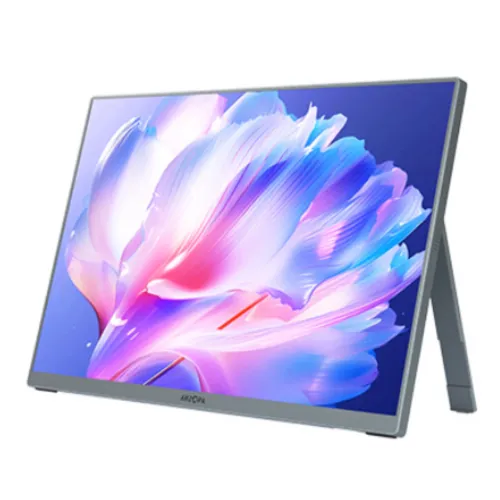
Model identity and specification confidence
The Arzopa Z7RC is listed in the catalog as a 15.6-inch 4K UHD IPS portable monitor. Arzopa’s public download center provides general support and manuals, while detailed model-specific values are inconsistently published across reseller pages. Listings commonly identify a 3840 × 2160 panel, 60Hz refresh, 400-nit brightness, two full-function USB-C ports, Mini HDMI and built-in speakers. One local retailer page contains conflicting 3840 × 2400 and 3840 × 2160 statements. Confirm the exact panel resolution, aspect ratio and suffix printed on the unit before treating those values as final.
Portable 15.6-inch format
At 15.6 inches, the Z7RC is designed to travel with a laptop or provide a compact second screen. Its thin, portable format is easier to place on a small desk than a full-size desktop monitor. Use a protective sleeve and avoid pressure on the panel while carrying it. The screen can be set beside a laptop for extended workspace, but the available stand or cover configuration should be confirmed because packages differ between sellers.
4K-class resolution and conflicting listings
Retail specifications commonly describe the Z7RC as 3840 × 2160 UHD, while at least one product page describes 3840 × 2400 in its feature text and 3840 × 2160 in its specification table. These are different pixel grids and aspect ratios. Do not choose scaling or advertise 16:10 until the monitor’s EDID, manual or carton confirms the actual native mode. Connect it to a computer and inspect the detected resolution before relying on a reseller headline.
IPS panel and viewing
The model is listed as an IPS display, a panel type associated with broad viewing angles and stable color visibility across a desk. Exact viewing-angle, contrast and calibration values should be confirmed in the model-specific manual. Portable panels can look different under bright ambient light or from steep viewing positions. Place the display near eye level and adjust the angle of its cover or stand. For color-critical work, profile the actual unit rather than trusting generic IPS marketing language.
60Hz refresh for work and media
Local specifications list a 60Hz refresh rate. This is suitable for documents, coding, video playback and general productivity, but it is not a high-refresh gaming monitor. Select the highest supported native resolution at 60Hz from the source device. If the refresh mode is missing, check the connection, adapter, cable and GPU. Motion smoothness depends on source frame rate as well as panel refresh, and a portable monitor cannot increase the frame rate of a connected device.
Brightness and indoor use
Retailer listings commonly state 400 nits brightness. Verify the rating for the exact production variant because an official model-specific data sheet was not available in the source reviewed. Brightness affects visibility in indoor rooms but does not guarantee clear use in direct sunlight. Increase output only as needed, and reduce it in dim environments for comfort. Matte or anti-glare treatment is also retailer-reported and should be checked against the unit’s screen finish.
Color gamut and color depth
Some listings describe 100% sRGB, 94.8% DCI-P3 and 1.07 billion colors. These figures are not yet corroborated by model-specific manufacturer documentation, so treat them as claims to verify. Color coverage is not the same as calibration accuracy or uniformity. If the monitor will be used for editing, connect it to the working computer, enable color management and calibrate it. For ordinary office work, choose a natural picture preset and avoid over-saturated modes.
USB-C full-function connections
Reseller descriptions list two full-function USB-C ports that can carry DisplayPort Alt Mode video and audio, with power delivery behavior depending on the connected device. Confirm the exact port capabilities and cable bundle for the unit; a USB-C connector alone does not guarantee video support or laptop charging. Connect a compatible laptop with a full-featured cable. If the screen does not light, use the supplied power input or a suitable external source as specified by the manual.
Mini HDMI connection
The Z7RC is commonly listed with a Mini HDMI input. This is useful for computers, consoles and devices that output HDMI, but the cable or adapter must match the monitor’s small port. Verify whether a Mini HDMI cable is included. HDMI video may require separate USB-C or power input because portable displays often draw more power than a source can provide over the video connection. Check the selected input and source output when troubleshooting.
Power and single-cable limitations
Portable monitors may receive power through USB-C, but the amount available depends on the source port and cable. Do not assume every laptop can power the Z7RC at full brightness or that it can charge a laptop. If the display flickers, resets or remains dim, connect the manufacturer-recommended external power supply. Confirm input voltage, current and included adapter from the product label. Use only a compatible power source and avoid substituting an adapter by connector shape alone.
Built-in speakers and audio
Local specifications list two 1W speakers. Small integrated speakers are convenient for basic playback and system sounds, but they are not a replacement for a dedicated speaker or headphones. Sound availability depends on whether audio is sent through the selected USB-C or HDMI video path and whether the connected device recognizes the display as an output. Verify the model-specific presence and rating before purchase because accessory and feature data can vary by region.
Stand, cover and orientation
Portable displays are often supplied with a folding cover or kickstand, but the exact Z7RC package and supported angles should be checked in the seller’s item listing. Place the monitor on a stable surface, keep the stand from slipping, and do not rely on an unsupported orientation. Confirm whether the unit supports portrait use and whether an accessory is required. The display is portable, but it still needs a stable support and a safe cable route.
Laptop and tablet compatibility
A compatible laptop or tablet can use the Z7RC as a second screen through USB-C DisplayPort Alt Mode or Mini HDMI, depending on the host. Some phones also support external display output, but this depends on the phone model and operating system. Check the source device’s video-output support first. A USB-C port used only for charging or data will not necessarily output video. Drivers may not be needed for standard display modes, but source-specific behavior can vary.
Console and handheld gaming
The monitor can be used with a console or handheld device if the device supports video output through HDMI or USB-C and supplies adequate power. Confirm whether the console’s resolution and refresh modes match the panel’s native mode. A portable monitor does not include a battery unless explicitly listed; plan for power when traveling. The small speakers may provide basic audio, while headphones can be useful in shared spaces. Protect the screen during transport.
HDR and image processing
Some reseller pages mention HDR10, but model-specific manufacturer documentation was not found to verify the HDR implementation. Treat HDR support and peak brightness as unconfirmed for the exact Z7RC until the manual or OSD establishes them. Signal compatibility does not guarantee a certified HDR tier or local dimming. If HDR looks washed out, compare SDR and check source, cable and monitor settings. Avoid promising a cinema-grade HDR result without corroborating certification data.
Travel setup and care
Before travel, disconnect cables, fold or remove the stand accessory as designed, and protect the screen with the supplied cover or a padded sleeve. Store adapters and Mini HDMI cables separately so they do not press against the display. On arrival, use a stable table, connect the correct input and power source, and adjust brightness for the room. Keep the monitor away from liquids and avoid bending or twisting the panel.
Who this portable display suits
The Z7RC suits users who want a larger second screen for laptop work, travel presentations, video review or console play. A 15.6-inch 4K-class panel may offer detailed output, but the exact native resolution needs verification due to conflicting published listings. A 60Hz refresh is intended for general use. Check dimensions, weight, stand, power requirements and accessory contents before relying on it as an everyday portable workstation.
Important limitations
Model-specific manufacturer evidence for Z7RC is limited in the reviewed source. Resolution and aspect ratio conflict across reseller copy, while brightness, gamut, HDR and power delivery are not confirmed by an official data sheet. Port behavior and included accessories can differ across regional units. These uncertainties matter for laptop compatibility and color work. Ask the seller for a photo of the label, exact manual, EDID/native mode and warranty terms before ordering.
Bangladesh warranty and seller checks
Arzopa’s public support site does not establish the warranty for this specific Bangladesh unit. Confirm warranty duration, service location, return period, dead-pixel policy and whether the seller is an authorized channel. Match the model suffix and serial on the monitor and box, retain the invoice, and verify what is included: USB-C cables, Mini HDMI cable, cover or stand, and power adapter. Check price and stock at checkout because offers change.
Troubleshooting connection and image
If the monitor displays no signal, select the correct input and check that the source supports video over the chosen USB-C port. For Mini HDMI, use a suitable cable and connect external power if required. If the screen dims or restarts, check power delivery and cable quality. If the image is soft, inspect the detected native resolution and scaling. If colors appear inaccurate, restore a neutral picture mode and compare with a calibrated primary display.