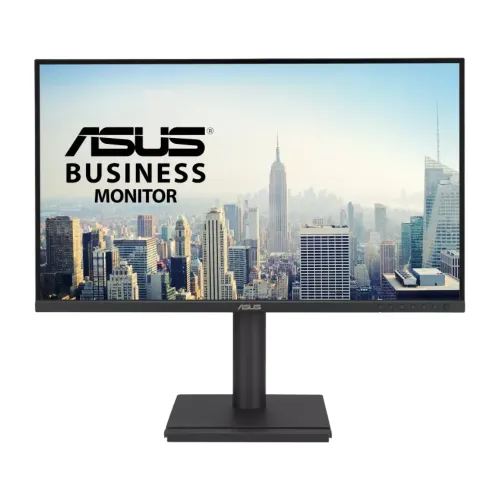
Verified model overview
ASUS BE27ACGN is a 27-inch QHD IPS business monitor with a 2560 × 1440 resolution and 120Hz refresh rate. The official specifications list 99% sRGB, 350-nit typical brightness, 1500:1 typical contrast and 5ms GtG response. Its USB-C port supports DisplayPort Alt Mode, data and up to 96W Power Delivery. The monitor also includes RJ45 LAN, USB hub, dual DisplayPort daisy-chain connections, HDMI, speakers and an adjustable stand. Confirm local package and warranty before purchase.
QHD resolution and workspace
The 27-inch panel uses 2560 × 1440 pixels in a 16:9 format. QHD provides more detailed text and desktop space than Full HD at the same size. Set the operating system to native resolution and choose scaling that suits your eyesight. This makes the screen useful for spreadsheets, coding, documents and media. The computer, cable and selected input determine whether QHD at 120Hz is available.
IPS panel and viewing angles
ASUS specifies an IPS panel with 178-degree horizontal and vertical viewing angles. The anti-glare finish helps limit reflections in office environments. Viewing-angle ratings do not guarantee identical brightness or color from every position. Place the display near eye level and avoid direct light sources. For color-sensitive tasks, use a calibrated profile and color-managed software rather than assuming that 99% sRGB alone proves accuracy.
120Hz SmoothMotion refresh
The maximum refresh rate is 120Hz. Compared with 60Hz, this can make scrolling, cursor movement and supported video appear smoother. It is a productivity-focused monitor rather than an esports display. Select 2560 × 1440 at 120Hz in the operating system and verify the active signal. A dock or adapter may limit refresh. Smoothness also depends on the source frame rate and application.
Response time and Adaptive-Sync
ASUS lists 5ms GtG response and Adaptive-Sync VRR. The response figure depends on measurement conditions and is not input lag. Adaptive-Sync can match compatible monitor refresh to GPU output and reduce tearing over a supported range. Enable it in the monitor and graphics settings if needed. Support depends on source, driver, input and frame rate. The display cannot improve the computer’s rendering performance.
Brightness and contrast
The official specification lists 350 cd/m² typical brightness, 1500:1 typical contrast and 3000:1 maximum/dynamic contrast. Typical and maximum measurements are distinct. Adjust brightness for the room rather than using the highest level by default. The anti-glare coating can help at a desk but does not eliminate strong reflections. Contrast and uniformity vary with panel, viewing position and ambient lighting.
Color range and everyday accuracy
ASUS lists 99% sRGB and 16.7 million colors. This is suited to office work, web content and general media. Gamut coverage is not the same as factory calibration accuracy. If working with photography, design or print, calibrate the monitor and use a color-managed workflow. Choose an sRGB or natural preset for content intended for standard displays. Avoid interpreting a coverage percentage as proof of a particular Delta E result.
USB-C docking and 96W charging
The USB-C port supports DisplayPort Alt Mode video, data and up to 96W Power Delivery. A compatible laptop can connect display, USB devices and network over one cable while receiving power. Actual charging depends on the host, cable and power profile. High-demand laptops may still need their original adapter under load. Use a full-featured USB-C cable and confirm the laptop supports video over USB-C.
RJ45 network connection
The integrated RJ45 LAN port can provide a wired network connection through a compatible USB-C host connection. Install the needed operating-system driver if the network adapter is not detected. Connect the monitor’s Ethernet cable to a router or switch, then check link status and network settings. This can reduce desk cabling, but network speed depends on the port, cable, host, router and service plan.
USB hub and peripheral connections
The official specification lists one USB-C hub connection with USB 3.2 Gen 1 and three USB-A downstream ports. These ports can connect keyboards, mice, storage and other peripherals. The USB upstream path to the computer is required for data. Port output and charging behavior are limited; check the manual for power ratings. A monitor USB hub is not equivalent to a high-speed Thunderbolt dock.
DisplayPort daisy chaining
ASUS lists two DisplayPort 1.4 connections, including a DisplayPort output for daisy-chain configurations. This allows compatible systems to connect another monitor through the first display, subject to graphics output, Display Stream Compression/MST support and bandwidth. Check the host and operating-system support before planning a multi-monitor chain. Each downstream display reduces available link bandwidth, and the exact supported resolution and refresh combination depends on the source.
HDMI and headphone output
The BE27ACGN includes one HDMI 2.1 TMDS input and a headphone jack. ASUS notes HDMI TMDS behavior in its specifications; the port supports QHD at up to 120Hz according to the listed signal range. Connect a compatible source, select the right input and route audio through the operating system if using headphones. The monitor also has two 2W speakers for basic sound.
Built-in speakers and ASUS AI mic
ASUS lists stereo speakers rated at 2W × 2 and promotes an AI noise-canceling microphone feature. The built-in speakers suit basic calls and system audio but are not a substitute for dedicated speakers. The microphone feature and call processing require a compatible USB connection and software path; check the manual for how it is enabled. For best conferencing, position the display and microphone properly and test audio before a meeting.
Ergonomic stand and portrait use
The stand supports tilt from -5 to +35 degrees, swivel ±180 degrees, pivot ±90 degrees and height adjustment up to 150mm. These adjustments help position the panel for sitting, standing or portrait layouts. Rotate the display carefully and set the computer’s screen orientation. The monitor supports 100 × 100mm VESA mounting. Confirm arm capacity and cable clearance before installation.
Eye Care and flicker-free features
ASUS lists TÜV-certified Flicker-Free and Low Blue Light technology, along with Eye Care+ features. Low-blue-light modes can change color temperature, so use a calibrated or neutral mode for color evaluation. Adjust brightness and viewing distance for comfort and use regular breaks. These features are display comfort options rather than medical treatment. They do not remove the need for appropriate lighting or ergonomic placement.
PIP, PBP and QuickFit tools
The specifications list picture-in-picture and picture-by-picture, ASUS QuickFit and SPLENDID picture modes. PIP/PBP can show multiple sources at once, subject to supported input combinations and resolution. QuickFit overlays can help align common page or photo dimensions. These are convenience features, not substitutes for application tools or calibrated output. Review the OSD guide to see which combinations work and how to switch modes.
Power Sync and Mini-PC integration
ASUS Power Sync can coordinate power behavior with supported ASUS devices connected through HDMI. The specification also lists a MiniPC kit accessory. Compatibility depends on the paired device, cable and firmware. Do not assume that all connected computers power on or off together. Confirm included accessories for the regional package and follow the mounting instructions for any MiniPC bracket. Keep the monitor vents unobstructed.
Power consumption and certifications
ASUS lists 18.15W typical power consumption, less than 0.5W in power-saving mode and 0W when switched off using the hard switch. Certifications include TCO, EPEAT Gold, ENERGY STAR and FSC MIX in the published specification. Certification availability can vary by market and SKU. Use the included power cable with a properly grounded supply. Power use changes with brightness, USB charging and connected devices.
Limitations and compatibility
The 120Hz maximum is lower than dedicated gaming monitors, and the 5ms GtG rating is not a high-speed esports claim. USB-C provides up to 96W but only with compatible host and cable. Daisy-chain support requires source MST compatibility. RJ45 and USB hub functions need the upstream data connection. USB-C docking reduces cables but cannot guarantee every laptop’s full feature set; verify host support before purchase.
Bangladesh warranty and setup checks
ASUS global pages do not guarantee coverage for a particular Bangladesh serial. Ask the seller to confirm local authorization, warranty period, service location, pixel policy and invoice needs. Match the serial and model code on the display, carton and receipt. Confirm included USB-C, HDMI, DisplayPort and power cables. Test USB-C charging, LAN, speakers, daisy-chain, display modes and stand movement during the stated return period.