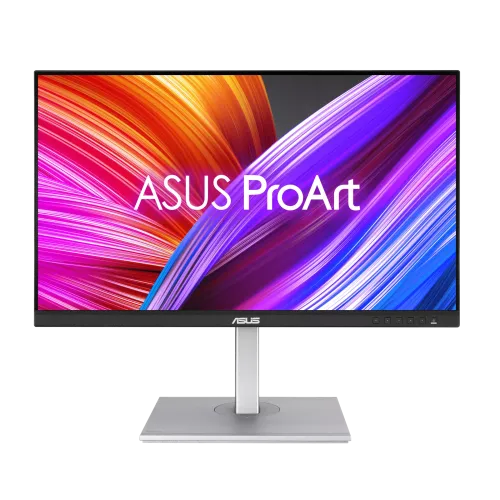
ASUS ProArt PA278CGV overview
ASUS ProArt Display PA278CGV is a 27-inch QHD IPS monitor combining creator-focused color controls with a 144Hz refresh rate. ASUS lists 2560 × 1440 resolution, 95% DCI-P3, 100% sRGB and Rec.709, Calman Verified factory calibration with Delta E below 2, VESA DisplayHDR 400, Adaptive-Sync, USB-C with 90W Power Delivery, USB hub and an ergonomic stand. Follow the PA278CGV manual and regional specification for supported signal modes and setup. Performance depends on computer, cable and selected monitor settings. Bangladesh price, stock, box contents, return policy and serial-specific warranty require local seller confirmation.
Exact PA278CGV model identity
Confirm the exact model is PA278CGV. ASUS ProArt models with similar PA278 names can differ in resolution, refresh, gamut and ports. The CGV model is QHD at 144Hz and supports USB-C PD up to 90W. Check the regional package, calibration report and serial label rather than relying on the broader ProArt series description. Follow the PA278CGV manual and regional specification for supported signal modes and setup. Performance depends on computer, cable and selected monitor settings. Bangladesh price, stock, box contents, return policy and serial-specific warranty require local seller confirmation.
27-inch QHD resolution
The 27-inch 16:9 display has native 2560 × 1440 QHD resolution and 109 pixels per inch. QHD provides workspace for timelines and multiple windows while remaining less demanding than 4K. Set native resolution for clear text and art. For high-refresh gaming, the GPU still needs to render enough frames at QHD. Follow the PA278CGV manual and regional specification for supported signal modes and setup. Performance depends on computer, cable and selected monitor settings. Bangladesh price, stock, box contents, return policy and serial-specific warranty require local seller confirmation.
IPS panel and viewing angles
ASUS specifies an IPS panel with 178-degree horizontal and vertical viewing angles, 350 cd/m² typical brightness and 1000:1 typical contrast. The anti-glare surface helps reduce reflections. IPS viewing angles help maintain image consistency across the desk, while actual uniformity and contrast vary with room conditions and unit characteristics. Follow the PA278CGV manual and regional specification for supported signal modes and setup. Performance depends on computer, cable and selected monitor settings. Bangladesh price, stock, box contents, return policy and serial-specific warranty require local seller confirmation.
Color gamut and factory accuracy
The monitor covers 95% DCI-P3 and 100% sRGB/Rec.709 and is Calman Verified with factory calibration and Delta E below 2 listed. These are useful color quality references, not a guarantee that every panel stays calibrated indefinitely. Keep the included calibration documentation and recalibrate for critical work when needed. Follow the PA278CGV manual and regional specification for supported signal modes and setup. Performance depends on computer, cable and selected monitor settings. Bangladesh price, stock, box contents, return policy and serial-specific warranty require local seller confirmation.
ProArt color modes and controls
ProArt Presets include sRGB, Adobe RGB, DCI-P3, Rec.2020, Rec.709, DICOM, HDR, Native and user modes. ProArt Palette supports RGB gain/offset and gamma adjustments. DICOM mode does not make this a certified medical diagnostic display. Choose the mode matching the delivery color space and maintain a color-managed application workflow. Follow the PA278CGV manual and regional specification for supported signal modes and setup. Performance depends on computer, cable and selected monitor settings. Bangladesh price, stock, box contents, return policy and serial-specific warranty require local seller confirmation.
144Hz refresh and response
PA278CGV supports up to 144Hz refresh with 5ms GTG response listed. The high refresh can make cursor movement and compatible games feel smoother than a standard 60Hz creator display. Response results depend on overdrive and signal conditions. Select 144Hz in the system settings and use a connection capable of the intended mode. Follow the PA278CGV manual and regional specification for supported signal modes and setup. Performance depends on computer, cable and selected monitor settings. Bangladesh price, stock, box contents, return policy and serial-specific warranty require local seller confirmation.
Adaptive sync and gaming
Adaptive-Sync and FreeSync Premium features support variable refresh on compatible systems. The monitor can serve mixed creator and gaming use, but the GPU and game determine frame rate. Enable VRR in the monitor and driver, then check compatibility. Adaptive sync does not replace accurate color configuration for design work. Follow the PA278CGV manual and regional specification for supported signal modes and setup. Performance depends on computer, cable and selected monitor settings. Bangladesh price, stock, box contents, return policy and serial-specific warranty require local seller confirmation.
VESA DisplayHDR 400
ASUS lists VESA DisplayHDR 400 compliance, 400 cd/m² peak HDR brightness and HDR support. HDR content and settings influence the result; DisplayHDR 400 is an entry certification tier and does not indicate local dimming or high-end mastering performance. Use a suitable HDR reference workflow for final delivery. Follow the PA278CGV manual and regional specification for supported signal modes and setup. Performance depends on computer, cable and selected monitor settings. Bangladesh price, stock, box contents, return policy and serial-specific warranty require local seller confirmation.
USB-C 90W and connectivity
One USB-C input supports DisplayPort Alt Mode and up to 90W Power Delivery. A compatible laptop can send video, use the monitor hub and charge through one cable. The display also has one DisplayPort 1.4 and two HDMI 2.0 inputs. Confirm host USB-C video support and whether 90W meets its power draw. Follow the PA278CGV manual and regional specification for supported signal modes and setup. Performance depends on computer, cable and selected monitor settings. Bangladesh price, stock, box contents, return policy and serial-specific warranty require local seller confirmation.
USB hub and KVM workflow
The monitor includes four USB 3.2 Gen 1 Type-A downstream ports and KVM functionality. Connect USB upstream paths from the computers to enable sharing peripherals. PIP/PBP and DualView are listed for multiple-source workflows. Hotkey Puck G2 is included to access color modes and monitor functions quickly. Follow the PA278CGV manual and regional specification for supported signal modes and setup. Performance depends on computer, cable and selected monitor settings. Bangladesh price, stock, box contents, return policy and serial-specific warranty require local seller confirmation.
Stand ergonomics and mounting
The stand supports height adjustment up to 150mm, tilt from -5 to +35 degrees, swivel ±45 degrees and pivot ±90 degrees. VESA mounting uses 100 × 100mm, with Kensington lock. Check clearance when pivoting and make sure an alternate arm supports the monitor’s weight and mounting hardware. Follow the PA278CGV manual and regional specification for supported signal modes and setup. Performance depends on computer, cable and selected monitor settings. Bangladesh price, stock, box contents, return policy and serial-specific warranty require local seller confirmation.
Audio, power and physical details
Two 2W speakers and a headphone jack are included. ASUS lists typical power consumption below 19.5W, standby below 0.5W, and 100–240V input. Approximate dimensions with stand are 615 × 524 × 228mm, and net weight around 8.5kg; check exact regional sheet and ensure the desk and arm can support the display. Follow the PA278CGV manual and regional specification for supported signal modes and setup. Performance depends on computer, cable and selected monitor settings. Bangladesh price, stock, box contents, return policy and serial-specific warranty require local seller confirmation.
Creator workstation setup
Connect a workstation through USB-C for video, data and charging if the host supports DisplayPort Alt Mode. Alternatively connect HDMI or DisplayPort for image and USB upstream for KVM/hub features. Select native QHD and an appropriate refresh, then choose the correct color preset. Use ProArt Palette and calibration tools deliberately. Follow the PA278CGV manual and regional specification for supported signal modes and setup. Performance depends on computer, cable and selected monitor settings. Bangladesh price, stock, box contents, return policy and serial-specific warranty require local seller confirmation.
Color-critical workflow and limits
This monitor suits creators who need QHD color work, USB-C docking, KVM and a higher refresh than many professional monitors. It is less suitable for 4K mastering or high-end HDR grading because it is QHD and DisplayHDR 400 class. Validate the desired color space, luminance and calibration for the actual production pipeline. Follow the PA278CGV manual and regional specification for supported signal modes and setup. Performance depends on computer, cable and selected monitor settings. Bangladesh price, stock, box contents, return policy and serial-specific warranty require local seller confirmation.
Strengths and trade-offs
Strengths include 95% DCI-P3, factory Delta E below 2, 144Hz, USB-C 90W, KVM, hub, PIP/PBP, Hotkey Puck G2 and a fully adjustable stand. Trade-offs include QHD rather than 4K, entry-tier HDR brightness, and the need for correct host connections to use the USB hub and KVM. USB-C 90W may not cover every workstation. Follow the PA278CGV manual and regional specification for supported signal modes and setup. Performance depends on computer, cable and selected monitor settings. Bangladesh price, stock, box contents, return policy and serial-specific warranty require local seller confirmation.
Eye care and display features
Flicker-free and Low Blue Light features are listed. These can change image color and brightness; calibrate after selecting a mode used for color work. Adjust brightness for the room and take breaks during long sessions. Comfort options do not eliminate all eye strain. Follow the PA278CGV manual and regional specification for supported signal modes and setup. Performance depends on computer, cable and selected monitor settings. Bangladesh price, stock, box contents, return policy and serial-specific warranty require local seller confirmation.
Delivery inspection and care
On delivery, check the panel, stand, Hotkey Puck G2, cables, USB upstream leads, calibration report, serial label and invoice. Keep packaging through the return period. Assemble the stand on a stable surface and verify its height and pivot locks before moving the monitor. Clean with a soft microfiber cloth without pressing the panel. Follow the PA278CGV manual and regional specification for supported signal modes and setup. Performance depends on computer, cable and selected monitor settings. Bangladesh price, stock, box contents, return policy and serial-specific warranty require local seller confirmation.
Bangladesh purchase checklist
Before buying in Bangladesh, confirm current price and stock, exact PA278CGV model, new or open-box condition, included calibration report and Hotkey Puck G2, cable bundle, return/dead-pixel terms, delivery, and serial-specific ASUS warranty provider and term. Ask the seller to document local warranty on the invoice. Follow the PA278CGV manual and regional specification for supported signal modes and setup. Performance depends on computer, cable and selected monitor settings. Bangladesh price, stock, box contents, return policy and serial-specific warranty require local seller confirmation.
Frequently asked questions
ASUS ProArt PA278CGV is a 27-inch QHD IPS monitor with 144Hz, 95% DCI-P3, factory calibration Delta E below 2 and USB-C 90W. It combines creator presets, KVM, USB hub and an ergonomic stand. Confirm exact package, calibration documentation and Bangladesh serial warranty before purchase. Follow the PA278CGV manual and regional specification for supported signal modes and setup. Performance depends on computer, cable and selected monitor settings. Bangladesh price, stock, box contents, return policy and serial-specific warranty require local seller confirmation.