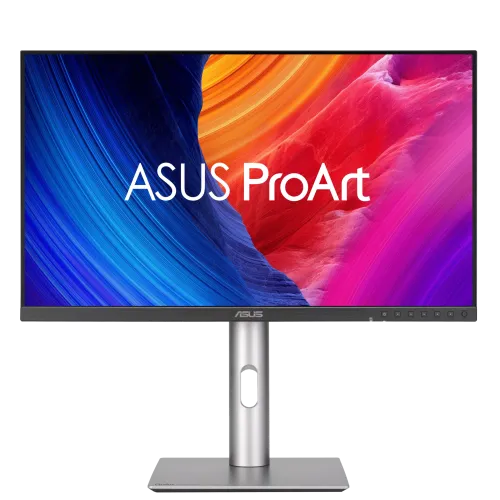
ASUS ProArt Display 6K PA32QCV is a 31.5-inch IPS monitor with 6016 x 3384 resolution, 218 PPI, 98% DCI-P3, factory Delta E < 2 calibration, dual Thunderbolt 4 with up to 96W PD, Auto KVM and an adjustable stand.
Overview and intended use
The ASUS ProArt Display 6K PA32QCV is a 31.5-inch IPS monitor designed for high-resolution creative and professional work. Its native 6016 x 3384 resolution provides approximately 218 pixels per inch, with a 16:9 aspect ratio and a matte LuxPixel anti-glare, low-reflection surface. ASUS lists 98% DCI-P3 and 100% sRGB, factory calibration with Delta E below 2, Calman Verification, VESA DisplayHDR 600 and 60Hz refresh. The PA32QCV also serves as a desk hub: two Thunderbolt 4 ports support daisy chaining and up to 96W power delivery; HDMI 2.1, DisplayPort 1.4 DSC, a USB hub, Auto KVM and 2 x 2W speakers are included. It is aimed at creators who value detailed 6K workspace and color control over high-refresh gaming.
31.5-inch panel and 6K resolution
The screen measures 31.5 inches diagonally and contains 6016 x 3384 pixels at a 16:9 ratio. ASUS lists 218 PPI and a 697.19 x 392.17mm active display area. The high pixel density can make fine text, interface details and high-resolution images appear crisp at an appropriate viewing distance. 6K is higher than 4K UHD and offers more workspace for full-resolution video timelines, large image canvases and multiple application windows. The panel is IPS with a 0.116mm pixel pitch and 178-degree horizontal and vertical viewing angles. ASUS identifies it as a flat LED-backlit LCD, not OLED. Users should confirm that their computer and software can drive 6016 x 3384 at 60Hz through the selected connection.
LuxPixel surface and light control
ASUS describes the surface as AGLR, meaning anti-glare and low-reflection, and markets its LuxPixel treatment for a paper-like viewing experience. The matte finish is intended to reduce reflections while retaining image detail; perceived texture and reflection depend on room lighting and viewing angle. Light Sync uses an ambient light sensor and a backlight sensor to adapt brightness or support more consistent viewing conditions. These sensors and the on-screen controls do not replace color calibration in a controlled environment. For color-critical tasks, use a suitable monitor profile, calibrator and consistent ambient lighting. The display is flat, so it does not use a curved panel or an ultrawide aspect ratio.
Color gamut, depth and factory accuracy
ASUS specifies 98% DCI-P3 and 100% sRGB coverage with 10-bit display color (1.0737 billion colors). Each unit is factory calibrated to Delta E below 2 and is Calman Verified, according to ASUS. The ProArt Palette offers color adjustment controls, and ProArt Presets include sRGB, Adobe RGB, DCI-P3, Rec.709, BT.2020, DICOM, HDR, Native and user modes. The six-mode color-temperature selection and gamma options from 1.8 through 2.6 allow supported adjustments. Factory calibration describes the unit's initial verification; color can drift with age, settings and environment. Recalibrate when the work requires an up-to-date measured profile, and keep operating-system and application color management enabled.
Brightness, contrast and HDR
The official specification lists 400cd/m² typical brightness and 600cd/m² peak HDR brightness. It specifies 1,500:1 typical contrast and a 3,000:1 maximum ratio; these measurements are not interchangeable. HDR10 input and VESA DisplayHDR 600 certification enable compatible HDR workflows, but the display is not a full-array local-dimming reference monitor. HDR results depend on mastering, source configuration, monitor mode and viewing conditions. A Bangladesh retailer lists a 1000:1 contrast figure; ASUS's exact-model technical table gives 1,500:1 typical and 3,000:1 maximum, so those manufacturer values are used here. Peak brightness should not be read as sustained full-screen brightness. Select an HDR mode only when the operating system, source and content are configured consistently.
Refresh, motion and variable refresh
The PA32QCV is a 60Hz monitor with a published 5ms gray-to-gray response time. It is designed around sharp detail and color-controlled work rather than competitive high-refresh gaming. ASUS lists Adaptive-Sync and VESA MediaSync Display, which can synchronize supported refresh behavior with a compatible source. This does not make the monitor a 144Hz or 120Hz gaming panel; verify the desired refresh timing in the source-device output settings. Flicker-free technology and TÜV Low Blue Light are listed among its certifications and features. These options can affect picture appearance and should be selected based on the task. The 5ms response figure is a manufacturer rating, not a guarantee of end-to-end input latency.
Thunderbolt 4 and video connections
Two Thunderbolt 4 ports support data, video, up to 96W USB Power Delivery and daisy chaining, according to ASUS. This can simplify a compatible laptop setup by carrying display output, data and charging over one cable, and allows a second Thunderbolt display to be chained where the computer supports it. The video inputs also include one HDMI 2.1 FRL port and one DisplayPort 1.4 with Display Stream Compression. The monitor's USB hub lists two USB 3.2 Gen 1 Type-A ports and one USB 3.2 Gen 1 Type-C port, plus a USB-C signal connection used for KVM. There is an earphone jack. Actual resolution, charging and data performance depend on the computer, cable and chosen port.
Auto KVM, controls and productivity tools
The built-in KVM switch lets one keyboard and mouse control two connected computers, with automatic switching features described by ASUS. Picture-in-Picture and Picture-by-Picture modes can display content from two sources at once. ProArt Chroma Tune, ProArt Palette, QuickFit Plus and DisplayWidget Center provide supported color, layout and display-setting tools. ASUS Power Sync can coordinate compatible ASUS devices. KVM operation requires the appropriate USB signal connection to each computer; it does not make a single video cable replace every host connection. Verify the configuration in the owner's manual and select the correct USB-C or upstream path for each source. QuickFit overlays can help preview print or layout dimensions but do not replace exporting at the required document size.
Ergonomic stand and VESA mounting
The included stand supports tilt from -5 to +23 degrees, swivel through 30 degrees to either side, pivot up to 90 degrees in either direction and 130mm of height adjustment. The monitor can be rotated to portrait when the workspace and cable routing allow it. ASUS lists a 100 x 100mm VESA mount and a Kensington lock slot. Approximate dimensions with the stand are 71.42 x 61.79 x 24.01cm; without the stand they are 71.42 x 41.97 x 4.69cm. Box dimensions are 82.8 x 50.9 x 14.2cm. Estimated weight is 9.3kg with stand, 6.3kg without and 13.4kg shipping weight. ASUS notes that regional dimensions and weights can vary; check desk clearance and monitor-arm ratings before installation.
Power and included items
The monitor accepts AC 100–240V at 50/60Hz. ASUS lists consumption below 49.49W, power-saving use below 0.5W and 0W in hard-switch-off mode. Actual use varies with brightness, connected devices, charging and selected picture modes. The listed accessories include a welcome card, warranty card, Thunderbolt 4 cable, quick-start guide, power cord, microfiber cloth, Ultra High Speed HDMI cable and color pre-calibration report. ASUS warns that accessories vary by region, so confirm the Bangladesh package with the seller. Connect the supplied power cord securely and keep ventilation clear. Avoid attaching unrelated objects to the monitor or hanging heavy headphones from its body, as ASUS cautions this can reduce product life.
Bangladesh market and warranty notes
On 6 November 2026, Star Tech displayed ৳195,500 and In Stock, with a regular price of ৳212,120. Ryans showed a special price of ৳196,500 and a regular price of ৳212,120, with availability requiring confirmation. Tech Land showed ৳196,500 against ৳218,000. The catalog MSRP of ৳196,500 is retained; these retailer observations are time-stamped and are not a guaranteed checkout price. ASUS's technical specification lists a three-year LCD zero-bright-dot warranty; local warranty service and dead-pixel thresholds can depend on distributor terms. Retailers list a three-year warranty. Confirm the authorized Bangladesh seller, warranty card, covered defects and claim procedure before purchase.
Who should consider it and trade-offs
The PA32QCV is suited to photographers, illustrators, designers and video editors who want a high-density 6K workspace, wide color gamut, factory calibration and Thunderbolt docking features. The adjustable stand and KVM can also help a multi-computer desk. It is not the right fit for users prioritizing 120Hz or higher gaming, OLED contrast, built-in high-power audio or USB-C charging above 96W. Running 6016 x 3384 at 60Hz requires a compatible graphics output and software scaling may be needed for comfortable text size. A color-accurate display supports, but does not replace, good source files, color-managed applications, appropriate calibration and review on target devices. Compare the desk footprint, computer ports and the local warranty coverage before ordering.
Key features
- 31.5-inch IPS display with native 6K resolution of 6016 x 3384 and 218 PPI.
- LuxPixel AGLR anti-glare, low-reflection surface; 16:9 aspect ratio.
- 98% DCI-P3, 100% sRGB, 10-bit color and factory-calibrated Delta E < 2.
- Calman Verified with ProArt Presets, ProArt Palette and Chroma Tune.
- VESA DisplayHDR 600, HDR10, 400 nits typical and 600 nits peak HDR.
- Two Thunderbolt 4 ports with daisy chaining and up to 96W Power Delivery.
- HDMI 2.1 FRL, DisplayPort 1.4 DSC and built-in USB hub.
- Built-in Auto KVM, PiP/PbP and ASUS Power Sync.
- Two 2W speakers and an earphone jack.
- Tilt, swivel, pivot, 130mm height adjustment and VESA 100 x 100mm.
Advantages
- 6K resolution and 218 PPI provide a fine-detail 31.5-inch workspace.
- Factory-calibrated Delta E < 2, Calman verification and broad sRGB/DCI-P3 coverage.
- Dual Thunderbolt 4 with 96W PD and daisy-chain capability can simplify compatible desks.
- Auto KVM, PiP/PbP, USB hub and ASUS color tools support multi-device workflows.
- Full ergonomic stand with height, tilt, swivel and pivot adjustments.
Trade-offs
- 60Hz refresh and 5ms GtG are intended for creative work rather than high-refresh gaming.
- A 6K signal requires a capable graphics output, cable and host configuration.
- USB Power Delivery is capped at 96W and may not fully power some workstations.
- The 31.5-inch display and stand require substantial desk space; regional box contents can vary.
- HDR peak 600 nits is not a claim of sustained full-screen brightness or local-dimming reference performance.
Frequently asked questions
1. What is the native resolution of PA32QCV?
6016 x 3384 pixels, which ASUS calls 6K. It is not 6K2K or 6144 x 3456.
2. What is the actual screen size?
ASUS lists a 31.5-inch panel, marketed in the 32-inch monitor class.
3. What panel technology does it use?
It is an IPS LCD with LED backlight and LuxPixel AGLR surface, not OLED.
4. Is it suitable for color-sensitive work?
ASUS lists factory calibration to Delta E < 2, Calman Verified status, 98% DCI-P3 and 100% sRGB. Calibration and color-managed applications are still important.
5. What brightness and HDR modes are supported?
ASUS lists 400 nits typical, up to 600 nits peak HDR, HDR10 and VESA DisplayHDR 600.
6. Does it support Thunderbolt 4?
Yes. There are two Thunderbolt 4 ports with daisy chaining and up to 96W power delivery, subject to host and cable capability.
7. What other video inputs are included?
One HDMI 2.1 FRL input and one DisplayPort 1.4 input with DSC are listed.
8. Does PA32QCV include a KVM?
Yes. ASUS lists a built-in KVM switch and Auto KVM features to share keyboard and mouse across two connected computers.
9. Does the monitor have speakers?
Yes. ASUS lists two 2W speakers and an earphone jack.
10. Can the display rotate vertically?
Yes. The stand supports pivot adjustment up to 90 degrees in either direction, plus tilt, swivel and 130mm height adjustment.
11. What is the Bangladesh price and warranty?
Retailers listed about ৳195,500–৳196,500 on 6 November 2026 and three-year warranty. Confirm current price, stock and local claim terms with the seller.
12. Will every computer run it at 6K 60Hz?
No. The host graphics output, cable, port and operating-system configuration must support 6016 x 3384 at 60Hz. Check the ASUS manual and graphics specifications before purchase.
Source note: ASUS exact-model product and technical specification pages plus dated Bangladesh retailer listings checked 6 November 2026. Regional accessory bundles and warranty claim terms should be confirmed with the seller.