Product overview
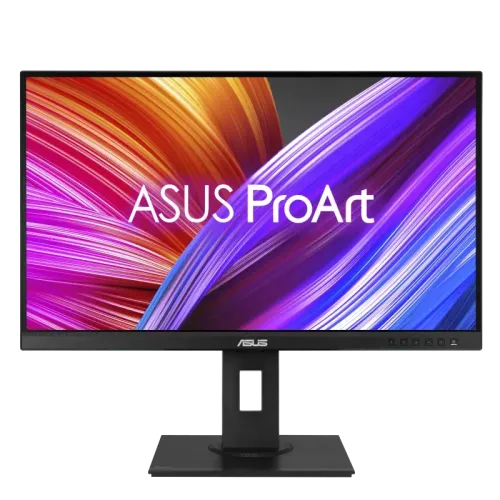
ASUS ProArt PA278QEV is a 27-inch WQHD IPS professional monitor designed around color accuracy. ASUS states it is factory calibrated and Calman Verified to achieve delta E below 2. Manufacturer specifications also list 100% sRGB/Rec.709 coverage, 75Hz refresh, 350 nits and a flexible stand. Use the PA278QEV-specific ASUS page for exact regional details. Actual color reproduction depends on calibration mode, profile, source and ambient lighting. Current price, stock, package contents, return terms and local serial warranty are separate seller facts and should be confirmed before purchase.
Exact PA278QEV model identity
Check the exact PA278QEV model code. It is different from PA278QV and other ProArt screens. Some manuals group the PA278QEV and PA278QV for shared hardware sections, but they differ in features such as speakers and color validation. Follow PA278QEV-specific product information. Use the PA278QEV-specific ASUS page for exact regional details. Actual color reproduction depends on calibration mode, profile, source and ambient lighting. Current price, stock, package contents, return terms and local serial warranty are separate seller facts and should be confirmed before purchase.
27-inch WQHD IPS panel
The monitor uses a 27-inch 2560 × 1440 WQHD IPS panel in a 16:9 format. The resolution provides detail for image editing, layout work and desktop use. Set native resolution for clear text and confirm the graphics output supports the selected refresh and color depth. Use the PA278QEV-specific ASUS page for exact regional details. Actual color reproduction depends on calibration mode, profile, source and ambient lighting. Current price, stock, package contents, return terms and local serial warranty are separate seller facts and should be confirmed before purchase.
Factory calibration and Calman verification
ASUS describes factory calibration and Calman verification with delta E below 2. This is a manufacturer validation claim for the model, not a guarantee that every unit remains perfectly calibrated over time. Check for the supplied calibration report and recalibrate if needed for critical work. Use the PA278QEV-specific ASUS page for exact regional details. Actual color reproduction depends on calibration mode, profile, source and ambient lighting. Current price, stock, package contents, return terms and local serial warranty are separate seller facts and should be confirmed before purchase.
Color gamut and color modes
ASUS lists 100% sRGB and 100% Rec.709 color-space coverage and ProArt preset modes. Gamut coverage indicates range, not accuracy in every mode. Use the working color profile and calibration suited to the delivery target. Do not confuse sRGB coverage with DCI-P3 or Adobe RGB coverage. Use the PA278QEV-specific ASUS page for exact regional details. Actual color reproduction depends on calibration mode, profile, source and ambient lighting. Current price, stock, package contents, return terms and local serial warranty are separate seller facts and should be confirmed before purchase.
75Hz refresh and response
The product specification lists 75Hz refresh and a response time below 5ms. This is a professional display, not a high-refresh gaming monitor. Motion and input latency depend on the system and selected mode. Pick this model for color-oriented tasks rather than competitive gaming. Use the PA278QEV-specific ASUS page for exact regional details. Actual color reproduction depends on calibration mode, profile, source and ambient lighting. Current price, stock, package contents, return terms and local serial warranty are separate seller facts and should be confirmed before purchase.
Brightness and contrast
ASUS specifies 350 cd/m² typical brightness and 1000:1 typical contrast. Room lighting and selected preset influence perceived contrast and color. The product is not advertised as HDR reference equipment. For print and color work, set a controlled brightness appropriate to the viewing environment. Use the PA278QEV-specific ASUS page for exact regional details. Actual color reproduction depends on calibration mode, profile, source and ambient lighting. Current price, stock, package contents, return terms and local serial warranty are separate seller facts and should be confirmed before purchase.
Ports and USB hub
PA278QEV includes DisplayPort 1.2, Mini DisplayPort, HDMI 1.4, DVI-D and a USB 3.x hub according to ASUS materials. Confirm exact ports and included cables for the local package. Connect the USB upstream cable to enable downstream peripherals. HDMI and DVI timing may differ from DisplayPort. Use the PA278QEV-specific ASUS page for exact regional details. Actual color reproduction depends on calibration mode, profile, source and ambient lighting. Current price, stock, package contents, return terms and local serial warranty are separate seller facts and should be confirmed before purchase.
Stand adjustment and ergonomics
The stand supports height adjustment, tilt, swivel and portrait pivot according to the official specification. Adjust screen height and viewing angle to reduce glare and fatigue. Ensure the stand locks securely after rotation. Preserve a stable base when using portrait mode. Use the PA278QEV-specific ASUS page for exact regional details. Actual color reproduction depends on calibration mode, profile, source and ambient lighting. Current price, stock, package contents, return terms and local serial warranty are separate seller facts and should be confirmed before purchase.
VESA mounting
ASUS specifies a 100 × 100mm VESA pattern. Confirm screw length and mount capacity before installation. The monitor is designed for a range of ergonomic positions; use an arm rated for its weight. Leave space for rear connectors and keep the cable bend radius comfortable. Use the PA278QEV-specific ASUS page for exact regional details. Actual color reproduction depends on calibration mode, profile, source and ambient lighting. Current price, stock, package contents, return terms and local serial warranty are separate seller facts and should be confirmed before purchase.
Color-managed workstation setup
For a color-managed workstation, use a calibrated monitor profile and a color-aware application. Set the target color space, brightness and white point for the deliverable. Disable non-neutral image enhancements when they conflict with the calibrated workflow. Keep a reference print or approved display when visual matching is important. Use the PA278QEV-specific ASUS page for exact regional details. Actual color reproduction depends on calibration mode, profile, source and ambient lighting. Current price, stock, package contents, return terms and local serial warranty are separate seller facts and should be confirmed before purchase.
Creative and professional use
The PA278QEV supports design, illustration, photo editing and general professional tasks that use WQHD and sRGB/Rec.709 color. Factory calibration can reduce initial setup work, while a later verification is prudent. Its 75Hz rate is adequate for desktop motion but not intended for high-frame-rate play. Use the PA278QEV-specific ASUS page for exact regional details. Actual color reproduction depends on calibration mode, profile, source and ambient lighting. Current price, stock, package contents, return terms and local serial warranty are separate seller facts and should be confirmed before purchase.
Photo editing and proofing
For photo editing, check monitor mode, OS profile and application color management. Soft proof to the intended output profile and view prints under suitable lighting. A delta E below 2 factory calibration claim does not ensure print matches without controlled ambient light and a calibrated output device. Use the PA278QEV-specific ASUS page for exact regional details. Actual color reproduction depends on calibration mode, profile, source and ambient lighting. Current price, stock, package contents, return terms and local serial warranty are separate seller facts and should be confirmed before purchase.
Video workflows
For video work, use the correct Rec.709 or other target workflow and monitor the timeline at the supported refresh. This model lists Rec.709 coverage and ProArt presets, but does not provide HDR reference capabilities. Verify source output, bit depth and signal path before critical review. Use the PA278QEV-specific ASUS page for exact regional details. Actual color reproduction depends on calibration mode, profile, source and ambient lighting. Current price, stock, package contents, return terms and local serial warranty are separate seller facts and should be confirmed before purchase.
Office and general desktop tasks
WQHD resolution, color presets and an ergonomic stand can improve general office and creative tasks. The IPS viewing angles support shared review. Use eye-care settings as needed, but avoid changes that invalidate a color-critical preset. The display’s 75Hz refresh and QHD resolution suit office use. Use the PA278QEV-specific ASUS page for exact regional details. Actual color reproduction depends on calibration mode, profile, source and ambient lighting. Current price, stock, package contents, return terms and local serial warranty are separate seller facts and should be confirmed before purchase.
Advantages and limits
Strengths include Calman verification, delta E below 2 factory calibration, 100% sRGB/Rec.709 coverage, WQHD resolution and a highly adjustable stand. Limits include 75Hz refresh, sRGB/Rec.709 focus rather than wide-gamut reference work, and no verified HDR workflow. Match the model to the intended color space. Use the PA278QEV-specific ASUS page for exact regional details. Actual color reproduction depends on calibration mode, profile, source and ambient lighting. Current price, stock, package contents, return terms and local serial warranty are separate seller facts and should be confirmed before purchase.
Care and delivery inspection
Inspect the monitor, stand, calibration report, ports and included cables during the return period. Keep the serial label and invoice. Clean with a soft microfiber cloth, avoid spraying liquid directly on the panel and preserve the calibrated baseline until the unit is checked. Use the PA278QEV-specific ASUS page for exact regional details. Actual color reproduction depends on calibration mode, profile, source and ambient lighting. Current price, stock, package contents, return terms and local serial warranty are separate seller facts and should be confirmed before purchase.
Warranty and purchase checklist
In Bangladesh, confirm price, stock, delivery, included cables and calibration report, return/dead-pixel terms and the serial-specific ASUS warranty provider. The previous catalog warranty claim is not proof of local coverage. Ask the seller to confirm PA278QEV model code and service terms in writing. Use the PA278QEV-specific ASUS page for exact regional details. Actual color reproduction depends on calibration mode, profile, source and ambient lighting. Current price, stock, package contents, return terms and local serial warranty are separate seller facts and should be confirmed before purchase.
Model comparisons and specification limits
Do not transfer PA278QV speaker claims or PA278CGV/other ProArt refresh rates to PA278QEV. ASUS product pages and manuals may group closely related devices; rely on PA278QEV-specific features. Confirm local port configuration, calibration report and warranty against the supplied unit. Use the PA278QEV-specific ASUS page for exact regional details. Actual color reproduction depends on calibration mode, profile, source and ambient lighting. Current price, stock, package contents, return terms and local serial warranty are separate seller facts and should be confirmed before purchase.
Frequently asked questions
ASUS lists PA278QEV as 27-inch 2560 × 1440 IPS with 100% sRGB/Rec.709, factory calibrated and Calman Verified at delta E below 2. It is 75Hz and offers DisplayPort, Mini DP, HDMI, DVI-D and USB hub connectivity. Confirm package, report and Bangladesh warranty with seller. Use the PA278QEV-specific ASUS page for exact regional details. Actual color reproduction depends on calibration mode, profile, source and ambient lighting. Current price, stock, package contents, return terms and local serial warranty are separate seller facts and should be confirmed before purchase.