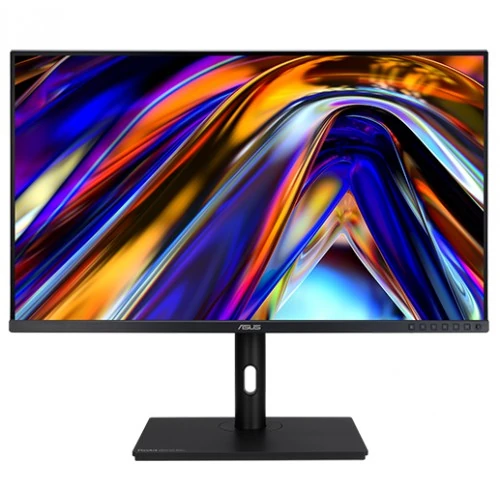
ASUS ProArt PA328QV overview
The ASUS ProArt Display PA328QV is a 31.5-inch professional monitor with a 2560 × 1440 WQHD IPS panel, 75Hz refresh and wide viewing angles. ASUS positions it for creative and productivity work, with 100% sRGB and Rec.709 coverage and factory color accuracy listed at Delta E below 2. It also provides an ergonomic stand, a USB hub, built-in stereo speakers and multiple picture controls. Features and signal limits are based on ASUS specifications; actual results depend on source hardware, cable, software and selected settings. Bangladesh price, availability, package contents and serial-specific warranty must be confirmed with the seller.
Exact model and display class
Verify the exact PA328QV model on the chassis and packaging. ASUS PA328QV is a WQHD 75Hz display; similarly named ProArt products can use different resolution, refresh, USB-C or color features. It should not be mistaken for a 4K monitor or for a USB-C dock display. Check the physical ports and regional specification before purchase. Features and signal limits are based on ASUS specifications; actual results depend on source hardware, cable, software and selected settings. Bangladesh price, availability, package contents and serial-specific warranty must be confirmed with the seller.
31.5-inch WQHD IPS panel
The 31.5-inch screen uses an IPS-type panel at 2560 × 1440 in a 16:9 format. This QHD resolution provides more desktop room than Full HD while keeping interface elements readable at ordinary scaling for many users. The large panel suits broad timelines, design canvases and side-by-side documents. Native resolution and sharpness depend on the computer output and selected signal. Features and signal limits are based on ASUS specifications; actual results depend on source hardware, cable, software and selected settings. Bangladesh price, availability, package contents and serial-specific warranty must be confirmed with the seller.
Color gamut and factory color accuracy
ASUS specifies 100% sRGB and 100% Rec.709 coverage, with Delta E below 2 factory color accuracy and Calman verification in product materials. These are useful starting points for SDR photo, video and design work. They do not replace calibration for a specific workflow or guarantee that every individual unit remains perfectly calibrated over time. Use appropriate color management and confirm the selected preset. Features and signal limits are based on ASUS specifications; actual results depend on source hardware, cable, software and selected settings. Bangladesh price, availability, package contents and serial-specific warranty must be confirmed with the seller.
Refresh rate and response
The monitor supports a maximum 75Hz refresh rate and a 5ms gray-to-gray response time in ASUS specifications. Compared with 60Hz, 75Hz can make desktop motion somewhat smoother, but it is not a high-refresh gaming display. Response measurements depend on the test method and overdrive setting. Select 2560 × 1440 at 75Hz when the connected graphics output supports it. Features and signal limits are based on ASUS specifications; actual results depend on source hardware, cable, software and selected settings. Bangladesh price, availability, package contents and serial-specific warranty must be confirmed with the seller.
Brightness, contrast and viewing angles
ASUS lists a 1000:1 contrast ratio, 350 cd/m² brightness and 178-degree horizontal and vertical viewing angles. The matte, non-glare surface helps reduce reflections, while IPS viewing supports more consistent colors across a wide seating position. Actual contrast and perceived brightness vary with room light, panel settings and viewing conditions. Avoid placing strong light sources directly behind the viewer. Features and signal limits are based on ASUS specifications; actual results depend on source hardware, cable, software and selected settings. Bangladesh price, availability, package contents and serial-specific warranty must be confirmed with the seller.
Inputs and USB hub connectivity
Digital inputs include one DisplayPort 1.2 and two HDMI 2.0 ports; the monitor also has a USB 3.2 Gen 1 Type-B upstream connection and four Type-A downstream USB ports. USB devices connect through the hub when the upstream cable is connected to a computer. The catalog previously included DVI, but ASUS does not list DVI for this model, so it has been removed. Features and signal limits are based on ASUS specifications; actual results depend on source hardware, cable, software and selected settings. Bangladesh price, availability, package contents and serial-specific warranty must be confirmed with the seller.
Speakers, headphone output and camera clarification
The PA328QV has two 2W built-in speakers and a headphone jack according to ASUS documentation. Audio quality is intended for basic desktop listening rather than replacing dedicated speakers. The existing catalog had a built-in camera entry, but ASUS documentation does not list a camera; do not expect a webcam. Use a separate camera when video calls require one. Features and signal limits are based on ASUS specifications; actual results depend on source hardware, cable, software and selected settings. Bangladesh price, availability, package contents and serial-specific warranty must be confirmed with the seller.
Stand adjustment and mounting
The included stand supports 130mm height adjustment, tilt from -5 to +23 degrees, swivel ±30 degrees and pivot ±90 degrees. It supports 100 × 100mm VESA mounting. Adjust the height and angle to keep the top of the screen near eye level and reduce neck strain. Check the desk depth and mounting arm load capacity before installing it on a third-party mount. Features and signal limits are based on ASUS specifications; actual results depend on source hardware, cable, software and selected settings. Bangladesh price, availability, package contents and serial-specific warranty must be confirmed with the seller.
ProArt color and workflow features
ProArt Preset offers multiple color modes, while ProArt Palette provides controls for color parameters and gamma. QuickFit Plus helps preview print or alignment guides, and ASUS lists picture-in-picture and picture-by-picture functions. These features support a controlled workflow, but outputs can differ between applications. Confirm the active preset and signal range when colors appear washed out or oversaturated. Features and signal limits are based on ASUS specifications; actual results depend on source hardware, cable, software and selected settings. Bangladesh price, availability, package contents and serial-specific warranty must be confirmed with the seller.
Compatibility and resolution setup
For the sharpest desktop output, connect with DisplayPort or HDMI, select 2560 × 1440 and choose 75Hz in the operating system when available. Use the supplied USB upstream cable to enable the four-port hub. Verify GPU and cable support, especially when using docks or adapters. If 75Hz is missing, update the graphics driver and review the active input and display mode. Features and signal limits are based on ASUS specifications; actual results depend on source hardware, cable, software and selected settings. Bangladesh price, availability, package contents and serial-specific warranty must be confirmed with the seller.
Photo, video and office work
The monitor’s large WQHD canvas can support photo editing, illustration, video timelines, office documents and general content review. Rec.709 and sRGB modes align with common SDR workflows, while calibration and ambient-light control improve consistency. QHD provides fewer pixels than 4K, so users editing native 4K footage may prefer a higher-resolution display or an external preview device. Features and signal limits are based on ASUS specifications; actual results depend on source hardware, cable, software and selected settings. Bangladesh price, availability, package contents and serial-specific warranty must be confirmed with the seller.
Gaming and motion expectations
Adaptive-Sync is listed by ASUS, and 75Hz can handle casual gaming and everyday motion. The PA328QV is designed primarily for creator and office use, not esports: its maximum refresh is modest compared with 144Hz or faster gaming displays. Confirm graphics synchronization support and driver settings if using variable refresh. Motion performance also depends on the game, frame rate and overdrive choice. Features and signal limits are based on ASUS specifications; actual results depend on source hardware, cable, software and selected settings. Bangladesh price, availability, package contents and serial-specific warranty must be confirmed with the seller.
Strengths and limitations
Advantages include a large IPS workspace, 100% sRGB and Rec.709 coverage, Delta E below 2 factory color accuracy, 75Hz refresh, ergonomic movement, a four-port USB hub and built-in speakers. Limitations include WQHD rather than 4K, no listed USB-C video input, no webcam and no DVI input. The 75Hz ceiling also makes it less suitable for high-refresh competitive gaming. Features and signal limits are based on ASUS specifications; actual results depend on source hardware, cable, software and selected settings. Bangladesh price, availability, package contents and serial-specific warranty must be confirmed with the seller.
OSD, eye-care and comfort setup
The OSD allows input selection, picture presets, brightness and other display settings. ASUS Eye Care functions include flicker-free backlighting and low blue light modes. Use a comfortable brightness for the room and take regular breaks during long sessions. Color presets and eye-care settings may change the image appearance, so recheck color-critical work after switching modes. Features and signal limits are based on ASUS specifications; actual results depend on source hardware, cable, software and selected settings. Bangladesh price, availability, package contents and serial-specific warranty must be confirmed with the seller.
Power, dimensions and placement
The monitor uses AC power input across 100–240V and has a typical power consumption below 26.5W according to its manual. Its stand footprint is about 245mm deep; the screen is approximately 715mm wide. Leave space for the base, cables and ventilation. The manual specifies operating temperature from 0°C to 40°C; avoid direct heat and moisture. Features and signal limits are based on ASUS specifications; actual results depend on source hardware, cable, software and selected settings. Bangladesh price, availability, package contents and serial-specific warranty must be confirmed with the seller.
Setup and calibration guidance
Place the display on a stable desk, connect the chosen video input, then set native WQHD resolution and supported refresh rate. Connect the USB Type-B upstream cable for USB hub access. Start with the intended ProArt preset and adjust brightness to the room. For color-critical work, calibrate with a colorimeter and keep room lighting and application color management consistent. Features and signal limits are based on ASUS specifications; actual results depend on source hardware, cable, software and selected settings. Bangladesh price, availability, package contents and serial-specific warranty must be confirmed with the seller.
Bangladesh purchase checklist
Before purchase in Bangladesh, confirm current price and stock, exact PA328QV model, sealed/new condition, included stand, cables and power cord, return and pixel policy, delivery arrangements, and the seller’s written serial-specific ASUS warranty provider and duration. Verify that the warranty wording is not confused with a replacement promise unless the local seller confirms its precise coverage in writing. Features and signal limits are based on ASUS specifications; actual results depend on source hardware, cable, software and selected settings. Bangladesh price, availability, package contents and serial-specific warranty must be confirmed with the seller.
Frequently asked questions
The PA328QV is a 31.5-inch WQHD creator monitor with IPS, 75Hz, 100% sRGB/Rec.709 and ASUS-listed Delta E below 2 accuracy. It includes HDMI 2.0 and DisplayPort 1.2, a four-port USB hub, speakers and a fully adjustable stand. It has no listed webcam, DVI input or USB-C video input. Confirm local warranty and package contents before ordering. Features and signal limits are based on ASUS specifications; actual results depend on source hardware, cable, software and selected settings. Bangladesh price, availability, package contents and serial-specific warranty must be confirmed with the seller.
Summary and who should consider it
Consider the PA328QV if you want a large QHD workspace, creator-focused color presets and an ergonomic stand at a moderate refresh rate. Compare a 4K model if pixel density is central, a high-refresh gaming display for competitive play, or a USB-C monitor if single-cable laptop docking is required. Match the choice to your source outputs and actual working applications. Features and signal limits are based on ASUS specifications; actual results depend on source hardware, cable, software and selected settings. Bangladesh price, availability, package contents and serial-specific warranty must be confirmed with the seller.