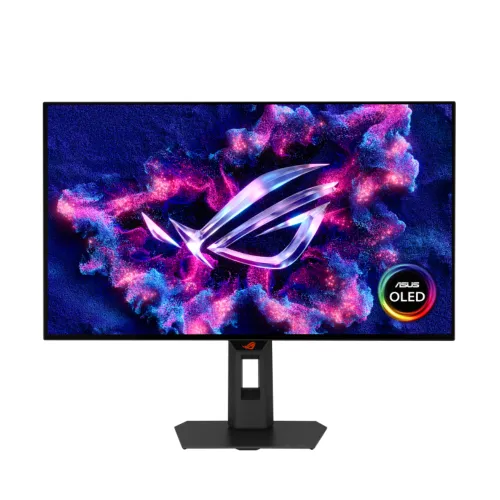
ASUS ROG Strix OLED XG27AQWMG: complete product guide
Tandem WOLED gaming overview
The ASUS ROG Strix OLED XG27AQWMG is a 26.5-inch flat 16:9 monitor with a 2560 x 1440 QHD fourth-generation Tandem WOLED panel. Its maximum refresh rate is 280Hz, and ASUS rates the gray-to-gray response at 0.03ms. The display combines a glossy TrueBlack Glossy surface, HDR10, VESA DisplayHDR True Black 500 and a peak HDR brightness rating of 1,500cd/m². It is designed for PC gaming where motion response, contrast and color are priorities. The product is not a 4K monitor: its native mode is 2560 x 1440. A compatible graphics system and the correct cable are necessary to use 280Hz. Verify the precise model label XG27AQWMG on the box, since other ROG Strix OLED monitors have similar names.
Panel, surface and resolution
The panel uses ASUS Tandem WOLED technology with a TrueBlack Glossy surface treatment. Native resolution is 2560 x 1440 and the active viewing area is approximately 590.42 x 331.88mm; the pixel pitch is 0.229mm. ASUS lists a 99.5% DCI-P3 color space, Delta E below 2 and 10-bit output for 1.0737 billion colors. The glossy surface supports strong image contrast but can reflect windows and lamps, so plan room lighting and screen placement. ASUS describes newer Tandem OLED technology as improving brightness, color volume and panel life compared with earlier WOLED generations. These are product-maker comparisons, not a promise of equal results across all use patterns. For professional grading or print work, calibrate the display to the actual output standard and monitor the complete signal chain.
Refresh rate, response and synchronization
The maximum refresh rate is 280Hz, with a 0.03ms GTG response-time rating. At 280Hz, the host must deliver a compatible high-refresh signal and the game must render enough frames to benefit. The monitor can show a new frame more frequently than a standard 60Hz display, but it does not increase GPU performance. ASUS lists AMD FreeSync Premium Pro, G-SYNC Compatible operation and VESA AdaptiveSync Display 280 certification. Variable refresh can synchronize the screen to compatible graphics output and reduce tearing across supported ranges. ASUS also provides Extreme Low Motion Blur, GameFast Input technology and OLED anti-flicker features. Visible motion depends on content, frame rate, GPU settings, cable and monitor configuration, so select a mode suited to the actual system rather than relying on a single response-time number.
HDR brightness, contrast and color
ASUS specifies 1,500cd/m² peak HDR brightness, a typical 1,500,000:1 contrast ratio and VESA DisplayHDR True Black 500 certification. HDR10 is listed as a supported format. Peak brightness is a highlight rating under suitable HDR conditions; it should not be interpreted as sustained full-screen output in every mode. ASUS notes that peak brightness can vary because of color pre-calibration. The Tandem WOLED panel combines self-emissive pixels and wide-gamut color to create deep blacks and vivid highlights. The manufacturer lists 99.5% DCI-P3, 10-bit color and Delta E below 2. For color-sensitive editing, verify the selected color mode and calibrate with appropriate equipment. A bright room, HDR source mastering, operating-system HDR controls and monitor settings all affect the final image.
OLED Care and panel longevity
ASUS OLED Care tools are intended to help reduce image-retention risk. The official page highlights a Neo Proximity Sensor that can detect when the user steps away and switch the display to a black image, then restore the picture when the user returns. Pixel Cleaning and Screen Move are among ASUS's OLED-care functions; follow on-screen prompts and do not disconnect power while a panel-cleaning routine is active. A custom heatsink and airflow are described as supporting cooling. ASUS states that its ROG OLED monitors include a three-year warranty covering panel burn-in, subject to warranty terms. This coverage is a useful feature, but claim eligibility, exclusions and service channel depend on region and the local warranty card. Use varied content and follow the maker's care instructions even with these protections enabled.
Inputs, USB hub and audio
The official I/O list includes one DisplayPort 1.4 input with Display Stream Compression, two HDMI 2.1 FRL inputs, two USB 3.2 Gen 1 Type-A hub ports and a headphone jack. There is no USB-C video input or built-in speaker listed. DisplayPort DSC is used to support high-resolution high-refresh modes within available link bandwidth; the exact signal must be supported by the graphics card and cable. ASUS includes a USB Type-B to Type-A cable in its regional accessories list so the USB hub can connect to the computer. Confirm the Bangladesh carton contents because ASUS notes accessories can vary by region. Use external speakers or headphones for audio. A Kensington lock and 1/4-inch tripod socket offer additional mounting and desk setup options.
Stand, mounting and workspace
The included stand supports tilt from -5 to +20 degrees, swivel from -45 to +45 degrees, pivot from -90 to +90 degrees and 0-110mm height adjustment. The display is compatible with a 100 x 100mm VESA mount. ASUS estimates dimensions at 60.5 x 50.0 x 18.8cm with the stand and 60.5 x 36.8 x 6.3cm without it. Net weight is estimated at 6.7kg with stand and 4.8kg without; box dimensions are 78.0 x 47.0 x 18.6cm and gross weight about 9.1kg. These estimates can vary by region. Check desk width, depth and cable clearance, and confirm any arm's weight capacity. ASUS includes the display, DP cable, HDMI cable, power cord, microfiber cloth, USB Type-B cable and VESA mount kit in its region-dependent accessories list.
Controls and software features
GamePlus and GameVisual provide in-game overlays and display presets. DisplayWidget Center offers software-based management for settings and firmware notifications, while ASUS lists a color-calibration report function through the application. Other features include Shadow Boost, Aspect Control, AI Visual, Dynamic Crosshair and Dynamic Shadow Boost. The AI tools are monitor-side gaming aids and do not replace game configuration or user accessibility needs. TUV Flicker-free and Low Blue Light hardware certifications are listed by ASUS. The actual benefit depends on the chosen mode, monitor firmware and user's preferences. Before applying a firmware update, use the official ASUS support resources for model XG27AQWMG and keep power connected throughout the update.
Power, care and practical setup
ASUS specifies consumption below 26.8W, power-saving mode below 0.5W and power-off mode below 0.3W, with 100-240V at 50/60Hz. For 280Hz, set the refresh rate in the operating system or graphics driver after connecting the display. If the rate is limited, check cable bandwidth, GPU output settings, DSC support and input selection. Keep the OLED panel clean with approved materials and avoid prolonged static images at high brightness. Allow OLED maintenance to finish when prompted. If using the USB hub, connect the upstream USB cable to the computer. Place the monitor away from direct glare, then use a comfortable brightness for long sessions. Follow the official manual for installation, cleaning and firmware maintenance.
Bangladesh price, availability and warranty
On 6 November 2026, Star Tech search results showed a listing price of ৳103,999 and indicated stock. This is one seller observation, not a full market range or guaranteed checkout price. Ryans and Global Brand also had product pages indexed, but the captured results did not provide a second comparable current price. The existing catalog variant MSRP is null and remains unchanged. ASUS's official specification page states a three-year warranty including panel burn-in; verify the local warranty card, importer and claim conditions with the seller. The record remains Active and its public product URL is preserved. Confirm exact stock, warranty coverage, included accessories and final price before ordering.
Source and regional notes
ASUS ROG's official specification page is the source for the XG27AQWMG panel, QHD resolution, 280Hz refresh, 0.03ms response, HDR peak, DCI-P3, inputs, USB hub, stand, power, accessories and three-year burn-in warranty. The feature page describes Tandem WOLED and TrueBlack Glossy technology. A Bangladesh Star Tech result provided a dated ৳103,999 price observation; it is not enough by itself to publish a market range. The catalog variant price remains null. Country of origin, GTIN/barcode and exact unit warranty card are not verified. Model code and existing SKU are preserved while the product title and MPN are normalized to the manufacturer's exact name.
Frequently asked questions
1. What is the native resolution?
2560 x 1440 QHD on a 26.5-inch panel.
2. What is the maximum refresh rate?
280Hz with a compatible system and supported connection.
3. Which OLED panel technology does it use?
Fourth-generation Tandem WOLED with TrueBlack Glossy surface treatment.
4. What is the response-time rating?
ASUS lists 0.03ms GTG.
5. Does it support HDR?
Yes. ASUS lists HDR10 and VESA DisplayHDR True Black 500, with 1500cd/m² peak HDR brightness.
6. Which inputs are available?
One DisplayPort 1.4 DSC, two HDMI 2.1 FRL, two USB-A hub ports and a headphone jack.
7. Does it have speakers or USB-C?
No built-in speakers or USB-C video input are listed.
8. Can the stand rotate and adjust?
Yes. The stand supports pivot, tilt, swivel and 0-110mm height adjustment.
9. What is ASUS OLED Care?
OLED protection tools include a Neo Proximity Sensor, pixel-cleaning and screen-move functions.
10. What warranty is listed?
ASUS lists three years including panel burn-in; check the Bangladesh unit card and claim rules.
11. What price was seen in Bangladesh?
Star Tech showed ৳103,999 on 6 November 2026; other captured pages did not provide a comparable quote.
12. What is in the box?
ASUS lists display, DP and HDMI cables, power cord, microfiber cloth, USB cable and VESA kit; regional bundles vary.