Pros
- 360Hz QHD DisplayPort operation for competitive PC gaming.
- G-SYNC Pulsar combines VRR and strobing motion technology.
- Ergonomic stand offers height, swivel, tilt and pivot adjustment.
- HDMI 2.1 inputs, USB hub and headphone output are included.

All categories
 New condition
Monitors
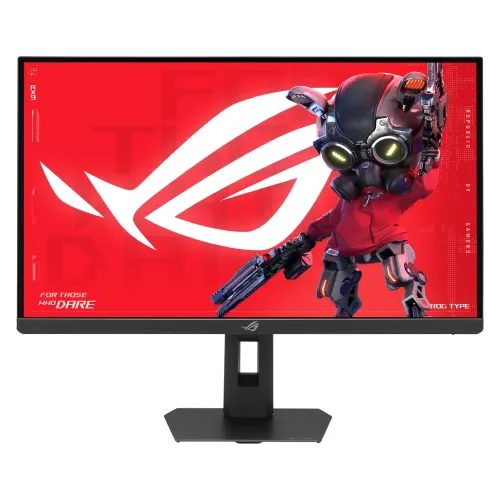
ASUS · ROG Strix Pulsar XG27AQNGV
27-inch QHD 360Hz Ultrafast IPS gaming monitor with G-SYNC Pulsar, 1ms response and HDMI 2.1.
Price unavailable
Price range updating
No verified price is available yet. Store offers will appear when merchants publish them.
Compare store prices
No live offers for this variant
Offers will appear when merchants publish them.
Loading history…
Product story
The ASUS ROG Strix Pulsar XG27AQNGV is a 27-inch 2560 × 1440 gaming display built around a 360Hz Ultrafast IPS panel and NVIDIA G-SYNC Pulsar. ASUS lists 1ms GtG response, 400-nit typical brightness, 500-nit HDR peak, Adaptive-Sync, HDMI 2.1 and DisplayPort 1.4 DSC. Pulsar combines variable refresh behavior with backlight strobing to improve perceived motion clarity in supported gaming conditions. This is a high-refresh PC gaming model; its QHD panel is not a 4K display and its HDMI vertical frequency is specified up to 120Hz. Actual result depends on GPU, connection, driver, selected mode, game and regional configuration; confirm exact Bangladesh offer and serial-specific warranty with the seller.
The full model identifier is XG27AQNGV, marketed as ROG Strix Pulsar. Keep it distinct from similarly named XG27AQ, XG27AQG and other ROG Strix products, which can have different refresh rates, ports, or motion features. The exact suffix matters when checking firmware, drivers, support documents and accessory fit. Verify the manufacturer label on the physical monitor and the invoice. ASUS also states specifications and bundled accessories can vary by region, so check the Bangladesh configuration supplied by the seller. Actual result depends on GPU, connection, driver, selected mode, game and regional configuration; confirm exact Bangladesh offer and serial-specific warranty with the seller.
The 27-inch 16:9 display uses an Ultrafast IPS panel with native 2560 × 1440 resolution, 0.233mm pixel pitch and 178-degree viewing angles. Anti-glare surface helps reduce reflections. QHD balances image detail and graphics workload for many gaming PCs, while giving more desktop room than Full HD. At 27 inches it is less dense than a 4K panel of the same size. The native contrast is 1000:1, typical for this display class and not equivalent to OLED-level dark-room blacks. Actual result depends on GPU, connection, driver, selected mode, game and regional configuration; confirm exact Bangladesh offer and serial-specific warranty with the seller.
ASUS specifies a maximum 360Hz refresh rate and 1ms GtG response time. To reach high refresh, the graphics card, connection, cable, game settings and selected resolution must support the required timing. DisplayPort is listed for up to 360Hz vertical frequency, while the HDMI signal range is listed up to 120Hz. Do not assume that connecting a console over HDMI enables 360Hz. Confirm the chosen input and refresh option in the operating system and monitor OSD. Actual result depends on GPU, connection, driver, selected mode, game and regional configuration; confirm exact Bangladesh offer and serial-specific warranty with the seller.
G-SYNC Pulsar is the model’s signature motion feature. ASUS describes it as combining G-SYNC variable refresh rate with advanced backlight strobing; NVIDIA’s specification lists the model as a Pulsar monitor. The perceived clarity benefit depends on supported refresh behavior, frame rate, settings and the viewer. It does not increase the game’s rendered frame rate or eliminate every source of motion blur. Use a compatible NVIDIA graphics configuration and consult current NVIDIA/ASUS guidance for activation and supported modes. Actual result depends on GPU, connection, driver, selected mode, game and regional configuration; confirm exact Bangladesh offer and serial-specific warranty with the seller.
The ASUS specification lists Adaptive-Sync as its VRR technology and G-SYNC and G-SYNC Pulsar certifications. Variable refresh can synchronize screen updates with compatible GPU output to reduce tearing and judder within the supported range. Actual behavior depends on connection, driver, game, frame rate and selected display mode. Configure the monitor and graphics control panel, then test with a compatible game. VRR cannot make an underpowered system render 360 frames per second. Actual result depends on GPU, connection, driver, selected mode, game and regional configuration; confirm exact Bangladesh offer and serial-specific warranty with the seller.
Ultra Low Motion Blur 2 (ULBM 2) is listed among the gaming features. Backlight strobing can improve motion definition but changes perceived brightness and may have compatibility or refresh restrictions. ASUS does not provide a user-specific guarantee that every game and refresh combination will work identically. Compare the modes using the games you play, and turn strobing off if flicker sensitivity, brightness loss or a feature conflict makes it uncomfortable. Follow the manual’s safety and setup guidance. Actual result depends on GPU, connection, driver, selected mode, game and regional configuration; confirm exact Bangladesh offer and serial-specific warranty with the seller.
Typical brightness is listed at 400 cd/m² and HDR peak brightness at 500 cd/m², with a 1000:1 typical contrast ratio and HDR support in the regional spec. The page does not list a VESA DisplayHDR tier. HDR signal acceptance should not be confused with the contrast, local dimming or peak highlights of premium HDR televisions and monitors. The IPS panel’s black level remains limited by its native contrast. Select SDR or HDR based on the game and operating-system configuration. Actual result depends on GPU, connection, driver, selected mode, game and regional configuration; confirm exact Bangladesh offer and serial-specific warranty with the seller.
ASUS lists 10-bit display color and color accuracy Delta E below 2, plus a color pre-calibration report among accessories. The specification lists 90% DCI-P3 in a repeated technical section. These figures describe the model specification and report, not a fresh independent measurement of a particular unit. Competitive gaming picture presets may prioritize visibility or speed over accurate color. For content work, use a suitable mode, manage profiles and validate the actual display if color tolerance matters. Actual result depends on GPU, connection, driver, selected mode, game and regional configuration; confirm exact Bangladesh offer and serial-specific warranty with the seller.
GameVisual offers display presets, GamePlus provides gaming overlays and tools, and Dark Boost can reveal darker scene detail. These settings change image processing and may affect color, gamma or visibility. Pick features deliberately rather than stacking options without checking the result. Crosshair overlays are generated by the monitor and may not reflect a game’s intended interface. For a neutral desktop image, return to a standard color mode and adjust brightness to match the room. Actual result depends on GPU, connection, driver, selected mode, game and regional configuration; confirm exact Bangladesh offer and serial-specific warranty with the seller.
The listed regional I/O configuration provides one DisplayPort 1.4 with DSC, two HDMI 2.1 FRL inputs, three USB 3.2 Gen 1 Type-A downstream ports and a headphone jack. The monitor does not list built-in speakers. Connect a computer to DisplayPort when pursuing up to 360Hz. HDMI is specified at up to 120Hz vertical frequency. USB peripherals require the appropriate upstream connection and the exact regional input configuration should be checked against the product label and manual. Actual result depends on GPU, connection, driver, selected mode, game and regional configuration; confirm exact Bangladesh offer and serial-specific warranty with the seller.
For PC gaming, verify GPU support for QHD at the intended refresh rate and connect through DisplayPort with a suitable cable. Console HDMI output is constrained by the monitor’s published HDMI signal range, which lists 50–120Hz vertical. The monitor does not provide native 4K resolution. Enable the required high-refresh and VRR settings in the operating system, GPU driver and game. If 360Hz is absent, check cable capability, input mode, resolution, graphics output and whether the software is using the discrete GPU. Actual result depends on GPU, connection, driver, selected mode, game and regional configuration; confirm exact Bangladesh offer and serial-specific warranty with the seller.
The stand offers tilt from -5 to +20 degrees, swivel 45 degrees each way, pivot 90 degrees in both directions and 0–110mm height adjustment. ASUS lists a 100 × 100mm VESA pattern. Adjust the screen for a comfortable viewing angle and leave slack for pivoting and swivel. A third-party arm must support the panel’s weight and the correct VESA hardware. Secure the display during installation and check desk clearance before attaching the stand or wall mount. Actual result depends on GPU, connection, driver, selected mode, game and regional configuration; confirm exact Bangladesh offer and serial-specific warranty with the seller.
Aura Sync lighting and an ambient light sensor are listed. Lighting can coordinate with compatible ROG hardware, while the sensor can adapt display behavior to room conditions depending on configuration. These are optional conveniences; turn them off if you prefer fixed brightness, less illumination or a simpler setup. The sensor cannot replace careful brightness calibration for color work. Check software support and privacy/permission prompts for the utility used to control connected ASUS devices. Actual result depends on GPU, connection, driver, selected mode, game and regional configuration; confirm exact Bangladesh offer and serial-specific warranty with the seller.
ASUS lists TÜV Flicker-free and TÜV Low Blue Light hardware solution certifications. These features may support more comfortable viewing for some users, but comfort depends on brightness, room lighting, distance, breaks and individual sensitivity. Use a suitable brightness and take regular breaks during long sessions. A certification does not eliminate eye fatigue or replace professional advice for persistent symptoms. Low-blue-light modes can change the apparent color balance and are best considered separately from color-critical work. Actual result depends on GPU, connection, driver, selected mode, game and regional configuration; confirm exact Bangladesh offer and serial-specific warranty with the seller.
The XG27AQNGV is suited to competitive PC gaming where high frame rates, QHD resolution and motion clarity are priorities. NVIDIA G-SYNC Pulsar and 360Hz operation can be valuable with compatible hardware and games that sustain high frame rates. The adjustable stand, headphone output and USB hub also support a focused desktop setup. Its strongest benefits are conditional: a capable PC, suitable DisplayPort connection, compatible driver stack and correct monitor settings are needed to access the full experience. Actual result depends on GPU, connection, driver, selected mode, game and regional configuration; confirm exact Bangladesh offer and serial-specific warranty with the seller.
This is not an OLED panel, not a 4K monitor, and not a high-brightness local-dimming HDR reference display. ASUS lists no built-in speakers and no USB-C video or laptop charging port. The HDMI vertical frequency range is lower than the DisplayPort maximum. Buyers who need USB-C docking, console-first 4K, deep OLED blacks, integrated audio or professional wide-gamut color should compare those requirements before choosing this model. Actual result depends on GPU, connection, driver, selected mode, game and regional configuration; confirm exact Bangladesh offer and serial-specific warranty with the seller.
Before purchase in Bangladesh, confirm exact XG27AQNGV model, current live offer, stock status, included cables and ROG pouch, and the seller’s return terms. Confirm ASUS service coverage, warranty duration and serial eligibility in writing. Check the graphics card’s DisplayPort output and the games’ performance at QHD if 360Hz is a priority. ASUS’s global technical page does not verify a local retailer’s price, inventory, bundle or warranty. Actual result depends on GPU, connection, driver, selected mode, game and regional configuration; confirm exact Bangladesh offer and serial-specific warranty with the seller.
For initial setup, assemble the stand on a stable surface, connect DisplayPort to the gaming PC and select QHD at the highest supported refresh in display settings. Install current GPU drivers, enable Adaptive-Sync/G-SYNC as directed, and test Pulsar/ULBM modes one at a time. If the image is limited to 120Hz, verify whether HDMI is in use; if 360Hz is missing on DisplayPort, inspect cable, graphics output, resolution and OSD configuration. Use the supplied color pre-calibration report as reference only. Actual result depends on GPU, connection, driver, selected mode, game and regional configuration; confirm exact Bangladesh offer and serial-specific warranty with the seller.
What is the native resolution? 2560 × 1440 QHD. What is the maximum refresh rate? ASUS lists 360Hz, with DisplayPort supporting up to 360Hz vertical frequency. What is G-SYNC Pulsar? It combines variable refresh with backlight strobing to improve perceived motion clarity. Does HDMI support 360Hz? ASUS lists HDMI vertical frequency up to 120Hz. Does it have speakers? No built-in speaker is listed. Does it include USB-C? No USB-C input is listed. What is peak HDR brightness? 500 cd/m²; typical brightness is 400 cd/m². What stand adjustments are included? 110mm height, tilt, swivel and pivot. Is it 4K? No, it is QHD. What warranty applies in Bangladesh? Confirm local service and serial terms with the seller. Actual result depends on GPU, connection, driver, selected mode, game and regional configuration; confirm exact Bangladesh offer and serial-specific warranty with the seller.
Helpful answers
Product-specific answers maintained with the catalog information.
It is a 27-inch QHD monitor with 2560 × 1440 native resolution.
ASUS lists up to 360Hz via the DisplayPort signal range; HDMI is listed up to 120Hz vertical.
It combines variable refresh and backlight strobing to improve perceived motion clarity.
No built-in speakers are listed; it has a headphone jack.
No USB-C port is listed on the technical specification page.
400 nits typical and 500 nits HDR peak.
0–110mm height, -5° to +20° tilt, ±45° swivel and ±90° pivot.
Yes, ASUS lists two HDMI 2.1 FRL inputs.
No, it is QHD 2560 × 1440.
Confirm local ASUS service, duration and serial eligibility with the seller.
Customer community
Become a merchant
Join BiponiBD, publish accurate offers and start free.