Pros
- High refresh can suit competitive PC gaming.
- Compact 24.5-inch Full HD panel is less demanding than QHD.
- Multiple sync and motion features are listed.
- Stand supports tilt, swivel and pivot.

All categories
 New condition
Monitors
ASUS · ROG Strix XG256Q
24.5-inch Full HD Fast IPS gaming monitor with 180Hz DisplayPort overclock, Adaptive-Sync, ELMB and DisplayHDR 400.
Price unavailable
Price range updating
No verified price is available yet. Store offers will appear when merchants publish them.
Compare store prices
No live offers for this variant
Offers will appear when merchants publish them.
Loading history…
Product story
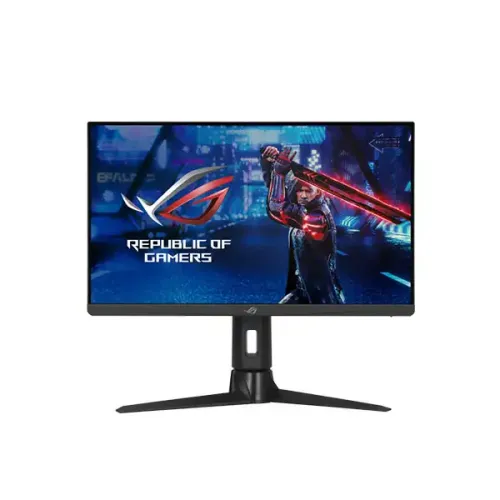
The ASUS ROG Strix XG256Q is a 24.5-inch Full HD gaming monitor with a Fast IPS panel. ASUS lists up to 180Hz over DisplayPort with overclocking, while HDMI supports up to 165Hz vertical refresh. Its feature set includes Adaptive-Sync, Extreme Low Motion Blur, DisplayHDR 400 and an ergonomic stand. Check the full XG256Q product code: ASUS ROG monitor names can be similar, and this model is a 1920 × 1080 display rather than a QHD screen.
The 24.5-inch screen has a native resolution of 1920 × 1080 pixels in a 16:9 aspect ratio. This Full HD resolution can make it easier for a gaming PC to reach high frame rates than a higher-pixel-count QHD monitor, depending on the game and graphics card. The viewing area is approximately 543.74 by 302.62mm. The panel uses an anti-glare finish and a 0.283mm pixel pitch.
ASUS identifies the panel as Fast IPS. It combines the viewing-angle characteristics associated with IPS displays with a gaming-focused response specification. ASUS lists 178-degree horizontal and vertical viewing angles, 1000:1 typical contrast and 400cd/m² typical brightness. These measurements describe manufacturer-rated performance; actual appearance depends on room lighting, picture mode, calibration and individual panel characteristics.
ASUS lists a maximum refresh rate of 180Hz. The specification indicates this is reached over DisplayPort with overclocking; HDMI signal frequency tops out at 165Hz. DisplayPort may default to 144Hz or another mode until the source selects the higher refresh. Enable the suitable mode in the display menu and operating-system graphics settings, and use a compatible GPU and cable. Availability depends on source, resolution and connection.
The stated response time is 1ms GtG. Response time describes pixel transitions under specified conditions; it is not the same as input lag and does not guarantee every transition completes in one millisecond in normal use. Extreme Low Motion Blur uses a separate motion-blur-reduction feature. Some response modes can introduce brightness changes or visual artifacts, so compare settings with real games and choose the clearest comfortable mode.
ASUS lists Adaptive-Sync and AMD FreeSync Premium, plus NVIDIA G-SYNC compatibility for supported systems. Variable refresh helps align display updates with changing frame output, which can reduce tearing and judder in supported configurations. Compatibility depends on graphics hardware, drivers, port, cable and settings. Check the GPU control panel and monitor menu if the expected variable-refresh option does not appear.
Extreme Low Motion Blur is ASUS’s motion-blur-reduction feature for compatible modes. It can make moving objects appear clearer, but strobing technology may reduce brightness or interact with variable refresh and refresh-rate limits. The most suitable setting depends on game frame rate and personal sensitivity. Do not assume ELMB and every Adaptive-Sync mode can operate together unless the selected configuration explicitly supports it.
ASUS lists VESA DisplayHDR 400 certification and typical brightness of 400cd/m². HDR requires compatible content, system settings and a supported signal path. DisplayHDR 400 is an entry-level HDR certification and does not imply local dimming. For everyday SDR, a comfortable brightness matched to the room may be preferable. The listing should not promise OLED-like blacks or advanced zone-based contrast from this certification.
ASUS specifies 99% sRGB coverage and 16.7 million display colors. This supports general gaming and everyday media use. It is not a substitute for a professional color-reference display or a calibrated proofing workflow. Presets and adjustments can affect color appearance, so creators should calibrate the monitor and verify output on other devices before delivering color-critical work.
The monitor provides one DisplayPort 1.2 connection, two HDMI 2.0 inputs and an earphone jack. ASUS lists DisplayPort as the connection for 180Hz overclocking; HDMI signal frequency is limited to 165Hz. Connect the PC or console directly when troubleshooting, select the correct input, and use a cable capable of the required signal. USB-C input and laptop charging are not listed for this model.
The dual HDMI inputs allow a console and another HDMI source to remain connected, while DisplayPort is suited to a gaming PC seeking the maximum refresh. Console output modes depend on the console generation and supported games; do not assume a console will use the monitor’s 180Hz overclock. On a PC, the GPU must render the frame rate and expose the desired output mode. Check the device manual and ASUS signal-frequency details.
The stand supports tilt from approximately -5 to +20 degrees, swivel around 25 degrees in either direction and clockwise pivot from 0 to 90 degrees. It can help adjust the screen for seated viewing or portrait use. ASUS’s specification does not list height adjustment, so do not promise a height-adjustable stand. A monitor riser or compatible arm can be considered if the desk position needs additional height.
The XG256Q supports 100 × 100mm VESA wall mounting and includes a Kensington lock provision. Confirm the arm or mount supports the monitor’s load and uses the correct screw length. Provide clearance for the power adapter and rear connections. When rotating the screen, check for cable slack and ensure the stand is stable. Keep the monitor away from heat, moisture and blocked ventilation.
ASUS lists an earphone jack but does not list integrated speakers. Plan to use headphones or external speakers for audio. Regional package contents may include a DisplayPort cable, power adapter, AC cord, quick-start guide, ROG pouch, sticker and warranty card; confirm the local seller’s included items before purchase. The monitor does not provide the computer, console, webcam or separate audio equipment.
ASUS lists power consumption below 16W, power-saving consumption below 0.5W and off-mode below 0.3W. The power input is 100–240V, 50/60Hz, using the specified external power adapter. Use the adapter included with the exact model and a compatible local AC cord. Disconnect power before cleaning, and do not cover the adapter or monitor ventilation areas.
GamePlus and GameVisual features are listed by ASUS, along with Shadow Boost and DisplayWidget support. These controls can adjust the display or provide game-oriented overlays and picture modes. They do not change the game engine’s rendering, guarantee a competitive advantage or replace practice. Menu availability can vary by input and configuration. Review the manual for safe operation and restore default settings if experimentation produces an undesirable image.
The monitor can also serve for browsing, office applications, study and video. Full HD at 24.5 inches is a familiar desktop format, while the stand’s swivel and pivot can help adapt its orientation. Text clarity depends on viewing distance, scaling and eyesight. HDR playback depends on content and application support. For extended sessions, set a comfortable brightness and take breaks; eye-comfort features may be enabled according to preference.
The exact code XG256Q identifies a Full HD 24.5-inch model. Do not confuse it with similarly named 25-inch or 27-inch ROG displays with different resolutions or refresh specifications. ASUS lists 180Hz overclock on DisplayPort and 165Hz on HDMI; those port-specific limits should remain clear in product copy. Local accessory packages, warranty terms and regulatory details can differ by market.
ASUS global product specifications do not prove that a particular serial number has a valid Bangladesh warranty. Ask the seller to confirm the official or seller warranty provider, service location, term, dead-pixel policy and invoice requirements. Check that the serial on the product and carton matches the invoice. Keep packaging and accessories while the return period is active. Warranty coverage can differ by import channel and should be confirmed before payment.
Before checkout, confirm the product is the ASUS ROG Strix XG256Q, not another ROG Strix model. Verify the live price, stock, delivery fees, promotion and return rules on the current offer because they can change. On delivery, inspect the panel and stand, connect the intended source, test HDMI and DisplayPort, verify available refresh settings, and check the earphone output and Adaptive-Sync behavior. Document visible damage promptly.
The XG256Q suits buyers who prefer a compact 24.5-inch Full HD display and want high refresh for compatible PC gaming. Fast IPS, Adaptive-Sync, ELMB and an adjustable tilt/swivel/pivot stand provide gaming and positioning options. It is not a fit for buyers who need QHD or 4K resolution, integrated speakers, USB-C video, laptop charging or a listed height-adjustment mechanism. Compare the exact input and refresh limits against the computer before buying.
Helpful answers
Product-specific answers maintained with the catalog information.
It is a 24.5-inch Full HD display with 1920 × 1080 resolution.
ASUS lists 180Hz overclock via DisplayPort; HDMI signal frequency supports up to 165Hz.
ASUS specifies a Fast IPS panel.
ASUS lists Adaptive-Sync and AMD FreeSync Premium.
ASUS lists G-SYNC compatibility; actual behavior depends on GPU, driver and connection.
Integrated speakers are not listed; an earphone jack is available.
USB-C video is not listed. The inputs are DisplayPort 1.2 and two HDMI 2.0.
ASUS lists tilt, swivel and pivot; a height adjustment is not specified.
Confirm serial-specific local warranty and service with the seller before purchase.
Customer community
Become a merchant
Join BiponiBD, publish accurate offers and start free.