Product overview
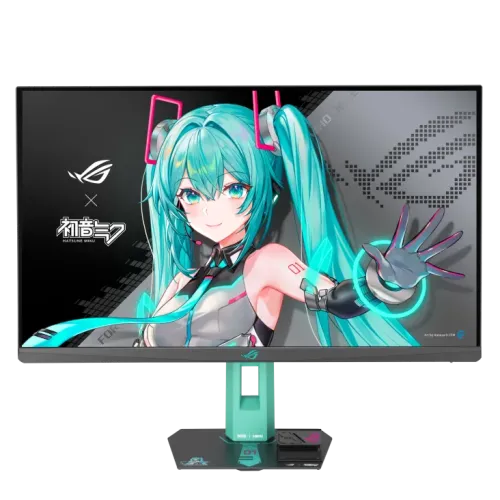
The ASUS ROG Strix XG27ACMEG-G Hatsune Miku Edition is a 27-inch 2560 × 1440 Fast IPS gaming monitor with a maximum 260Hz refresh rate. ASUS lists 1ms GTG and a 0.3ms minimum response figure, 400 cd/m² typical and peak HDR brightness, VESA DisplayHDR 400, Adaptive-Sync, AMD FreeSync Premium and G-SYNC Compatible. USB-C supports DisplayPort Alt Mode and 15W power delivery. Consult ASUS's XG27ACMEG-G model-specific specification and guide for setup details. Performance depends on source, input, cable, mode and software. Live Bangladesh price, stock, warranty and return terms are seller-specific and should be confirmed before purchase.
Exact Hatsune Miku model identity
This is the ROG Strix XG27ACMEG-G Hatsune Miku Edition. Confirm the full model code on the product label; other ROG 27-inch monitors can use OLED, different panel technology or different refresh capabilities. The themed edition's accessories and styling may vary by regional bundle. The specifications below use ASUS's exact model page. Consult ASUS's XG27ACMEG-G model-specific specification and guide for setup details. Performance depends on source, input, cable, mode and software. Live Bangladesh price, stock, warranty and return terms are seller-specific and should be confirmed before purchase.
27-inch QHD display
The 27-inch panel has a 16:9 aspect ratio and native 2560 × 1440 resolution. QHD provides more image detail and workspace than Full HD, while 260Hz gaming at QHD places substantial frame-rate demands on the source PC. Use native resolution for sharp output and choose graphics settings according to the GPU and game. Consult ASUS's XG27ACMEG-G model-specific specification and guide for setup details. Performance depends on source, input, cable, mode and software. Live Bangladesh price, stock, warranty and return terms are seller-specific and should be confirmed before purchase.
Fast IPS and image characteristics
ASUS specifies a Fast IPS panel with 178-degree horizontal and vertical viewing angles, anti-glare surface and LED backlight. Typical contrast is 1000:1. The wide viewing angle is useful for off-center viewing, but brightness uniformity and panel characteristics can vary by unit. The display spec lists 95% DCI-P3 color space. Consult ASUS's XG27ACMEG-G model-specific specification and guide for setup details. Performance depends on source, input, cable, mode and software. Live Bangladesh price, stock, warranty and return terms are seller-specific and should be confirmed before purchase.
260Hz refresh and signal setup
The maximum refresh is 260Hz, and ASUS lists a vertical signal-frequency range up to 260Hz across HDMI, USB-C and DisplayPort. To use high refresh, the graphics output, cable, operating system and game must support the chosen resolution and timing. Select QHD and 260Hz in system display settings and verify the signal in the monitor menu. Consult ASUS's XG27ACMEG-G model-specific specification and guide for setup details. Performance depends on source, input, cable, mode and software. Live Bangladesh price, stock, warranty and return terms are seller-specific and should be confirmed before purchase.
Response time and motion clarity
ASUS lists 1ms GTG and 0.3ms minimum. These are distinct response-time figures and should not be interpreted as every pixel transition or complete system input latency. Actual motion depends on overdrive, refresh, frame rate and settings. Tune ELMB/response behavior for the source and game, checking for artifacts. Consult ASUS's XG27ACMEG-G model-specific specification and guide for setup details. Performance depends on source, input, cable, mode and software. Live Bangladesh price, stock, warranty and return terms are seller-specific and should be confirmed before purchase.
VESA DisplayHDR 400
The model carries VESA DisplayHDR 400 certification, with ASUS specifying 400 cd/m² typical and peak HDR brightness. HDR results depend on the input, content and settings. HDR400 certification does not establish OLED-style blacks or local dimming. Use HDR only with compatible content and source configuration, and adjust picture mode to preference. Consult ASUS's XG27ACMEG-G model-specific specification and guide for setup details. Performance depends on source, input, cable, mode and software. Live Bangladesh price, stock, warranty and return terms are seller-specific and should be confirmed before purchase.
Color space and viewing
ASUS lists 95% DCI-P3 color space, 1000:1 typical contrast and 178-degree viewing. GameVisual provides picture presets; these can alter color and brightness. Gamut coverage is not a substitute for a calibration report, so color-critical work should use suitable measurement and a workflow matched to the delivery color space. Consult ASUS's XG27ACMEG-G model-specific specification and guide for setup details. Performance depends on source, input, cable, mode and software. Live Bangladesh price, stock, warranty and return terms are seller-specific and should be confirmed before purchase.
Adaptive-Sync and FreeSync
Adaptive-Sync is listed, with AMD FreeSync Premium and G-SYNC Compatible certification. Enable VRR in the display and GPU settings and confirm compatibility for the selected input and mode. Adaptive sync can reduce tearing within the supported range but does not make the game render faster or replace a capable GPU. Consult ASUS's XG27ACMEG-G model-specific specification and guide for setup details. Performance depends on source, input, cable, mode and software. Live Bangladesh price, stock, warranty and return terms are seller-specific and should be confirmed before purchase.
ELMB Sync and gaming functions
ASUS lists Extreme Low Motion Blur and ELMB Sync, along with GamePlus, Shadow Boost, GameVisual and DisplayWidget Center. Features and combinations can depend on signal mode. ELMB Sync pairs blur reduction with variable refresh on supported configurations; use the OSD and observe image quality, brightness and synchronization behavior with your own setup. Consult ASUS's XG27ACMEG-G model-specific specification and guide for setup details. Performance depends on source, input, cable, mode and software. Live Bangladesh price, stock, warranty and return terms are seller-specific and should be confirmed before purchase.
USB-C and other connectivity
Inputs include USB-C with DisplayPort Alt Mode and 15W USB-C Power Delivery, one DisplayPort 1.4 HBR3, one HDMI 2.1 and an earphone jack. The 15W USB-C output is modest and should not be treated as laptop charging replacement. Confirm the host's video-over-USB-C capability and use a cable suitable for the desired mode. Consult ASUS's XG27ACMEG-G model-specific specification and guide for setup details. Performance depends on source, input, cable, mode and software. Live Bangladesh price, stock, warranty and return terms are seller-specific and should be confirmed before purchase.
Stand, lighting and accessories
The monitor supports tilt from -5 to +20 degrees, Aura Sync lighting and 100 × 100mm VESA mounting. ASUS lists a DisplayPort cable, phone holder, power adapter, power cord, quick-start guide, ROG pouch, sticker and warranty card as regional accessories. ASUS notes accessories vary by region, so verify the local package contents before purchase. Consult ASUS's XG27ACMEG-G model-specific specification and guide for setup details. Performance depends on source, input, cable, mode and software. Live Bangladesh price, stock, warranty and return terms are seller-specific and should be confirmed before purchase.
PC gaming setup
For high-refresh PC gaming, connect through a supported DisplayPort 1.4, HDMI 2.1 or USB-C video path, select 2560 × 1440 and up to 260Hz in the operating system, then verify the active mode. GPU, cable, driver and game must all support the timing. Use a frame-rate cap or quality settings appropriate to your graphics hardware. Consult ASUS's XG27ACMEG-G model-specific specification and guide for setup details. Performance depends on source, input, cable, mode and software. Live Bangladesh price, stock, warranty and return terms are seller-specific and should be confirmed before purchase.
Console and USB-C source compatibility
The HDMI 2.1 input supports compatible video sources, while refresh and resolution limits depend on the exact console or device. USB-C video requires DisplayPort Alt Mode from the host. Do not assume USB-C charging at 15W will power a laptop under load. Confirm source output modes, VRR and HDR compatibility for the specific device. Consult ASUS's XG27ACMEG-G model-specific specification and guide for setup details. Performance depends on source, input, cable, mode and software. Live Bangladesh price, stock, warranty and return terms are seller-specific and should be confirmed before purchase.
Mounting, dimensions and power
The display measures approximately 61.4 × 50.3 × 18.8cm with stand; without stand ASUS lists 61.4 × 36.7 × 8.6cm. Net weight is 5.8kg with stand and 3.7kg without. Power input is 100–240V, with typical-on consumption under 29W. Use a stable desk or compatible VESA arm and leave cable clearance. Consult ASUS's XG27ACMEG-G model-specific specification and guide for setup details. Performance depends on source, input, cable, mode and software. Live Bangladesh price, stock, warranty and return terms are seller-specific and should be confirmed before purchase.
Strengths and trade-offs
Benefits include QHD resolution, up to 260Hz, Fast IPS, Adaptive-Sync certifications, ELMB Sync, USB-C DP Alt Mode and a distinctive Hatsune Miku theme. Considerations include demanding GPU requirements at QHD/high refresh, limited 15W USB-C power delivery, HDR400's entry-level brightness class and single HDMI input. Match the features to your equipment and needs. Consult ASUS's XG27ACMEG-G model-specific specification and guide for setup details. Performance depends on source, input, cable, mode and software. Live Bangladesh price, stock, warranty and return terms are seller-specific and should be confirmed before purchase.
Hatsune Miku design edition
The Hatsune Miku Edition is a themed ROG collaboration, with ASUS-listed Aura Sync lighting and included regional accessories such as a phone holder and ROG pouch. The branding and bundle do not change the panel's core performance requirements. Inspect actual finish and accessory contents on arrival because ASUS says regional accessories may vary. Consult ASUS's XG27ACMEG-G model-specific specification and guide for setup details. Performance depends on source, input, cable, mode and software. Live Bangladesh price, stock, warranty and return terms are seller-specific and should be confirmed before purchase.
Care and delivery inspection
On delivery, inspect the themed finish, display surface, stand, ports, adapter, cable and package contents. Keep invoice, serial label and packaging through the seller's return period. Use a soft dry microfiber cloth; avoid spraying liquid on the panel. Test QHD, refresh modes, USB-C video, audio output, VRR and HDR with compatible source equipment. Consult ASUS's XG27ACMEG-G model-specific specification and guide for setup details. Performance depends on source, input, cable, mode and software. Live Bangladesh price, stock, warranty and return terms are seller-specific and should be confirmed before purchase.
Bangladesh purchase checklist
Before buying in Bangladesh, confirm live price and inventory, exact XG27ACMEG-G model, regional accessory bundle, return/dead-pixel policy, delivery and serial-specific local ASUS warranty provider and term. ASUS's global specification does not confirm local seller coverage. Retain invoice and serial details, and ask the seller to confirm service conditions in writing. Consult ASUS's XG27ACMEG-G model-specific specification and guide for setup details. Performance depends on source, input, cable, mode and software. Live Bangladesh price, stock, warranty and return terms are seller-specific and should be confirmed before purchase.
Frequently asked questions
ASUS specifies a 27-inch QHD Fast IPS panel up to 260Hz, HDR400, Adaptive-Sync, FreeSync Premium, G-SYNC Compatible, ELMB Sync, USB-C DP Alt Mode with 15W PD, DisplayPort 1.4 and HDMI 2.1. Check host compatibility for high refresh. Confirm price, stock, package and Bangladesh warranty with the seller. Consult ASUS's XG27ACMEG-G model-specific specification and guide for setup details. Performance depends on source, input, cable, mode and software. Live Bangladesh price, stock, warranty and return terms are seller-specific and should be confirmed before purchase.