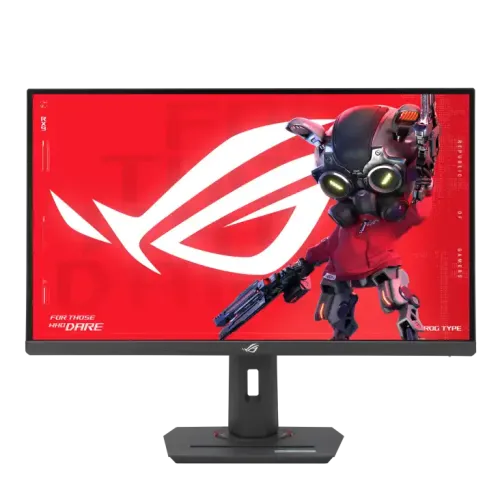
Verified model overview
ASUS ROG Strix XG27ACS is a 27-inch QHD Fast IPS gaming monitor with 2560 × 1440 resolution and up to 180Hz. ASUS specifies 1ms GtG, Adaptive-Sync, ELMB Sync, HDR10 and VESA DisplayHDR 400. Its inputs include DisplayPort 1.4, HDMI 2.0 and USB-C DisplayPort Alt Mode with 7.5W Power Delivery. Typical brightness is 350 nits; HDR peak is 400 nits. The stand supports height, tilt, swivel and pivot. Confirm local serial warranty and included accessories.
QHD resolution and pixel detail
The 27-inch panel has native QHD resolution of 2560 × 1440 in a 16:9 aspect ratio. This provides a detailed image and broad workspace for games, coding and media. Set the computer to native resolution and adjust text scaling for comfort. The source GPU, cable and selected input control the available refresh mode. Using a non-native resolution can soften text, so check the display settings if the picture appears blurry.
Fast IPS panel
ASUS identifies a Fast IPS panel with anti-glare surface and 178-degree horizontal and vertical viewing angles. IPS supports broad viewing, while Fast IPS is tuned for quicker response in motion. Viewing angle ratings do not guarantee identical color from every position. Sit centered for competitive play and avoid direct light reflections. For color-sensitive design tasks, calibrate the actual display and use color-managed software.
180Hz refresh rate
The maximum refresh is 180Hz over DisplayPort and USB-C; HDMI supports up to 144Hz at QHD according to ASUS signal timing. Select 2560 × 1440 at 180Hz in the operating system and verify the active signal. Use DisplayPort or compatible USB-C when targeting 180Hz. Cable, adapter, dock, GPU and game settings can limit the mode. High refresh only improves motion when the source can provide enough frames.
1ms GtG response
ASUS lists 1ms gray-to-gray response. This is a pixel transition measurement, not input lag and not a guarantee that every color transition completes in that time. The picture depends on overdrive, frame rate and refresh. Adjust Trace Free or response options to avoid inverse ghosting. A strong setting may make bright trails visible. Test with moving objects and choose a clean result rather than optimizing only for the smallest listed number.
Adaptive-Sync and G-SYNC compatibility
ASUS lists Adaptive-Sync, AMD FreeSync and NVIDIA G-SYNC compatibility certifications. Variable refresh can align display updates with compatible GPU output and reduce tearing over the supported range. Enable it in the OSD and driver, then test at the frame rates you typically use. Compatibility can depend on input, graphics card and firmware. VRR does not increase rendering speed and may behave differently across computer configurations.
ELMB Sync and motion clarity
Extreme Low Motion Blur Sync combines motion blur reduction with variable refresh on supported conditions. It can improve perceived clarity for fast movement, but behavior depends on refresh and graphics timing. Blur-reduction modes may reduce brightness or create flicker for some viewers. Compare ELMB Sync off and on with real games. If the image appears dim or unstable, disable it and use Adaptive-Sync alone.
HDR10 and DisplayHDR 400
The monitor accepts HDR10 content and carries VESA DisplayHDR 400 certification in ASUS specifications. ASUS lists 400 cd/m² peak HDR brightness and 350 cd/m² typical brightness. DisplayHDR 400 is an entry-level HDR tier and does not guarantee local dimming. HDR appearance depends on source material, operating-system settings and game implementation. Use HDR for compatible media and compare SDR for everyday desktop work.
Color space and display colors
ASUS lists 97% DCI-P3 and 133% sRGB color-space values, with 16.7 million display colors. The percentages use a specified measurement space and describe gamut rather than accuracy. Wide gamut can make standard content appear oversaturated if color management is not active. Choose an sRGB or natural mode when appropriate. For professional color evaluation, use a calibrated profile and confirm the workflow with the software you use.
Brightness and contrast
The specification lists 350 cd/m² typical brightness, 400 cd/m² HDR peak and 1000:1 typical contrast. These values describe different modes and are not interchangeable. Adjust brightness for ambient lighting and avoid using maximum output in a dim room. Contrast affects the appearance of dark and bright details but is not equivalent to local dimming. Panel uniformity and perceived black level can vary by unit.
DisplayPort, HDMI and USB-C
The I/O list includes one DisplayPort 1.4 with HBR3, one HDMI 2.0 and one USB-C port with DisplayPort Alt Mode. DP and USB-C support up to 180Hz vertical scan; HDMI is listed up to 144Hz at QHD. A headphone jack is also included. Choose a cable appropriate to the source and desired timing. USB-C video requires compatible host output; connector shape alone does not guarantee display capability.
USB-C power limits
ASUS lists USB-C Power Delivery at 7.5W. This can provide limited power to small devices but is not laptop charging. The USB-C port carries DisplayPort Alt Mode video when the computer supports it. Use the laptop’s separate power adapter for charging. Check the cable and host specifications if the monitor shows no signal. Do not confuse this model’s 7.5W USB-C output with ASUS docking monitors that provide much higher wattage.
Audio and speaker configuration
ASUS lists a headphone jack but no integrated speakers. Audio can be routed over HDMI, DisplayPort or USB-C from the source device to the headphone output. Select the monitor audio device in the operating system and check volume if sound is absent. Use external speakers or headphones for audio. A monitor with a USB-C input does not necessarily include a microphone or built-in speaker system.
Ergonomic stand and tripod socket
The stand supports height adjustment from 0 to 120mm, tilt from -5 to +20 degrees, swivel ±45 degrees and pivot ±90 degrees. A 1/4-inch tripod socket is also listed. The monitor supports 100 × 100mm VESA mounting. Adjust the display to reduce neck movement and glare. For an arm, check the monitor’s weight, mount pattern and screw length. Keep cables clear while rotating into portrait orientation.
GamePlus, ELMB and ASUS controls
ASUS lists GamePlus, GameVisual, Shadow Boost, GameFast Input and DisplayWidget Center. These controls offer overlays, picture presets and desktop software adjustment. They do not increase GPU performance. Change one setting at a time and test in both games and normal content. Avoid excessive sharpness or shadow enhancement if it creates halos or washed-out blacks. Save a preferred profile for gaming and a neutral profile for productivity.
Eye care and flicker-free viewing
The display includes hardware Low Blue Light and TÜV-certified Flicker-Free technology. It also lists TÜV low-blue-light certification. Low-blue-light settings can warm the image and alter color. Use a neutral mode for color work, and adjust brightness for the room. Take regular breaks and maintain a comfortable viewing distance. These features are comfort tools and are not medical treatment or a guarantee against eye strain.
Power use and physical setup
ASUS lists power consumption below 23.1W, power-saving use below 0.5W and off-mode below 0.3W. The monitor weighs about 6.61kg with stand and measures roughly 61.48 × 51.29 × 21.88cm. Leave room for the stand adjustments and rear cables. Use the included power cord and place the monitor on a stable surface. Do not hang objects from the panel or headphone jack.
Who should consider this monitor
The XG27ACS suits PC gamers who want QHD detail, 180Hz refresh, Fast IPS response and flexible stand adjustment. It also works as a general desktop display with a broad color gamut and HDR support. HDMI users should expect up to 144Hz at QHD, while DP or compatible USB-C can reach 180Hz. A 7.5W USB-C connection is for video and limited power, not laptop docking or charging.
Tradeoffs and compatibility
The monitor offers many gaming tools but does not include speakers, a USB hub or high-wattage laptop charging. HDR400 does not provide local dimming. The 180Hz mode requires a compatible source and connection; HDMI is limited to 144Hz at QHD. High frame rates at QHD require a capable GPU. Regional accessories, warranty and packaging can vary. Verify the full model code and local service before buying.
Bangladesh purchase and warranty checks
ASUS global documentation does not guarantee warranty coverage for a particular Bangladesh serial. Ask the seller to confirm authorized channel, warranty term, service center, dead-pixel policy and invoice requirements. Match the XG27ACS model and serial on the monitor and box. Confirm included DisplayPort cable, power cord, pouch and warranty card because ASUS says accessories vary by region. Test inputs, refresh, VRR, stand, pixel condition and USB-C video during the return window. Before ordering, also confirm whether the advertised price includes VAT, delivery, and any current promotion, since these commercial terms can change independently of the monitor specifications. Keep the invoice and serial number together for support requests.