Pros
- One panel switches between 4K detail and 320Hz Full HD play.
- Fast IPS and Adaptive-Sync support responsive gaming.
- HDMI 2.1, DisplayPort and USB-C video cover common PC sources.
- 120mm height adjustment and VESA mounting aid desk setup.

All categories
 New condition
Monitors
ASUS · ROG Strix XG27UCG-W
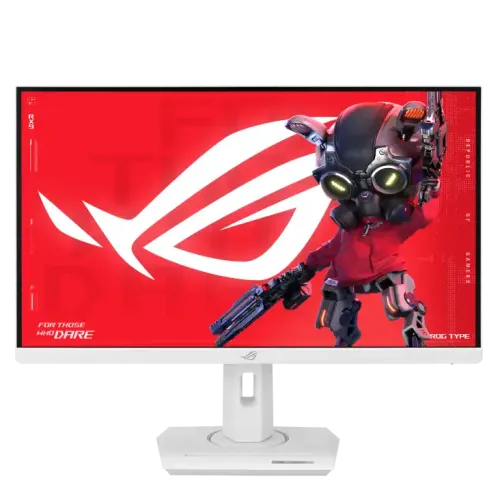
27-inch Fast IPS dual-mode gaming monitor: 4K 160Hz or Full HD 320Hz, with Adaptive-Sync and USB-C video.
Price unavailable
Price range updating
No verified price is available yet. Store offers will appear when merchants publish them.
Compare store prices
No live offers for this variant
Offers will appear when merchants publish them.
Loading history…
Product story
The ASUS ROG Strix XG27UCG-W is a 27-inch Fast IPS gaming monitor with a 3840 × 2160 4K panel and a dual-mode option. ASUS specifies up to 160Hz in UHD mode or up to 320Hz after switching to Full HD. It also lists 1ms GTG, Adaptive-Sync, ELMB Sync, HDMI 2.1, DisplayPort 1.4 and USB-C video input. It targets gamers who alternate detailed single-player visuals with fast competitive play. The usable refresh rate depends on the connected source, cable, selected mode and software configuration. Bangladesh price, availability, included accessories and serial-specific warranty require confirmation from the seller.
The suffix “-W” identifies the white version of the XG27UCG family. Check the complete model on the rear label; similar XG27UCG variants may differ in regional finish or package. The manufacturer product page identifies 4K/160Hz and FHD/320Hz dual mode. It is not the newer XG27UCGR-W Gen 2, whose refresh specifications differ. The usable refresh rate depends on the connected source, cable, selected mode and software configuration. Bangladesh price, availability, included accessories and serial-specific warranty require confirmation from the seller.
In UHD mode the monitor displays 3840 × 2160 at up to 160Hz. Dual mode switches to 1920 × 1080 at up to 320Hz, favoring higher frame rates and lower rendering load over pixel detail. The display remains 27 inches in either mode. Use the monitor’s supported mode controls and confirm the active resolution and refresh in the graphics driver after switching. The usable refresh rate depends on the connected source, cable, selected mode and software configuration. Bangladesh price, availability, included accessories and serial-specific warranty require confirmation from the seller.
The 27-inch Fast IPS panel has a 16:9 aspect ratio, anti-glare surface and 178-degree viewing angles. 4K resolution yields a dense image for detailed environments, fine text and sharp desktop output. Full HD uses fewer source pixels and may look less crisp at this panel size, though it can make very high frame rates easier for a gaming PC to produce. The usable refresh rate depends on the connected source, cable, selected mode and software configuration. Bangladesh price, availability, included accessories and serial-specific warranty require confirmation from the seller.
ASUS specifies up to 160Hz at 3840 × 2160 and up to 320Hz at 1920 × 1080, with a 1ms GTG response time. The fastest mode depends on the selected input, source, cable and graphics output. A high refresh display cannot generate extra game frames by itself; the PC must render and deliver them. Check the actual active signal before benchmarking. The usable refresh rate depends on the connected source, cable, selected mode and software configuration. Bangladesh price, availability, included accessories and serial-specific warranty require confirmation from the seller.
The official specification lists 95% DCI-P3, 130% sRGB, typical brightness of 350 cd/m², HDR peak brightness of 400 cd/m² and a 1000:1 typical contrast ratio. The product supports VESA DisplayHDR 400. These figures describe coverage and peak conditions, not reference-grade HDR contrast or local dimming. Choose HDR only when the game, operating system and source output are configured correctly. The usable refresh rate depends on the connected source, cable, selected mode and software configuration. Bangladesh price, availability, included accessories and serial-specific warranty require confirmation from the seller.
Adaptive-Sync, AMD FreeSync Premium and G-SYNC Compatible are listed, as are Extreme Low Motion Blur and ELMB Sync. These features can reduce tearing or perceived blur in supported configurations. Some motion settings may have mode restrictions or affect brightness. Compare settings in the games played and follow ASUS instructions for combinations rather than assuming every feature works simultaneously. The usable refresh rate depends on the connected source, cable, selected mode and software configuration. Bangladesh price, availability, included accessories and serial-specific warranty require confirmation from the seller.
Video connections include one DisplayPort 1.4 input with HBR3 and one HDMI 2.1 input. ASUS lists both UHD mode up to 160Hz and Full HD mode up to 320Hz across supported inputs, subject to signal timing and source capability. Use a suitable cable and graphics port; a dock or adapter may limit bandwidth and prevent the intended refresh rate. The usable refresh rate depends on the connected source, cable, selected mode and software configuration. Bangladesh price, availability, included accessories and serial-specific warranty require confirmation from the seller.
USB-C supports DisplayPort Alt Mode and up to 15W power delivery. This can carry video from a compatible laptop or handheld device and provide modest accessory power, but 15W is not laptop charging power for most computers. Confirm the USB-C source supports video output and use its proper power adapter if the device needs more charging capacity. The usable refresh rate depends on the connected source, cable, selected mode and software configuration. Bangladesh price, availability, included accessories and serial-specific warranty require confirmation from the seller.
The stand provides 120mm height adjustment and tilt from -5 to +20 degrees. ASUS lists 100 × 100mm VESA mounting, a Kensington lock and Aura Sync lighting. No swivel or pivot adjustment is listed on this specification page. Plan a centered viewing position or choose a compatible VESA arm if rotation or additional movement is needed. The usable refresh rate depends on the connected source, cable, selected mode and software configuration. Bangladesh price, availability, included accessories and serial-specific warranty require confirmation from the seller.
GamePlus offers in-game overlays and tools, while GameVisual provides image modes for different content. Shadow Boost adjusts dark-scene visibility; DisplayWidget Center provides monitor controls through compatible software. These options can change the image and should be adjusted to personal preference. For color-sensitive work, use a neutral profile and avoid competitive visibility enhancements. The usable refresh rate depends on the connected source, cable, selected mode and software configuration. Bangladesh price, availability, included accessories and serial-specific warranty require confirmation from the seller.
For 4K play, connect a capable GPU using DisplayPort 1.4 or HDMI 2.1, select 3840 × 2160 and choose up to 160Hz where the source supports it. Use appropriate graphics settings or upscaling if frame rate is below the panel refresh. Enable Adaptive-Sync if desired, and check that the active signal is not limited by an adapter, cable or driver configuration. The usable refresh rate depends on the connected source, cable, selected mode and software configuration. Bangladesh price, availability, included accessories and serial-specific warranty require confirmation from the seller.
For competitive play, switch dual mode to Full HD at up to 320Hz and use a graphics system capable of high frame rates. The reduced resolution can improve frame-rate headroom, but image detail is lower than native 4K. Confirm that the monitor and driver show the FHD high-refresh mode after switching. Prioritize stable frame delivery and settings that remain comfortable during longer sessions. The usable refresh rate depends on the connected source, cable, selected mode and software configuration. Bangladesh price, availability, included accessories and serial-specific warranty require confirmation from the seller.
A PC can use the monitor’s full dual-mode range when graphics hardware and connection support it. Console maximums depend on the console, title and input mode; do not assume a console can use the 320Hz PC mode. Check the console’s supported 4K/120Hz or 1080p output, game options and displayed signal information. USB-C handheld compatibility also depends on video output support. The usable refresh rate depends on the connected source, cable, selected mode and software configuration. Bangladesh price, availability, included accessories and serial-specific warranty require confirmation from the seller.
The central advantage is a single screen that can switch between detailed 4K at 160Hz and Full HD at 320Hz. Fast IPS, Adaptive-Sync, ELMB Sync and broad input choices add flexibility. Trade-offs include needing a powerful PC for high-frame-rate 4K, lower sharpness in FHD mode, limited USB-C power at 15W, and a stand specification that does not list swivel or pivot. The usable refresh rate depends on the connected source, cable, selected mode and software configuration. Bangladesh price, availability, included accessories and serial-specific warranty require confirmation from the seller.
Place the display on a stable desk with unobstructed ventilation and route cables without pulling on the ports. Use a soft microfiber cloth for the anti-glare surface and avoid pressing the panel. HDR brightness and high refresh operation can change power and heat behavior. Keep the power adapter ventilated and use the correct regional power cord and adapter supplied with the unit. The usable refresh rate depends on the connected source, cable, selected mode and software configuration. Bangladesh price, availability, included accessories and serial-specific warranty require confirmation from the seller.
If 160Hz or 320Hz is missing, verify model and selected dual mode, connect directly to a capable GPU output, use a suitable cable, update graphics drivers and inspect Windows advanced display settings. Check the monitor OSD input and mode. Some docks, adapters and older GPU ports restrict resolution or refresh even when the monitor supports higher modes. The usable refresh rate depends on the connected source, cable, selected mode and software configuration. Bangladesh price, availability, included accessories and serial-specific warranty require confirmation from the seller.
Before ordering in Bangladesh, confirm current stock and price, exact white XG27UCG-W model rather than another suffix, new condition, included stand, DP cable and power accessories, return and pixel policy, delivery, and the seller’s written serial-specific ASUS warranty provider and duration. Verify the unit can switch to both specified dual modes and retain invoice and packaging during inspection. The usable refresh rate depends on the connected source, cable, selected mode and software configuration. Bangladesh price, availability, included accessories and serial-specific warranty require confirmation from the seller.
The XG27UCG-W is a 27-inch 4K Fast IPS gaming monitor with dual mode: 3840 × 2160 at up to 160Hz or 1920 × 1080 at up to 320Hz. ASUS also lists 1ms GTG, HDMI 2.1, DP 1.4, USB-C video with 15W power, Adaptive-Sync and a 120mm height-adjustable stand. Confirm source support and local warranty before purchase. The usable refresh rate depends on the connected source, cable, selected mode and software configuration. Bangladesh price, availability, included accessories and serial-specific warranty require confirmation from the seller.
Choose this display if you value switching between high-detail 4K gaming and very high-refresh Full HD play. It suits PC users with strong graphics hardware and a use case for both modes. For USB-C laptop docking, note the 15W power limit; for fixed 4K work, a creator monitor may fit better; for a high-refresh console-only setup, compare the console’s output ceiling. The usable refresh rate depends on the connected source, cable, selected mode and software configuration. Bangladesh price, availability, included accessories and serial-specific warranty require confirmation from the seller.
Helpful answers
Product-specific answers maintained with the catalog information.
UHD 3840 × 2160 up to 160Hz or FHD 1920 × 1080 up to 320Hz.
Yes, ASUS specifies a Fast IPS panel.
One HDMI 2.1, one DisplayPort 1.4 and one USB-C with DisplayPort Alt Mode.
USB-C power delivery is 15W, usually insufficient to charge a laptop under load.
ASUS lists Adaptive-Sync, AMD FreeSync Premium and G-SYNC Compatible.
ASUS specifies a 1ms gray-to-gray response time.
VESA DisplayHDR 400 is listed, with 400 cd/m² peak brightness.
The stand provides 0–120mm height adjustment and -5° to +20° tilt.
Confirm provider, duration, service coverage and serial-specific terms with the seller in writing.
Customer community
Become a merchant
Join BiponiBD, publish accurate offers and start free.