Pros
- 4K detail with up to 160Hz refresh suits PC gaming and desktop use.
- Fast IPS and adaptive sync support responsive motion.
- HDMI 2.1, DisplayPort and USB-C video provide flexible inputs.
- Height adjustment and VESA mounting help fit a desk setup.

All categories
 New condition
Monitors
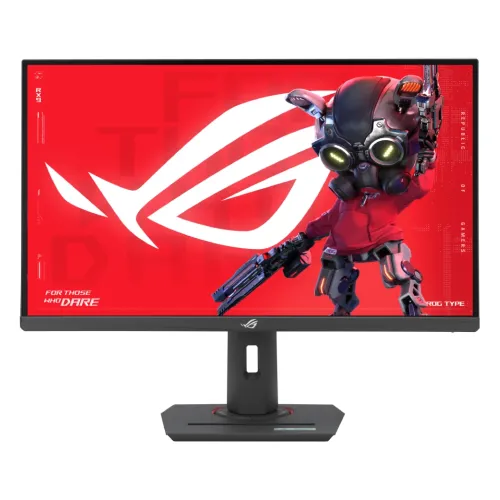
ASUS · ROG Strix XG27UCS
27-inch 4K Fast IPS gaming monitor with 160Hz, adaptive sync, HDMI 2.1 and USB-C 15W.
Price unavailable
Price range updating
No verified price is available yet. Store offers will appear when merchants publish them.
Compare store prices
No live offers for this variant
Offers will appear when merchants publish them.
Loading history…
Product story
The ASUS ROG Strix XG27UCS is a 27-inch 4K UHD gaming monitor with a Fast IPS panel and up to 160Hz refresh. ASUS specifies 3840 × 2160 resolution, 1ms GTG response, 95% DCI-P3, 130% sRGB, VESA DisplayHDR 400 and Adaptive-Sync. It provides HDMI 2.1, DisplayPort 1.4 and USB-C video, with a compact adjustable stand for PC gaming and general use. Actual performance depends on input, cable, graphics hardware, game and selected settings. Bangladesh stock, price, package contents and serial-specific warranty require seller confirmation.
Check the exact XG27UCS code on the rear label and box. It is different from XG27UCG, XG27UCG-W and XG27UCS Gen 2, which have different dual-mode or port configurations. The standard XG27UCS is listed for 4K at up to 160Hz; do not attribute a 320Hz Full HD dual mode from a different model to this monitor. Actual performance depends on input, cable, graphics hardware, game and selected settings. Bangladesh stock, price, package contents and serial-specific warranty require seller confirmation.
The 27-inch 16:9 screen has native 3840 × 2160 resolution and approximately 163 pixels per inch. This provides fine text and detailed game graphics, though interface scaling may be useful. Set native resolution for the sharpest image and verify that the computer’s graphics output supports 4K at the intended refresh rate. Actual performance depends on input, cable, graphics hardware, game and selected settings. Bangladesh stock, price, package contents and serial-specific warranty require seller confirmation.
ASUS specifies Fast IPS, 95% DCI-P3 and 130% sRGB coverage, with 178-degree viewing angles. The anti-glare surface limits some reflections. Gamut percentages describe coverage and do not alone guarantee color accuracy. For color-sensitive production, use an appropriate color profile and calibration, and check the active preset after changing HDR or game modes. Actual performance depends on input, cable, graphics hardware, game and selected settings. Bangladesh stock, price, package contents and serial-specific warranty require seller confirmation.
The maximum refresh rate is 160Hz and ASUS lists 1ms GTG response time. The actual mode depends on graphics source, input, cable and settings. A high refresh monitor cannot create extra rendered frames; the GPU and game must supply them. Select 3840 × 2160 at 160Hz in the operating system when supported and test response settings for artifacts. Actual performance depends on input, cable, graphics hardware, game and selected settings. Bangladesh stock, price, package contents and serial-specific warranty require seller confirmation.
ASUS lists FreeSync and G-SYNC Compatible VRR, Extreme Low Motion Blur and ELMB Sync. Variable refresh can reduce tearing when supported by the GPU and game. Blur reduction features may have compatibility or brightness trade-offs. Choose the combination that works with the actual input and game, and avoid assuming every motion feature can run simultaneously. Actual performance depends on input, cable, graphics hardware, game and selected settings. Bangladesh stock, price, package contents and serial-specific warranty require seller confirmation.
The monitor supports HDR and carries VESA DisplayHDR 400 certification, with 400 cd/m² typical brightness and 450 cd/m² HDR peak per ASUS. These specifications do not imply local dimming or premium HDR contrast. Set HDR in the game and operating system only when the content supports it; compare results with SDR in your room lighting. Actual performance depends on input, cable, graphics hardware, game and selected settings. Bangladesh stock, price, package contents and serial-specific warranty require seller confirmation.
Inputs include one HDMI 2.1, one DisplayPort 1.4 and one USB-C with DisplayPort Alt Mode. ASUS lists up to 160Hz over these digital inputs, subject to the selected mode and source capabilities. Use suitable cables and a direct GPU connection when troubleshooting. Docks and adapters may restrict resolution, refresh, color depth or bandwidth. Actual performance depends on input, cable, graphics hardware, game and selected settings. Bangladesh stock, price, package contents and serial-specific warranty require seller confirmation.
USB-C provides DisplayPort video and up to 15W power delivery. This can power small accessories and carry video from a compatible laptop, but it is not full laptop charging for most notebooks. The laptop USB-C port must support DisplayPort Alt Mode. Use the laptop’s own power adapter if its requirements exceed the monitor’s 15W output. Actual performance depends on input, cable, graphics hardware, game and selected settings. Bangladesh stock, price, package contents and serial-specific warranty require seller confirmation.
GamePlus provides gaming overlays and tools, GameVisual offers picture modes, Shadow Boost adjusts dark-scene visibility and DisplayWidget Center supports software controls. These options can change image appearance or reveal information in games. Use features that suit the task and disable overlays when they are not appropriate. Actual performance depends on input, cable, graphics hardware, game and selected settings. Bangladesh stock, price, package contents and serial-specific warranty require seller confirmation.
The stand supports 120mm height adjustment and tilt from -5 to +20 degrees. ASUS lists VESA 100 × 100mm mounting and a Kensington lock. Swivel and pivot are not listed in this regional spec. Position the screen directly in front and check desk clearance or monitor-arm compatibility if additional movement is required. Actual performance depends on input, cable, graphics hardware, game and selected settings. Bangladesh stock, price, package contents and serial-specific warranty require seller confirmation.
For 4K high-refresh PC gaming, connect a capable GPU through HDMI 2.1 or DisplayPort 1.4, choose 3840 × 2160 and select up to 160Hz. Enable FreeSync or G-SYNC Compatible as appropriate. If 160Hz is missing, check the active signal, cable rating, driver, input and whether an adapter limits the connection. Actual performance depends on input, cable, graphics hardware, game and selected settings. Bangladesh stock, price, package contents and serial-specific warranty require seller confirmation.
The monitor supports standard gaming PC input modes. Console output is constrained by console and game capabilities; do not assume a console can use the 160Hz PC maximum. Check the console’s 4K/120Hz or other supported mode and the detected signal. USB-C handhelds can output video only when their Type-C port supports display output. Actual performance depends on input, cable, graphics hardware, game and selected settings. Bangladesh stock, price, package contents and serial-specific warranty require seller confirmation.
4K detail and 160Hz can serve both immersive games and everyday desktop tasks. At 27 inches, small interface elements may need scaling. Fast IPS and wide color coverage make it versatile, but its 15W USB-C output is not a full docking power supply. The flat screen and 16:9 shape suit conventional desktop layout better than ultrawide workflows. Actual performance depends on input, cable, graphics hardware, game and selected settings. Bangladesh stock, price, package contents and serial-specific warranty require seller confirmation.
Advantages include 4K detail, 160Hz refresh, Fast IPS, FreeSync/G-SYNC Compatible support, ELMB Sync, HDMI 2.1, height adjustment and VESA mounting. Trade-offs include demanding graphics requirements at 4K/160Hz, DisplayHDR 400 rather than advanced HDR, USB-C power limited to 15W and no stand swivel or pivot listed. Actual performance depends on input, cable, graphics hardware, game and selected settings. Bangladesh stock, price, package contents and serial-specific warranty require seller confirmation.
TÜV Flicker-free and Low Blue Light certifications are listed. Adjust brightness to room conditions and use eye-care modes when helpful, noting that color can shift. For color work, return to a suitable preset and verify profiles after enabling low-blue-light or HDR. Take breaks during long sessions and avoid direct reflections on the anti-glare panel. Actual performance depends on input, cable, graphics hardware, game and selected settings. Bangladesh stock, price, package contents and serial-specific warranty require seller confirmation.
Place the display on a firm surface, use the supplied power cable and route signal cables without tension. Clean the panel with a soft cloth and avoid pressing or spraying cleaner directly on it. Inspect the screen, stand, port labels, cables and serial at delivery. Retain packaging and invoice until the seller’s return period has passed. Actual performance depends on input, cable, graphics hardware, game and selected settings. Bangladesh stock, price, package contents and serial-specific warranty require seller confirmation.
Before ordering in Bangladesh, confirm price and stock, exact XG27UCS (not UCG or Gen 2), new condition, included stand and cables, return/dead-pixel policy, delivery, USB-C 15W limitation and seller’s written serial-specific ASUS warranty provider and duration. Confirm local service terms on the invoice and keep the serial label accessible. Actual performance depends on input, cable, graphics hardware, game and selected settings. Bangladesh stock, price, package contents and serial-specific warranty require seller confirmation.
The XG27UCS is a 27-inch 4K Fast IPS monitor with up to 160Hz, 1ms GTG, 95% DCI-P3, DisplayHDR 400, HDMI 2.1, DP 1.4 and USB-C 15W. It supports Adaptive-Sync, FreeSync and G-SYNC Compatible operation, plus adjustable height and VESA mounting. Verify exact model and local warranty before purchase. Actual performance depends on input, cable, graphics hardware, game and selected settings. Bangladesh stock, price, package contents and serial-specific warranty require seller confirmation.
Consider the XG27UCS if you want a 27-inch 4K PC gaming display with high refresh and compatible adaptive sync. It is most useful with a capable GPU and direct high-bandwidth connection. Choose another model if you require dual-mode 320Hz, high-wattage USB-C laptop charging, stand pivot or higher-grade HDR. Actual performance depends on input, cable, graphics hardware, game and selected settings. Bangladesh stock, price, package contents and serial-specific warranty require seller confirmation.
Helpful answers
Product-specific answers maintained with the catalog information.
3840 × 2160 4K UHD at 27 inches.
ASUS specifies up to 160Hz.
The USB-C port provides up to 15W power delivery.
ASUS lists G-SYNC Compatible and FreeSync VRR support.
One HDMI 2.1, one DisplayPort 1.4 and one USB-C video input are listed.
VESA DisplayHDR 400 certification and HDR support are listed.
15W is generally too little for full laptop charging; use the laptop adapter.
ASUS specifies 0–120mm height adjustment and -5° to +20° tilt.
Confirm local ASUS provider, coverage, duration and serial-specific terms in writing.
Customer community
Become a merchant
Join BiponiBD, publish accurate offers and start free.