Pros
- QHD resolution, 180Hz and Adaptive-Sync suit compatible gaming PCs.
- Fast VA panel lists 3000:1 contrast and 1500R curvature.
- USB-C video adds a connection option for compatible laptops.
- Stand includes height, tilt and swivel adjustment.

All categories
 New condition
Monitors
ASUS · ROG Strix XG27WCS
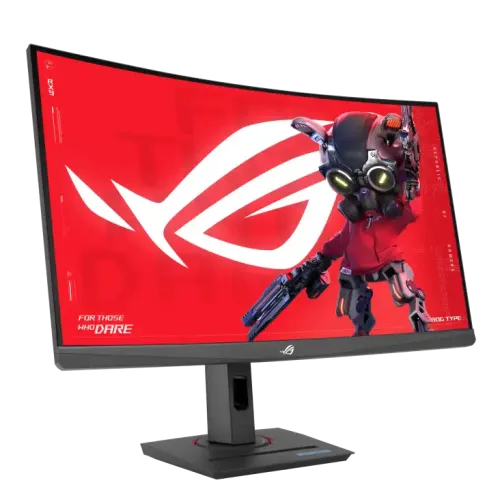
27-inch 1500R QHD Fast VA gaming monitor with 180Hz, Adaptive-Sync, USB-C video and 7.5W power delivery.
Price unavailable
Price range updating
No verified price is available yet. Store offers will appear when merchants publish them.
Compare store prices
No live offers for this variant
Offers will appear when merchants publish them.
Loading history…
Product story
The ASUS ROG Strix XG27WCS is a 27-inch QHD curved gaming monitor with a Fast VA panel, 1500R curvature and up to 180Hz refresh. Its inputs include DisplayPort 1.4, HDMI 2.0 and USB-C DisplayPort Alt Mode. USB-C power delivery is 7.5W, suitable only for limited device power and not laptop charging. This is the XG27WCS model; check the exact model label because similar ASUS ROG displays use different panel types, ports and power features.
The monitor uses a native 2560 × 1440 resolution in a 16:9 aspect ratio. QHD provides more detail than Full HD and additional room for desktop windows, but requires more GPU performance at high frame rates. The 27-inch viewable area is approximately 596.74 × 335.66mm. Set the PC to native resolution for sharp text and use suitable scaling for comfortable reading. The curved format changes the viewing experience but does not change the pixel resolution.
ASUS identifies the panel as Fast VA, not Fast IPS. The specifications list 3000:1 typical contrast, 400cd/m² brightness and 178-degree horizontal/vertical viewing angles. VA panel behavior can vary by transition and picture mode; the 1ms GtG rating should not be treated as a guarantee of identical response in every scene. The anti-glare surface helps reduce reflections. For color-sensitive work, calibrate the screen and verify output rather than assuming a gaming monitor is factory-reference accurate.
The 1500R curve wraps the 27-inch panel toward the viewer. Sit centered at a comfortable distance to keep the image edges within a natural field of view. A curve can feel more immersive in games and video, but individual preference varies and straight lines may look different to users accustomed to flat panels. Check desk depth and viewing position before buying. The monitor remains a 16:9 screen and does not provide the wider workspace of an ultrawide display.
ASUS lists a maximum 180Hz refresh rate. Its signal-frequency table lists USB-C and DisplayPort up to 180Hz, while HDMI is limited to 144Hz vertical refresh. Use a suitable DisplayPort or USB-C video connection for the highest rate, then select 180Hz in the operating system or GPU settings. Results depend on the source, cable, resolution, color format and monitor configuration. HDMI users should expect the listed 144Hz limit rather than assume all ports reach 180Hz.
The official specification lists 1ms GtG response. This measurement is distinct from MPRT and input lag, and does not mean every pixel transition completes in exactly one millisecond in normal use. Overdrive and motion settings can alter blur and overshoot. Test them in real content at your typical frame rate. A fast monitor can show new frames more frequently, but the PC or console must generate them. Stable frame pacing often matters more than the advertised peak rate.
ASUS lists Adaptive-Sync, Extreme Low Motion Blur and ELMB Sync. Adaptive-Sync can align display refresh with variable frame output on supported hardware and reduce tearing. ELMB Sync combines motion-blur reduction with variable refresh in supported modes. Actual compatibility depends on GPU, driver, cable, input and settings. If flicker or artifacts appear, try another refresh or response mode and verify the display menu. Do not assume every feature combination works with every device.
ASUS lists HDR10 support and 400cd/m² typical and peak HDR brightness. HDR requires compatible content, application, operating system and signal path. The specifications list HDR10 but do not in themselves establish a VESA DisplayHDR certificate or local-dimming zones. Set expectations accordingly: HDR support is not equivalent to an OLED or Mini LED HDR system. The display can also be used in SDR, with brightness adjusted for the room and viewing comfort.
ASUS lists 95% DCI-P3 and 125% sRGB color-space figures. Gamut coverage and gamut size are different ways of expressing color range, so the percentages are not directly interchangeable. Color output also depends on mode, calibration and source. The monitor suits gaming and general media, but creative professionals should calibrate it and soft-proof work on suitable target displays. A wide-gamut panel does not guarantee out-of-box accuracy for every color workflow.
The XG27WCS provides one DisplayPort 1.4 HBR3, one HDMI 2.0, one USB-C input with DisplayPort Alt Mode, and an earphone jack. Choose the input in the on-screen menu and connect a device capable of the target resolution and refresh. USB-C video requires a host that supports DisplayPort Alt Mode and a video-capable cable. The port count does not imply a USB hub or laptop dock; none is listed in the manufacturer specs.
USB-C Power Delivery is 7.5W. This is a low-power output and should not be advertised as laptop charging or docking power. It may provide limited power to a small accessory, while USB-C also carries DisplayPort video from a compatible host. A laptop will generally need its own charger. Confirm the cable supports video and check the computer’s USB-C port capabilities; not every USB-C port outputs DisplayPort.
ASUS lists tilt from approximately -5 to +20 degrees, swivel about 35 degrees in either direction and height adjustment from 0 to 120mm. These adjustments help position the screen for seated use. The stand does not list pivot rotation in the specification. Leave clearance for swivel and the rear cable bend. Adjust the height so the monitor sits comfortably rather than leaning forward to see the image.
The monitor supports 100 × 100mm VESA wall mounting and includes a Kensington lock slot. Verify that a monitor arm supports the unit’s weight and use the proper screw length. Curved screens require careful positioning and cable clearance. Keep the monitor stable while mounting and do not apply force to the panel. If the included stand is used, place the broad base on a level desk and avoid blocking ventilation or access to ports.
ASUS lists an earphone jack, but integrated speakers are not listed for XG27WCS. Use headphones or external speakers when audio is needed. Regional package contents may include a DisplayPort cable, power cord, quick-start guide, ROG pouch, sticker and warranty card; verify the local seller’s exact box contents. Optional cables may not be included. HDMI/DP audio routing depends on the source and selected output device.
GamePlus, GameVisual, Shadow Boost, DisplayWidget Center, GameFast Input technology and Aspect Control are listed by ASUS. These options provide monitor-side picture and gaming controls; they do not increase the computer’s frame rate or replace game settings. Start from a familiar picture mode and change one option at a time. If the image becomes washed out or oversharpened, restore the prior profile. Menu availability can depend on selected input and signal mode.
A QHD 180Hz signal needs a compatible graphics device and connection. DisplayPort and USB-C can reach the listed 180Hz maximum; HDMI is listed up to 144Hz. Console output may use lower refresh or a different HDR/VRR combination depending on model and game. Check the console settings and the specific game’s supported modes. For laptops, confirm USB-C video support and plan separate charging because 7.5W is not laptop-grade power.
At 2560 × 1440, the display offers detailed game visuals while retaining a high refresh target. Competitive titles may reach high frame rates with suitable hardware and tuned settings; demanding games can run slower. Adaptive-Sync can help smooth changing frame output when supported. Curvature and Fast VA contrast can suit immersive play, while response behavior depends on the selected overdrive. Tune image quality and stability for the GPU rather than chasing 180Hz in every game.
The QHD panel can support documents, web browsing, coding and media in addition to gaming. The 27-inch format is compact enough for many desks, and the height-adjustable stand supports ergonomic positioning. The 1500R curve may be less suited to workflows that require a flat geometric reference or shared side viewing. For spreadsheets, CAD or design, check how the curvature affects your work and use calibrated settings if color fidelity matters.
ASUS lists consumption below 22.5W, power-saving below 0.5W and off-mode below 0.3W, with 100–240V 50/60Hz input. Use the supplied power cord and clean the screen with a soft microfiber cloth. Do not spray cleaner directly onto the panel, press on the LCD or block ventilation. Disconnect power before cleaning the housing. Keep the monitor, adapter and connectors away from liquids and excessive heat.
Global ASUS specifications do not verify a Bangladesh warranty for a particular serial. Ask the seller to confirm warranty provider, term, local service location, dead-pixel policy and invoice requirements. Verify the product code and match the serial on the display, box and invoice. Confirm current price, stock, delivery, return terms and included cables before payment. On delivery, test QHD resolution, 180Hz on DP/USB-C, HDMI mode, VRR, USB-C video and stand adjustments.
The ASUS ROG Strix XG27WCS suits buyers who want a 27-inch 1500R curved QHD Fast VA gaming monitor with 180Hz, Adaptive-Sync and USB-C video. It is not a one-cable laptop dock: 7.5W USB-C power is limited. Users who need IPS, HDMI 180Hz, high-wattage laptop charging, built-in speakers or pivot adjustment should compare another model. Check exact regional warranty, cable inclusion and source compatibility before ordering.
Helpful answers
Product-specific answers maintained with the catalog information.
XG27WCS is a 27-inch 2560 × 1440 QHD display.
ASUS lists 180Hz over DisplayPort and USB-C; HDMI supports up to 144Hz.
No. ASUS identifies the XG27WCS panel as Fast VA.
ASUS lists a 1500R curved screen.
USB-C power delivery is 7.5W, which is not typical laptop charging power.
Yes, ASUS lists Adaptive-Sync and ELMB Sync.
Integrated speakers are not listed; an earphone jack is included.
Height, tilt and swivel are listed; pivot is not listed.
Confirm serial-specific ASUS warranty and service terms with the seller.
Customer community
Become a merchant
Join BiponiBD, publish accurate offers and start free.