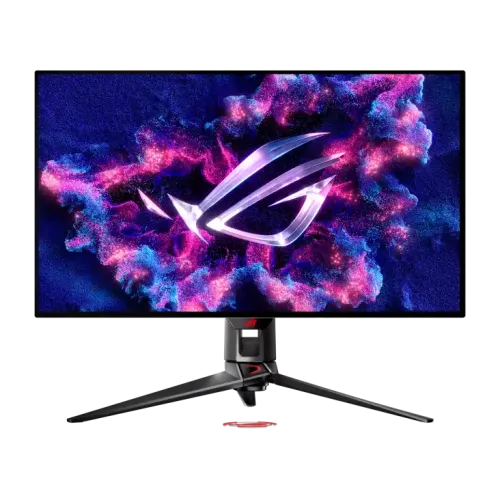
ASUS ROG Swift OLED PG32UCDM overview
The ASUS ROG Swift OLED PG32UCDM is a 31.5-inch viewable 4K QD-OLED gaming monitor with 3840 × 2160 resolution, up to 240Hz refresh and a 0.03ms gray-to-gray response rating. ASUS lists HDR10, Dolby Vision, VESA DisplayHDR 400 True Black, 99% DCI-P3, Adaptive-Sync, G-SYNC Compatible and AMD FreeSync Premium Pro. Connectivity includes DisplayPort 1.4 DSC, two HDMI 2.1 inputs, USB-C with Power Delivery, three USB-A ports, KVM and optical audio out. This Active listing update follows ASUS specifications.
Exact PG32UCDM model and viewable size
The product model is ROG Swift OLED PG32UCDM. ASUS calls it a 32-inch monitor with a 31.5-inch viewable panel; its official specification gives a viewing area of 699.48 × 394.73mm. Similar ASUS ROG model names can use different panels and connections, so verify PG32UCDM on the device label, carton and invoice. Existing product slug, Active state, variant ID and SKU are retained. This listing identifies the exact QD-OLED model rather than a different PG-series display.
QD-OLED panel and 4K detail
The 31.5-inch viewable QD-OLED panel has a native 3840 × 2160 UHD resolution and 16:9 aspect ratio. The dense 4K image supports detailed games and creative work, while operating-system scaling can improve readability at a normal desk distance. ASUS highlights its QD-OLED subpixel layout for clearer text. Results still depend on the application, font rendering, scaling and viewing distance. Reflections and ambient light may affect perceived contrast, so position the display thoughtfully.
240Hz refresh and 0.03ms response
ASUS specifies a maximum 240Hz refresh rate and 0.03ms gray-to-gray response. High refresh can make supported motion appear smoother when the graphics source supplies enough frames. The response figure describes pixel transitions under the manufacturer’s measurement method, not complete system input lag or a guarantee of 240fps. A powerful GPU, suitable cable, active port and correct settings are important for 4K at high refresh. Check the monitor information menu after setup to confirm the active signal.
HDR formats, contrast and brightness
The official page lists HDR10 and Dolby Vision support, VESA DisplayHDR 400 True Black certification, 1,500,000:1 typical contrast and up to 1,000 cd/m² HDR peak brightness. Peak output varies with content and color pre-calibration; it is not a promise of 1,000 nits across the entire screen. QD-OLED contrast can produce deep blacks, while HDR appearance depends on the game or video, source settings, selected display mode and room lighting.
Color gamut and 10-bit color
ASUS lists 99% DCI-P3 coverage, Delta E below 2 and true 10-bit output with 1.073 billion colors. These manufacturer values indicate wide gamut and stated color accuracy, not guaranteed identical measurement for every unit or workflow. For photo, video or design work, use color-managed software and verify the supplied calibration report and display profile. ASUS DisplayWidget Center can provide monitor adjustments and access to OLED-related functions from a computer.
Variable refresh and gaming controls
ASUS lists Adaptive-Sync, AMD FreeSync Premium Pro and NVIDIA G-SYNC Compatible support. Variable refresh can synchronize a compatible graphics source and monitor to reduce tearing when frame rates fluctuate. GamePlus, GameVisual, Shadow Boost, Extreme Low Motion Blur, Aspect Control and GameFast Input tools are also listed. Available behavior can depend on source, driver, HDR mode, port and selected settings; enable compatible options at both ends and confirm with supported content.
DisplayPort 1.4 DSC and HDMI 2.1
PG32UCDM has one DisplayPort 1.4 input with DSC and two HDMI 2.1 FRL inputs. ASUS lists signal support up to 240Hz over compatible connections. The graphics card, console, cable and selected signal format determine whether a particular 4K, refresh, HDR and color-depth combination is available. Use a cable certified for the required bandwidth and confirm the source output capabilities. A port label by itself does not guarantee 4K 240Hz from every connected device.
USB-C display and 90W Power Delivery
One USB-C port supports DisplayPort Alt Mode and Power Delivery up to 90W. ASUS notes that 65W is the default and 90W can be enabled through the on-screen display menu. A compatible laptop can send video and receive power through one full-featured USB-C cable; the laptop’s power needs and cable quality affect charging. A charge-only cable cannot carry display data. Verify the OSD power setting and laptop compatibility before relying on one-cable operation.
KVM, hub and multi-device switching
ASUS lists a built-in KVM and three USB 3.2 Gen 1 Type-A hub ports. The KVM can let compatible devices share a keyboard and mouse through the monitor. Connect video and USB upstream paths for each host, then assign the USB routing and input in the on-screen menu. KVM switches peripheral access; it does not merge computers or transfer every peripheral automatically. Check the connected device routing if keyboard or mouse control does not follow the active source.
Audio connections and built-in speakers
The specification lists an earphone jack and SPDIF optical digital audio output; it does not list built-in speakers. Plan for headphones or external speakers. HDMI and DisplayPort can carry digital audio from compatible sources, while the optical output can connect suitable audio equipment. Select the intended playback device in the computer or console and check volume and format settings. Audio support depends on the connected source and receiver or headset.
ASUS OLED Care, heatsink and panel maintenance
ASUS OLED Care provides tools such as pixel cleaning reminders, a screen saver, screen movement and logo brightness adjustment. The custom heatsink, airflow and graphene film are designed to help manage heat and reduce burn-in risk. These protective features cannot guarantee that image retention will never happen. Follow the monitor’s maintenance prompts, avoid leaving static content at high brightness for extended periods, and do not disconnect power during a pixel-cleaning cycle.
Stand adjustment, dimensions and mounting
The stand supports tilt from -5° to +20°, swivel around ±15° and 0–80mm height adjustment. ASUS specifies a 100 × 100mm VESA mount. Approximate dimensions are 71.8 × 57.9 × 27.4cm with stand and 71.8 × 43.0 × 7.4cm without; estimated weight is 8.8kg with stand and 6.0kg without. Confirm desk capacity, arm load rating, mounting screws, wall strength and cable clearance before installation. Handle the screen carefully during assembly.
Power, accessories and warranty
ASUS lists power consumption below 42W, power-saving below 0.5W, off mode below 0.3W and 100–240V at 50/60Hz. Regional accessories may vary; the specification lists a DisplayPort cable, power adapter and cord, quick-start guide, ROG pouch, stickers and warranty card. ASUS lists three years including panel burn-in globally. That does not confirm this unit’s Bangladesh service eligibility, so ask the seller to verify the serial-specific coverage and retain invoice and carton labels.
Who may prefer a 32-inch 4K OLED
The PG32UCDM suits a user looking for a 4K OLED image, high refresh and broad device connectivity for gaming or content creation. USB-C charging and KVM may help organize a laptop-and-desktop setup, while a headphone or optical audio connection serves external sound equipment. Consider GPU capability for 4K 240Hz, desk viewing distance and OLED care needs. The display has no listed built-in speakers, and its premium panel makes room lighting and placement worth considering.
Frequently asked questions
What is the viewable size? 31.5 inches (32-inch class). What is the resolution? 3840 × 2160 4K UHD. What panel type? QD-OLED. What refresh rate? Up to 240Hz. What response rating? 0.03ms GTG. Does it support Dolby Vision? Yes, ASUS lists Dolby Vision and HDR10. Does USB-C charge a laptop? Up to 90W, with 65W default noted by ASUS. Does it include KVM? Yes. Are speakers built in? No speakers are listed. What Bangladesh warranty applies? Confirm local serial terms with the seller.