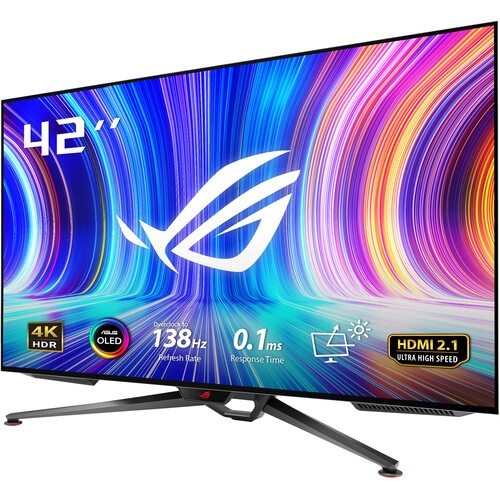
ASUS ROG Swift OLED PG42UQ: full product guide
Overview and use cases
ASUS ROG Swift OLED PG42UQ is a 41.5-inch 4K OLED gaming display with 3840 x 2160 resolution, 16:9 aspect ratio and a maximum 138Hz overclocked refresh rate. ASUS lists a 0.1ms gray-to-gray response time, 98% DCI-P3 color space, factory pre-calibration, G-SYNC compatibility and an anti-glare micro-texture coating. Its large screen can work as a desktop gaming monitor or a close-range entertainment display for compatible PCs and consoles. The connection panel includes one DisplayPort 1.4 with DSC, two HDMI 2.1 inputs and two HDMI 2.0 inputs. It also has a four-port USB-A hub, speakers with an integrated woofer and a remote control. The PG42UQ is physically large and does not include height adjustment, so desk dimensions and viewing distance should be checked before purchase.
Resolution and panel size
The display resolution is 3840 x 2160, commonly called 4K UHD, with a 16:9 aspect ratio. ASUS lists a 41.5-inch diagonal and a 919.68 x 517.32mm active viewing area. The pixel pitch is 0.2395mm. This resolution can show detailed text and images, but comfortable desktop use depends on viewing distance and operating-system scaling. A 4K signal at up to 138Hz requires compatible source hardware, an appropriate connection and a supported timing. ASUS lists DisplayPort 1.4 with Display Stream Compression and HDMI 2.1 inputs; the HDMI 2.0 ports have lower signal-frequency limits. The panel does not add frames to games: actual frame rate depends on the graphics processor, game and settings. When a source does not support the full timing, select a lower refresh or resolution supported by both devices.
OLED contrast, brightness and HDR
The PG42UQ uses a WOLED panel. ASUS lists 450cd/m² typical brightness and up to 1,000cd/m² peak HDR brightness, noting that peak brightness can vary with pre-calibration. Its regional specification lists 135,000:1 typical contrast and 1,500,000:1 HDR maximum; other ASUS material describes the HDR measurement at a specified average picture level. These values use different modes and measurement conditions, so they should not be compared as if measured identically. OLED pixels produce their own light and can display deep blacks. HDR results depend on the content, operating system, app, display mode and the size of bright areas. ASUS advertises HDR support, but certification and regional listings can vary. The anti-glare micro-texture finish reduces reflections from ambient light, though it cannot eliminate glare in every room.
Color and factory calibration
ASUS specifies 98% DCI-P3 and 133% sRGB color-space coverage, 10-bit display color and about 1.07 billion colors. Factory pre-calibration is listed, with the calibration report included among region-dependent accessories. These details may support media creation and color-rich games, but a factory report is a snapshot and does not guarantee the exact result after settings or hardware changes. For color-critical work, use the target color profile, a color-managed application and suitable calibration equipment. ASUS also lists multiple color-temperature selections and GameVisual picture modes. The PG42UQ can be used for editing and viewing, but professional proofing decisions should be based on measured calibration and workflow requirements rather than the product's coverage figure alone.
Refresh rate, response and variable refresh
The official ROG specification lists a maximum 138Hz refresh rate, described as overclocked, and a 0.1ms GtG response time. ASUS lists a vertical signal range up to 138Hz over DisplayPort and HDMI 2.1, while HDMI 2.0 is listed at up to 60Hz. G-SYNC Compatible and Adaptive-Sync can coordinate compatible graphics output with display refresh to reduce tearing. Feature availability depends on the GPU, driver, connection, settings and content. GamePlus tools include crosshair, timer, FPS counter, stopwatch and sniper assistance. GameVisual offers presets for different content; Shadow Boost and aspect control are also listed. These options can change the image or overlay and may not be appropriate for every game or visual task. A 138Hz panel will not make a game render at 138 frames per second if the computer cannot produce those frames.
Ports, USB hub and compatibility
The connection list contains one DisplayPort 1.4 input with DSC, two HDMI 2.1 inputs with FRL support, two HDMI 2.0 inputs, four USB 3.2 Gen 1 Type-A downstream ports, one USB 3.0 upstream connection, an earphone jack and optical SPDIF audio output. Connect the USB upstream cable to the computer to use the built-in hub. USB-A downstream ports can connect peripherals, but they do not provide USB-C display input or laptop USB-C charging. HDMI 2.1 supports higher-bandwidth console and PC connections; HDMI 2.0 remains useful for sources with lower supported timings. Confirm the source device's output and manual timing table before expecting 4K at 138Hz. The included cable bundle varies by region and seller; verify the actual Bangladesh box contents.
Speakers, woofer and remote
ASUS lists two 10W speakers plus a 15W woofer, with Harman Kardon audio. This integrated sound can handle casual viewing, game audio and system playback without separate desktop speakers. The monitor also includes an earphone connection and optical digital audio output. Built-in speakers do not replace a dedicated headset or speaker system when precise positioning, room-filling volume or microphone support is needed. The supplied remote can control functions such as volume, input and on-screen settings from a seated position; confirm that a remote is included in the local package because accessory bundles can vary. Audio output, selected input and computer settings determine where sound plays.
Design, adjustment and mounting
The display is black and uses an anti-glare micro-texture coating. Its included stand supports tilt but does not provide height adjustment or swivel. ASUS lists a tilt range of approximately -5 to +5 degrees and a 300 x 300mm VESA mount pattern. The stand dimensions are 932.08 x 611.3 x 255.4mm (W x H x D); without the stand, the display measures 932.08 x 551.96 x 37.38mm. Net weight is listed as 14.77kg with stand and 13.58kg without it; shipping weight is 20.07kg. The box is approximately 1070 x 870 x 188mm. Ensure the desk or arm can support the weight and footprint. For wall or arm mounting, use hardware rated for the display and follow ASUS's installation instructions.
Power and OLED care
ASUS lists AC input at 100 to 240V and 50/60Hz, operating power below 220W, power-saving consumption below 0.5W and off-mode consumption below 0.3W. Actual use changes with brightness, HDR, audio volume and connected USB devices. The monitor has pixel-cleaning behavior; follow the on-screen instructions and the manual, and do not disconnect power during a maintenance cycle. OLED care guidance recommends avoiding prolonged static high-contrast content where practical and allowing the monitor's protective features to operate. These steps do not guarantee prevention of image retention and do not replace the warranty. Keep ventilation clear and use the supplied power cable and a suitable outlet.
Bangladesh market and warranty
On 6 November 2026, Star Tech listed the model at ৳275,500 against a regular price of ৳298,650 and marked it in stock. PC House also listed ৳275,500 and in stock. Ryans showed a ৳271,500 special price against ৳293,490 but indicated delivery in 45 days. These are retailer observations on the check date, not guaranteed checkout prices or current stock. The catalog MSRP of ৳275,500 is retained. Bangladesh retailer listings advertise three-year warranty. ASUS's US ROG specification page lists a two-year warranty including panel burn-in, and ASUS's regional warranty page lists 24 months for PG42UQ; regional terms differ. Ask the local seller to identify the authorized distributor, exact warranty card, burn-in coverage, dead-pixel policy, claim documents and return period for the specific unit.
Who should consider it and trade-offs
The PG42UQ may suit someone seeking a large 4K OLED display for PC gaming, console play, video and general entertainment at a desk or in a compact viewing space. Its strengths include OLED contrast, 4K detail, high refresh, varied HDMI inputs, an integrated USB hub and built-in audio. Trade-offs include the 41.5-inch size, a heavy stand-mounted footprint, no height adjustment, modest tilt-only stand movement, and the need for strong graphics hardware to drive demanding 4K games at high frame rates. OLED care and region-specific burn-in warranty terms also deserve attention. Measure the desk and viewing distance, confirm GPU output compatibility, and compare local warranty documentation before ordering.
Specification source notes
Technical values here follow the ASUS ROG exact-model specification and PG42UQ manual. ASUS specifies WOLED, 41.5 inches, 3840 x 2160, 16:9, 138Hz maximum overclocked, 0.1ms GtG, 450cd/m² typical, 1,000cd/m² HDR peak, 98% DCI-P3, 133% sRGB, HDMI 2.1 and HDMI 2.0 inputs, DisplayPort 1.4 DSC, USB-A hub, 10W x 2 speakers plus 15W woofer, physical dimensions and power. Bangladesh retailer prices and three-year warranty claims are shown separately from ASUS regional two-year warranty material. Retailer pages may have inconsistent details, including differing HDMI port counts or warranty terms; manufacturer specifications are used for the technical connection list. Barcode, GTIN and country of origin are not asserted because the consulted exact-model sources do not establish them.
Frequently asked questions
1. What is the resolution?
3840 x 2160 pixels, known as 4K UHD, at a 16:9 aspect ratio.
2. What is the panel size?
The panel is 41.5 inches diagonally.
3. What is the maximum refresh rate?
ASUS lists up to 138Hz overclocked. The source, cable and display timing must support the selected mode.
4. What response time is specified?
ASUS rates it at 0.1ms GtG.
5. Which inputs are included?
One DisplayPort 1.4 with DSC, two HDMI 2.1 and two HDMI 2.0 inputs.
6. Does it support G-SYNC?
ASUS lists G-SYNC Compatible and Adaptive-Sync. Compatibility depends on graphics hardware and connection.
7. Does it have speakers?
Yes. ASUS lists two 10W speakers and a 15W woofer.
8. Can it be height-adjusted?
No. The stand offers tilt but no height adjustment or swivel.
9. What is the VESA pattern?
300 x 300mm. Use a mount rated for the monitor weight and follow the manual.
10. What is the Bangladesh price?
Retailers checked on 6 November 2026 listed ৳271,500 to ৳275,500. Promotions and stock can change.
11. What warranty is offered locally?
Bangladesh retailer listings advertise three years. Confirm the exact warranty card, distributor and claim terms.
12. Does warranty include OLED burn-in?
ASUS US/regional materials state two years including panel burn-in/24 months, while Bangladesh retailer listings say three years. Coverage depends on the unit region and local warranty terms; confirm in writing.