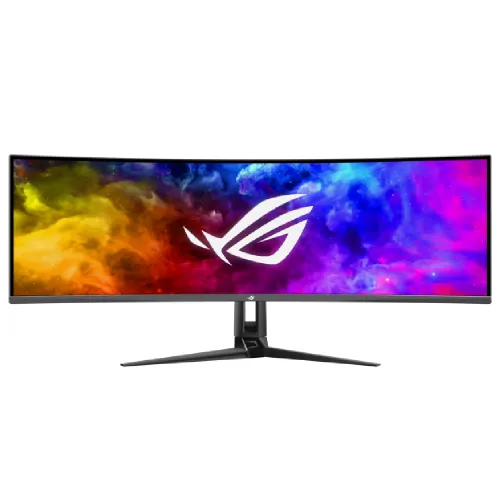
ASUS ROG Swift OLED PG49WCD overview
The ASUS ROG Swift OLED PG49WCD is a 49-inch curved QD-OLED gaming monitor with 5120 × 1440 DQHD resolution, a 32:9 aspect ratio, 1800R curvature and up to 144Hz refresh. ASUS lists 0.03ms GTG response, DisplayHDR True Black 400, 99% DCI-P3, Adaptive-Sync, KVM, OLED Care and USB-C with up to 90W Power Delivery. Its wide desktop canvas supports compatible games and multi-window work. This listing update follows the official ASUS ROG product and specification pages; local offer details remain unverified.
Confirm PG49WCD model and 49-inch format
This listing is for the ROG Swift OLED PG49WCD. Confirm the full model code on the monitor label, carton and invoice because other ASUS 49-inch monitors may use different refresh rates, panel technologies or port layouts. ASUS specifies a 49-inch diagonal, 32:9 ratio and 5120 × 1440 resolution for this model. Existing product slug, Active state, variant and SKU are preserved. Specifications in this content refer specifically to PG49WCD and should not be mixed with a different OLED G9 class product.
49-inch QD-OLED panel and 1800R curve
ASUS lists a QD-OLED panel with an 1800R curve and anti-reflection surface. Its active viewing area measures 1196.7 × 339.2mm. The wide curved canvas can create an enveloping view from a suitable position and reduce the visual gap across a broad desktop workspace. A 49-inch display needs substantial desk width and sensible viewing distance. Anti-reflection treatment can reduce some glare but does not eliminate reflections from strong light or windows.
5120 × 1440 DQHD and 32:9 workspace
The native 5120 × 1440 resolution is Dual QHD, often described as two 2560 × 1440 work areas side by side. It can support broad timelines, multiple windows and compatible super-ultrawide games without a center bezel. Software behavior varies: some games restrict aspect ratio, and standard 16:9 video may show side bars or be cropped. Confirm that the connected computer or console supports the selected resolution and refresh over the chosen input.
144Hz refresh and 0.03ms response
ASUS specifies a maximum refresh rate of 144Hz and 0.03ms gray-to-gray response. High refresh can make supported motion appear smoother when the source supplies enough frames. The GtG rating describes panel pixel transition, not total system latency or guaranteed frame output. GPU capability, cable, port, operating mode and game settings influence actual performance. After connection, verify the monitor signal information and configure the game or operating system to use the supported refresh rate.
HDR brightness, contrast and color
The ROG specification lists typical brightness of 250 cd/m², HDR peak brightness up to 1,000 cd/m², typical contrast of 1,500,000:1 and VESA DisplayHDR True Black 400. ASUS notes peak brightness can vary with pre-calibration and screen content. A peak value applies to bright highlights and does not mean the entire screen sustains that output. ASUS also lists 99% DCI-P3 and Delta E below 2; actual color work still benefits from calibration and color-managed software.
10-bit color and wide viewing angles
The panel supports 1.0737 billion colors at 10-bit and viewing angles of 178° horizontally and vertically. These values are manufacturer specifications; source settings and application color management determine how content is displayed. For editing, check the monitor’s calibration report, profile and selected picture mode. The large panel can be useful for creative timelines, though brightness, room lighting and screen placement affect perceived consistency across such a wide viewing area.
Adaptive-Sync, G-SYNC and gaming modes
ASUS lists Adaptive-Sync and G-SYNC Compatible support, plus GamePlus, GameVisual, GameFast Input, Shadow Boost, Dark Boost and Aspect Control. Variable refresh can synchronize compatible graphics output with the monitor to reduce tearing and uneven motion. The feature set depends on the source, driver, port and monitor settings. Enable VRR on both the display and graphics device, then verify it in compatible games. Aspect Control can adjust image presentation, but it does not change the panel’s native resolution.
DisplayPort, HDMI and high-bandwidth inputs
PG49WCD includes one DisplayPort 1.4 DSC input and one HDMI 2.1 FRL input. ASUS lists support for the native 5120 × 1440 mode at up to 144Hz over supported connections. Graphics hardware, console capability, cable rating, HDR and color settings all influence the active signal. Use a suitable high-bandwidth cable and check the source’s display settings. One HDMI input is listed for this model, so plan input switching if multiple HDMI devices will be connected.
USB-C video and up to 90W charging
One USB-C port supports DisplayPort Alt Mode and up to 90W Power Delivery. A compatible laptop can transmit video and receive power through a single full-featured cable, while the monitor’s USB hub can route peripherals. Charging depends on the laptop’s demand and the cable. A charge-only cable will not carry display data. Confirm the laptop supports USB-C display output and whether the available power meets its workload requirements.
ROG Smart KVM and USB hub
ASUS lists a built-in KVM switch, two USB 3.2 Gen 1 Type-A ports and two USB 2.0 Type-A ports. Smart KVM can let compatible devices share a keyboard and mouse through the monitor without a separate switch. Connect both computers’ video and USB data paths, then configure source and peripheral routing. KVM switches selected peripherals; it does not merge computers or control every device automatically. Check the on-screen settings if the keyboard and mouse do not follow the selected input.
OLED Care, custom heatsink and maintenance
ASUS describes OLED Care functions including pixel cleaning, screen saver, screen movement and logo brightness adjustment, along with a custom heatsink and graphene rear for heat management. These tools are intended to reduce burn-in risk, but cannot guarantee that static-image retention will never occur. Follow the display’s maintenance prompts, avoid leaving fixed desktop content at high brightness for prolonged periods and keep power connected during a pixel-cleaning routine. Use the monitor’s uniform-brightness option when consistent luminance matters more than peak output.
Audio outputs and built-in speakers
The specification lists an earphone jack and SPDIF optical digital audio output; built-in speakers are not listed. Plan for headphones or external speakers. Digital audio over HDMI or DisplayPort depends on the connected source. Select the intended output device in the computer or console, check volume and confirm audio format compatibility with the receiver or headset. The optical output provides a direct connection to compatible external audio equipment.
Stand, VESA mount, dimensions and weight
The supplied stand supports tilt from -5° to +20°, swivel around ±15° and height adjustment up to 100mm. ASUS specifies a 100 × 100mm VESA pattern. Approximate dimensions with stand are 119.64 × 52.72 × 28.30cm; without stand they are 119.64 × 37.17 × 15.54cm. Estimated net weight is 11.7kg with stand and 8.5kg without. Confirm desk or arm capacity, fastener fit, cable clearance and available space before mounting this wide panel.
Power, package items and warranty
ASUS lists 100–240V, 50/60Hz power input and approximately 47W typical operating consumption, with lower standby and off-mode figures. Accessories vary by region; ASUS documentation lists a base, power cable, HDMI and DisplayPort cables, USB and Type-C cables, wall-mount kit, pouch, stickers and calibration report. The UK specification page lists two years including panel burn-in; regional warranty terms differ. Local eligibility can differ; confirm the supplied serial’s ASUS Bangladesh service coverage and retain the invoice and carton label.
Frequently asked questions
What is the panel size? 49 inches. What is the native resolution? 5120 × 1440 DQHD. What are the ratio and curvature? 32:9 and 1800R. What panel type? QD-OLED. What is the refresh rate? Up to 144Hz. What response rating? 0.03ms GTG. Does USB-C charge a laptop? Up to 90W with compatible devices. Does it include KVM? Yes. Are speakers built in? They are not listed; headphone and SPDIF outputs are available. What Bangladesh warranty applies? Confirm serial-specific local coverage with the seller.