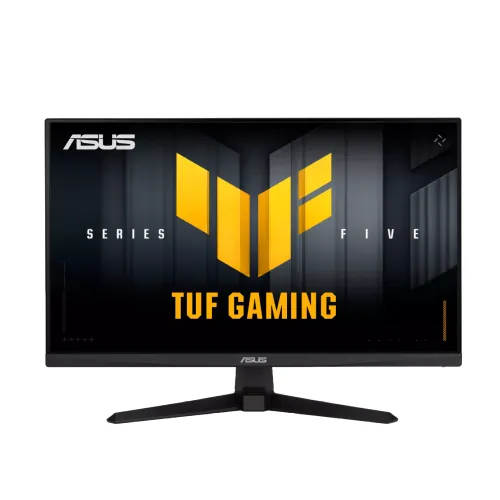
ASUS TUF Gaming VG249QM5A 23.8-inch Fast IPS monitor
The ASUS TUF Gaming VG249QM5A is a 23.8-inch Full HD gaming monitor with a Fast IPS panel and maximum refresh rate of 240Hz. ASUS specifies 1ms GtG and a 0.3ms minimum response figure, 300 cd/m² typical brightness, 1000:1 typical contrast, 99% sRGB and 88% DCI-P3. Features include HDR10 input support, Adaptive-Sync, AMD FreeSync Premium, G-SYNC Compatible and ELMB Sync. Connections are two HDMI 2.0 ports, one DisplayPort 1.4 (HBR2) and an earphone jack. It also includes two 2W speakers and a tilt stand. This description follows ASUS's model-specific technical specifications.
23.8-inch Fast IPS and Full HD detail
The VG249QM5A uses a 23.8-inch Fast IPS panel with 1920 × 1080 resolution, 16:9 aspect ratio and a 527.04 × 296.46mm viewing area. ASUS lists 0.2745mm pixel pitch, an anti-glare surface and 178-degree horizontal and vertical viewing angles. Full HD at this size provides a familiar desktop scale with more pixel density than a 27-inch Full HD monitor. It can suit gaming, general computing, study and everyday media.
Fast IPS is designed to support rapid transitions while retaining broad viewing angles. Actual motion clarity depends on each pixel transition, overdrive setting, frame rate and content. Full HD offers less workspace detail than QHD, so users who prioritize fine text or multi-window productivity may want to compare a higher-resolution display. For competitive games, a 23.8-inch screen can keep the full action within a compact field of view.
240Hz refresh over HDMI and DisplayPort
ASUS lists a maximum refresh rate of 240Hz. Its technical page gives a 48–240Hz vertical signal frequency for both DisplayPort and HDMI. The available ports are HDMI 2.0 × 2 and DisplayPort 1.4 (HBR2) × 1. Connect a compatible GPU output and cable, select 1920 × 1080 and choose 240Hz in the operating system or graphics settings. The source, cable, adapter or dock in the signal path must also support the target mode.
If 240Hz is unavailable, confirm the monitor input, cable, graphics driver, GPU output mode, operating-system refresh setting and any converter or KVM. One HDMI port can connect a console while the other remains connected to a PC; select the active input when switching. A 240Hz display can show more frequent updates, but it cannot create frames the computer does not render. Game settings and graphics performance determine actual frame rate.
Response time: 1ms GtG and 0.3ms minimum
ASUS specifies 1ms grey-to-grey response and 0.3ms (minimum). The manufacturer lists both values, so they should be presented with their stated qualifiers. The minimum figure is not a promise that all pixel transitions complete in 0.3ms, nor does it make the GtG measurement identical. Response changes with transition pair, overdrive, refresh mode and test method. Perceived motion clarity also depends on frame rate, persistence, strobing and content.
Use the monitor's response controls carefully. Stronger overdrive can reduce some transition blur but may introduce bright or dark inverse ghosting. Compare settings in the games you play and choose a stable image. If comparing displays, use measured response behaviour and overshoot data rather than relying on one minimum response headline.
Adaptive-Sync, FreeSync Premium and G-SYNC Compatible
ASUS lists Adaptive-Sync, AMD FreeSync Premium, G-SYNC Compatible and VESA AdaptiveSync Display 240Hz certification. Variable refresh can synchronize compatible display updates with frames from the GPU to reduce tearing and judder within supported conditions. Operation depends on graphics hardware, driver, input, refresh range and game settings. Check the latest official compatibility list for the exact graphics card and driver.
ASUS's product overview notes G-SYNC compatibility status can be subject to its compatibility-list update. A certification label does not guarantee that every combination of GPU, cable and application behaves identically. Enable variable refresh in the monitor and graphics settings, then test for flicker, range and stability. If you see artefacts, compare driver versions and the available settings.
ELMB Sync and gaming controls
The monitor lists Extreme Low Motion Blur and ELMB Sync, designed to reduce perceived blur during motion, including alongside variable refresh under supported conditions. Results depend on frame rate and the content. Blur-reduction features can affect brightness or visual comfort, so test the modes you plan to use. Other listed features include Trace Free overdrive, GameFast Input technology, Shadow Boost, GamePlus crosshair and timer options, and GameVisual presets.
ASUS DisplayWidget Center can control some settings from a supported computer. Availability and controls depend on operating system and software version. Download current software from ASUS support for VG249QM5A. Game modes can change gamma and colour appearance, so choose neutral settings for normal desktop work or colour-sensitive tasks.
HDR10, brightness and colour
ASUS lists HDR10 support, 300 cd/m² typical brightness, 1000:1 typical contrast, 99% sRGB and 88% DCI-P3. HDR10 indicates the monitor accepts HDR content or signal modes; it does not by itself guarantee high peak brightness, local dimming, high contrast HDR performance or a VESA DisplayHDR certification. The listed typical brightness is 300 nits.
The sRGB and DCI-P3 figures describe colour-space coverage and do not establish factory calibration accuracy, uniformity or colour volume. ASUS lists 16.7 million colours. For photo, video or print work, request a calibration report or use a colorimeter. HDR content, SDR desktop settings, game modes and colour-temperature presets may each produce different results; adjust settings for the content and room.
HDMI, DisplayPort, speakers and audio
Connectivity includes two HDMI 2.0 ports, one DisplayPort 1.4 with HBR2 and one earphone jack. Both digital inputs support the listed 48–240Hz vertical frequency range at the signal level specified by ASUS. Use a suitable cable and direct connection when troubleshooting missing refresh modes. The monitor has integrated stereo speakers rated 2W × 2. They can handle basic system sounds and casual audio, but dedicated speakers or headphones generally provide fuller sound.
For audio over HDMI or DisplayPort, select the monitor as the computer or console output. The 3.5mm jack provides an audio output for compatible headphones or external equipment. Check application volume, system routing and monitor volume if no sound is heard. HDMI and DisplayPort carry digital video and audio; VGA is not among the model's listed inputs.
Stand, VESA and physical dimensions
The supplied stand tilts from -5° to +23°. ASUS lists no height adjustment. Swivel and pivot are not specified. A 100 × 100mm VESA mounting pattern supports compatible monitor arms or brackets. Check the arm's rated load, mounting screw size and clearance before installation. The Kensington lock slot supports an optional compatible security cable.
ASUS estimates dimensions at 541 × 394 × 174mm with stand and 541 × 323 × 58mm without stand, with regional variation noted. Net weight is approximately 3.4kg, or 2.9kg without the stand. Measure available desk space and cable routes before setup. Avoid lifting the panel by the screen surface and follow the included setup guidance.
Power and package contents
ASUS lists power input at 100–240V AC, 50/60Hz, under 15W power consumption, below 0.5W in power-saving mode and below 0.3W when off. The manufacturer specifies a power cord, warranty card, quick-start guide, L-shaped screwdriver and DisplayPort cable among accessories, with the note that accessories vary by region. Confirm the Bangladesh package contents with the seller before purchase.
Inspect the monitor, stand, cable, serial label and carton on delivery. Keep the invoice, warranty card and serial evidence. Verify that the supplied cable and the computer output support the refresh rate you intend to use. Use the correct power cord and a suitable surge-protected outlet where appropriate.
Who should consider the VG249QM5A?
This monitor may suit competitive PC gamers seeking a compact Full HD Fast IPS display with 240Hz, Adaptive-Sync, ELMB Sync and multiple connection options. It can also support everyday desktop work, study and video, with integrated speakers and an anti-glare surface. HDMI, DisplayPort and dual HDMI inputs make it possible to connect more than one source.
Consider a QHD monitor if text detail and workspace are more important than refresh rate, a brighter or locally dimmed screen if HDR quality is central, or a height-adjustable stand if ergonomic positioning is required. Buyers who want integrated audio should treat the 2W speakers as basic convenience rather than a substitute for dedicated speakers.
Bangladesh price, stock and warranty
Bangladesh retailers list the VG249QM5A, but a reliable current price range was not captured for this review. Seller prices, stock and promotions can change. Ask for a current written quote, confirm the exact model name and serial, and check delivery fees and return terms. Avoid confusing VG249QM5A with similar ASUS TUF model codes that have different refresh rates or panel specifications.
Confirm the local warranty provider, serial eligibility, coverage period, dead-pixel terms and service process before ordering. A product-family warranty claim on a seller page does not prove that every regional unit is covered. Retain the authorised dealer invoice, warranty card, carton and serial label.
Frequently asked questions
What are the resolution and maximum refresh rate?
ASUS lists a 23.8-inch Fast IPS panel with 1920 × 1080 resolution and a maximum 240Hz refresh rate. The official timing table gives 48–240Hz vertical frequency for both HDMI and DisplayPort.
Does 240Hz work on HDMI as well as DisplayPort?
Yes. ASUS lists HDMI 2.0 × 2 and DisplayPort 1.4 (HBR2) × 1, with 48–240Hz vertical signal range for HDMI and DP. Your computer, cable and selected mode must support the signal.
What does 0.3ms mean compared with 1ms GtG?
ASUS specifies 1ms GtG and 0.3ms (minimum). These are not identical descriptions: 0.3ms is a minimum response figure, not a guarantee for every transition. Motion perception depends on pixel transitions, refresh, settings and frame rate.
Does it support FreeSync and G-SYNC?
ASUS lists Adaptive-Sync, AMD FreeSync Premium and G-SYNC Compatible for this model, along with VESA AdaptiveSync Display 240Hz certification. Compatibility depends on graphics hardware, driver, input and configuration. Check ASUS’s current compatibility list.
What is ELMB Sync?
ASUS lists Extreme Low Motion Blur and ELMB Sync. ELMB Sync allows blur-reduction and variable refresh to operate together under supported conditions. The result depends on frame rate and settings; compare flicker, brightness and motion in your own games.
Does it support HDR?
ASUS lists HDR10 support. HDR10 signal support alone does not establish high peak luminance, local dimming or a particular VESA DisplayHDR certification. The typical brightness is 300 cd/m².
What ports are included?
Two HDMI 2.0 inputs, one DisplayPort 1.4 (HBR2) and one earphone jack are listed.
Are speakers built in?
Yes. ASUS lists two 2W speakers. For richer sound or private listening, connect external speakers or headphones to the computer or monitor earphone output.
Can the stand adjust height?
No. ASUS lists tilt from -5° to +23° and no height adjustment. A 100 × 100mm VESA pattern supports compatible monitor arms; verify load rating and screws.
What is the Bangladesh price and warranty?
Current Bangladesh asking prices and warranty depend on seller and stock. Request a live quote and confirm the exact model, serial eligibility, service provider, written warranty period and return policy before ordering.
Key reminder: ASUS lists 240Hz over HDMI and DP, 1ms GtG and 0.3ms minimum response, 2×2W speakers, tilt-only stand and HDR10 signal support.