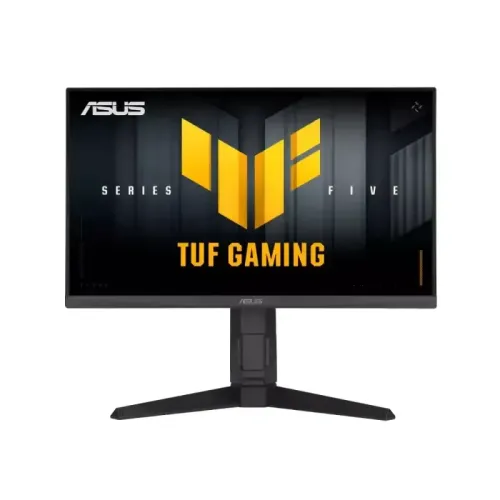
The ASUS TUF Gaming VG249QML5A is a 23.8-inch Full HD 1920 × 1080 Fast IPS gaming monitor with a maximum 240Hz refresh rate, Adaptive-Sync, ELMB Sync, HDR10 input support, dual HDMI 2.0, DisplayPort 1.4 and a height-adjustable ergonomic stand. ASUS lists 300 cd/m² typical brightness, 1ms GTG and a 0.3ms minimum response figure. Actual refresh and response depend on the source, connection, mode and settings. Read the complete specifications, limitations and buying checklist below.
A compact Full HD gaming display
The ASUS TUF Gaming VG249QML5A pairs a 23.8-inch screen with 1920 × 1080 resolution and a 16:9 aspect ratio. Its Fast IPS panel, LED backlight and anti-glare surface are designed for a desk setup where the display is used for games, communication, browsing and general computer work. The stated 527.04 × 296.46 mm viewing area and 0.2745 mm pixel pitch describe the active image dimensions and pixel spacing.
At this size and resolution, many players find Full HD a sensible match for high frame rates and a broad range of graphics hardware. It has fewer pixels than a QHD display, so very small text and fine image detail will not look as dense. Consider how far you sit, what games you play and whether smooth motion or extra desktop workspace matters more before choosing.
240Hz and system requirements
ASUS specifies a maximum 240Hz refresh rate. A high refresh rate can show more frequent frames when the game and computer produce them, making fast movement and pointer motion appear more immediate than on a lower-refresh panel. The improvement depends on the complete system: game frame rate, graphics settings, operating-system display mode, selected input, cable and GPU output all matter.
After connecting the display, select the intended refresh rate in the operating system or graphics control panel and confirm it in the monitor information screen. Use a suitable cable and an output mode supported by both the source and the selected port. A 240Hz label does not mean every console, laptop, game or HDMI adapter will deliver 240 frames per second.
Fast IPS image characteristics
The product uses a Fast IPS panel. ASUS lists 178-degree horizontal and vertical viewing angles at contrast ratio greater than or equal to 10, 99% sRGB coverage and 88% DCI-P3 coverage. Those figures provide useful orientation about viewing and color gamut, but they do not replace a calibrated color profile or a measurement of uniformity, accuracy and brightness across an individual retail unit.
Typical brightness is listed as 300 cd/m² and typical contrast as 1000:1. These are specification values rather than a guarantee that every sample measures identically. Room lighting, screen reflections, selected picture mode and brightness setting affect the image you perceive. The anti-glare coating reduces reflections but cannot remove direct sunlight or every bright light source.
Understanding response-time claims
ASUS lists 1ms GTG and a 0.3ms minimum response figure. GTG means a grey-to-grey transition; the word minimum signals a best-case figure rather than a universal result for all transitions. The achieved response depends on panel behavior, overdrive level, temperature and measurement method. A quoted response time is not the same as input lag, and it should not be interpreted as a promise that all motion is perfectly blur-free.
The OSD includes Trace Free and ASUS also lists Extreme Low Motion Blur. Stronger overdrive can create overshoot or inverse ghosting, while blur-reduction modes can affect brightness and may limit variable refresh behavior. Test the settings with the games you actually play and choose the cleanest image, rather than assuming the most aggressive mode is always best.
Adaptive sync and motion tools
ASUS lists Adaptive-Sync, AMD FreeSync Premium, G-SYNC Compatible and VESA AdaptiveSync Display 240Hz. Variable refresh can coordinate supported monitor refresh with a compatible graphics source to reduce tearing and uneven pacing when frame rates vary inside the applicable range. Certification and compatibility listings do not make every combination of GPU, cable, driver and refresh mode identical.
ELMB Sync, Extreme Low Motion Blur, GameFast Input technology, Trace Free and Shadow Boost are among the named features. Their purpose differs: some affect motion clarity, some tune dark-scene visibility and some adjust response behavior. Options may be mutually exclusive or change with the selected signal. Consult the model manual and on-screen menu for available combinations and tune them to your preference.
Color, HDR and realistic expectations
HDR10 support means the monitor can accept compatible HDR content. ASUS does not list a VESA DisplayHDR certification on the cited specification page, and its typical brightness rating is 300 cd/m². HDR impact depends on peak brightness, contrast, black level, color volume and tone mapping, not just a signal-format label. Treat HDR10 as compatibility information rather than a guarantee of a dramatic HDR picture.
The stated color space is 99% sRGB and 88% DCI-P3. GameVisual and four color-temperature modes give users picture presets, but those modes are convenience choices and are not a factory calibration report. For color-sensitive photo or print work, use a calibrated workflow and a monitor with verified accuracy data. For general games, videos and web content, choose the preset that looks comfortable in your room.
Inputs and connected devices
The official specification lists two HDMI 2.0 ports and one DisplayPort 1.4 input marked HBR2. There is also an earphone jack and HDCP 2.3 support. This selection can accommodate a desktop PC plus other video sources without unplugging the main connection each time. The supplied DisplayPort cable is listed among accessories, although ASUS cautions that included accessories vary by region.
Check the exact resolution and refresh supported by each source over its chosen port. Laptop docks, adapters, older graphics cards and long or low-quality cables can limit available modes. HDMI 2.0 and DisplayPort 1.4 are interface specifications; the actual timing also depends on the source device, color format, bit depth and configuration. The earphone jack provides a path for private listening, while the two built-in speakers cover basic sound.
Adjustable stand and mounting
The included stand supports height adjustment from 0 to 120 mm, tilt from +23° to -5°, swivel from +15° to -15° and pivot from +90° to -90°. This adjustment range helps align the screen with seated eye level, reduce neck movement and rotate the panel for portrait-oriented work. Adjust the display while supporting it and place the base on a stable, level desk.
ASUS lists VESA 100 × 100 mm mounting, a Kensington lock and a 1/4-inch tripod socket. Before using an arm or wall mount, confirm its capacity exceeds the monitor’s weight, check the screw depth and make sure cables have room to bend. Removing the stand changes the footprint and setup requirements; follow the manual for safe installation and avoid putting pressure on the LCD surface.
Gaming and everyday use
For competitive titles, 240Hz and variable refresh may be valuable when the PC can sustain a high frame rate. For story-driven games and video, Full HD and the 23.8-inch size are straightforward to drive and fit many desks. GamePlus offers gaming overlays and utilities, GameVisual provides picture modes, and Shadow Boost can alter visibility in dark scenes. These tools change presentation; they do not improve the game engine or replace skill.
The same panel can serve as a general desktop monitor for browser tabs, office documents and video. Full HD leaves less room for side-by-side windows than QHD, though scaling can make text comfortable. The ergonomic stand helps switch between tasks, and the multiple inputs support more than one source. Set expectations around the display’s resolution and speakers before deciding whether it fits a mixed-use workspace.
Power, size and package contents
ASUS lists 15W power consumption, less than 0.5W in power-saving mode and less than 0.3W in standby, with 100–240V AC at 50/60Hz. These are manufacturer figures and operating consumption varies by brightness, refresh mode, connected devices and use. Keep ventilation unobstructed, use the intended regional power cord and disconnect power before cleaning or moving the display.
Estimated dimensions are 54.1 × 52.5 × 20.5 cm with stand and 54.1 × 32.3 × 5.8 cm without it. Estimated net weight is 4.9 kg with stand and 2.9 kg without, with gross package weight 6.6 kg. Regional packaging may vary. ASUS lists a warranty card, quick-start guide, power cord, L-shaped screwdriver and DisplayPort cable, but included items can differ by region.
Price and warranty in Bangladesh
At the time of this content review, TechLand displayed ৳25,500 discounted from ৳28,500 and an In Stock label, and advertised a three-year warranty. These figures are a seller-page snapshot that may change, and the listing is not a BiponiBD offer or a promise that another shop has stock. Confirm the exact VG249QML5A model, final checkout price, delivery fee, return policy and availability before payment.
Warranty coverage depends on the local distributor, serial number, invoice and service terms. Ask the seller who handles warranty, whether the unit is eligible for Bangladesh service, what the panel/dead-pixel policy covers and which accessories or packaging must be retained. Do not assume a retailer’s general warranty text applies to every imported or region-specific unit.
Model identity and buying checklist
This page is specifically for ASUS TUF Gaming VG249QML5A. Similar names such as VG249QM5A, VG249QM1A and other VG249 variants can have different specifications, regional availability and warranty terms. Match the model printed on the monitor label, carton and invoice before purchase. A listing title or image alone is not enough to establish exact variant identity.
Before ordering, decide whether Full HD, 240Hz, adaptive sync, stand ergonomics, built-in audio and available ports match your setup. Check that the graphics source has a suitable output, verify the included cable and ask for local warranty details. No hands-on review, measured response test, color calibration result or guaranteed stock claim is made in this product description.
Key features
- 23.8-inch Full HD (1920 × 1080), 16:9 Fast IPS panel with LED backlight and anti-glare surface.
- Up to 240Hz maximum refresh rate for high-frame-rate PC gaming when the computer, connection and selected timing support it.
- ASUS lists 1ms GTG and a 0.3ms minimum response figure; these are different response claims and are not a guarantee for every transition or setting.
- Adaptive-Sync with AMD FreeSync Premium, G-SYNC Compatible and VESA AdaptiveSync Display 240Hz certifications/listings.
- ELMB and ELMB Sync combine motion-blur reduction with adaptive sync in supported configurations; available modes can depend on refresh and OSD settings.
- 300 cd/m² typical brightness, 1000:1 typical contrast, 99% sRGB and 88% DCI-P3 as listed by ASUS.
- HDR10 input support; treat this as signal compatibility, not proof of certified high-dynamic-range brightness or local dimming.
- One DisplayPort 1.4 (HBR2), two HDMI 2.0 ports, an earphone jack and HDCP 2.3.
- Two integrated 2W speakers for basic desktop audio; external speakers or headphones may give fuller sound.
- Height adjustment up to 120 mm, tilt, swivel and portrait pivot; VESA 100 × 100 mm mounting is also listed.
- GamePlus, GameVisual, Shadow Boost, Trace Free, GameFast Input, Dynamic Crosshair and ASUS DisplayWidget Center tools.
- Flicker-Free and Low Blue Light features, with TÜV listings shown in ASUS specifications.
Pros
- 240Hz maximum refresh and Adaptive-Sync support suit compatible high-frame-rate gaming setups.
- Fast IPS, 99% sRGB and wide stated viewing angles offer a practical balance for games and everyday desktop use.
- The stand adjusts for height, tilt, swivel and pivot, reducing dependence on a separate monitor arm.
- Two HDMI inputs plus DisplayPort allow several connected sources; confirm each source reaches its desired refresh rate.
- Integrated speakers, an earphone jack and VESA mounting add useful flexibility for a compact gaming desk.
Cons and considerations
- Full HD on 23.8 inches is less detailed than QHD; buyers prioritizing fine text or a large creative workspace may prefer higher resolution.
- The 0.3ms minimum response claim is not equivalent to typical 1ms GTG behavior across all pixel transitions and settings.
- HDR10 compatibility alone does not establish strong HDR impact; ASUS lists 300 cd/m² typical brightness and no DisplayHDR badge on the referenced spec page.
- Built-in 2W speakers are convenient for basic audio but are modest in output and bass compared with dedicated speakers or a headset.
- Bangladesh seller price, stock and three-year warranty are time- and serial-dependent; confirm exact local coverage before ordering.
Full specifications
- Brand: ASUS
- Model: TUF Gaming VG249QML5A
- ManufacturerPartNumber: TUF Gaming VG249QML5A
- DisplaySize: 23.8 inches
- AspectRatio: 16:9
- ViewingArea: 527.04 × 296.46 mm
- Panel: Fast IPS, LED backlight
- Resolution: 1920 × 1080 (Full HD)
- Surface: Anti-glare
- PixelPitch: 0.2745 mm
- ViewingAngles: 178° horizontal / 178° vertical (CR ≥10)
- ColorSpace: 99% sRGB; 88% DCI-P3
- DisplayColors: 16.7 million
- Brightness: 300 cd/m² typical
- Contrast: 1000:1 typical
- RefreshRate: Up to 240Hz; exact max depends on input timing, GPU, cable and settings
- ResponseTime: 1ms GTG; 0.3ms minimum ASUS-listed figure; response modes and measurement conditions differ
- HDR: HDR10 signal support; no VESA DisplayHDR certification or peak HDR brightness listed on ASUS spec page
- VRR: Adaptive-Sync; AMD FreeSync Premium; G-SYNC Compatible; VESA AdaptiveSync Display 240Hz
- MotionFeatures: ELMB; ELMB Sync; Extreme Low Motion Blur; Trace Free; GameFast Input
- GamingFeatures: GamePlus; GameVisual; Shadow Boost; Dynamic Crosshair; AI Visual; DisplayWidget Center; ASUS Power Sync
- EyeCare: Flicker-Free; Low Blue Light; TÜV Flicker-free and TÜV Low Blue Light listed
- Ports: 1 × DisplayPort 1.4 (HBR2); 2 × HDMI 2.0; earphone jack
- HDCP: HDCP 2.3
- Speakers: 2 × 2W built-in
- Stand: Tilt +23° to -5°; swivel +15° to -15°; pivot +90° to -90°; height 0–120 mm
- Mount: VESA 100 × 100 mm; Kensington lock; 1/4-inch tripod socket
- Power: 100–240V AC, 50/60Hz; 15W listed; power saving <0.5W; standby <0.3W
- DimensionsWithStand: 54.1 × 52.5 × 20.5 cm (W × H × D; estimated, region may vary)
- DimensionsWithoutStand: 54.1 × 32.3 × 5.8 cm (W × H × D; estimated, region may vary)
- Weight: 4.9 kg net with stand; 2.9 kg without stand; 6.6 kg gross (estimated, region may vary)
- InBox: Warranty card, quick start guide, power cord, L-shaped screwdriver, DisplayPort cable (accessories vary by region)
- LocalPriceObservation: TechLand listed ৳25,500 discounted / ৳28,500 regular and In Stock at review time; seller snapshot only, not BiponiBD offer
- LocalWarrantyObservation: TechLand advertised 3 years; verify Bangladesh distributor, serial eligibility and terms before purchase
- Color: Black (retailer listing)
- CountryOfOrigin: Not confirmed for this specific unit; do not infer from seller claims
Frequently asked questions
What is the ASUS VG249QML5A resolution and size?
It is a 23.8-inch 16:9 Fast IPS monitor with Full HD 1920 × 1080 resolution.
Does it support 240Hz?
ASUS lists a maximum refresh rate of 240Hz and input signal ranges up to 240Hz. The actual selectable refresh depends on the source device, port, cable, operating-system mode and GPU output.
What does 1ms GTG and 0.3ms minimum mean?
ASUS lists 1ms GTG and 0.3ms as a minimum figure. Response measurement methods and overdrive settings differ; neither number guarantees every pixel transition will complete at that time.
Which ports are included?
The official specification lists one DisplayPort 1.4 (HBR2), two HDMI 2.0 inputs and an earphone jack. It also lists HDCP 2.3.
Does it support Adaptive-Sync or G-SYNC?
ASUS lists Adaptive-Sync, AMD FreeSync Premium, G-SYNC Compatible and VESA AdaptiveSync Display 240Hz. Compatibility and range depend on the GPU, connection and settings.
What are ELMB and ELMB Sync?
They are ASUS motion-blur-reduction features. ELMB Sync is intended to combine blur reduction and adaptive sync in supported conditions; enabling it can change brightness or restrict other settings.
Is HDR supported?
HDR10 input support is listed. This does not by itself mean the monitor has a VESA DisplayHDR certification or high peak brightness; ASUS lists 300 cd/m² typical brightness.
Does it have built-in speakers?
Yes. ASUS lists two 2W speakers, plus an earphone jack. The built-in speakers are suitable for basic audio; use external audio if stronger sound is important.
Can I adjust the stand?
ASUS lists height adjustment from 0 to 120 mm, tilt from +23° to -5°, swivel from +15° to -15° and pivot from +90° to -90°.
Can it be mounted on an arm?
Yes. ASUS lists a 100 × 100 mm VESA wall-mount pattern. Check the arm’s supported weight and use the correct screws and spacers.
What is the price and warranty in Bangladesh?
TechLand displayed ৳25,500 discounted and ৳28,500 regular with an In Stock label and advertised a three-year warranty when reviewed. This is a retailer snapshot, not BiponiBD pricing or a guarantee; confirm current stock, exact model, distributor and serial eligibility.
Is this the same as VG249QM5A?
No. VG249QML5A is the exact model reviewed here. Do not use specifications or merchant offers for the similar VG249QM5A or other VG249 variants as proof for this product.
Source and scope note: Technical details are based on ASUS model-specific specifications and product information. Bangladesh price, availability and warranty are retailer observations only and can change. Verify local unit identity and warranty terms with the seller. No BiponiBD price, hands-on test or inventory status is claimed.