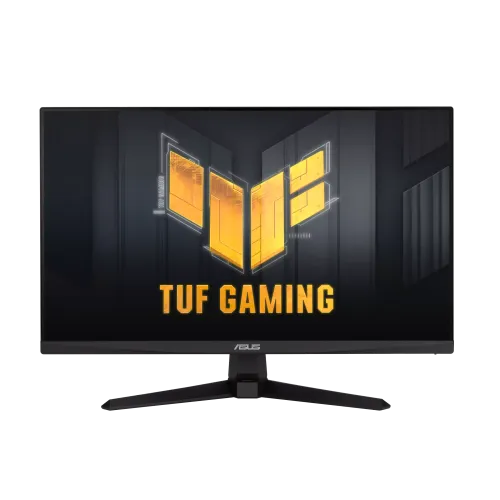
ASUS TUF Gaming VG259Q5A 24.5-inch FHD 200Hz Fast IPS Monitor pairs a 24.5-inch Full HD Fast IPS panel with a manufacturer-rated 200Hz refresh rate, Adaptive-Sync, HDR10 support and stereo speakers. This guide explains the confirmed features, practical trade-offs, setup and Bangladesh availability checks.
A fast 24.5-inch Full HD display
The ASUS TUF Gaming VG259Q5A is a 24.5-inch Fast IPS monitor built for a high refresh rate and responsive PC gaming. It uses a 1920 × 1080 Full HD resolution and 16:9 aspect ratio. ASUS specifies a 543.74 × 302.62mm viewable area, anti-glare surface and LED backlight. At this size, Full HD is a familiar resolution for games, video and everyday work, while keeping the rendering load manageable for a gaming PC targeting high frame rates. It does not provide the extra pixel density or workspace of a QHD monitor, so users who spend their day reading small text, editing detailed images or arranging many windows may prefer a higher-resolution screen.
200Hz refresh and what it means
ASUS specifies a maximum 200Hz refresh rate and lists a vertical signal range of 48–200Hz over both HDMI and DisplayPort. A 200Hz screen can present frames more frequently than a conventional 60Hz display, which can make camera movement, scrolling and supported games appear smoother. The improvement is most useful when the computer can render at a high frame rate. Select the correct input and refresh rate in the graphics settings after setup; a compatible GPU, cable and port mode are needed. A monitor refresh rating does not create extra game frames, reduce every kind of latency or guarantee a particular competitive result.
Fast IPS, color and viewing angles
The Fast IPS panel combines the broad viewing characteristics associated with IPS with gaming-oriented motion specifications. ASUS lists 178-degree horizontal and vertical viewing angles at a contrast criterion of 10:1, a typical 300 cd/m² brightness and 1000:1 typical contrast ratio. The manufacturer also specifies 99% sRGB and 16.7 million colors. These figures help describe the display but do not replace professional calibration or establish accuracy across every unit. The anti-glare finish can reduce distracting reflections in many indoor setups, though it cannot eliminate bright-window glare. Adjust brightness to the room and consider a calibrated monitor when exact color work is important.
Response time, ELMB and motion tuning
ASUS lists 1ms GTG and a 0.3ms minimum GTG response mode. A minimum response figure is a best-case specification and should not be read as the average for all pixel transitions. The monitor also offers Extreme Low Motion Blur and Trace Free controls. Motion clarity options can have trade-offs: strobing or stronger response tuning may reduce brightness, introduce artifacts or change the overall image. Start with a moderate overdrive setting and compare actual gameplay rather than assuming the strongest mode is best. The right balance depends on frame rate, game content and individual sensitivity to blur or overshoot.
Adaptive-Sync and certified compatibility
The official specification lists Adaptive-Sync, AMD FreeSync Premium, G-SYNC Compatible and VESA AdaptiveSync Display 200Hz. These features can coordinate screen refresh with the frame output of compatible graphics hardware and may reduce tearing or uneven motion in supported modes. Driver version, GPU, input, cable and configuration all matter. If variable refresh is unavailable, check the monitor OSD, graphics driver and operating-system display settings. Compatibility names indicate supported technologies; they do not guarantee that every computer or game will behave identically.
HDR10 and eye-care features
The VG259Q5A accepts HDR10 signals and includes flicker-free and Low Blue Light features. HDR input support does not by itself prove high HDR brightness, local dimming or a premium HDR contrast experience. ASUS specifies typical brightness of 300 cd/m² and typical contrast of 1000:1, so evaluate the screen primarily as a high-refresh SDR gaming monitor with HDR10 compatibility. Low Blue Light and four color-temperature modes give users options to adjust the image for different environments. Comfort also depends on room lighting, viewing distance, posture and taking regular breaks.
Connections and built-in audio
The monitor provides two HDMI 2.0 inputs, one DisplayPort 1.4 (HBR2) input and an earphone jack according to ASUS. This makes it possible to leave multiple devices connected, such as a gaming PC and console, and switch inputs as needed. ASUS publishes a 48–200Hz vertical signal range for HDMI and DisplayPort, though device output and settings must support the selected mode. Two built-in 2W speakers provide basic audio for desktop use. They are convenient for alerts, video calls or casual viewing, while a headset or external speaker system can deliver a fuller sound experience.
TUF gaming tools and desktop control
GameVisual provides selectable picture presets, while GamePlus adds monitor-side gaming tools. Shadow Boost can make dark areas easier to see by adjusting the image, and GameFast Input technology is intended to reduce display-side processing latency. DisplayWidget Center provides a software interface for supported monitor controls. These utilities can help tailor the display, but settings should be chosen for clear visibility and accurate scene appearance rather than maximum brightness alone. The monitor also offers four color-temperature settings and an on-screen menu for additional adjustment.
Stand, desk fit and VESA mounting
The standard stand supports tilt from approximately -5 degrees to +23 degrees, but ASUS lists no height adjustment. There is no listed swivel or pivot adjustment either. A stable riser can raise the panel, or the 100 × 100mm VESA pattern can be used with a compatible desk arm or wall mount. ASUS estimates dimensions with stand at 559 × 401 × 174mm and net weight at 3.4kg; estimates can vary by region. Check the desk depth, wall clearance and mount load rating before installation. A correctly positioned screen can help reduce neck movement during extended sessions.
Power and package contents
ASUS lists power consumption below 15W, power-saving use below 0.5W and power-off use below 0.3W, with a 100–240V, 50/60Hz input. The regional accessory bundle may include a DisplayPort cable, power cord, L-shaped screwdriver, quick-start guide, warranty card and certificate. Accessories vary by market, so confirm what is included in the sealed Bangladesh package. Retain the invoice, serial details and packaging while you check return terms and warranty claim procedures.
Bangladesh price, availability and warranty
TechLand showed a ৳22,500 discounted price and ৳25,000 regular price when checked, but its page marked the monitor out of stock. Ryans also withheld a current price because of stock unavailability. These seller pages do not establish a live BiponiBD offer or a purchasable market price, so no numeric price range is recorded for this product. Contact a local seller for a fresh stock check, final quote and delivery terms. TechLand advertises a three-year warranty, but the actual provider, serial eligibility and claim conditions must be confirmed for the specific unit before payment.
Who should consider this model?
The VG259Q5A suits a gamer prioritizing 200Hz Full HD motion, a Fast IPS panel, variable refresh and flexible connections in a 24.5-inch format. It can also handle general browsing and office tasks, and the built-in speakers provide basic sound without extra hardware. It is less suited to people who require QHD detail, integrated height adjustment, USB-C docking, professional color validation or premium HDR performance. Consider your graphics card, games, desk ergonomics and warranty terms together. The high refresh rate is most valuable when the system can supply high frame rates consistently.
Specifications at a glance
- Brand: ASUS
- Series: TUF Gaming Series 5
- Model: VG259Q5A
- Display Size: 24.5-inch
- Viewing Area: 543.74 × 302.62mm
- Resolution: 1920 × 1080 Full HD
- Aspect Ratio: 16:9
- Panel Type: Fast IPS
- Backlight: LED
- Surface: Anti-glare
- Pixel Pitch: 0.2832 × 0.2802mm
- Viewing Angle: 178° horizontal / 178° vertical (CR ≥ 10)
- Brightness: 300 cd/m² typical
- Contrast Ratio: 1000:1 typical
- Color Space: 99% sRGB
- Display Colors: 16.7 million
- Refresh Rate: Up to 200Hz
- Response Time: 1ms GTG; 0.3ms GTG minimum mode
- HDR: HDR10 signal support
- Variable Refresh: Adaptive-Sync; AMD FreeSync Premium; G-SYNC Compatible; VESA AdaptiveSync Display 200Hz
- Motion Features: Extreme Low Motion Blur, GameFast Input, Trace Free
- Game Utilities: GameVisual, GamePlus, Shadow Boost, DisplayWidget Center
- Color Temperature: 4 modes
- Flicker-free: Yes
- Low Blue Light: Yes
- HDCP: 2.3
- HDMI: 2 × HDMI 2.0
- DisplayPort: 1 × DisplayPort 1.4 (HBR2)
- Audio: 2 × 2W speakers; earphone jack
- Tilt: Approximately -5° to +23°
- Height Adjustment: No
- VESA Mount: 100 × 100mm
- Kensington Lock: Yes
- Dimensions with Stand: 559 × 401 × 174mm (estimated; region may vary)
- Dimensions without Stand: 559 × 329 × 62mm (estimated; region may vary)
- Net Weight with Stand: 3.4kg estimated
- Net Weight without Stand: 2.9kg estimated
- Power Consumption: Less than 15W
- Power Saving: Less than 0.5W
- Power Off: Less than 0.3W
- Voltage: 100–240V, 50/60Hz
- Accessories: May include power cord, DisplayPort cable, L-shaped screwdriver, quick-start guide, warranty card and certificate; verify local package
- Warranty: TechLand advertises 3 years; confirm local provider and unit/serial eligibility
Frequently asked questions
What is the screen size and resolution?
The VG259Q5A uses a 24.5-inch Fast IPS display with Full HD 1920×1080 resolution and a 16:9 aspect ratio. ASUS specifies 99% sRGB, 300 cd/m² typical brightness and 1000:1 typical contrast.
Does it really support 200Hz?
Yes. ASUS lists 200Hz maximum refresh and a 48–200Hz vertical signal range for both HDMI and DisplayPort. Use a compatible graphics output, cable and settings, and select 200Hz in the operating system.
What response time should I expect?
ASUS lists 1ms GTG and 0.3ms minimum GTG. The minimum figure applies under a specific setting or measurement condition and is not the average for every pixel transition. Overdrive and ELMB options can change motion appearance.
What ports are available?
ASUS lists two HDMI 2.0 ports, one DisplayPort 1.4 (HBR2) and an earphone jack. This allows several devices to remain connected, although audio and refresh behavior depend on each device and selected input.
Does it support Adaptive-Sync and G-SYNC?
ASUS lists Adaptive-Sync, AMD FreeSync Premium and G-SYNC Compatible, as well as VESA AdaptiveSync Display 200Hz. Compatibility still depends on the graphics card, drivers, connection and supported modes.
Does the monitor have speakers?
Yes. ASUS specifies two 2W speakers. They are suitable for basic system audio, but users seeking stronger sound or richer bass may prefer dedicated speakers or headphones.
Does HDR10 mean it is a high-performance HDR display?
It accepts HDR10 signals, but that label alone does not establish high peak brightness, local dimming or a wide HDR color volume. ASUS specifies typical brightness of 300 cd/m²; evaluate it as an entry-level HDR signal-compatible monitor rather than assuming premium HDR effects.
Can I adjust its height?
No. ASUS specifies tilt adjustment from approximately -5° to +23° and no height adjustment. A stable riser or a compatible VESA mount can help position the screen higher.
Can it be mounted on a monitor arm?
Yes. ASUS lists a 100×100mm VESA mounting pattern. Confirm that the arm supports the weight and uses appropriate screw length before installation.
What is the current price in Bangladesh?
TechLand displayed ৳22,500 but marked the item out of stock. Ryans did not show a current price due to stock unavailability. These are availability snapshots, not a live offer; contact sellers for a current quote. BiponiBD had no verified live offer in this review.
What warranty comes with a Bangladesh unit?
TechLand advertises three years, but a product page does not confirm coverage for every unit or serial number. Ask the seller for the warranty provider, official/third-party status, serial eligibility, invoice requirements and claim terms before purchase.
What is included in the box?
ASUS lists a warranty card, quick-start guide, power cord, L-shaped screwdriver, DisplayPort cable and certificate, with accessories varying by region. Verify the exact Bangladesh bundle and cable contents with the seller.
Source note: Core specifications are from ASUS. Local seller pages are snapshots for stock, price and warranty; verify the exact unit and current terms before purchase.