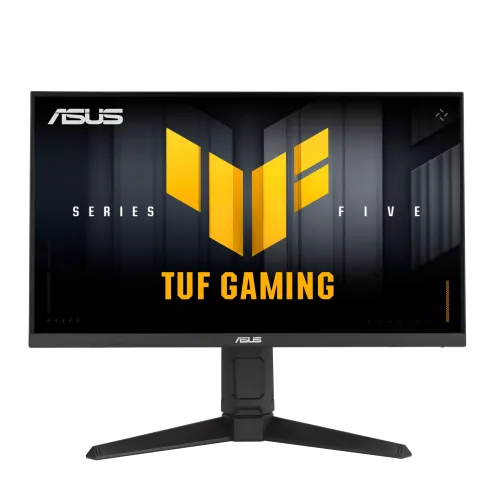
ASUS TUF Gaming VG259QMRL5A overview
The ASUS TUF Gaming VG259QMRL5A is a 24.5-inch Full HD Fast IPS gaming monitor with a maximum 310Hz overclocked refresh rate. ASUS lists 1920 × 1080 resolution, 400 cd/m² typical brightness, 1000:1 contrast, 1ms GtG and 0.3ms minimum response specification. It supports HDR10 and VESA DisplayHDR 400, AMD FreeSync Premium, G-SYNC Compatible operation, Adaptive-Sync and ELMB Sync. Connectivity includes two HDMI 2.0 inputs, one DisplayPort 1.4 HBR2 input and two 2W speakers. The maximum refresh differs by input: DisplayPort is listed up to 310Hz and HDMI up to 240Hz.
24.5-inch Full HD panel
The 24.5-inch panel uses native Full HD resolution of 1920 × 1080 pixels and a 16:9 aspect ratio. ASUS lists an active viewing area of 543.74 × 302.62mm and pixel pitch of 0.2832 × 0.2802mm. At this size, Full HD can provide a clear, familiar desktop while allowing a high frame rate in competitive games. It offers less desktop detail than a QHD monitor of similar size, so users who prioritize pixel density or many windows may prefer a higher-resolution display. Select native resolution in the operating system for a correctly mapped image and adjust scaling for comfortable reading.
Fast IPS image and viewing angles
ASUS identifies a Fast IPS panel with LED backlighting, anti-glare surface and 178-degree horizontal and vertical viewing angles. IPS viewing can help retain a consistent image when the user is not exactly centered. ASUS lists 99% sRGB coverage and 16.7 million colors. These specifications do not provide individual-unit calibration results. For web, office and general games, sRGB is a common color target; for color-sensitive photo or print work, verify the unit and use calibration hardware and a managed color profile. Anti-glare treatment reduces some reflections but cannot remove reflections from every lighting setup.
310Hz overclock and port limits
ASUS promotes 310Hz as an overclocked maximum. The technical specification lists DisplayPort 1.4 vertical timing from 48 to 310Hz and HDMI 2.0 from 48 to 240Hz. Use DisplayPort for the full 310Hz mode. Depending on the OSD and computer, an overclock setting may need to be enabled before selecting the mode. If 310Hz is unavailable, confirm the input, cable, graphics-card output and driver, then check the advanced display mode. HDMI at 240Hz is within the stated HDMI range and does not indicate a product problem. Return to a stable mode if an overclocked signal flickers or blanks.
Competitive gaming and frame-rate planning
The 310Hz ceiling targets competitive PC gaming where high frame rates and responsive motion matter. A game and computer need to render frames at a sufficiently high rate to use the display’s maximum refresh. Lightweight esports titles may reach high frame rates with tuned settings, while demanding games may run substantially lower. The monitor cannot generate frames or compensate for CPU, GPU or network limitations. Full HD is generally less demanding than QHD, which can help a capable computer achieve high frame output. Check game-specific performance and the exact DisplayPort path before buying specifically for 310fps.
Response time and motion settings
ASUS lists 1ms GtG and 0.3ms minimum response time. The product page calls the 0.3ms figure a minimum, so it should not be read as a result for every pixel transition or as an input-lag measurement. GtG response, refresh rate, input latency and perceived motion clarity are related but distinct. Trace Free adjusts overdrive; overly aggressive overdrive can create inverse ghosting. ELMB uses backlight strobing, and ELMB Sync is listed for use with variable refresh. Strobing may affect brightness and have mode restrictions. Compare settings in actual games and use the mode that looks clearest.
Adaptive-Sync, FreeSync and G-SYNC
ASUS lists Adaptive-Sync, AMD FreeSync Premium and G-SYNC Compatible support. Variable refresh can reduce tearing and stutter when the GPU and monitor synchronize within a supported range. Enable the function in the monitor OSD and graphics driver as required, then check that the driver detects the display. Compatibility depends on GPU, software, input, cable and refresh mode. FreeSync Premium certification and G-SYNC compatibility are not substitutes for checking the exact computer setup. Variable refresh does not increase rendered frame rate or remove every source of latency.
HDR10 and VESA DisplayHDR 400
The VG259QMRL5A supports HDR10 and is listed with VESA DisplayHDR 400 certification. ASUS specifies 400 cd/m² typical brightness and the product page describes DisplayHDR 400. HDR appearance depends on content, operating-system setup, picture mode and the panel’s brightness and contrast. DisplayHDR 400 is an entry-level certification tier and does not imply OLED-level blacks or advanced local dimming. Enable HDR with compatible games or videos and compare the result with SDR. If the image looks washed out or too dim in a particular workflow, review tone mapping and use the mode that preserves detail.
Color, brightness and contrast
ASUS lists 400 cd/m² typical brightness, 1000:1 typical contrast and 99% sRGB. The manufacturer also lists 16.7 million colors and four color-temperature selections. Set brightness for the room and avoid maximum output in a dim environment. Contrast and color-temperature adjustments can affect shadow detail and white balance. The 99% sRGB specification describes gamut coverage rather than factory calibration accuracy. For competitive gaming, some users may prefer a brighter picture, while content creation benefits from a calibrated sRGB mode. Use GameVisual presets as starting points and restore a neutral profile if colors become unnatural.
Ports and display timing
The exact-model specification lists one DisplayPort 1.4 input with HBR2 and two HDMI 2.0 inputs. The vertical scan range is 48–310Hz through DisplayPort and 48–240Hz over HDMI. ASUS also lists HDCP support; the technical table identifies HDCP 2.3. Audio is provided through two integrated 2W speakers. No USB hub or USB-C video input is listed. Choose DisplayPort for the highest refresh rate and HDMI for compatible consoles or additional sources. Docks and converters can restrict timings, so connect directly to the graphics card when diagnosing a missing high-refresh mode.
Speakers and sound
ASUS includes stereo speakers rated at 2W each. They provide convenient basic audio for system alerts, casual video and game sound without an external speaker set. The small integrated drivers are not a replacement for headphones or dedicated speakers when richer audio or higher volume is important. The specification lists speakers and two HDMI ports but does not list a separate earphone jack on this model’s tech page; verify the actual I/O panel and manual before planning headphone routing. Audio from a computer depends on selecting the monitor as the HDMI or DisplayPort playback device.
Stand, adjustment and tripod socket
The included stand adjusts from 0 to 120mm in height, tilts from -5 to +23 degrees, swivels ±15 degrees and pivots ±90 degrees. The monitor also includes a 1/4-inch tripod socket, which can support compatible camera or accessory mounting use as described by ASUS. A 100 × 100mm VESA pattern and Kensington lock are listed. Keep cables loose enough for height and pivot adjustment, and check clearance around the stand before rotating the screen. Use the manufacturer’s mounting instructions and correct screws when attaching an arm or accessory.
Dimensions and weight
ASUS lists estimated dimensions of 559 × 528 × 208mm with stand and 559 × 329 × 62mm without stand. Net weight is approximately 4.9kg with the stand and 2.9kg without; gross package weight is about 6.6kg. These dimensions are estimates and may vary by region. Measure the desk or shelf before installation, especially if using the full-height stand position. For a third-party monitor arm, check its weight capacity and VESA compatibility. Keep space behind the screen for DisplayPort, HDMI and power cable routing, and support the display securely when removing or attaching the stand.
Power and operating modes
The monitor accepts AC 100–240V at 50/60Hz. ASUS lists power consumption below 16W, power-saving mode below 0.5W and power-off mode below 0.3W. Actual use changes with brightness, refresh mode, HDR and speaker activity. Use the supplied power cord and a properly grounded outlet. Keep ventilation openings clear and avoid pinching the cable in a height-adjustable desk or stand. Turn the monitor off safely before cleaning or moving it. The product specification page lists a DisplayPort cable and power cord among regional accessories, but accessory bundles can vary, so confirm the local package.
Gaming AI and OSD tools
ASUS lists GameVisual, GamePlus, Shadow Boost, Dynamic Shadow Boost, Dynamic Crosshair, AI Visual, GameFast Input, DisplayWidget Center and four color-temperature modes. These are optional tools for picture adjustment, controls and game overlays. Dynamic Crosshair and Sniper-like overlays can be disabled where they are unwanted or inappropriate. Shadow Boost changes dark-scene visibility; GameVisual can change color and contrast. DisplayWidget Center offers mouse-based access to monitor controls on a compatible host. Features may behave differently by firmware or game. Change one option at a time and return to a neutral preset if the image loses detail.
Eye comfort and screen finish
ASUS lists Low Blue Light, Flicker-Free and TÜV certifications for low blue light and flicker-free operation. The screen surface is anti-glare. Low-blue-light settings may warm colors and are best disabled when judging color accuracy. Anti-glare treatment can reduce reflections but does not remove all reflections from windows or bright lamps. Set screen brightness according to ambient light, position the display to reduce glare, and take breaks during long sessions. Eye-care technologies are display features, not medical treatment. Adjust height and distance to keep a comfortable posture during extended play or work.
Advantages and practical trade-offs
The ASUS TUF VG259QMRL5A combines a 24.5-inch Full HD Fast IPS panel with a very high 310Hz DisplayPort maximum and motion tools including ELMB Sync. AMD FreeSync Premium, G-SYNC Compatible support, DisplayHDR 400, integrated speakers and a fully adjustable stand round out the feature set. Its Full HD resolution can be easier to drive at extreme frame rates than QHD. Trade-offs include the lower workspace compared with QHD, HDMI’s 240Hz ceiling, the need for a powerful PC to use 310Hz, and HDR400’s limits versus higher-tier HDR monitors. Match these details to your games and desk.
Warranty and Bangladesh purchase terms
ASUS notes that accessories, availability and specifications may vary by region. The official product page does not establish warranty coverage for a particular Bangladesh serial. Confirm the seller’s three-year catalog claim with the serial number and invoice, including the provider, coverage start date, panel policy, pixel-defect terms and repair location. Verify that the included power cord and DisplayPort cable match the local package. Current BiponiBD price, stock, delivery, payment and return terms should be checked on the live offer because they can change separately from the manufacturer specifications. Keep the invoice and serial label.
Setup and troubleshooting
Assemble the stand and connect the supplied power cord. Use DisplayPort 1.4 for the 310Hz overclock mode or HDMI 2.0 for up to 240Hz. Select 1920 × 1080 and the highest stable supported refresh in the operating system. If 310Hz is missing, verify the DisplayPort cable, GPU output, driver and any OSD overclock option. Enable Adaptive-Sync in the monitor and graphics settings. If motion artifacts appear, adjust Trace Free or test ELMB separately. For speaker audio, select the monitor as the digital playback device and check system volume. Reset to a stable mode if the screen blanks during a high-refresh test.
Who should consider this display
This monitor is suited to competitive PC players who prioritize very high refresh at Full HD on a 24.5-inch Fast IPS panel. It can also handle general desktop work, streaming and casual gaming, but users seeking finer workspace at this size may prefer QHD. The 310Hz maximum requires a compatible DisplayPort connection and high frame rates from the PC. Buyers who need integrated audio can use the included 2W speakers, while audio enthusiasts should plan headphones or external speakers. Check that the monitor’s height, pivot and desk footprint suit the setup, and confirm local warranty before purchase.
Product summary
ASUS TUF Gaming VG259QMRL5A is a 24.5-inch FHD 1920 × 1080 Fast IPS gaming monitor with 310Hz overclock via DisplayPort 1.4 and up to 240Hz via HDMI 2.0. ASUS lists 1ms GtG, 0.3ms minimum, 400-nit typical brightness, 99% sRGB, HDR10 and VESA DisplayHDR 400. It supports FreeSync Premium, G-SYNC Compatible, Adaptive-Sync and ELMB Sync, with 2W × 2 speakers and a stand offering 120mm height, tilt, swivel and pivot. Confirm live offer, local warranty and included accessories before ordering.