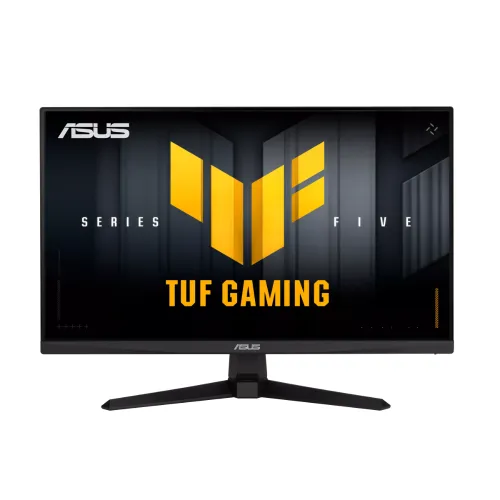
ASUS TUF Gaming VG27AQE5A is a 27-inch QHD gaming monitor with an IPS panel and a manufacturer-listed maximum refresh rate of 165Hz. ASUS describes the 165Hz figure as an overclocked mode on its product overview; its technical sheet lists 165Hz maximum. The model combines 2560 × 1440 resolution with Adaptive-Sync, HDR10 signal support, ELMB motion features and stereo speakers. This page is specifically for VG27AQE5A. Do not substitute the specifications of VG27AQ5A, VG27AQM5A, VG27AQ or VG27AQE5A regional bundles without checking the printed model code.
Screen size, panel and image detail
The monitor has a 27-inch, 16:9 IPS display with an anti-glare surface and 2560 × 1440 native resolution. QHD provides 3,686,400 pixels, offering finer detail than Full HD at the same screen size while requiring more graphics performance to drive high frame rates. ASUS lists a 596.74 × 335.66 mm active viewing area and 0.2331 mm pixel pitch. The stated viewing angle is 178° horizontally and vertically at the CR≥10 criterion. IPS viewing angles help preserve image consistency from off-centre positions, while room lighting and display settings still affect perceived contrast and color.
Refresh rate and response time
ASUS lists up to 165Hz refresh and a minimum 0.3ms GtG response time. Its regional product overview calls 165Hz an overclocked mode. The exact available timing can depend on the selected input, graphics source, cable, firmware, resolution and monitor settings; ASUS lists DisplayPort vertical frequency up to 165Hz and HDMI up to 150Hz in the US specification. The 0.3ms figure is a minimum GtG specification, not a universal pixel transition time. Enable the desired refresh mode in system display settings after connecting, and consult the manual for overclock and ELMB configuration.
Variable refresh and motion clarity
ASUS lists Adaptive-Sync/VRR and identifies AMD FreeSync, NVIDIA G-SYNC Compatible and VESA AdaptiveSync Display 165Hz certificates in the specification. Its overview also describes ELMB and Variable Overdrive technologies. Variable refresh can coordinate screen updates with frame delivery to reduce tearing when supported by the GPU, port and software configuration. ELMB is a separate motion-blur reduction feature; some blur-reduction modes can impose brightness or compatibility trade-offs. Use the options supported by the connected device and avoid assuming every mode can run simultaneously at every resolution or refresh rate.
Color, brightness and contrast
The ASUS technical sheet lists 300 cd/m² typical brightness, 16.7 million display colors, 120% sRGB and 90% DCI-P3 coverage, and 1500:1 typical contrast on the UK specification page. The US regional sheet reports a different 1000:1 typical contrast, so the contrast figure varies between regional documentation; confirm the specification for the shipped region rather than treating one value as universal. Gamut coverage describes a range of reproducible colors; it is not proof of calibration in each unit. For photo/video work, verify a measured profile and settings.
HDR10 support
ASUS lists HDR10 support. This indicates compatibility with an HDR signal format, but it does not by itself guarantee a specific HDR certification, high peak brightness, local dimming or reference-grade HDR performance. The available specification lists 300 cd/m² typical brightness and does not provide a peak brightness value on the French sheet. Use realistic expectations for HDR content and check the exact region’s technical sheet for any certification or luminance claims before buying.
Ports and audio
The listed inputs are one DisplayPort 1.4 (HBR2) and two HDMI 2.0 ports. A headphone jack is present. Unlike many basic gaming monitors, ASUS lists two built-in 2W speakers (2W × 2); a headset or external audio system can still be preferable for fuller sound. The specification also lists HDCP 2.3. Check the graphics card output and cable capability when planning QHD at high refresh, and verify included accessories because package contents vary by region.
Stand and mounting
The included stand supports tilt from -5° to +23°. ASUS lists 100 × 100 mm VESA wall mounting and a Kensington lock. The technical sheet does not list stand height adjustment, swivel or pivot, so those functions should not be assumed. A compatible monitor arm can provide a wider range of positioning, subject to its load rating and mounting hardware. Measure desk clearance and consider the fixed stand geometry before placing the screen; do not force the tilt hinge beyond its intended range.
Dimensions, weight and power
ASUS lists dimensions with the stand of 61.5 × 45.3 × 19.3 cm and without the stand of 61.5 × 36.9 × 5.9 cm; package dimensions are 68.0 × 45.0 × 17.1 cm. Net weight is 4.7 kg, 3.9 kg without the stand, and gross package weight is 6.52 kg. The supply accepts 100–240V at 50/60Hz. ASUS lists power consumption below 45W, power-saving below 0.5W and power-off below 0.3W. These are manufacturer figures and may vary with display settings and region.
Gaming and daily use
QHD can make game scenes and text more detailed than Full HD at 27 inches, while 165Hz can make motion appear smoother when the computer can render high frame rates. The graphics card and game determine practical performance; a monitor’s maximum refresh rate does not make a slow source render more frames. Adaptive-Sync helps with fluctuating frame delivery in compatible configurations. For productivity, QHD can provide additional desktop workspace, and the anti-glare IPS panel supports broad viewing. Choose based on the games, GPU and typical viewing distance rather than refresh specifications alone.
TUF and ASUS software features
The official listings mention GameVisual profiles, GamePlus tools, Shadow Boost, Trace Free, Low Blue Light, Flicker-free, ELMB, GameFast Input, DisplayWidget Center and TUF Gaming AI features such as Dynamic Shadow Boost, Dynamic Crosshair and AI Visual. Availability can depend on software version, connected PC and settings. Presets change image processing; users may need to tune brightness and color for their environment. These functions are conveniences for supported workflows and do not promise improved results in every game.
Exact model and evidence notes
ASUS exact-model technical documentation supports the key display, port, stand, audio, dimensions and power claims in this listing. Refresh timing, contrast and accessories can vary by regional specification and package; the United States and United Kingdom pages do not present every item identically. The catalog keeps the exact model code VG27AQE5A separate from VG27AQ5A. The Bangladesh retailer page advertises a three-year warranty, but local serial coverage, dead-pixel policy, authorized importer and a BiponiBD offer were not verified as part of this product update.
Who should consider it
This model may fit players seeking 27-inch QHD detail, a refresh ceiling up to 165Hz, an IPS panel, variable refresh and built-in speakers. It may not suit buyers who need a documented height-adjustable or pivot stand, higher HDMI refresh than the region-specific documentation allows, verified Bangladesh warranty before checkout, built-in USB hub, or a guaranteed HDR peak brightness. Compare the model label and graphics connection before choosing, and check the retailer’s stock and written terms on the purchase date.
Setup checklist
Connect by DisplayPort 1.4 or HDMI 2.0, select 2560 × 1440, and choose the highest supported refresh rate in the operating system or graphics control panel. ASUS lists DisplayPort up to 165Hz and HDMI vertical frequency up to 150Hz in the cited US technical sheet; regional timing may differ. Turn on Adaptive-Sync when supported by the graphics card and driver. Review the manual before enabling overclock or ELMB options. Adjust tilt for posture, use external audio if desired, and keep the stand on a stable surface. Verify serial, accessories and written warranty at delivery.
Purchase and warranty guidance
Retail prices, available stock, imported region, box contents and after-sales policies can change independently of the ASUS technical sheet. Ask the seller to confirm that the carton label says VG27AQE5A, which port reaches the advertised refresh mode, whether the stand is tilt-only, which cables are included, and the exact local warranty and dead-pixel terms. Keep the invoice and serial record. This catalog page does not claim a verified BiponiBD offer or a guaranteed Bangladesh warranty duration.
Summary
ASUS TUF Gaming VG27AQE5A is a 27-inch QHD IPS monitor with a manufacturer-listed 165Hz maximum, minimum 0.3ms GtG, Adaptive-Sync, HDR10, ELMB, one DisplayPort 1.4, two HDMI 2.0 ports, a headphone jack and stereo 2W × 2 speakers. Its stand is listed for tilt only, and it supports VESA 100 × 100 mm. Regional documents differ on some details, so confirm the exact market SKU. Check the live Bangladesh offer and serial-specific written warranty with the seller before ordering.
Key features
- 27-inch QHD 2560 × 1440 IPS panel
- 165Hz maximum refresh; ASUS overview labels it 165Hz overclock
- Minimum 0.3ms GtG response rating
- Adaptive-Sync / VRR support
- ELMB and Variable Overdrive gaming features
- HDR10 signal support
- 300 cd/m² typical brightness (manufacturer listed)
- One DisplayPort 1.4 (HBR2) and two HDMI 2.0 inputs
- Built-in stereo speakers rated 2W × 2
- Headphone output
- Tilt stand and 100 × 100 mm VESA mount
- GameVisual, GamePlus, Shadow Boost and DisplayWidget Center
Advantages
- QHD resolution at 27 inches offers more detail than Full HD of the same size.
- 165Hz maximum with Adaptive-Sync is documented by ASUS.
- Two HDMI 2.0 inputs plus DisplayPort 1.4 support multiple devices.
- Built-in 2W × 2 speakers and a headphone jack are listed.
- VESA 100 × 100 mm mounting is supported.
Limitations
- The listed stand has tilt adjustment only; height, swivel and pivot are not specified.
- HDMI vertical timing is listed up to 150Hz on the cited US technical sheet.
- HDR10 support does not establish peak brightness or local dimming.
- ASUS regional specifications differ on contrast and package details.
- BiponiBD offer and serial-specific Bangladesh warranty remain unverified.
Frequently asked questions
What is the resolution?
The native resolution is 2560 × 1440 (QHD) at 16:9.
What refresh rate does ASUS specify?
ASUS lists a maximum of 165Hz; the UK overview calls it 165Hz overclocked. The cited US technical sheet lists DP vertical frequency up to 165Hz and HDMI up to 150Hz.
What does 0.3ms mean?
ASUS specifies 0.3ms GtG minimum. It is a minimum rating, not a guarantee that every pixel transition is 0.3ms.
Does it have Adaptive-Sync?
Yes. ASUS lists Adaptive-Sync/VRR and supported FreeSync/G-SYNC compatibility. Check current GPU and driver compatibility.
Does it support HDR?
ASUS lists HDR10 support. That does not itself confirm peak brightness, local dimming or a specific HDR certification.
Which video ports are available?
One DisplayPort 1.4 (HBR2) and two HDMI 2.0 ports are listed.
Are speakers built in?
Yes. ASUS lists stereo speakers rated at 2W × 2, and a headphone jack.
Can the stand adjust in height?
The cited technical sheet lists tilt from -5° to +23°; height adjustment, swivel and pivot are not listed.
Can it be mounted on an arm?
Yes, ASUS lists 100 × 100 mm VESA mounting. Verify the arm rating and hardware.
What are the dimensions and weight?
With stand: 61.5 × 45.3 × 19.3 cm and 4.7 kg. Without stand: 61.5 × 36.9 × 5.9 cm and 3.9 kg. Regional measurement variance is possible.
What is the power requirement?
The listed input is 100–240V, 50/60Hz and power consumption is below 45W; actual use varies.
What warranty applies in Bangladesh?
The local retailer advertises three years, but this does not verify the warranty for a specific BiponiBD unit. Confirm written terms and serial eligibility with the seller.
Manufacturer sources: ASUS technical specifications and ASUS product overview. Regional differences and local warranty/offer limitations are described above. Reviewed 2026-11-08T22:20:20.157Z.